 PluginStats
Container Tools installs statistics
By Microsoft (223 listings) · VS Code Marketplace · Programming Languages
Makes it easy to create, manage, and debug containerized applications.
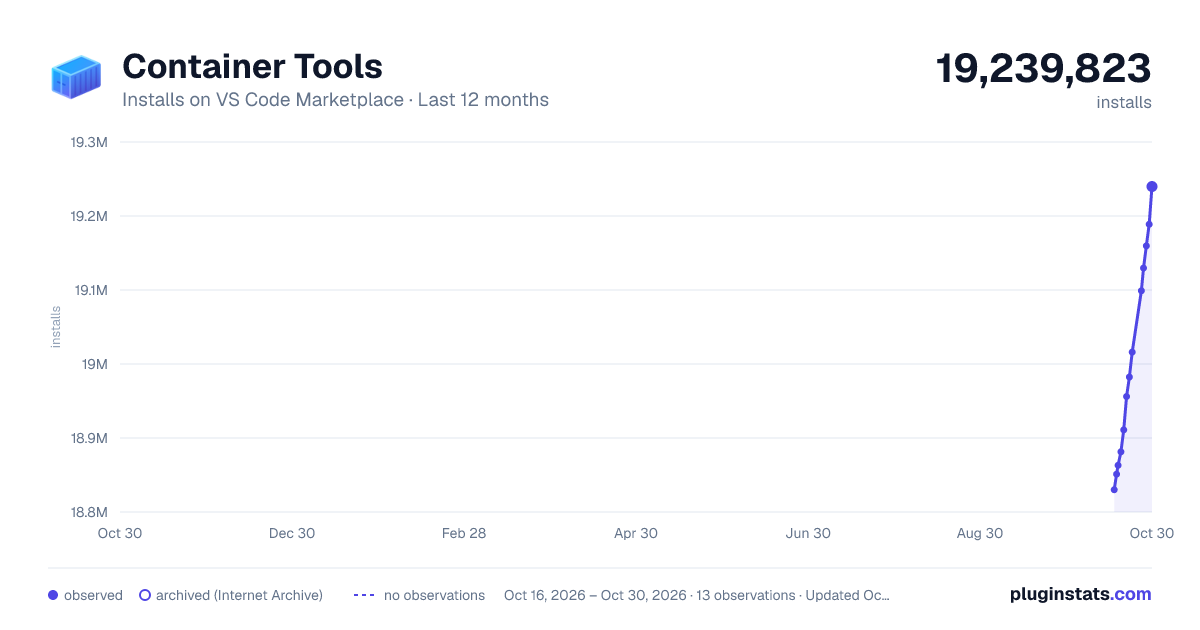
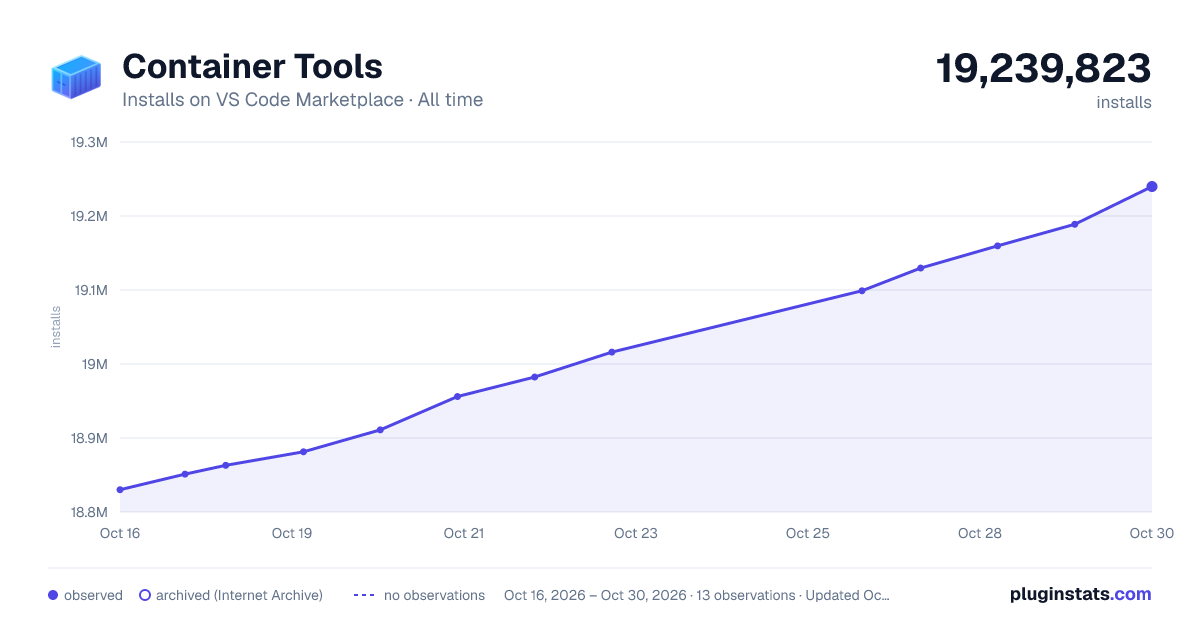
Container Tools has 18,863,070 recorded installs on VS Code Marketplace.
It ranks #57 of 2,500 tracked VS Code Marketplace listings by installs.
It is rated 3.9 out of 5 from 20 ratings.
PluginStats has 3 daily observations since Oct 16, 2026; the latest is from Oct 18, 2026.
Rating: 3.85 / 5 from 20 ratings
About Container Tools
Container Tools for Visual Studio Code
The Container Tools extension makes it easy to build, manage, and deploy containerized applications from Visual Studio Code. It also provides one-click debugging of Node.js, Python, and .NET inside a container.
Check out the Working with containers topic on the Visual Studio Code documentation site to get started.
Why do I have this extension?
If you didn't install it directly, you probably got it as part of the Docker Extension Pack. The extension pack is optional and can be uninstalled at any time. The Container Tools extension replaces the language service, container management, and debugging functionality previously provided by the Docker extension. See here for additional information.
Installation
Container Tools requires VS Code 1.109 (January 2026) or later.
Install Docker on your machine and add it to the system path.
On Linux, you should enable rootless Docker and set the generated Docker context to "rootless" (more secure) or enable Docker CLI for the non-root user account (less secure) that will be used to run VS Code.
To install the extension, open the Extensions view, search for container tools to filter results and select the Container Tools extension authored by Microsoft.
Overview of the extension features
Editing Docker files
Container Tools provides basic IntelliSense when editing your Dockerfile and compose.yaml files including completions and syntax help for common commands.
Note: Docker DX is the official language service from Docker that provides more advanced IntelliSense for Docker, Compose, and Bake configuration files. This extension is recommended to be installed alongside Container Tools for enhanced editing support.
In addition, you can use the Problems panel (Ctrl+Shift+M on Windows/Linux, Shift+Command+M on Mac) to view common errors for Dockerfile and compose.yaml files.
Generating Docker files
You can add Docker files to your workspace by opening the Command Palette (F1) and using Containers: Add Docker Files to Workspace command. The command will generate a Dockerfile and .dockerignore file and add them to your workspace. The command will also ask you if you want to add Docker Compose files as well, but this is optional.
The extension can scaffold Docker files for most popular development languages (C#, Node.js, Python, Ruby, Go, and Java) and customizes the generated Docker files accordingly. When these files are created, we also create the necessary artifacts to provide first-class debugging support for Node.js, Python, and .NET (C#).
Container Explorer
The Container Tools extension contributes a Container Explorer view to VS Code. The Container Explorer lets you examine and manage container-related assets: containers, images, volumes, networks, and container registries.
The right-click menu provides access to commonly used commands for each type of asset.
For running containers, you can use Open in Integrated Browser to open a published port in a VS Code desktop browser tab. GitHub Copilot's browser tools can interact with these tabs. Alternatively, you can use Open in External Browser to open the port in your external browser. Both actions are also available in the Command Palette.
You can rearrange the view panes by dragging them up or down with a mouse and use the context menu to hide or show them.
Container commands
Many of the most common container commands are built right into the Command Palette:
You can run container commands to manage images, networks, volumes, container registries, and Docker Compose. In addition, the Containers: Prune System command will remove stopped containers, dangling images, and unused networks and volumes.
Docker Compose
Docker Compose lets you define and run multi-container applications. Our Compose Language Service in the Container Tools extension gives you IntelliSense and tab completions when authoring compose.yaml files. Press Ctrl+Space to see a list of valid Compose directives.
We also provide tooltips when you hover over a Compose YAML attribute.
While Compose Up allows you to run all of your services at once, our new feature Compose Up - Select Services lets you select any combination of the services you want to run.
Once your Compose Up command completes, navigate to the Container Explorer to view your services as a Compose Group. This allows you to start, stop, and view the logs of each service as a group.
Using image registries
You can display the content and push, pull, or delete images from Docker Hub and Azure Container Registry:
An image in an Azure Container Registry can be deployed to Azure App Service directly from VS Code. See Deploy images to Azure App Service to get started. For more information about how to authenticate to and work with registries, see Using container registries.
Debugging services running inside a container
You can debug services built using Node.js, Python, or .NET (C#) that are running inside a container. The extension offers custom tasks that help with launching a service under the debugger and with attaching the debugger to a running service instance. For more information, see Debug containerized apps and Customize the Container Tools extension.
Azure CLI integration
You can start Azure CLI (command-line interface) in a standalone, Linux-based container with Container Images: Run Azure CLI command. This gives you access to the full Azure CLI command set in an isolated environment. For more information on available commands, see Get started with Azure CLI.
Alternative container runtimes
The Container Tools extension supports multiple container runtime options, such as Docker or Podman. If you want to change runtimes, you can do so with the VS Code settings containers.containerClient and containers.orchestratorClient. Changing requires a restart to take effect.
Contributing
See the contribution guidelines for ideas and guidance on how to improve the extension. Thank you!
Code of Conduct…
Description from the VS Code Marketplace listing.
- compose
- container
- containers
- debuggers
- docker
- dockercompose
- dockerfile
- ignore
- language-model-tools
- multi-root ready
- podman
- tools
Where Container Tools sits in the listing
Each band is one page of 20. Installs on a log scale. Placement is projected from installs, so it can differ from the marketplace's own sort order. Hover a dot to see the listing.


Charts
Images: 30d · 1y · all time · 1600×900 dark


Adoption over time


7/30/90-day growth


Ranking history


Filled points are observed values; hollow points come from Internet Archive snapshots of the listing page. Dashed segments span periods with no observations — values between points are not interpolated.
Recent observations
Full history (3)Similar VS Code Marketplace Programming Languages plugins
Data source
Install counts, average rating, and rating counts come from the public Visual Studio Marketplace gallery API. Installs are cumulative and exclude updates.
Listing: https://marketplace.visualstudio.com/items?itemName=ms-azuretools.vscode-containers. First seen Oct 16, 2026; last successful collection Oct 18, 2026. See the methodology.