 PluginStats
Arduino Community Edition installs statistics
By vscode-arduino · VS Code Marketplace · Programming Languages
Arduino for Visual Studio Code
Arduino Community Edition has 195,279 recorded installs on VS Code Marketplace.
It ranks #1548 of 2,500 tracked VS Code Marketplace listings by installs.
It is rated 4.0 out of 5 from 8 ratings.
PluginStats has 3 daily observations since Oct 16, 2026; the latest is from Oct 18, 2026.
Rating: 4.00 / 5 from 8 ratings
About Arduino Community Edition
Visual Studio Code extension for Arduino
NOTE: This is a community maintained fork of Microsoft's vscode arduino extension
Welcome to the Visual Studio Code extension for Arduino preview ! The Arduino extension makes it easy to develop, build, and deploy your Arduino sketches in Visual Studio Code, with a rich set of functionalities. These include:
• IntelliSense and syntax highlighting for Arduino sketches • Verify and upload your sketches in Visual Studio Code • Built-in board and library manager • Built-in example list • Built-in serial monitor • Snippets for sketches • Automatic Arduino project scaffolding • Command Palette (F1) integration of frequently used commands (e.g. Verify, Upload...)
Prerequisites
Either the legacy Arduino IDE or Arduino CLI are required. The recommended approach is to use the version of Arduino CLI that comes bundled with the extension, which works out of the box. Support for the legacy Arduino IDE will be removed in a future version of the extension.
Arduino CLI
To use the bundled version of Arduino CLI, arduino.useArduinoCli should be true, and arduino.path and arduino.commandPath should be empty or unset. arduino.useArduinoCli defaults to false while we deprecate support for the Arduino IDE, but there will be a prompt when the extension first activates to switch to the Arduino CLI.
If you want to use a custom version of Arduino CLI, it can be downloaded from the repository's release page. For custom versions, arduino.path must be set to the directory containing the Arduino CLI executable.
Legacy Arduino IDE
Use of the legacy Arduino IDE is not recommended, and support for the legacy Arduino IDE will be removed in a future version of the extension. The legacy Arduino IDE can be installed from the Arduino download page. • The supported legacy Arduino IDE versions are 1.6.x and up to, but not including, 2.0.0. • The Windows Store's version of the Arduino IDE is not supported because of the sandbox environment that the application runs in. • *Note:* Arduino IDE 1.8.7 had some breaking changes, causing board package and library installation failures. These failures were corrected in 1.8.8 and later. • *Note:* Arduino IDE 2.X.Y is not supported and there are no plans for support in the future (issue 1477).
Installation
Open VS Code and press F1 or Ctrl + Shift + P *or* Cmd + Shift + P to open command palette, select Install Extension and type vscode-arduino-community.
Or launch VS Code Quick Open (Ctrl + P *or* Cmd + P ), paste the following command, and press enter.
You can also install directly from the Marketplace within Visual Studio Code, searching for Arduino.
Get Started
You can find code samples and tutorials each time that you connect a supported device. Alternatively you can visit our IoT Developer Blog Space or Get Started Tutorials.
Commands
This extension provides several commands in the Command Palette (F1 or Ctrl + Shift + P *or* Cmd + Shift + P) for working with *.ino files:
• Arduino: Board Manager: Manage packages for boards. You can add 3rd party Arduino board by configuring Additional Board Manager URLs in the board manager. • Arduino: Change Board Type: Change board type or platform. • Arduino: Change Timestamp Format: Change format of timestamp printed before each line of Serial Monitor output. • Arduino: Close Serial Monitor: Stop the serial monitor and release the serial port. • Arduino: Examples: Show list of examples. • Arduino: Initialize: Scaffold a VS Code project with an Arduino sketch. • Arduino: Library Manager: Explore and manage libraries. • Arduino: Open Serial Monitor: Open the serial monitor in the integrated output window. • Arduino: Select Serial Port: Change the current serial port. • Arduino: Upload: Build sketch and upload to Arduino board. • Arduino: CLI Upload: Upload complied code without building sketch (CLI only). • Arduino: Upload Using Programmer: Upload using an external programmer. • Arduino: CLI Upload Using Programmer: Upload using an external programmer without building sketch (CLI only). • Arduino: Verify: Build sketch. • Arduino: Rebuild IntelliSense Configuration: Forced/manual rebuild of the IntelliSense configuration. The extension analyzes Arduino's build output and sets the IntelliSense include paths, defines, compiler arguments accordingly.
Keybindings
• Arduino: Upload Alt + Cmd + U *or* Alt + Ctrl + U • Arduino: Verify Alt + Cmd + R *or* Alt + Ctrl + R • Arduino: Rebuild IntelliSense Configuration Alt + Cmd + I *or* Alt + Ctrl + I
Options
| Option | Description |…
Description from the VS Code Marketplace listing.
- arduino
- arduino-output
- C
- C++
- cpp
- iot
- json
- keybindings
- snippet
Where Arduino Community Edition sits in the listing
Each band is one page of 20. Installs on a log scale. Placement is projected from installs, so it can differ from the marketplace's own sort order. Hover a dot to see the listing.


Charts
Images: 30d · 1y · all time · 1600×900 dark
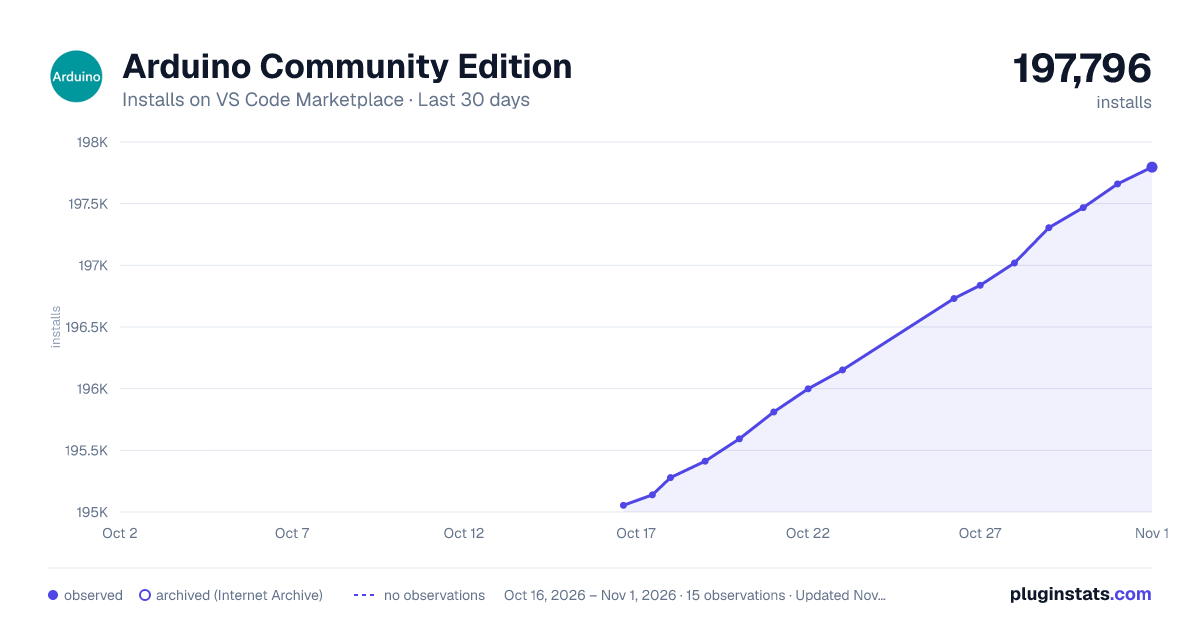
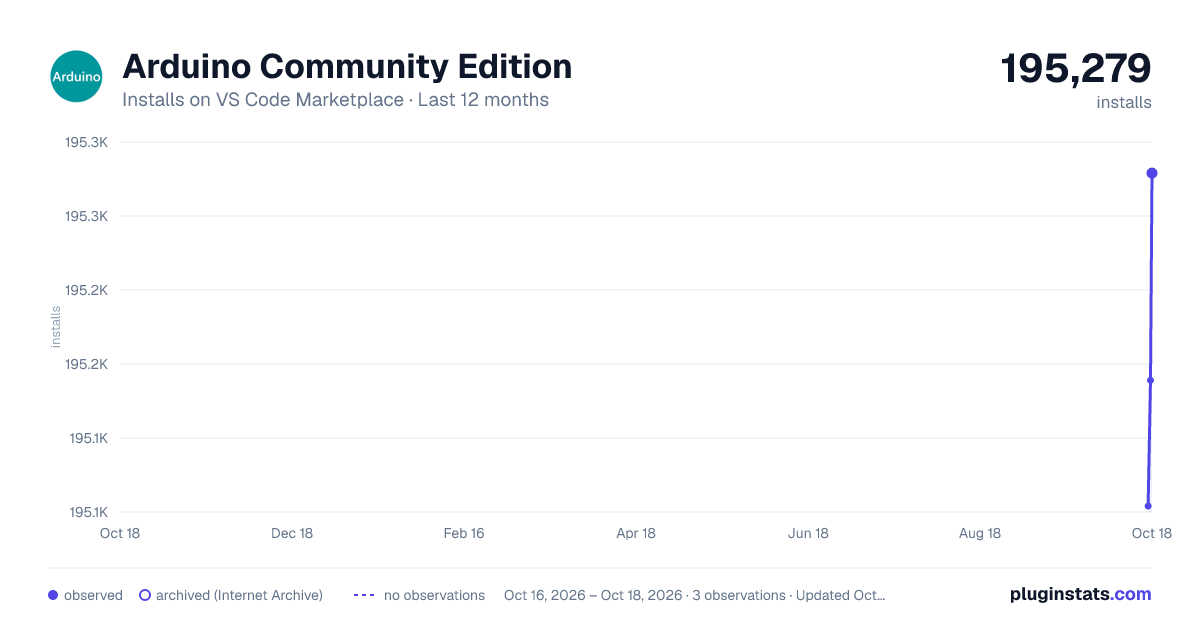
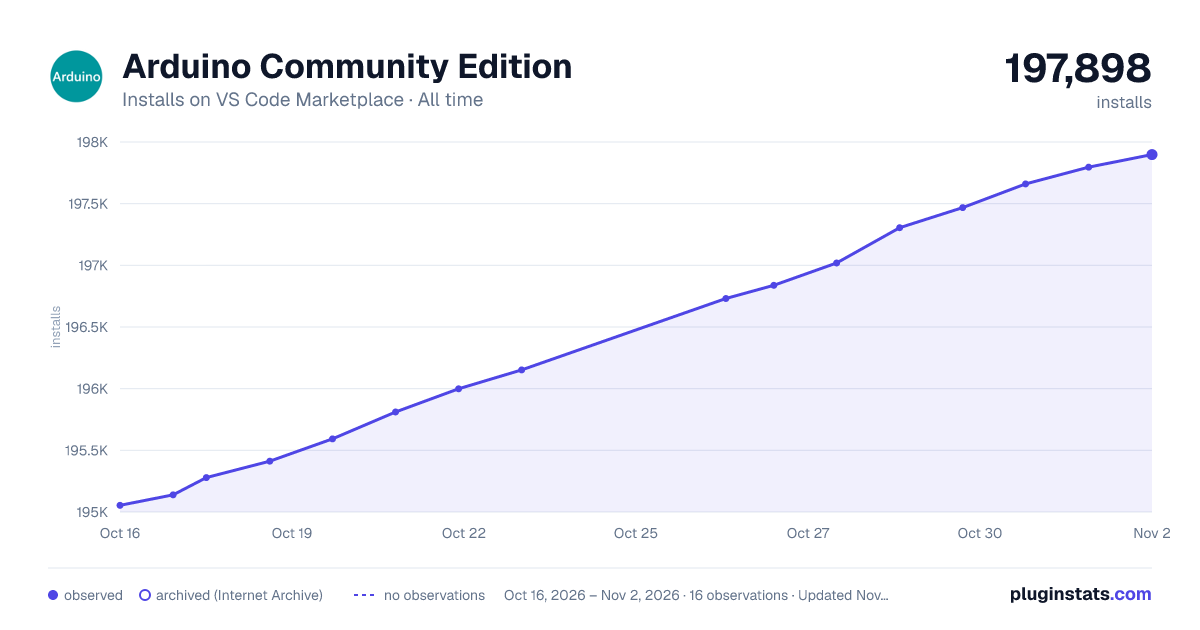

Adoption over time


7/30/90-day growth


Ranking history


Filled points are observed values; hollow points come from Internet Archive snapshots of the listing page. Dashed segments span periods with no observations — values between points are not interpolated.
Recent observations
Full history (3)Similar VS Code Marketplace Programming Languages plugins
Data source
Install counts, average rating, and rating counts come from the public Visual Studio Marketplace gallery API. Installs are cumulative and exclude updates.
Listing: https://marketplace.visualstudio.com/items?itemName=vscode-arduino.vscode-arduino-community. First seen Oct 16, 2026; last successful collection Oct 18, 2026. See the methodology.