 PluginStats
Prettier - Code formatter installs statistics
By Prettier (4 listings) · VS Code Marketplace · Formatters
Code formatter using prettier
Prettier - Code formatter has 72,367,040 recorded installs on VS Code Marketplace.
It ranks #11 of 2,500 tracked VS Code Marketplace listings by installs.
It is rated 3.5 out of 5 from 492 ratings.
PluginStats has 3 daily observations since Oct 16, 2026; the latest is from Oct 18, 2026.
Rating: 3.54 / 5 from 492 ratings
About Prettier - Code formatter
Prettier Formatter for Visual Studio Code
Prettier is an opinionated code formatter. It enforces a consistent style by parsing your code and re-printing it with its own rules that take the maximum line length into account, wrapping code when necessary.
JavaScript · TypeScript · Flow · JSX · JSON CSS · SCSS · Less HTML · Vue · Angular HANDLEBARS · Ember · Glimmer GraphQL · Markdown · YAML Your favorite language?
Installation
Install through VS Code extensions. Search for Prettier - Code formatter
Visual Studio Code Market Place: Prettier - Code formatter
Can also be installed in VS Code: Launch VS Code Quick Open (Ctrl+P), paste the following command, and press enter.
Default Formatter
To ensure that this extension is used over other extensions you may have installed, be sure to set it as the default formatter in your VS Code settings. This setting can be set for all languages or by a specific language.
Note: VS Code does not support combined language syntax for editor.defaultFormatter. You must set the formatter for each language separately:
If you want to disable Prettier on a particular language you can either create a .prettierignore file or you can use VS Code's editor.defaultFormatter settings.
The following will use Prettier for all languages except Javascript.
The following will use Prettier for only Javascript.
Additionally, you can disable format on save for specific languages if you don't want them to be automatically formatted.
Prettier Resolution
This extension will use prettier from your project's local dependencies (recommended). When the prettier.resolveGlobalModules is set to true the extension can also attempt to resolve global modules. Should prettier not be installed locally with your project's dependencies or globally on the machine, the version of prettier that is bundled with the extension will be used.
To install prettier in your project and pin its version as recommended, run:
NOTE: You will be prompted to confirm that you want the extension to load a Prettier module. This is done to ensure that you are not loading a module or script that is not trusted.
Prettier Versions
This extension bundles Prettier 3.x by default. If your project has a local installation of Prettier (in node_modules), that version will be used instead of the bundled version. This allows you to use a specific version of Prettier in your project.
Prettier 2.x Compatibility: Projects using Prettier 2.x are still fully supported. If you have Prettier 2.x installed locally in your project, the extension will automatically use that version.
Plugins
This extension supports Prettier plugins when you are using a locally or globally resolved version of prettier. If you have Prettier and a plugin registered in your package.json, this extension will attempt to register the language and provide automatic code formatting for the built-in and plugin languages.
Configuration
There are multiple options for configuring Prettier with this extension. You can use VS Code settings, prettier configuration files, or an .editorconfig file. The VS Code settings are meant to be used as a fallback and are generally intended only for use on non-project files. It is recommended that you always include a prettier configuration file in your project specifying all settings for your project. This will ensure that no matter how you run prettier - from this extension, from the CLI, or from another IDE with Prettier, the same settings will get applied.
Using Prettier Configuration files to set formatting options is the recommended approach. Options are searched recursively down from the file being formatted so if you want to apply prettier settings to your entire project simply set a configuration in the root. Settings can also be configured through VS Code - however, these settings will only apply while running the extension, not when running prettier through the command line.
Configuring Default Options
Some users may not wish to create a new Prettier config for every project or use the VS Code settings. In order to set a default configuration, set prettier.configPath. However, be careful, if this is set this value will always be used and local configuration files will be ignored.
Visual Studio Code Settings
You can use VS Code settings to configure prettier. Settings will be read from (listed by priority):
1. Prettier configuration file 1. .editorconfig 1. Visual Studio Code Settings (Ignored if any other configuration is present)
NOTE: If any local configuration file is present (i.e. .prettierrc) the VS Code settings will NOT be used.
Usage
Using Command Palette (CMD/CTRL + Shift + P)
Keyboard Shortcuts
Visual Studio Code provides default keyboard shortcuts for code formatting. You can learn about these for each platform in the VS Code documentation.
If you don't like the defaults, you can rebind editor.action.formatDocument and editor.action.formatSelection in the keyboard shortcuts menu of vscode.
Format On Save
Respects editor.formatOnSave setting.
You can turn on format-on-save on a per-language basis by scoping the setting:
Format Selection
Format selection works on several languages depending on what Prettier itself supports. The following languages currently are supported:
Format Document (Forced)
If you would like to format a document that is configured to be ignored by Prettier either because it is in a .prettierignore file or part of a normally excluded location like node_modules, you can run the command Format Document (Forced) to force the document to be formatted. Forced mode will also ignore any config for requirePragma allowing you to format files without the pragma comment present.
Linter Integration…
Description from the VS Code Marketplace listing.
- angular
- commonmark
- css
- ember
- flow
- formatter
- glimmer
- graphql
- handlebars
- html
- ignore
- javascript
- js
- json
- jsx
- less
- markdown
- md
- mdx
- multi-root ready
Where Prettier - Code formatter sits in the listing
Each band is one page of 20. Installs on a log scale. Placement is projected from installs, so it can differ from the marketplace's own sort order. Hover a dot to see the listing.


Charts
Images: 30d · 1y · all time · 1600×900 dark
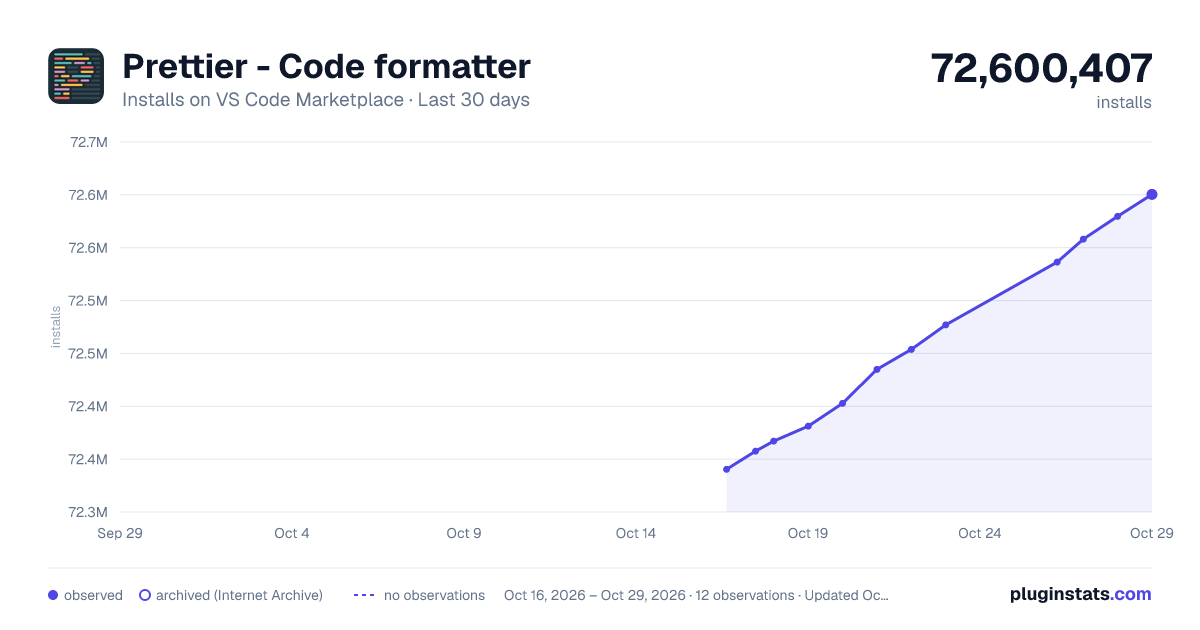

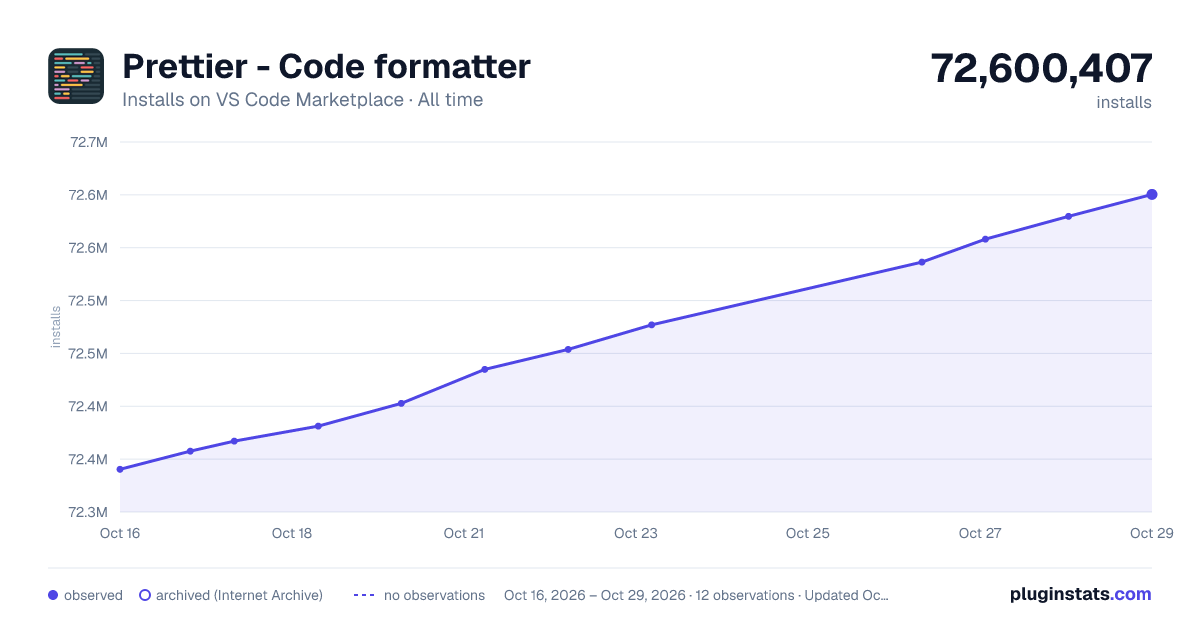

Adoption over time


7/30/90-day growth


Ranking history


Filled points are observed values; hollow points come from Internet Archive snapshots of the listing page. Dashed segments span periods with no observations — values between points are not interpolated.
Recent observations
Full history (3)Similar VS Code Marketplace Formatters plugins
Data source
Install counts, average rating, and rating counts come from the public Visual Studio Marketplace gallery API. Installs are cumulative and exclude updates.
Listing: https://marketplace.visualstudio.com/items?itemName=esbenp.prettier-vscode. First seen Oct 16, 2026; last successful collection Oct 18, 2026. See the methodology.