 PluginStats
win-ca installs statistics
By ukoloff · VS Code Marketplace · Other
Make Trusted Root Certificates @Windows available to VSCode extensions
win-ca has 199,786 recorded installs on VS Code Marketplace, ranking #1511 of 2,501 tracked listings.
Rating: 5.00 / 5 from 13 ratings
About win-ca
Win-CA
Make Trusted Root Certificates in Windows available to VS Code extensions.
Abstract
This is a tiny VS Code extension. Its only purpose is to run the win-ca package, which allows all Trusted Root Certificates become available to other VS Code extensions.
This extensions is useful if you are:
-
Running VS Code on Microsoft Windows, <ins>and</ins>
-
Trusting some non-standard (not Mozilla) root certificates (in most cases, your Enterprise Trust), <ins>and</ins>
-
Using another extension that connects to a server relying on a root-CA signed cert from #2.
In other words, you can connect to an internet site by browser, but a VS Code extension fails to connect to it.
This extension can help by fetching a list of Windows'
Trusted Root Certification Authorities
and making those certificates available
to other VS Code extensions via NodeJS
https.globalAgent.options.ca
(or tls.createSecureContext()).
In some cases, this can help.
Installation
Install from here or open VS Code,
hit Ctrl+Shift+X (Extensions pane),
search for win-ca and press Install.
Parameters
Since v3.0.0 this extension has got some parameters, available at File / Preferences / Settings / Extensions / win-ca:
-
Save (switch)
- Enables/disables saving fetched certificates to disk
-
Method of injection
None- do not inject: turns off the extension
Replace(Default)- built-in certificates with what Windows thinks are the root certificates
(
https.globalAgent.options.camethod)
- built-in certificates with what Windows thinks are the root certificates
(
Append- new experimental method, where both lists are used together
(
tls.createSecureContext()method)
- new experimental method, where both lists are used together
(
The last method can help with the fact
that
Windows lazily populates root certificate store.
If you connect to popular sites,
their root certificate may be missing
from Windows' Root store.
If using a browser,
Windows will silently add
the certifacate to the store,
but not for VS Code extensions.
The simplest remedy is to connect to that site
once with your browser.
The second option is to use append mode
for this extension.
Caveats
| Note |
|---|
📝 If you change the parameters, <br/>VS Code must be restarted (e.g., <br/>Command Palette > Developer: Reload Window),<br/>since old values are cached too deeply<br/>in the guts of https module<br/>and there is no way to update them on the fly. |
Description from the VS Code Marketplace listing.
- ca
- root
- ssl
- vscode
- windows
README badge
Show your rank in a README or on your website. The badge updates automatically.
Charts
Images: 30d · 1y · all time · 1600×900 dark

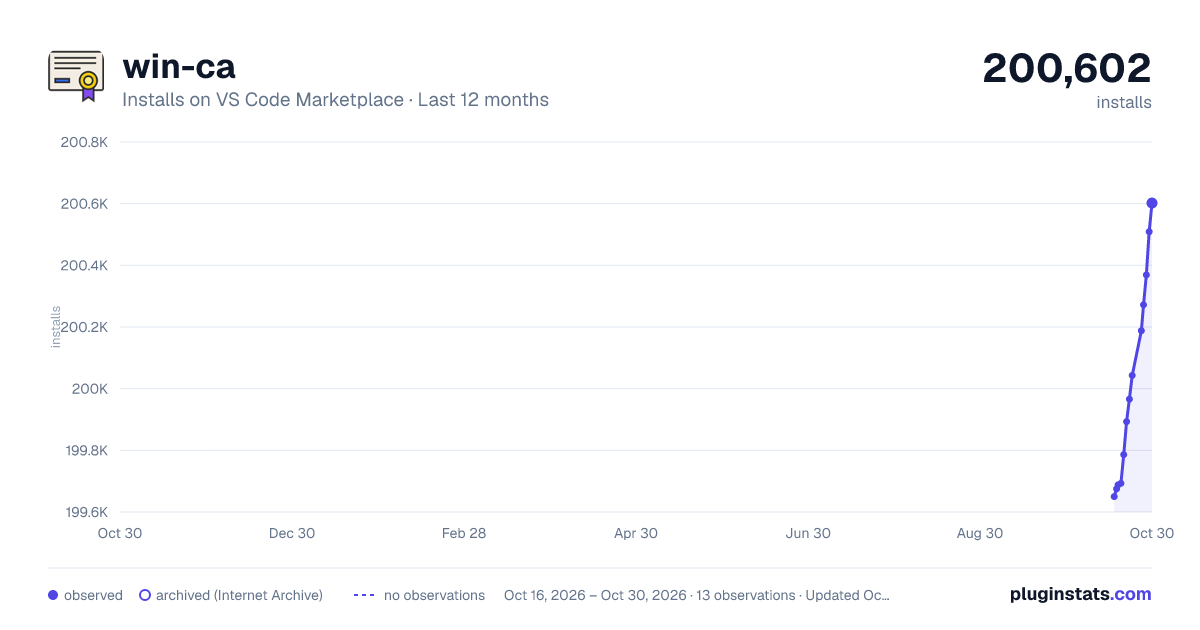


Adoption over time
7/30/90-day growth
Ranking history
Ratings over time
Listing placement
Listing placement
Filled points are observed values; hollow points come from Internet Archive snapshots of the listing page. Dashed segments span periods with no observations — values between points are not interpolated.
Each band is one page of 20. Installs on a linear scale. Placement is projected from installs, so it can differ from the marketplace's own sort order. Hover a dot to see the listing.
Recent observations
Full history (5)Similar VS Code Marketplace Other plugins
All 20 win-ca alternativesData source
Install counts, average rating, and rating counts come from the public Visual Studio Marketplace gallery API. Installs are cumulative and exclude updates.
Listing: https://marketplace.visualstudio.com/items?itemName=ukoloff.win-ca. First seen Oct 16, 2026; last successful collection Oct 20, 2026. See the methodology.