 PluginStats
Protobuf VSC installs statistics
By drblury · VS Code Marketplace · Programming Languages
Comprehensive Protocol Buffers support for VS Code with syntax highlighting, IntelliSense, diagnostics, formatting, protoc compilation, breaking change detection, and more. Successor to vscode-proto3.
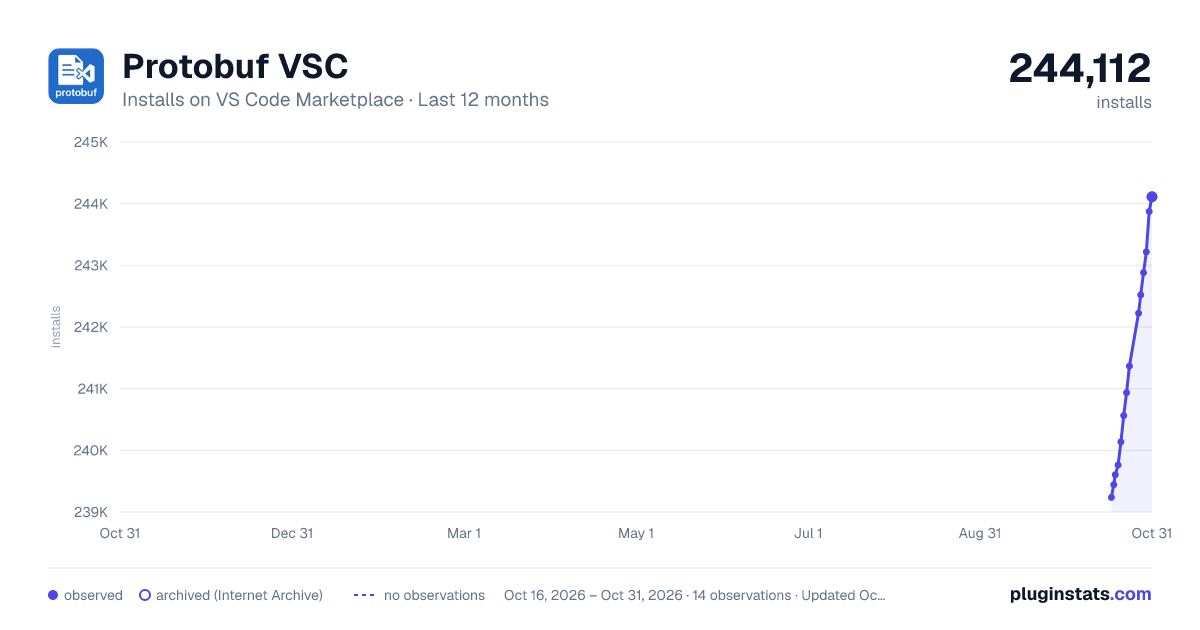
Protobuf VSC has 239,604 recorded installs on VS Code Marketplace.
It ranks #1335 of 2,500 tracked VS Code Marketplace listings by installs.
It is rated 2.4 out of 5 from 30 ratings.
PluginStats has 3 daily observations since Oct 16, 2026; the latest is from Oct 18, 2026.
Rating: 2.43 / 5 from 30 ratings
About Protobuf VSC
Protobuf VSC
Protocol Buffers language support for VS Code: navigation, IntelliSense, diagnostics, formatting, compilation, linting, breaking-change checks, and schema graphs.
Note: Protobuf VSC is a separate successor to the vscode-proto3 extension. It has a different codebase, feature set, and maintainer.
Author: Julian Bensch (@DrBlury)
Contents: Quick Start • Install • What You Get • Common Tasks • Settings Cheat Sheet • Documentation • Optional Tools • Development • Support • License
Quick Start
1. Install Protobuf VSC from the Marketplace. 2. Open a .proto or .textproto file; IntelliSense, diagnostics, and formatting are on (proto2 + proto3 supported). 3. Use the Command Palette (Cmd/Ctrl+Shift+P) and run Protobuf: Compile This Proto or Protobuf: Show Schema Graph. 4. Install protoc (and optional tools below) if you need compilation/linting. 5. Add a minimal config if you want import resolution and compilation output:
Note: Use protobuf.includes for configuring import paths. The extension also extracts --proto_path from protobuf.protoc.options as a fallback, but protobuf.includes is preferred for better IntelliSense and diagnostics support.
If you use Go-style module imports, you can map a virtual prefix to a local directory using virtual=path entries:
Install
• Marketplace: ext install DrBlury.protobuf-vsc or search "Protobuf VSC" in Extensions. • From source: git clone, npm install, npm run compile, then press F5 to launch the Extension Development Host.
What You Get
• Navigation and IntelliSense: definitions, references, workspace symbols, import completion, auto-imports, fuzzy search • Diagnostics: validation for syntax, imports, duplicate names/tags, reserved ranges, undefined types, edition rules, and circular dependencies; optional style and cleanup checks • Code Lens: Reference counts and metadata above symbols • Document Links: Clickable import paths for quick navigation • Hover Information: symbol details, definitions, documentation, and reference counts • Code Actions: quick fixes, organize imports, proto3 conversion, and renumbering • Completions: type-based field name suggestions, import paths, keywords, options, and context-aware completions • CEL / Protovalidate Support: completions for buf.validate CEL expressions, field references, and CEL functions • Formatting: Built-in formatter with field alignment, clang-format, or buf format. Supports format on save and format selection • Compilation: Run protoc per file or all files, with custom options and variables • Linting: Buf or Protolint integration on demand or on save • Breaking-change Detection: Compare against a git ref or file baseline • Schema Graph: Interactive view of message/enum relationships • Buf Configuration: detection of buf.yaml, buf.yml, buf.work.yaml, and buf.work.yml roots for import resolution • Templates: Pre-built templates for common proto patterns • Refactoring: Rename, renumber fields/enums, quick fixes for imports and naming • Toolchain Management: Install and manage protoc/buf directly from VS Code • Auto-Detection: detect installed tools (buf, protolint, protoc) and suggest configuration • Dependency Suggestions: Suggest adding BSR modules to buf.yaml when external imports are detected
See the Feature Reference for a structured list of supported features.
Common Tasks
• Format current file: Protobuf: Format Document. • Compile current file: Protobuf: Compile This Proto; compile all: Protobuf: Compile All Protos. • Check for breaking changes: Protobuf: Check for Breaking Changes (configure baseline in settings). • Run lint: Protobuf: Run External Linter (Buf/Protolint). • View schema: Protobuf: Show Schema Graph. • Renumber: Protobuf: Renumber Fields/Enums commands from palette or editor menu.
Commands (Palette)
| Command | What it does |
| Protobuf: Compile This Proto | Runs protoc on the active file using configured options/variables. | | Protobuf: Compile All Protos | Compiles every proto in the workspace. | | Protobuf: Check for Breaking Changes | Compares current schema to a configured git ref or file. | | Protobuf: Show Schema Graph | Opens an interactive graph of messages/enums and their relations. | | Protobuf: Renumber Fields/Enums | Rewrites tag numbers to close gaps or reorder. | | Protobuf: Format Document | Formats current proto via built-in or clang-format. | | Protobuf: Run External Linter | Runs Buf or Protolint with configured options. | | Protobuf: Go to Definition / Find References | Standard navigation for symbols and imports. |
Settings Cheat Sheet
Search for "protobuf" in VS Code settings. Common options:
| Setting | Purpose | Default |
| protobuf.formatter.enabled | Enable built-in formatter and automatic semicolon fixes | true | | protobuf.formatter.insertEmptyLineBetweenDefinitions | Ensure a single blank line between top-level messages/enums/services | true | | protobuf.formatter.maxEmptyLines | Collapse consecutive blank lines down to this limit | 1 | | protobuf.formatOnSave | Format on save (overrides VS Code's editor.formatOnSave just for .proto/.textproto). When editor.formatOnSaveMode is set to modifications, the extension defers to VS Code and will not run its own formatter while editor.formatOnSave is disabled. | false | | protobuf.protoc.path | Path to protoc | "protoc" | | protobuf.protoc.options | Extra protoc args | [] | | protobuf.protoc.compileOnSave | Compile on save | false | | protobuf.breaking.enabled | Turn on breaking-change checks | false | | protobuf.breaking.againstGitRef | Git ref baseline | "HEAD~1" | | protobuf.externalLinter.linter | buf, protolint, api-linter | "none" | | protobuf.clangFormat.enabled | Use clang-format | false | | protobuf.clangFormat.style | clang-format style ("file" reads .clang-format) | "file" |
Example workspace settings (popular defaults):
Documentation
Documentation is available in the docs/ folder:
Core Features…
Description from the VS Code Marketplace listing.
- api
- buf
- clang-format
- grpc
- microservices
- pbtxt
- proto
- proto2
- proto3
- protobuf
- protoc
- protocol buffers
- ProtocolBuffers
- ProtocolBuffersTextFormat
- protolint
- rpc
- schema
- serialization
- snippet
- textproto
Where Protobuf VSC sits in the listing
Each band is one page of 20. Installs on a log scale. Placement is projected from installs, so it can differ from the marketplace's own sort order. Hover a dot to see the listing.


Charts
Images: 30d · 1y · all time · 1600×900 dark



Adoption over time


7/30/90-day growth


Ranking history


Filled points are observed values; hollow points come from Internet Archive snapshots of the listing page. Dashed segments span periods with no observations — values between points are not interpolated.
Recent observations
Full history (3)Similar VS Code Marketplace Programming Languages plugins
Data source
Install counts, average rating, and rating counts come from the public Visual Studio Marketplace gallery API. Installs are cumulative and exclude updates.
Listing: https://marketplace.visualstudio.com/items?itemName=DrBlury.protobuf-vsc. First seen Oct 16, 2026; last successful collection Oct 18, 2026. See the methodology.