 PluginStats
HLSL Tools installs statistics
By Tim G. Jones · VS Code Marketplace · Programming Languages
Rich HLSL language support for Visual Studio Code
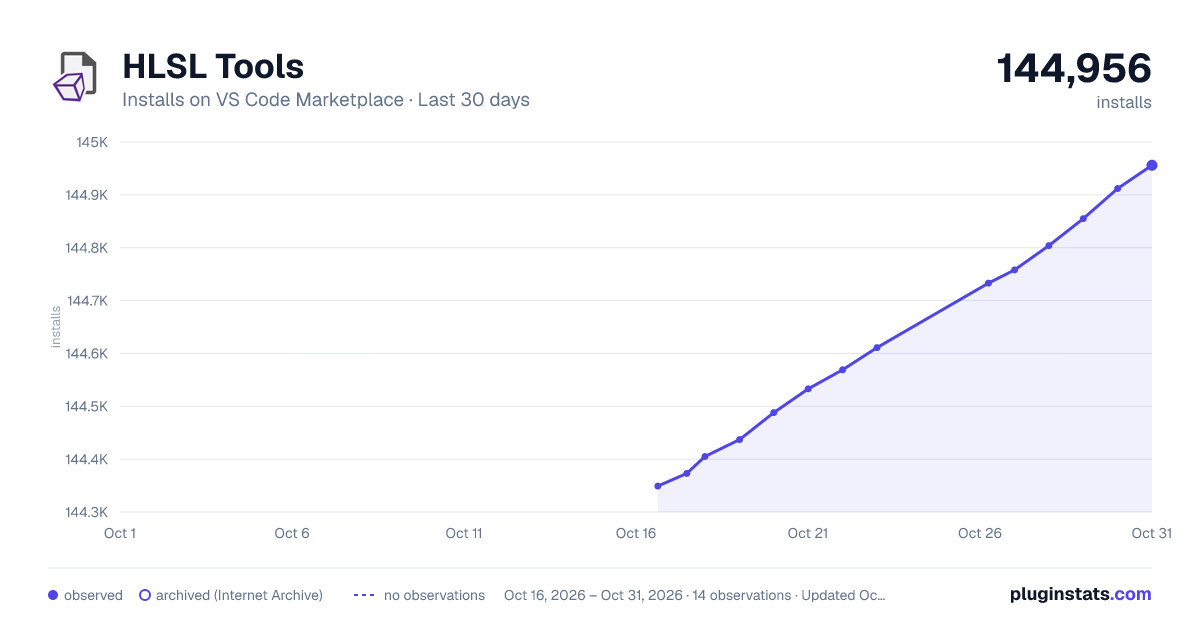
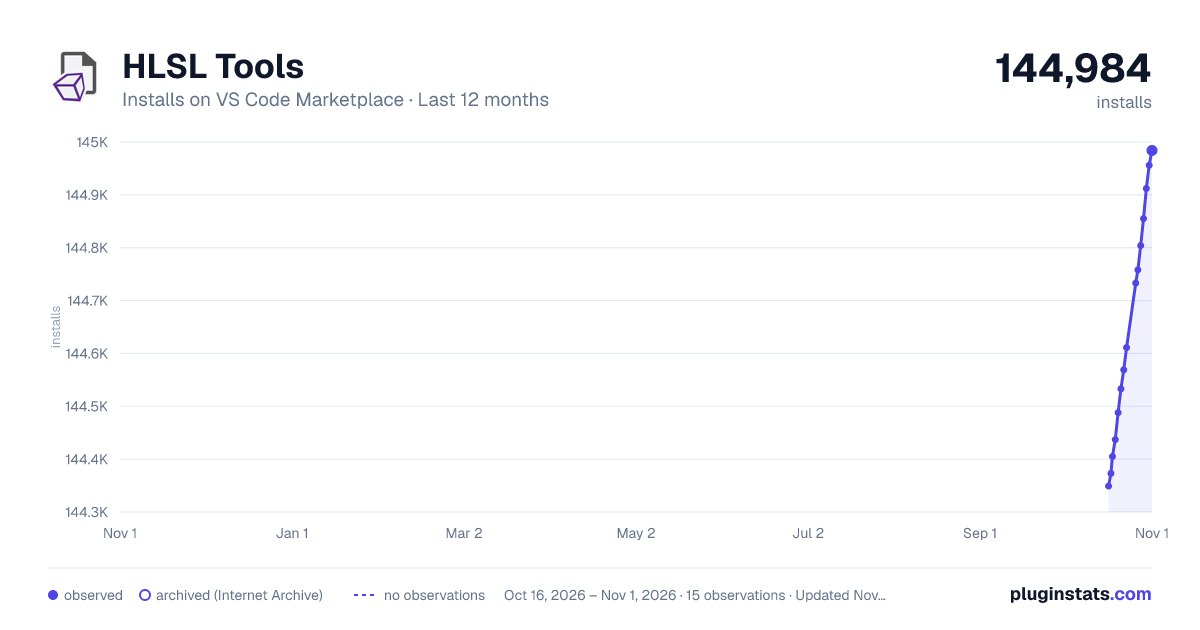
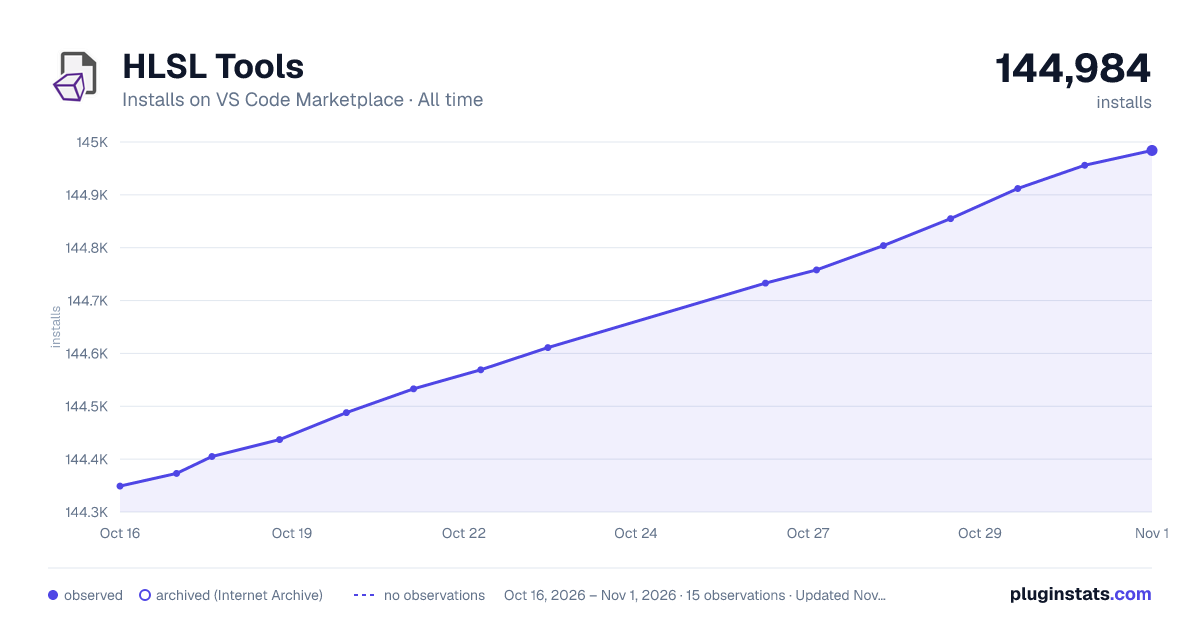
HLSL Tools has 144,405 recorded installs on VS Code Marketplace.
It ranks #1897 of 2,500 tracked VS Code Marketplace listings by installs.
It is rated 4.5 out of 5 from 2 ratings.
PluginStats has 3 daily observations since Oct 16, 2026; the latest is from Oct 18, 2026.
Rating: 4.50 / 5 from 2 ratings
About HLSL Tools
HLSL Tools for VS Code
*This extension is for Visual Studio Code. Go here for the Visual Studio 2017 / 2019 extension.*
HLSL Tools provides enhanced support for editing High Level Shading Language (HLSL) files in VS Code.
System requirements
To use HLSL Tools you need to be on Windows x64 or macOS. Linux support will come in a future version.
Why use HLSL Tools?
Here's the feature list: • Statement completion • Signature help • Reference highlighting • Go to symbols • Live errors • Go to definition • Quick info
Features
Statement completion
Just start typing, and HLSL Tools will show you a list of the available symbols (variables, functions, etc.) at that location. You can manually trigger this with the usual Ctrl+Space shortcut.
Signature help
Signature help (a.k.a. parameter info) shows you all the overloads for a function call, along with information (from MSDN) about the function, its parameters, and return types. Typing an open parenthesis will trigger statement completion, as will the standard Ctrl+Shift+Space shortcut. Signature help is available for all HLSL functions and methods, including the older tex2D-style texture sampling functions, and the newer Texture2D.Sample-style methods.
Reference highlighting
Placing the cursor within a symbol (local variable, function name, etc.) will cause all references to that symbol to be highlighted.
Go to Symbol
Use Ctrl+Shift+O and start typing the name of the variable, function, or other symbol that you want to find.
Live errors
HLSL Tools shows you syntax and semantic errors immediately. No need to wait till compilation! Errors are shown as squigglies and in the error list.
Go to definition
Press F12 to go to a symbol definition. Go to definition works for variables, fields, functions, classes, macros, and more. You can also "peek definition" with Alt+F12.
Quick info
Hover over almost anything (variable, field, function call, macro, semantic, type, etc.) to see a Quick Info tooltip.
Preprocessor support
HLSL Tools evaluates preprocessor directives as it parses your code. If you want to make a code block visible to, or hidden from, HLSL Tools, use the INTELLISENSE macro.
Custom preprocessor definitions and additional include directories
HLSL Tools has a built-in preprocessor to handle #define and #include directives. The behavior of this preprocessor can be customised by creating a file named shadertoolsconfig.json:
• hlsl.preprocessorDefinitions: It's normal for additional preprocessor definitions to be defined as part of a project build. In some cases, the shader won't compile correcty without these. To handle this, you can add those additional preprocessor definitions here. • hlsl.additionalIncludeDirectories: HLSL Tools will, by default, only use the directory containing the source file to search for #include files. Additional include directories can be added here. • hlsl.virtualDirectoryMappings: Use this to configure the virtual directory mappings required by Unreal Engine. The virtual directory (/Project in the example above) must start with a forward slash or backslash.
HLSL Tools will look for a file named shadertoolsconfig.json in the directory of an opened file, and in every parent directory. A search for shadertoolsconfig.json files will stop when the drive root is reached or a shadertoolsconfig.json file with "root": true is found. If multiple config files are found during this search, they will be combined, with properties in closer files taking precedence.
Config files are cached for performance reasons. If you make make changes to a config file, you'll need to close and re-open any source files that use that config file.
Assocating other file types with HLSL Tools
By default, HLSL Tools only recognises a few file extensions as being HLSL files. You can associate any other file extension like this:
Getting involved
You can ask questions in our Gitter room. If you find a bug or want to request a feature, create an issue here . You can find me on Twitter at @\_tim_jones\_ and I tweet about HLSL Tools using the #hlsltools hashtag.
Contributions are always welcome. Please read the contributing guide first.
Maintainer(s)
• @tgjones
Description from the VS Code Marketplace listing.
- hlsl
- shader
Where HLSL Tools sits in the listing
Each band is one page of 20. Installs on a log scale. Placement is projected from installs, so it can differ from the marketplace's own sort order. Hover a dot to see the listing.


Charts
Images: 30d · 1y · all time · 1600×900 dark

Adoption over time


7/30/90-day growth


Ranking history


Filled points are observed values; hollow points come from Internet Archive snapshots of the listing page. Dashed segments span periods with no observations — values between points are not interpolated.
Recent observations
Full history (3)Similar VS Code Marketplace Programming Languages plugins
Data source
Install counts, average rating, and rating counts come from the public Visual Studio Marketplace gallery API. Installs are cumulative and exclude updates.
Listing: https://marketplace.visualstudio.com/items?itemName=TimGJones.hlsltools. First seen Oct 16, 2026; last successful collection Oct 18, 2026. See the methodology.