 PluginStats
JSON to CSV installs statistics
By Khaer Ansori · VS Code Marketplace · Formatters
Bidirectional JSON-CSV Converter - transform JSON files into CSV and CSV files into JSON with ease.
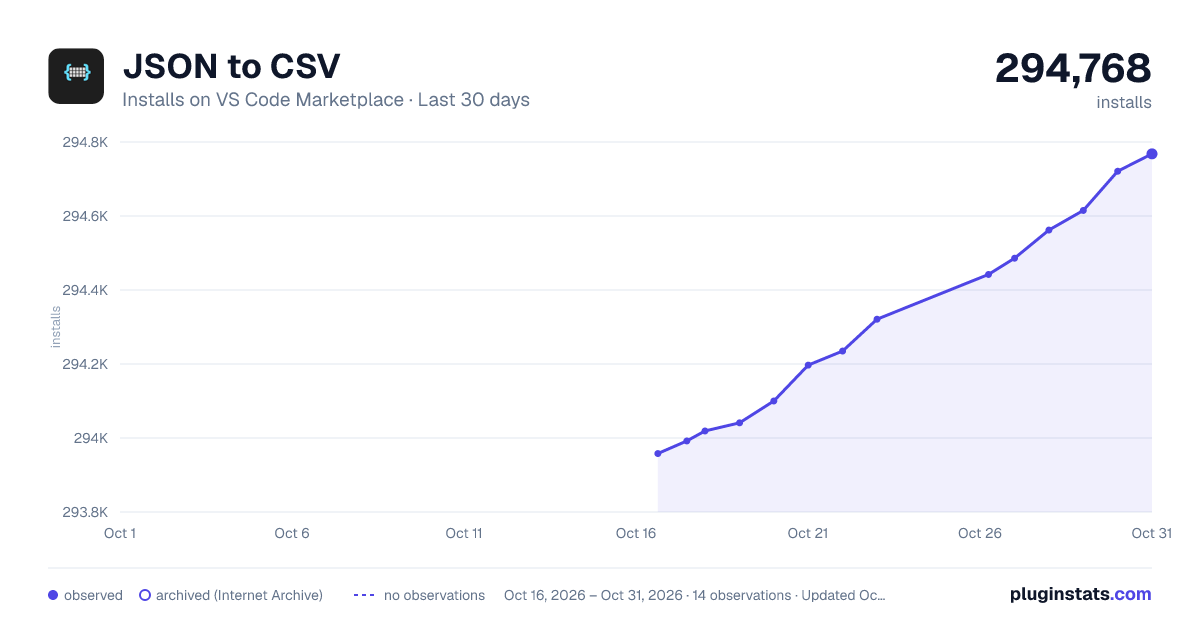
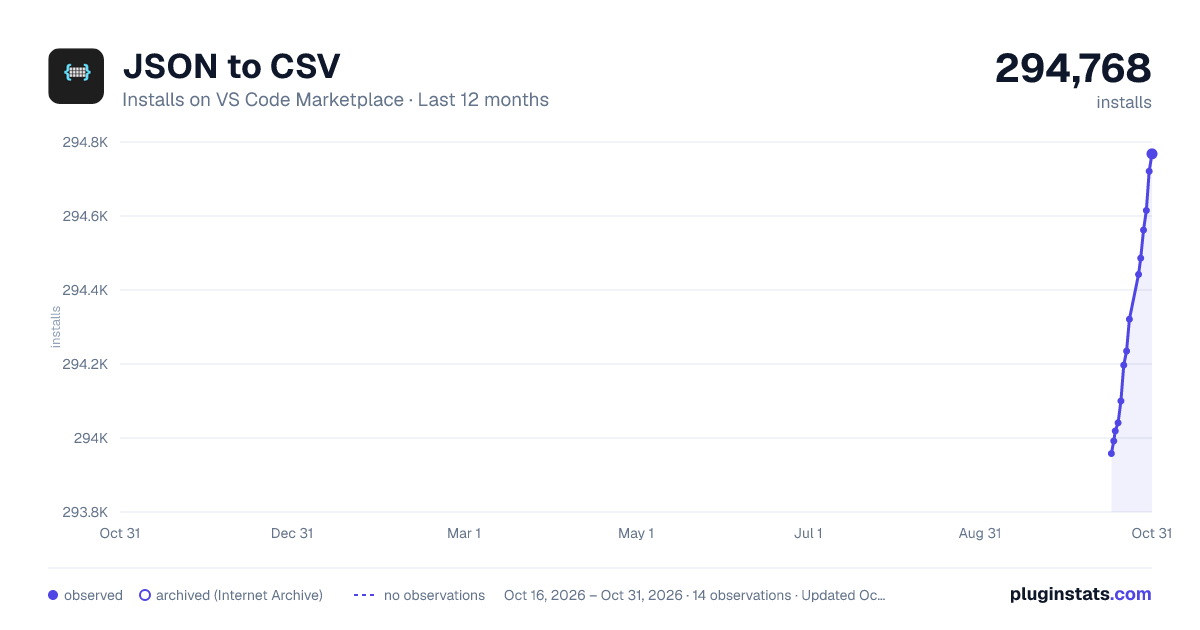
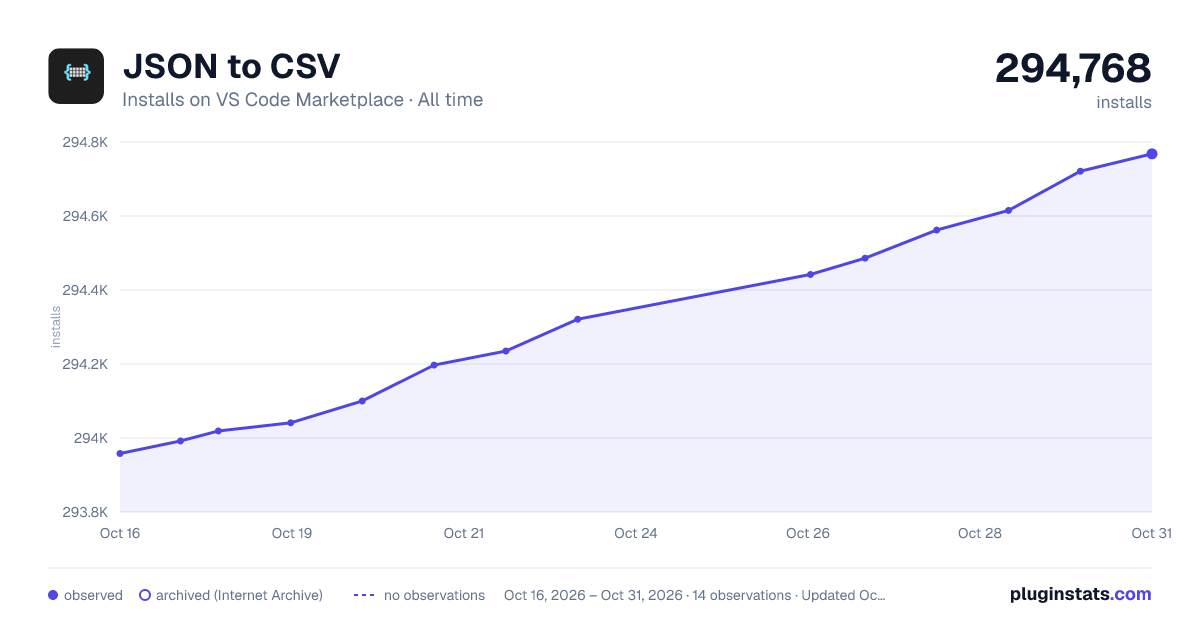
JSON to CSV has 294,041 recorded installs on VS Code Marketplace.
It ranks #1171 of 2,501 tracked VS Code Marketplace listings by installs.
It is rated 4.2 out of 5 from 18 ratings.
PluginStats has 4 daily observations since Oct 16, 2026; the latest is from Oct 19, 2026.
Rating: 4.17 / 5 from 18 ratings
About JSON to CSV
json2csv
json2csv is a Visual Studio Code extension that allows you to easily convert between JSON and CSV formats, directly within the editor. It is designed to simplify data manipulation and format conversion for developers and data analysts, with support for lossless conversion of big integer numbers.
Features
• Convert JSON to CSV: Transform JSON files into CSV format with customizable options. • Convert CSV to JSON: Easily convert CSV files back into JSON format. • Customizable Options: Configure delimiters, headers, and other formatting options for the output. • Lossless Conversion for Big Integer Numbers: Ensures large integers are accurately converted without losing precision during format conversion. • Supports Complex JSON Structures: Handles nested objects and arrays, with options to expand array objects.
Installation
1. Open Visual Studio Code. 2. Go to the Extensions panel (or press Ctrl+Shift+X). 3. Search for json2csv. 4. Click Install.
Alternatively, install directly from the Visual Studio Marketplace.
Usage
Convert JSON to CSV
1. Open a JSON file. 2. Press Ctrl+Shift+P (or Cmd+Shift+P on macOS) to open the Command Palette. 3. Type Convert JSON to CSV and select the command. 4. The converted CSV will be displayed in a new editor tab.
Convert CSV to JSON
1. Open a CSV file. 2. Press Ctrl+Shift+P (or Cmd+Shift+P on macOS) to open the Command Palette. 3. Type Convert CSV to JSON and select the command. 4. The converted JSON will be displayed in a new editor tab.
Configuration
You can customize the behavior of json2csv through the following configuration options:
toCSV Configuration
• json2csv.toCSV.arrayIndexesAsKeys (default: false): Should array indexes be included in the generated keys? _Note: This provides a more accurate representation of the JSON in the returned CSV, but may be less human readable. See #207 for more details._ • json2csv.toCSV.checkSchemaDifferences (default: false): Should all documents have the same schema? _Note: An error will be thrown if some documents have differing schemas when this is set to true._ • json2csv.toCSV.delimiter.field (default: ,): Field delimiter for CSV. • json2csv.toCSV.delimiter.wrap (default: "): Wrap values in the delimiter of choice. • json2csv.toCSV.delimiter.eol (default: \n): End of line delimiter. • json2csv.toCSV.emptyFieldValue (default: none): Value that, if specified, will be substituted in for field values that are undefined, null, or an empty string. • json2csv.toCSV.excelBOM (default: false): Should a unicode character be prepended to allow Excel to open a UTF-8 encoded file with non-ASCII characters present. • json2csv.toCSV.expandNestedObjects (default: true): Should nested objects be deep-converted to CSV? _Note: Set this to false may result in CSV output that does not map back exactly to the original JSON_ • json2csv.toCSV.expandArrayObjects (default: false): Should objects in array values be deep-converted to CSV? _Note: This may result in CSV output that does not map back exactly to the original JSON. See #102 for more information._ • json2csv.toCSV.prependHeader (default: true): Should the auto-generated header be prepended as the first line in the CSV? • json2csv.toCSV.sortHeader (default: false): Should the header keys be sorted in alphabetical order? • json2csv.toCSV.trimFieldValues (default: false): Should the field values be trimmed? • json2csv.toCSV.trimHeaderFields (default: false): Should the header fields be trimmed? • json2csv.toCSV.useDateIso8601Format (default: false): Should date values be converted to an ISO8601 date string? _Note: If selected, values will be converted using toISOString() rather than toString() or toLocaleString() depending on the other options provided._ • json2csv.toCSV.useLocaleFormat (default: false): Should boolean values be wrapped in wrap delimiters to prevent Excel from converting them to Excel's TRUE/FALSE Boolean values. • json2csv.toCSV.preventCsvInjection (default: false): Should CSV injection be prevented by left trimming these characters: Equals (=), Plus (+), Minus (-), At (@), Tab (0x09), Carriage return (0x0D).
toJSON Configuration
• json2csv.toJSON.delimiter.field (default: ,): Field delimiter for CSV. • json2csv.toJSON.delimiter.wrap (default: "): Wrap values in the delimiter of choice. • json2csv.toJSON.excelBOM (default: false): Should a unicode character be prepended to allow Excel to open a UTF-8 encoded file with non-ASCII characters present. • json2csv.toJSON.trimHeaderFields (default: false): Should the header fields be trimmed? • json2csv.toJSON.trimFieldValues (default: false): Should the field values be trimmed? • json2csv.toJSON.parseStringLiteralNull (default: false): Should the string literal "null" be parsed as a null value? _Note: case-insensitive comparison is used._
Lossless Big Integer Conversion
JavaScript and JSON have limitations when handling big integers due to the Number type’s precision. json2csv handles this by ensuring lossless conversion of large integers, preserving their precision across both JSON and CSV formats. For safety, large integers are *quoted* during the conversion process to ensure they are not misinterpreted or rounded.
For example, a large integer such as:
will be converted to:
and accurately preserved when converting between formats.
Examples
Convert JSON to CSV
Input JSON:
Output CSV:
Convert CSV to JSON
Input CSV:
Output JSON:
Libraries Used
This extension makes use of the following libraries:
• lossless-json by Jos de Jong: Used for ensuring lossless conversion of big integer numbers in JSON format, preserving precision by quoting large numbers. • json-2-csv by Manuel Rodriguez: A fast and flexible library for converting between JSON and CSV formats, used for core format conversion functionalities in this extension.
Contribution
Feel free to contribute! Here’s how you can help:…
Description from the VS Code Marketplace listing.
- convert
- csv
- csv2json
- developer tools
- json
- json2csv
- visual studio code
Where JSON to CSV sits in the listing
Each band is one page of 20. Installs on a log scale. Placement is projected from installs, so it can differ from the marketplace's own sort order. Hover a dot to see the listing.


Charts
Images: 30d · 1y · all time · 1600×900 dark

Adoption over time


7/30/90-day growth


Ranking history


Filled points are observed values; hollow points come from Internet Archive snapshots of the listing page. Dashed segments span periods with no observations — values between points are not interpolated.
Recent observations
Full history (4)Similar VS Code Marketplace Formatters plugins
Data source
Install counts, average rating, and rating counts come from the public Visual Studio Marketplace gallery API. Installs are cumulative and exclude updates.
Listing: https://marketplace.visualstudio.com/items?itemName=khaeransori.json2csv. First seen Oct 16, 2026; last successful collection Oct 19, 2026. See the methodology.