 PluginStats
Power Query / M Language installs statistics
By Microsoft (223 listings) · VS Code Marketplace · Programming Languages
Language service for the Power Query / M formula language
Power Query / M Language has 170,813 recorded installs on VS Code Marketplace.
It ranks #1697 of 2,500 tracked VS Code Marketplace listings by installs.
It is rated 4.3 out of 5 from 9 ratings.
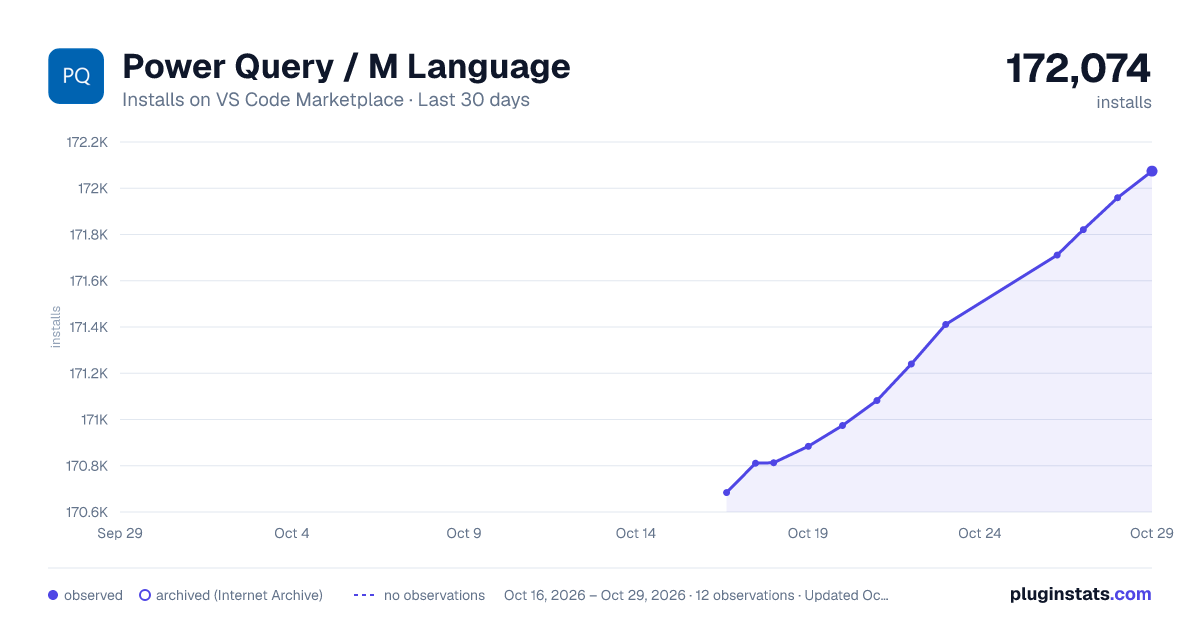
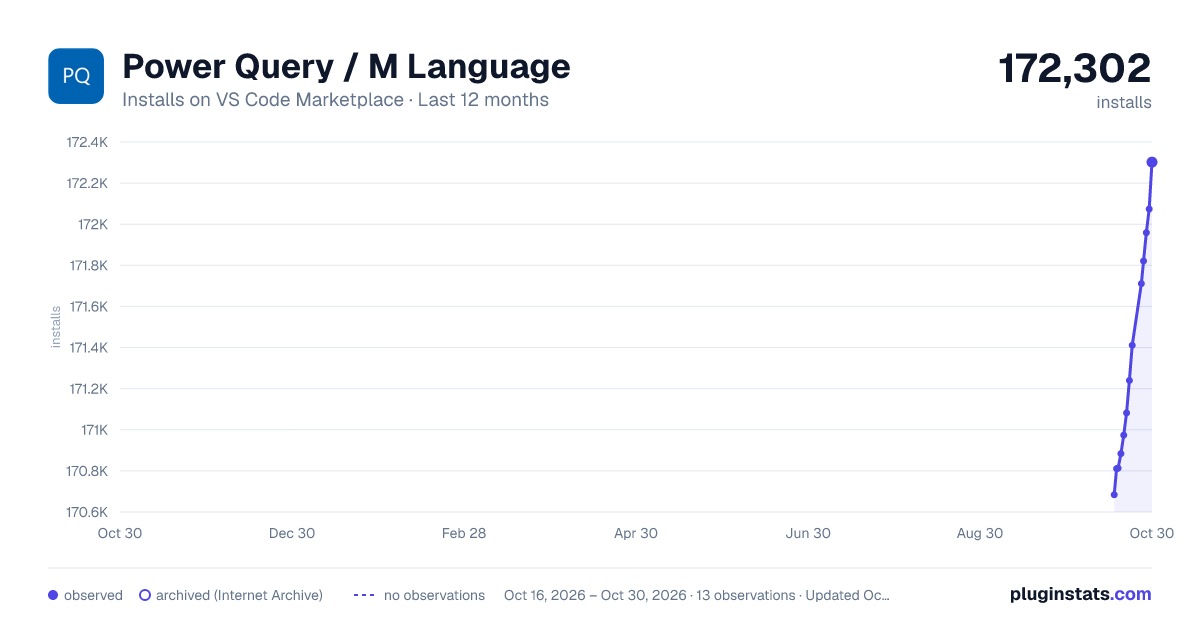
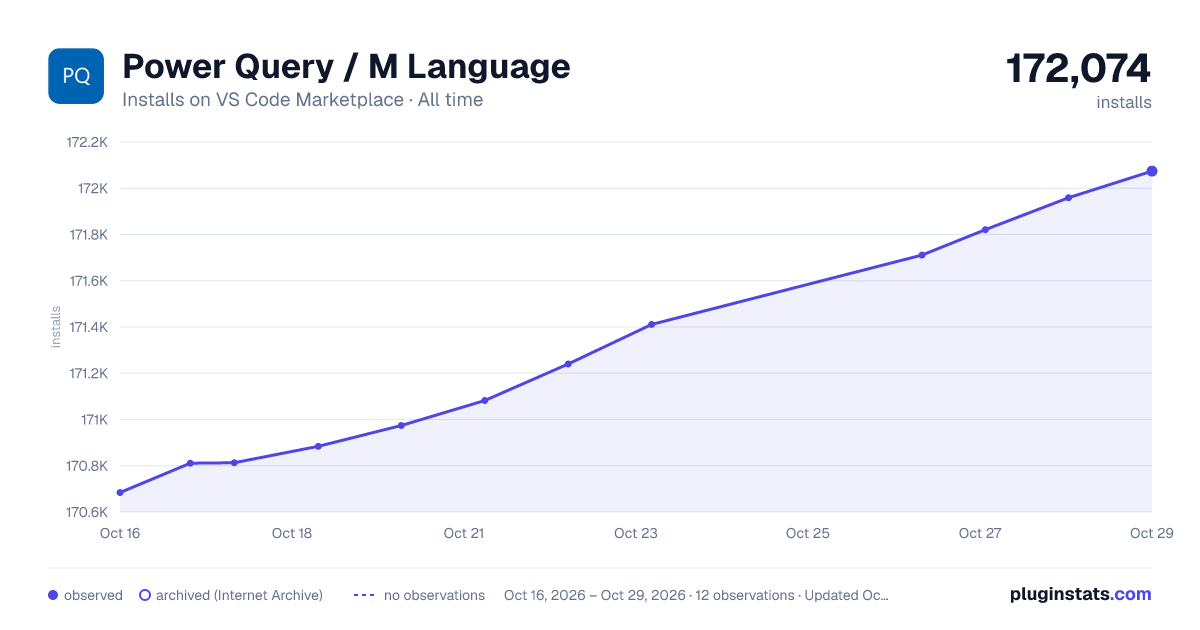
PluginStats has 3 daily observations since Oct 16, 2026; the latest is from Oct 18, 2026.
Rating: 4.33 / 5 from 9 ratings
About Power Query / M Language
Power Query language service for VS Code
Available in the Visual Studio Code Marketplace. Provides a language service for the Power Query / M formula language with the following capabilities:
Fuzzy autocomplete
Suggests keywords, local variables, and the standard Power Query library.
Hover
Function hints
Displays function documentation if it exists, and validates the types for function arguments.
Code formatting
Provides a formatter for the "Format Document" (Alt + Shift + F) command.
Commands
String encoding/decoding
These commands can be used to add/remove M and JSON string formatting to/from the currently selected text. This can be helpful when you need to encode an embedded SQL (or other) query in an M expression, or when you're working with files that contain embedded M expressions, such as Power BI Dataflow's model.json file, and Power Query traces. There is a powerquery.editor.transformTarget setting in the extension to choose the target for the operation. inPlace (the default) replaces the currently selected text with the updated value. clipboard does not change the currently selected text, and puts the transformed text on the clipboard.
These commands require one or more text selections in the active editor window.
| Command | Label |
| powerquery.jsonEscapeText | Encode selection as JSON string | | powerquery.jsonUnescapeText | Remove JSON string encoding from selection | | powerquery.mEscapeText | Encode selection as an M text value | | powerquery.mUnescapeText | Remove M text encoding from selection |
A more specialized version of this command will extract the M Document from an entire model.json/dataflow.json document. This command requires the active document to be recognized as JSON. The result is a new PowerQuery document.
| Command | Label |
| powerquery.extractDataflowDocument | Extract M document from model.json |
Related projects
• powerquery-parser: A lexer + parser for Power Query. Also contains features such as type validation. • powerquery-formatter: A code formatter for Power Query which is bundled in the VSCode extension. • powerquery-language-services: A high level library that wraps the parser for external projects, such as the VSCode extension. Includes features such as Intellisense.
How to build
Install dependencies:
Build the project:
Generate vsix package:
The .vsix can be installed into VS Code from the commandline:
Testing
There are two test suites:
1. Server unit tests - mocha based, no build dependency. 2. Client UI test - vscode/test-electron based, requires webpacked test suite.
Running tests from the command line
To run all tests:
To run server unit tests only:
Running tests from VS Code
Run one of the following Debug/Launch profiles:
1. Run server unit tests 2. Language UI Test
If you receive errors related to missing problem matchers, please ensure you have the TypeScript + Webpack Problem Matchers vscode extension installed.
Contributing
This project welcomes contributions and suggestions. Most contributions require you to agree to a Contributor License Agreement (CLA) declaring that you have the right to, and actually do, grant us the rights to use your contribution. For details, visit .
When you submit a pull request, a CLA bot will automatically determine whether you need to provide a CLA and decorate the PR appropriately (e.g., status check, comment). Simply follow the instructions provided by the bot. You will only need to do this once across all repos using our CLA.
This project has adopted the Microsoft Open Source Code of Conduct. For more information see the Code of Conduct FAQ or contact opencode@microsoft.com with any additional questions or comments.
Trademarks
This project may contain trademarks or logos for projects, products, or services. Authorized use of Microsoft trademarks or logos is subject to and must follow Microsoft's Trademark & Brand Guidelines. Use of Microsoft trademarks or logos in modified versions of this project must not cause confusion or imply Microsoft sponsorship. Any use of third-party trademarks or logos are subject to those third-party's policies.
Description from the VS Code Marketplace listing.
- M
- powerquery
- PowerQueryFormulaLanguage
- PowerQueryM
- pq
Where Power Query / M Language sits in the listing
Each band is one page of 20. Installs on a log scale. Placement is projected from installs, so it can differ from the marketplace's own sort order. Hover a dot to see the listing.


Charts
Images: 30d · 1y · all time · 1600×900 dark

Adoption over time


7/30/90-day growth


Ranking history


Filled points are observed values; hollow points come from Internet Archive snapshots of the listing page. Dashed segments span periods with no observations — values between points are not interpolated.
Recent observations
Full history (3)Similar VS Code Marketplace Programming Languages plugins
Data source
Install counts, average rating, and rating counts come from the public Visual Studio Marketplace gallery API. Installs are cumulative and exclude updates.
Listing: https://marketplace.visualstudio.com/items?itemName=PowerQuery.vscode-powerquery. First seen Oct 16, 2026; last successful collection Oct 18, 2026. See the methodology.