 PluginStats
DeepSeek R1 installs statistics
By colourafredi · VS Code Marketplace · Other
Write, review, explain, refactor, and test code. Supports multiple languages and provides customizable prompts for efficient coding assistance.
DeepSeek R1 has 264,521 recorded installs on VS Code Marketplace.
It ranks #1255 of 2,500 tracked VS Code Marketplace listings by installs.
It is rated 4.2 out of 5 from 11 ratings.
PluginStats has 3 daily observations since Oct 16, 2026; the latest is from Oct 18, 2026.
Rating: 4.18 / 5 from 11 ratings
About DeepSeek R1
Free | No Login Required | Multi-language
免费 | 免登录 | 多语言
🚀 Key Features
• 💻 Code Operations: One-click copy, insert code into current file or new file • 🔍 Intelligent Analysis: Code explanation, error detection, refactoring suggestions, test generation • ✨ Code Completion: AI-powered code suggestions as you type • 📝 Custom Prompts: Support adding and managing predefined prompts to improve questioning efficiency • 💾 Local Storage: Chat history saved locally for replay, continuation and management • 🌐 Custom baseUrl Support: Configure your own baseUrl server for flexible API access • 🔒 Privacy Protection: All information stored locally, no data uploaded • 🌍 Multi-language: Support Chinese, English and other language interfaces • 🎯 Model Selection: Support multiple DeepSeek models for different needs • 🖥️ Local Deployment: Support deploying DeepSeek R1 locally via Ollama with knowledge base, usable without internet
📦 Installation
1. Open VS Code 2. Press shortcut: • Windows/Linux: Ctrl + Shift + P • Mac: Command + Shift + P 3. Press Ctrl+Shift+P to open command palette 4. Delete > and enter ext install colourafredi.vscode-deepseek 5. Press Enter to install
Or directly visit VS Code Marketplace to install
🛠️ Main Features
1. Code Analysis and Optimization
• Code Explanation: Detailed explanation of code logic and implementation • Error Detection: Find and fix bugs in code • Code Refactoring: Optimize code structure, improve code quality • Test Generation: Automatically generate unit test code • Code Completion: Get intelligent code suggestions while typing
2. Intelligent Dialogue
• Context Dialogue: Support multi-turn conversations, understand context • Streaming Response: Real-time display of AI answers • Session Management: Save, export, clean chat history • Custom Prompts: Support preset common prompts
3. Personalization Settings
• Server Settings: Configurable server • Model Selection: Support multiple DeepSeek models • API Key Management: Support binding your own API Key • Model Temperature: Set model temperature (0-2) • token: Set maximum token count • top_p: Set top_p value • top_k: Set top_k value • frequency_penalty: Set frequency_penalty value • Interface Language: Switch between Chinese, English and other interface languages
💡 Usage Guide
Quick Start
1. After installing the plugin, click the DeepSeek icon on the left side of VS Code 2. Enter your question in the input box and press Enter to send 3. Wait for AI response, you can: • Copy the answer content • Insert into current file • Create new file to save
Code Related Features
1. Select code snippet 2. Right click to select DeepSeek related commands: • Explain code • Check for errors • Refactor and optimize • Generate tests
Code Completion
The DeepSeek extension provides powerful code completion features to help you write code more efficiently.
Enable/Disable Code Completion
You can enable or disable the code completion feature in the following ways:
1. Via the Command Palette: • Press Ctrl+Shift+P (Windows/Linux) or Cmd+Shift+P (Mac) to open the command palette • Type "DeepSeek: Enable Completion" or "DeepSeek: Disable Completion" and select the desired command
2. Via Settings: • Open VS Code settings (Ctrl+, or Cmd+,) • Search for "DeepSeek" • Find the "Enable Completion" option and check or uncheck it as needed
Using Code Completion
When the code completion function is enabled, it will automatically provide suggestions as you write code:
1. Start typing your code, and after a short pause, completion suggestions will appear automatically 2. If you see a gray loading indicator, the suggestions are being generated 3. The completion content is shown as gray text at your cursor position 4. Press Tab to accept the suggestion, or continue typing to ignore it
Configuring Code Completion
To use code completion, you need to configure the following parameters:
1. API Key: • Search for "DeepSeek: API Key" in the settings • Enter your DeepSeek API key
2. Base URL: • By default, this is the official DeepSeek API address • If you use a local deployment or another compatible service, you can modify this setting
3. Model: • Select the model used for code completion • It is recommended to use "deepseek-coder" or other code-optimized models
4. Other Parameters (optional): • Temperature: Controls the randomness of the generated results; a lower value yields more deterministic output • Max Tokens: Controls the maximum length of the generated content • Top P: Controls the diversity of the generated results • Top K: Limits the number of tokens considered at each step • Frequency Penalty: Reduces the likelihood of repeated content
Tips and Tricks
• Code completion works best when writing new code, rather than editing existing code • The completion suggestions are generated based on your code context, including the content before and after the cursor • If the suggestions are not what you expect, keep typing to get new recommendations • Describing your intent in comments can help the model generate more accurate completions • For complex functions or classes, input the function signature or class definition first, then let the completion feature help implement the details
Preset Management
You can define your own custom prompts for quick use There are two ways to manage your custom prompts 1. Enter commands in the Ctrl/Command + Shift + P command palette 2. Select any code and choose from the right-click menu
1. Add Predefined Prompt(>deepseek:Add predefined prompt) • Add new preset prompt template • Set prompt name and content • Support variable placeholders
2. Edit Predefined Prompt(>deepseek:Edit predefined prompt) • Modify existing preset prompts • Update prompt name and content • Delete unwanted presets
3. Select Predefined Prompt(>deepseek:Select predefined prompt) • Quickly select prompts from preset list • Auto-fill to dialogue box • Support search filtering…
Description from the VS Code Marketplace listing.
- ai
- assistant
- chat
- code
- code-completion
- code-explanation
- code-refactoring
- code-review
- copilot
- deepseek
- documentation
- gpt
- testing
Where DeepSeek R1 sits in the listing
Each band is one page of 20. Installs on a log scale. Placement is projected from installs, so it can differ from the marketplace's own sort order. Hover a dot to see the listing.


Charts
Images: 30d · 1y · all time · 1600×900 dark
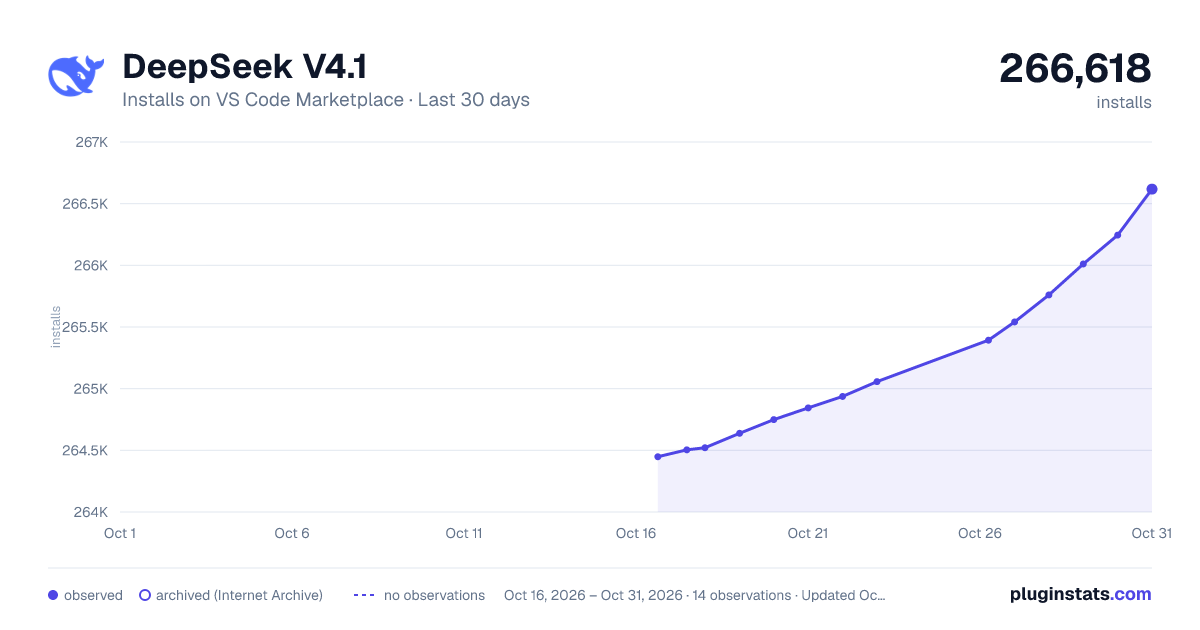
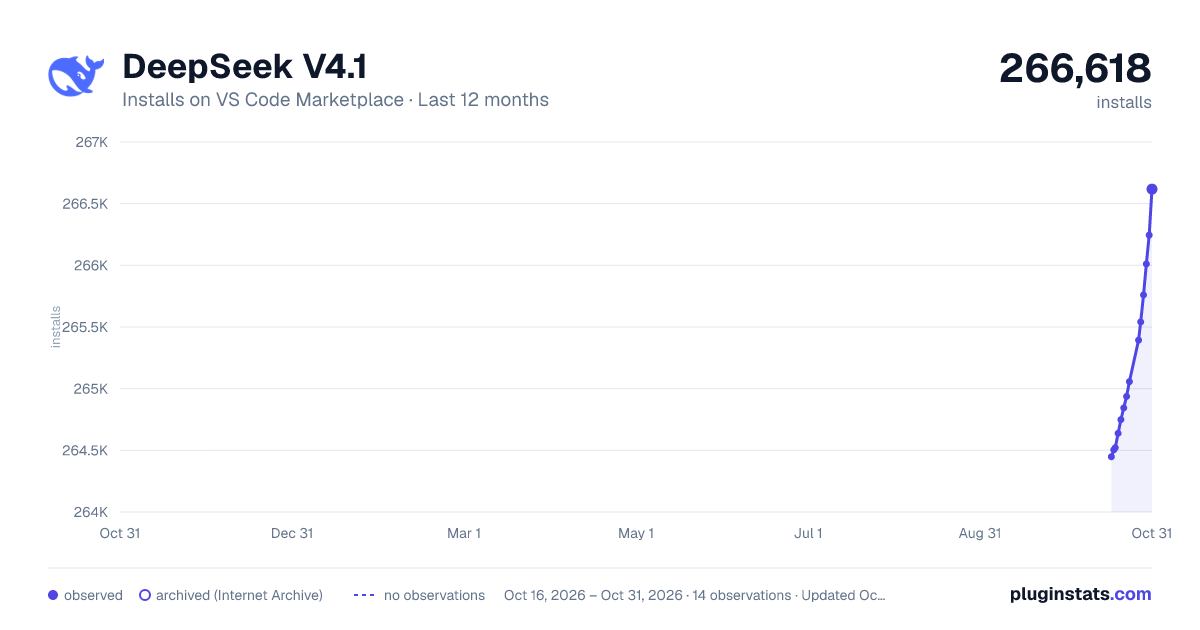
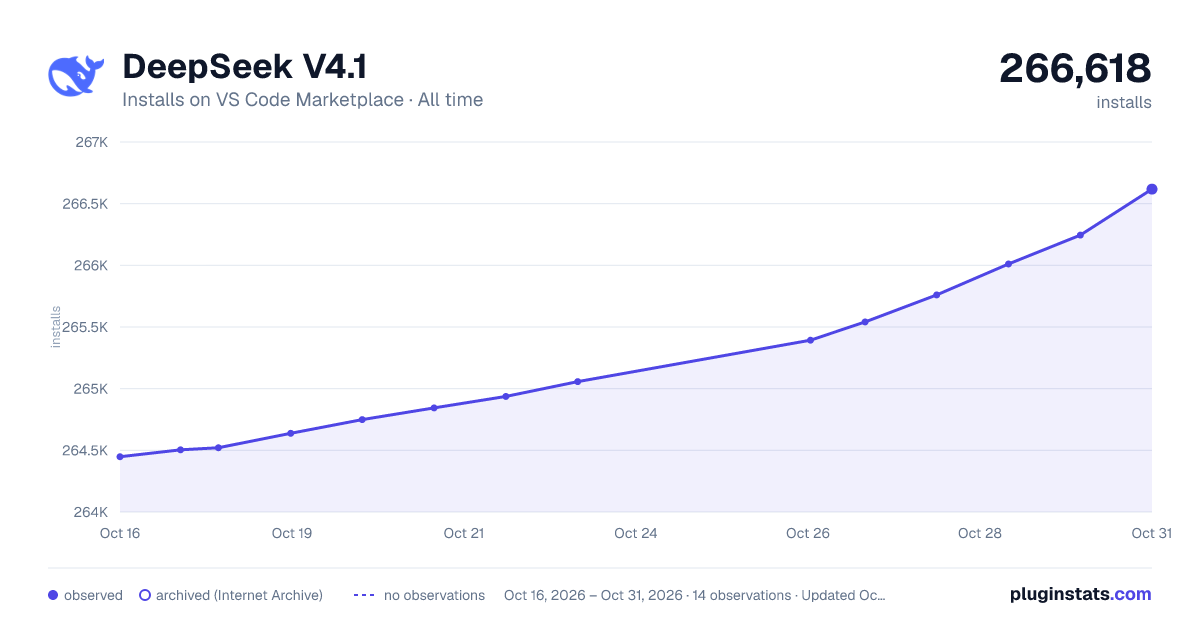

Adoption over time


7/30/90-day growth


Ranking history


Filled points are observed values; hollow points come from Internet Archive snapshots of the listing page. Dashed segments span periods with no observations — values between points are not interpolated.
Recent observations
Full history (3)Similar VS Code Marketplace Other plugins
Data source
Install counts, average rating, and rating counts come from the public Visual Studio Marketplace gallery API. Installs are cumulative and exclude updates.
Listing: https://marketplace.visualstudio.com/items?itemName=colourafredi.vscode-deepseek. First seen Oct 16, 2026; last successful collection Oct 18, 2026. See the methodology.