 PluginStats
Bootstrap 5 & Font Awesome Snippets installs statistics
By HansUXdev · VS Code Marketplace · Snippets
Code snippets for Bootstrap 5
Bootstrap 5 & Font Awesome Snippets has 600,200 recorded installs on VS Code Marketplace.
It ranks #764 of 2,501 tracked VS Code Marketplace listings by installs.
It is rated 4.0 out of 5 from 8 ratings.
PluginStats has 4 daily observations since Oct 16, 2026; the latest is from Oct 19, 2026.
Rating: 4.00 / 5 from 8 ratings
About Bootstrap 5 & Font Awesome Snippets
Bootstrap 5
The first, (currently only) and hands down BEST bootstrap 5 snippet extension. Includes templates, powerful utility snippets, and much more.
Features
1. Templates one tab away 2. Powerful utilities 3. Font Awesome icons ! (currently 4.7, eventually 6.0) 4. Much more hidden... 6. Much more planned, so consider giving it a star on github or the marketplace, become a sponsor.
Open Source Marketplace
This may surprizes you but VS-Code and it's marketplace aren't really open source, is licensed under a not-FLOSS license and contains telemetry/tracking, read more...
This extension is built for open-vsx and published on the ONLY open source registry for VS Code extensions.
Learn more about open source versions of vscode such as vscodium, GitPod's IDE and more.
Notes
Bootstrap 5 is currently in alpha and this extension should be considered in the same status. Unlike a lot of other snippets, this extension aims to balence user simplicity, with power and flexibility by keeping the total number of snippets to a minimum.
In terms of user simplicity, other Bootstrap 4 snippets have 5 different snippets for the grid, whereas this will have 3, but each is more powerful.
Roadmap
• v1.2.5 - Introduces Flex utilities, media-query and awesome awesome 4.7.0. • v1.5 - Each snippet with eventually have a gif demo (soon). • v2 - All base templates and several others will be one tab away, so consider sponsoring this or giving it a star.
Powerful, Simple, Flex Snippets
Center, position or reorder any element, by any default breakpoint with under 10 snippets.
Trigger | Description
!templates | Sets the display type. !utilities | Sets the display type. b5- | Main component snippets. fa- | Font Awesome component snippets.
Templates/Layout
Templates are just one tab away. Most of the official example templates have been implmented.
Trigger | Description
!b5-$ | Shortcut creating an html document with cdn scripts included !b5-$Offcanvas | Offcanvas Template, one tab away. !b5$Template-name | More coming soon...
Powerful Utility Classes
There are two way to use utilities. 1. Class utilities, which use ! as a prefix. For example, if you want to add a utility class to an existing HTML element, inside of class=" " you would add class="!spacing" then hit tab and fill out the options, the default will be class="mx-auto" which sets margin to auto on left and right (x). 2. Wrapper elements, ex: b5-{txt,color,shadow,boder,spacing} which will create a div, p, h2 then allow you to tab through the options.
Trigger | Description
!spacing or b5-spacing | A single, powerful utility snippet. The default is mx-auto which adds margins on right and left. The options allow you to switch between (m)argin and (p)adding, x,y,(t)op,(r)ight, (b)ottom, (l)eft, etc. Read about the classes on the official bootstrap documentation. !shadow or b5-shadow | Useful whenever you want to make things look like paper or material design. Read about the classes on the official bootstrap documentation. https://v5.getbootstrap.com/docs/5.0/utilities/shadows/ !font or b5-text | This intentionally uses two different names to differentiate between the class utility and the wrapper element. The options are responsive positions {|sm,md,lg,xl|}-${|left,center,right|}, line-height base,1,sm,lg}, font-weight normal,italic,weight-normal,weight-bold,weight-bolder,weight-light,weight-lighter ,and text-${6|none,lowercase,uppercase,capitalize|}, decoration and reset,break,monospace ! b5-border | change border attributes all border attributes. Read about the classes on the official bootstrap documentation.
Powerful, Simple, Flex Snippets
Center, position or reorder any element, by any default breakpoint with under 10 snippets.
Trigger | Description
!!MQ | Sets the display type. !flex | Sets the display type. !justify | Sets the display type. !align | Sets the display type. !fill | Sets the display type. !grow-shrink | Sets the display type. !flex-wrap | Sets the display type. !flex-order | Sets the display type.
Grid
This is works great but it may be simplified and rewritten. I'm also toying around with new utility snippet to that combines the display classes and flex classes. If you have any thoughts or suggestions, let me know on github.
Trigger | Description
b5-container | Grid container with options for -fluid, px, gy and more. b5-row | Powerful row, ${1| ,row-cols-2,row-cols-3, auto,justify-content-md-center,md,lg,xl,xxl|}. Default to row with optional utility classes. b5-col | Pretty much all your need covered and more. Ex: col${1| ,-1,-2,-3,-4,-5,-6,-sm,-md,-lg,-xl,-xxl|}${2| ,-auto,-1,-2,-3,-4,-5,-6,-7,-8,-9,-10,-11,-12
Navbar
Trigger | Description
b5-navbar-default | Navbar default b5-navbar-scollspy | V1 is here b5-Nav-bottom | V1 is here
b5-nav-item | item with link and options for common pages such as Home, About, Blog, Contact. b5-navlink | link b5-nav-dropdown | dropdown b5-nav-dropdown toggle | Navbar toggle b5-nav- | more in this category coming soon...
Button
Trigger | Description
b5-btn | Button with link b5-btn-o | Button with outline b5-btn-close | Close buttons... b5-btn- | more in this category coming soon...
Cards
Trigger | Description
b5-card | Basic Card b5-card- | more in this category coming soon...
modal
Trigger | Description
b5-modal | Basic modal b5-modal- | more in this category coming soon...
Collapse
Trigger | Description
b5-btn-reveal | Click a button and reveal some content. b5-modal- | more in this category coming soon...
JavaScript
I plan on eventually adding bootstrap snippet for the JavaScript but its not on the roadmap yet because I'm also working on this massive javascript extension which will replace about 5-10 of the most popular extensions add and add things like optional chaining among other methods.
Trigger | Description
jb5 | consider submitting a PR or becoming a sponsor.
Release Notes
Users appreciate release notes as you update your extension.…
Description from the VS Code Marketplace listing.
- bootstrap
- Bootstrap 5
- Bootstrap Snippets
- Font Awesome
- snippet
- Snippets
Where Bootstrap 5 & Font Awesome Snippets sits in the listing
Each band is one page of 20. Installs on a log scale. Placement is projected from installs, so it can differ from the marketplace's own sort order. Hover a dot to see the listing.


Charts
Images: 30d · 1y · all time · 1600×900 dark
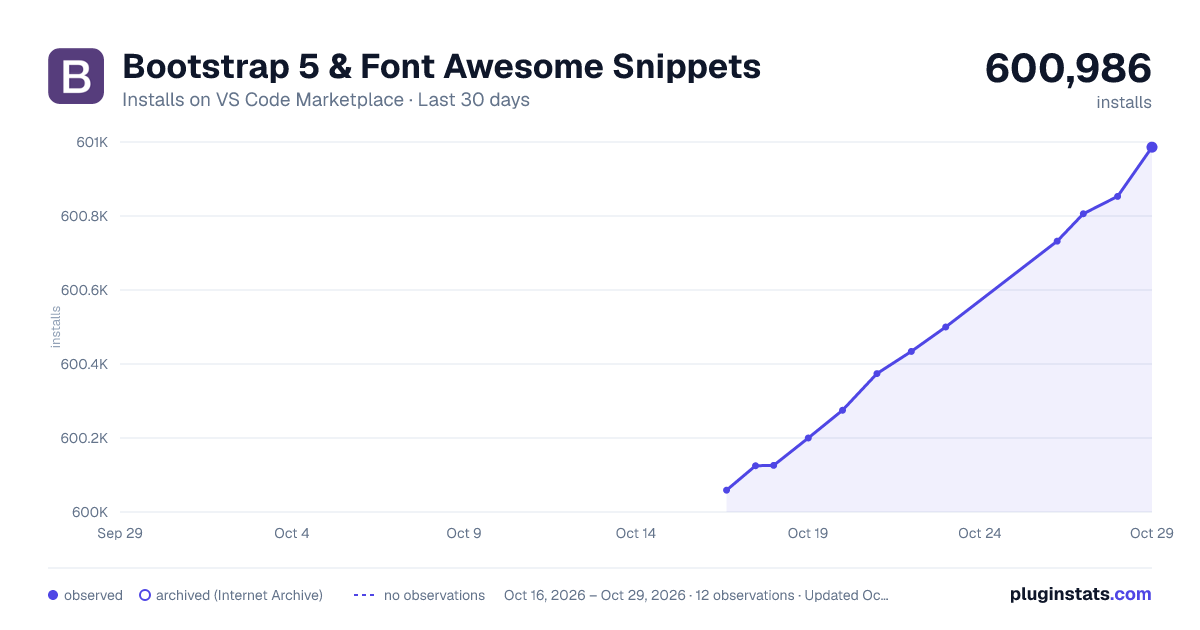
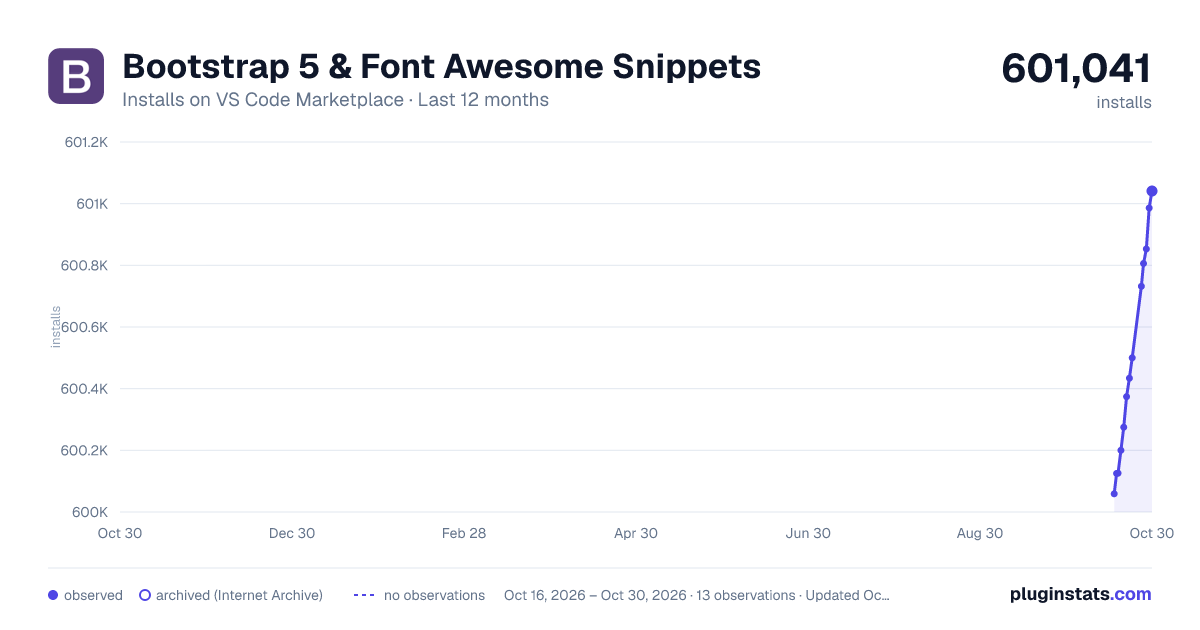
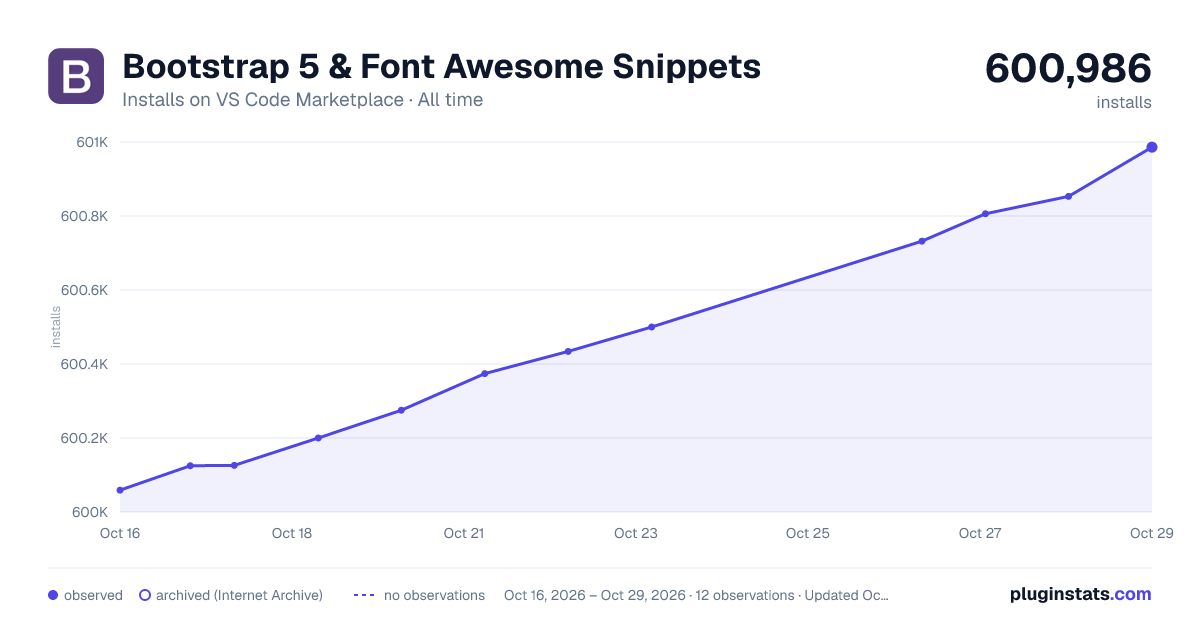

Adoption over time


7/30/90-day growth


Ranking history


Filled points are observed values; hollow points come from Internet Archive snapshots of the listing page. Dashed segments span periods with no observations — values between points are not interpolated.
Recent observations
Full history (4)Similar VS Code Marketplace Snippets plugins
Data source
Install counts, average rating, and rating counts come from the public Visual Studio Marketplace gallery API. Installs are cumulative and exclude updates.
Listing: https://marketplace.visualstudio.com/items?itemName=HansUXdev.bootstrap5-snippets. First seen Oct 16, 2026; last successful collection Oct 19, 2026. See the methodology.