 PluginStats
CSS Navigation installs statistics
By pucelle · VS Code Marketplace · Programming Languages
Provides CSS Completion, Finding Definition, Finding References, Diagnostic, Hover, Workspace Symbols services for HTML, JS, TS, JSX, Vue and more languages across whole workspace
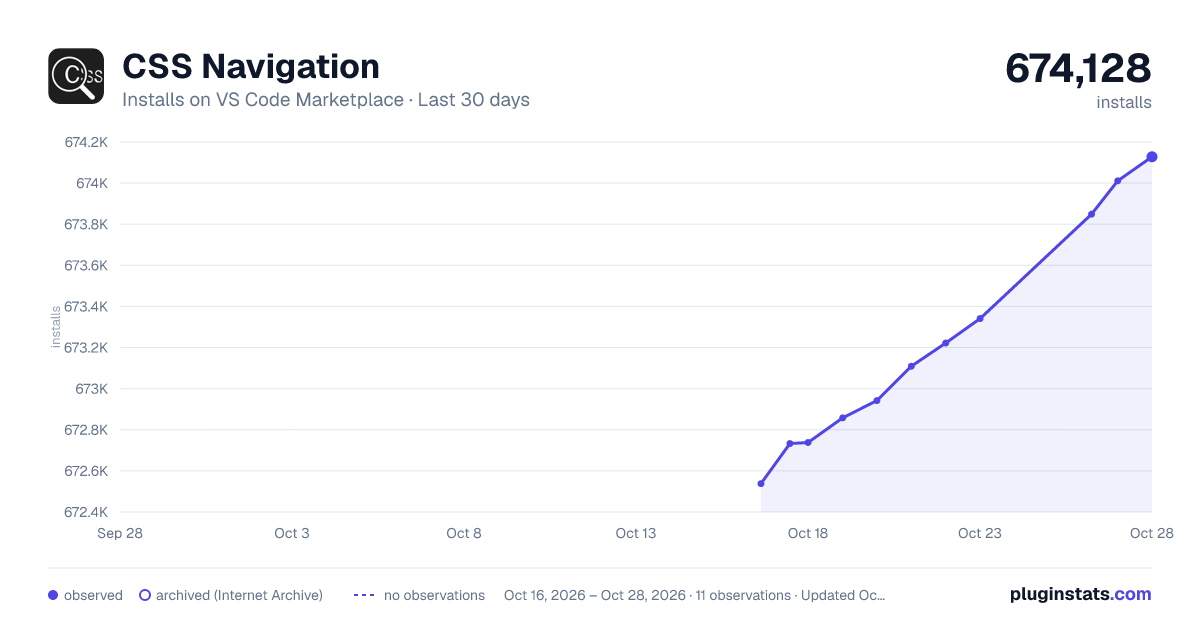
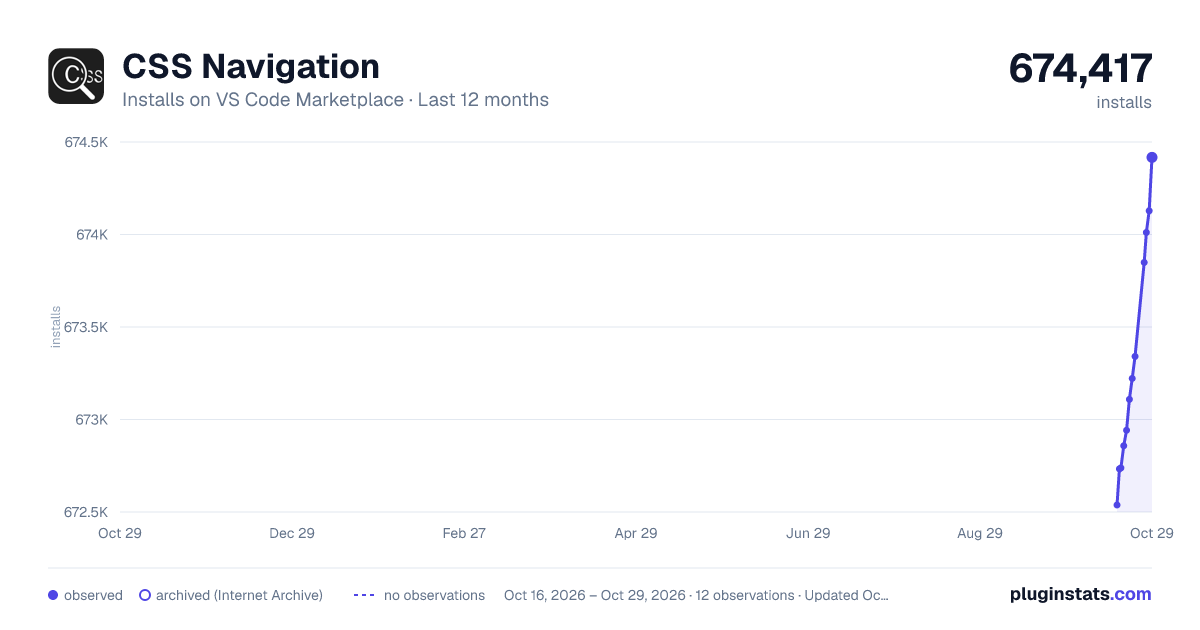
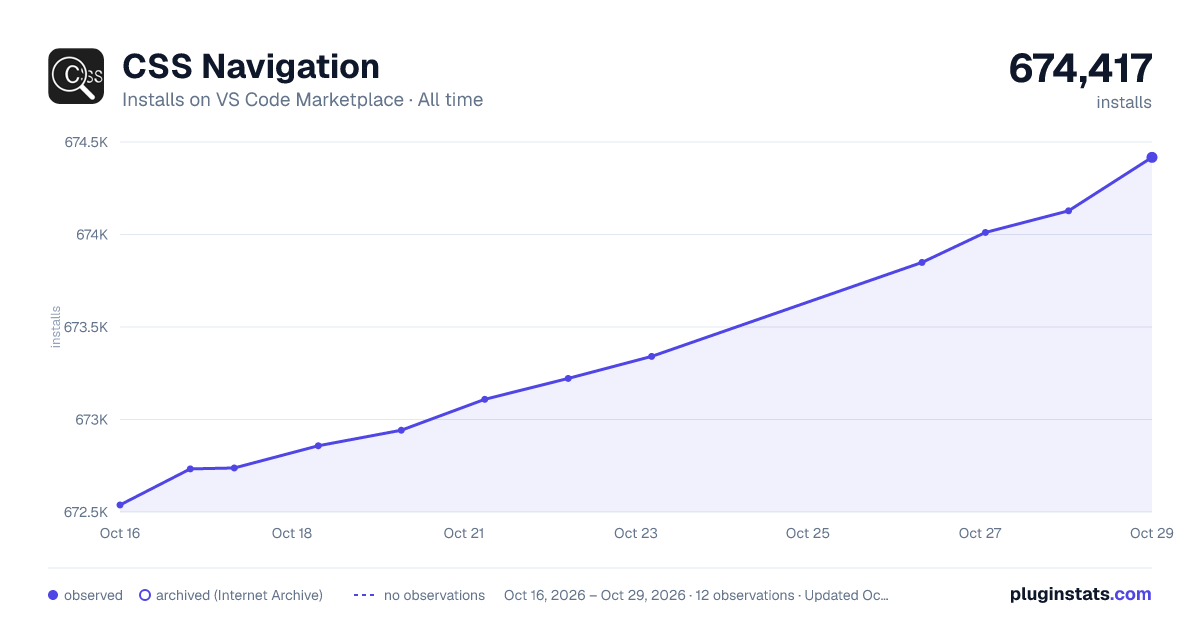
CSS Navigation has 672,738 recorded installs on VS Code Marketplace.
It ranks #707 of 2,500 tracked VS Code Marketplace listings by installs.
It is rated 4.8 out of 5 from 45 ratings.
PluginStats has 3 daily observations since Oct 16, 2026; the latest is from Oct 18, 2026.
Rating: 4.84 / 5 from 45 ratings
About CSS Navigation
CSS Navigation - VSCode Extension
Provides CSS Completion, Finding Definition, Finding References, Diagnostic, Hover, Workspace Symbols services for HTML, JS, TS, JSX, Vue and more languages across whole workspace.
Features
Explain Class Name Detection in JavaScript and TypeScript
querySelector, classList.add, $
Selector strings in querySelector, querySelectorAll, and $(), and literal arguments in classList.add, are detected separately and do not require a matching variable name. For classList.add, detection reads consecutive literal arguments from the start and stops at the first non-literal argument.
variables and properties
CSS Navigation detects literal class names in JavaScript and TypeScript so you can find their CSS definitions, hover over them, and find their references. It scans source code without evaluating expressions or following variable values at runtime.
For variable declarations and property initializers, the name must match option jsClassNameReferenceNames. The default patterns are ["*ClassName*", "*class_name*"]; * matches zero or more letters, digits, or underscores. For example, these names match: className, itemClassName, and item_class_name.
Renaming, Property Selector - New in V2.15
In v2.15, we support:
• class and id renaming. • property selectors: [disabled] [checked] [selected] [hidden] [type=...] [aria-*=...] [data-*=...]. :is and :where. • ignoreSameNameCSSFile option, which excludes generated CSS files when a same-name SCSS, Sass, or Less source exists.
Class Name CodeLens - New in V2.8
Since v2.8.0, this plugin provides Class Name CodeLens feature. You should set following options to true to enable:
• Set enableDefinitionCodeLens option to true to enable definition code lens. • Set enableReferenceCodeLens option to true to enable reference code lens.
Otherwise, you should also ensure vscode settings editor.codeLens to be true.
Class Name Diagnostics - New in V2.7
Since v2.7.0, this plugin provides Class Name Diagnostics feature:
• Set enableClassNameDefinitionDiagnostic option to true to enable definition diagnostic. • Set enableClassNameReferenceDiagnostic option to true to enable reference diagnostic.
Use diagnosticIgnoredClassNames to suppress diagnostics for classes supplied by generated or external CSS. Exact names and * wildcards are supported. Diagnostic quick fixes can add a reported name to Workspace or User Settings.
CSS Variable Services - New in V2.2
Since v2.2.0, this plugin provides full CSS Variable service include Definition / Completion / Reference / Hover.
And it provides color preview besides color type css variables, recently supported color formats: hex, rgb, rgba, hsl, hsla.
For CSS Modules imported with a default import, namespace import, or require, it provides module-scoped completion and go-to-definition for dot and bracket property access in JavaScript and TypeScript files.
Class Name and ID Hover Info - New in V2.0
When mouse hover at a Class Name / Id / CSS Variable, will show it's description (leading comment) and first several style properties.
You may configure maxHoverStylePropertyCount to specify How Many Style Properties to show. If you don't want style properties, set maxHoverStylePropertyCount to 0.
Class Name, CSS Variable and ID Completion
Provides Class Name/ Id / CSS Variable completion for your HTML files, and if you have specified some class name or id in HTML files, can also complete them in CSS files.
Go to Definition and Peek Definition
Choose Go to definition or Peek definition, the extension will search related CSS & Scss & Less selectors in current workspace folder.
The places you can goto definitions:
• HTML (or files whose extension included by activeHTMLFileExtensions option): __, _class=_"class-name_"_, _id="_id-name_"_. • Jquery & DOM Selector: _$('_class-name_')_, x._querySelector('_class-name_')_, x._querySelectorAll('_class-name_')_. • CSS Variables: var(--css-variable-name). • JSX & TSX: _className="_class-name_"_, _className={"_class-name_"}_ and others. • Vue: :class="_class-name_", :class="{_'class-name'_ : ... }" • If want more, give me a feedback.
Find All References and Peek References
Supports looking for CSS selector references across all HTML & CSS files of workspace folder.
When your workspace folder having too much HTML like files, parsing them all may cause stuck, so it limits to read at most 500 files.
Workspace symbols
Allows to search workspace symbols from CSS & Scss & Less files across all activated workspace folders.
You may open workspace symbol popup by Go / Goto Symbol in Workspace, or use shortcut key Ctrl+T to open it.
Miscellaneous Features
• Can goto referenced files after clicking url part of or @import "...", and several more. • Completions sort by numbers, e.g.: .class1, .class2, .class10.
Note about JSX
Note that the JSX template doesn't provide completion for attribute value by default, you may trigger it manually by clicking Ctrl + Space, or change settings:
Configuration
| Name | Description…
Description from the VS Code Marketplace listing.
- css
- CSS Completion
- CSS Find References
- CSS Goto Definition
- CSS Hover
- CSS Peek Definition
- CSS Variable
- CSS Workspace Symbol
- javascript
- Less
- Sass
Where CSS Navigation sits in the listing
Each band is one page of 20. Installs on a log scale. Placement is projected from installs, so it can differ from the marketplace's own sort order. Hover a dot to see the listing.


Charts
Images: 30d · 1y · all time · 1600×900 dark

Adoption over time


7/30/90-day growth


Ranking history


Filled points are observed values; hollow points come from Internet Archive snapshots of the listing page. Dashed segments span periods with no observations — values between points are not interpolated.
Recent observations
Full history (3)Similar VS Code Marketplace Programming Languages plugins
Data source
Install counts, average rating, and rating counts come from the public Visual Studio Marketplace gallery API. Installs are cumulative and exclude updates.
Listing: https://marketplace.visualstudio.com/items?itemName=pucelle.vscode-css-navigation. First seen Oct 16, 2026; last successful collection Oct 18, 2026. See the methodology.