 PluginStats
Azure Logic Apps (Standard) installs statistics
By Microsoft (223 listings) · VS Code Marketplace · Azure
Visual Studio Code extension for Azure Logic Apps (Standard)
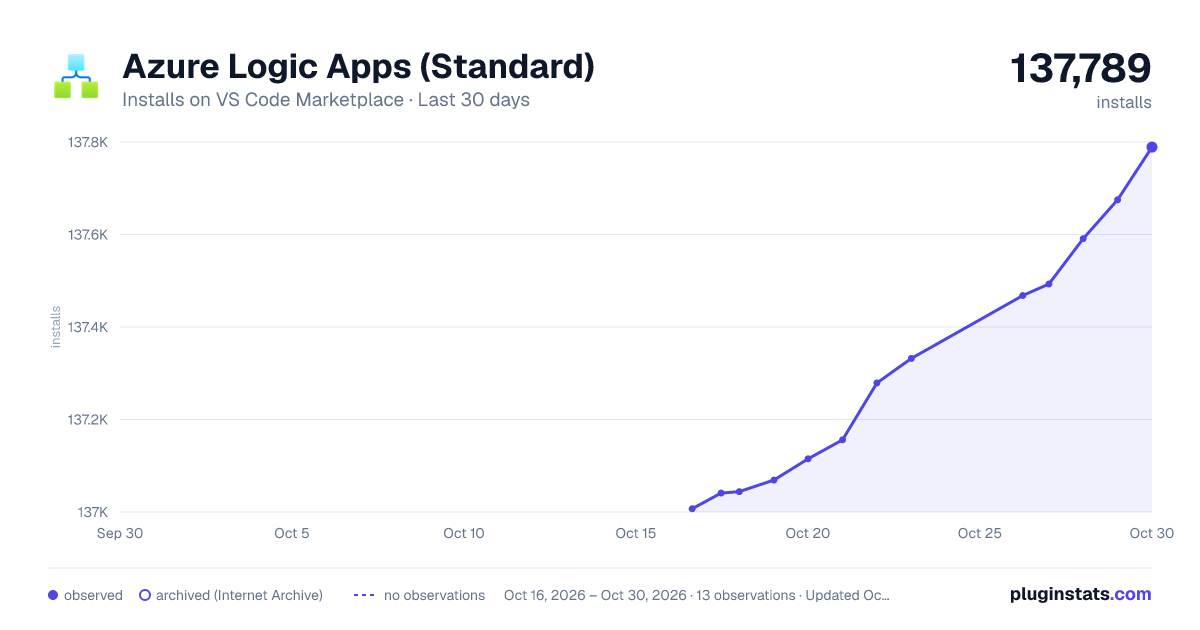
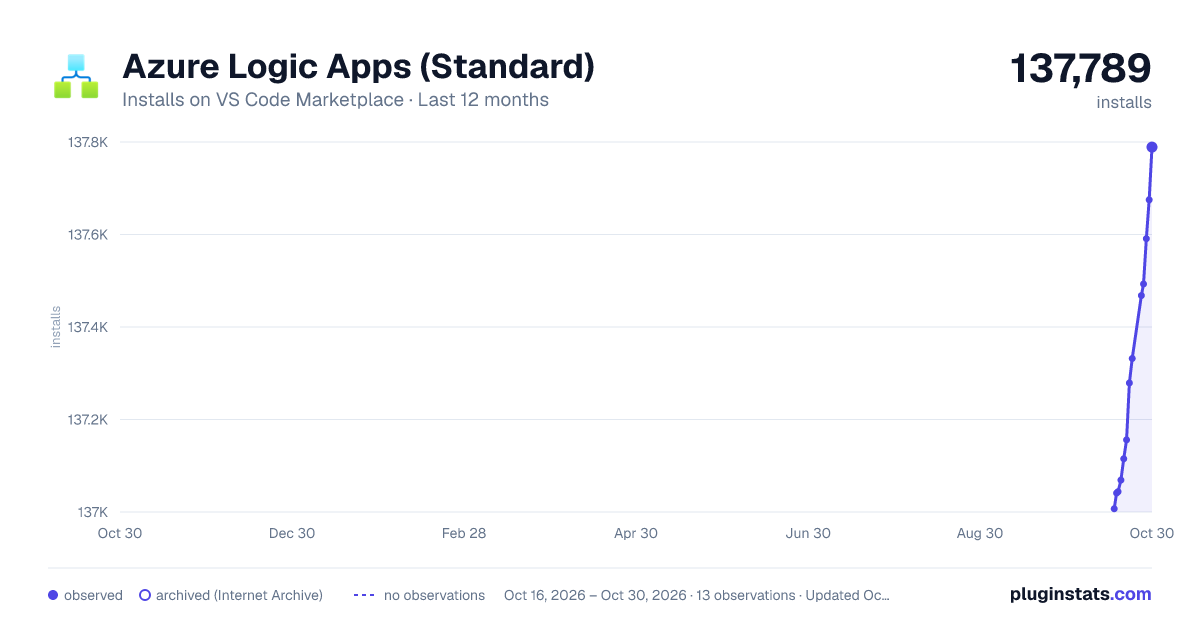
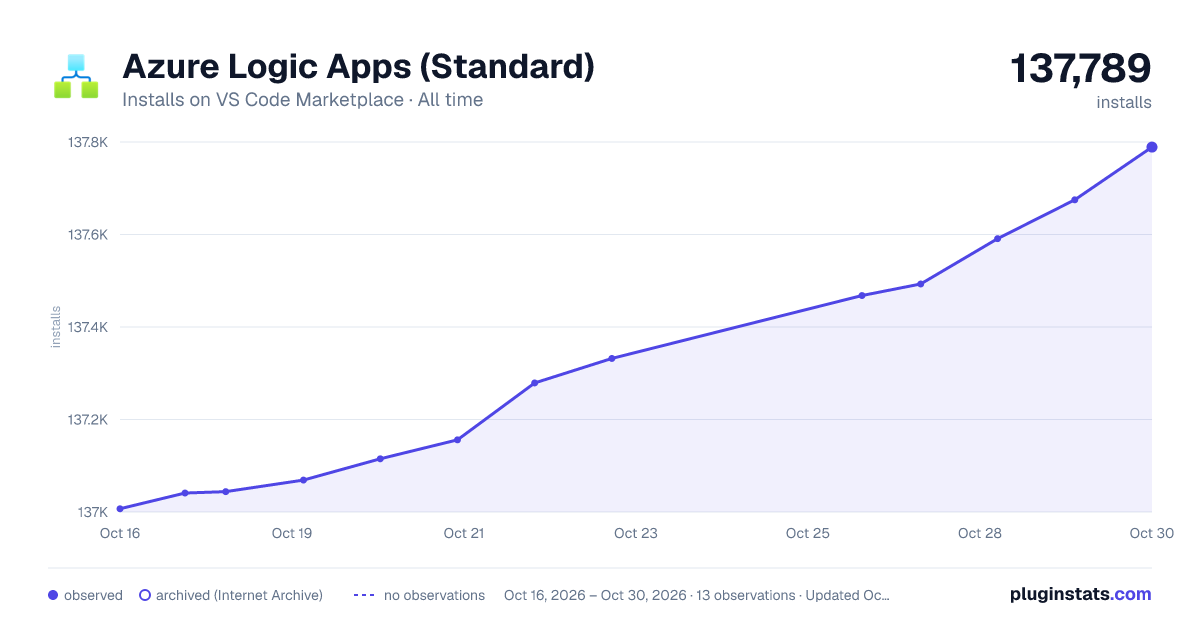
Azure Logic Apps (Standard) has 137,044 recorded installs on VS Code Marketplace.
It ranks #1957 of 2,500 tracked VS Code Marketplace listings by installs.
It is rated 3.8 out of 5 from 10 ratings.
PluginStats has 3 daily observations since Oct 16, 2026; the latest is from Oct 18, 2026.
Rating: 3.80 / 5 from 10 ratings
About Azure Logic Apps (Standard)
Azure Logic Apps for Visual Studio Code (Standard)
In Visual Studio Code, you can use the Azure Logic Apps (Standard) extension to quickly create, debug, manage, and deploy logic apps directly to Azure. For requirements and more information, see Create a Standard logic app workflow using Visual Studio Code.
Sign up today for your free Azure account and receive 12 months of free popular services, $200 free credit and 25+ always free services 👉 Start Free.
Azure Logic Apps - Create unit tests from Standard workflows
Starting with version 5.58.8, the Azure Logic Apps (Standard) extension for Visual Studio Code provides the capability to create unit test from a workflow run or a workflow saved definition, that can be edited and executed locally. For more information, see Create unit tests from Standard workflows in Azure Logic Apps with Visual Studio Code (Preview).
Azure Logic Apps - Create Standard logic app projects from Azure portal export
Starting with version 5.18.7, the Azure Logic Apps (Standard) extension for Visual Studio Code provides the capability to create Standard logic app projects from a logic app exported from the Azure portal. For more information, see Export Standard logic apps from Azure portal to Visual Studio Code.
Azure Logic Apps - Introducing the Azure Logic Apps Hybrid deployment model (preview)
Starting with version 4.107.2, the Azure Logic Apps (Standard) extension for Visual Studio Code introduces the Azure Logic Apps Hybrid deployment model, a new feature that gives you more flexibility and control over your infrastructure. This offering lets you build and deploy workflows that run on customer-managed infrastructure, providing you with the option to run Standard logic apps on premises, in a private cloud, or even in a non-Microsoft public cloud. For more information, see Introducing the Logic Apps Hybrid Deployment Model (Public Preview).
Azure Logic Apps - Automatic Regeneration of Connection ACL keys
Starting with version 4.57.0, the Azure Logic Apps (Standard) extension for Visual Studio Code will automatically regenerate the keys required to allow the extension to access Azure Managed Connections. This will allow the same Azure Managed Connection to be used for projects for longer than 7 days without any user intervention. For more information, see Regeneration Azure Managed Connection ACL for Local Development.
Azure Logic Apps - Introducing Azure Logic Apps Rules Engine
Starting with version 4.25.1, the Azure Logic Apps (Standard) extension for Visual Studio Code introduces the Rules Engine, a decision management inference engine. This engine allows customers to build Standard workflows in Azure Logic Apps and integrate readable, declarative, and semantically rich rules that operate on multiple data sources. Currently, the native data sources available for the Rules Engine are XML and .NET objects. For more information, see Decision management and business logic integration using the Azure Logic Apps Rules Engine (Preview).
Azure Logic Apps - Introducing .NET 8 Custom Code support (preview)
Starting with version 4.25.1, the Azure Logic Apps (Standard) extension for Visual Studio Code supports the integration of .NET 8 custom code into Logic Apps workspaces. This update allows for a smooth transition to the latest .NET version while maintaining compatibility with existing workflows. Developers can now easily develop and debug custom code within the Logic Apps environment, accelerating the development process and leveraging the advancements of .NET 8 technology. This empowers users to build more robust and efficient workflows using the most up-to-date tools and capabilities. For more information, see Introducing .NET 8 Custom Code support for Azure Logic Apps (Standard) - Preview.
Azure Logic Apps - Automated Deployment Scripts Generation (preview)
Starting with version 4.4.3, the Azure Logic Apps (Standard) extension for Visual Studio Code supports the ability to generate ARM templates for Logic Apps Standard applications and Azure Managed Connections. It will also support the generation of Azure DevOps YAML pipelines, sppeding up the move from Local development to cloud using DevOps best practics. For more information, see Automate build and deployment for Standard logic app workflows with Azure DevOps (preview).
Azure Logic Apps - Improved Onboarding Experience
Starting with version 2.81.5, the Azure Logic Apps (Standard) extension for Visual Studio Code includes a dependency installer that automatically installs all the required dependencies in a new binary folder and leaves any existing dependencies unchanged. For more information, see Get started more easily with the Azure Logic Apps (Standard) extension for Visual Studio Code.
Azure Logic Apps - Data Mapper for Visual Studio Code
In Visual Studio Code, you can graphically describe transformations by mapping relationships between data types in a source schema and a target schema. After you install the Azure Logic Apps - Data Mapper, you can create direct basic relationships and more complex transformations using functions, handling any translation between supported schema types in the backend. For more information, see Create maps to transform data in Azure Logic Apps with Visual Studio Code (preview).
Azure Logic Apps (Standard) moves to the Resources tab
🎉 Version 2.15.15 and later: The Azure Logic Apps extension now follows the design pattern that Azure extensions follow. Previously, in the Azure window, an Azure Logic Apps extension section showed your Azure subscriptions and associated "remote" logic apps hosted in Azure.
Now, your remote logic apps still appear in the Azure window, but in the Resources section instead. You can see your remote logic apps when you expand the Logic App node.
Extension toolbar buttons have now migrated to the Workspace section.
Azure Logic Apps (Standard) Custom Code Workspace…
Description from the VS Code Marketplace listing.
- Azure
- csharp
- debuggers
- json
- Logic App
- multi-root ready
- serverless
Where Azure Logic Apps (Standard) sits in the listing
Each band is one page of 20. Installs on a log scale. Placement is projected from installs, so it can differ from the marketplace's own sort order. Hover a dot to see the listing.


Charts
Images: 30d · 1y · all time · 1600×900 dark

Adoption over time


7/30/90-day growth


Ranking history


Filled points are observed values; hollow points come from Internet Archive snapshots of the listing page. Dashed segments span periods with no observations — values between points are not interpolated.
Recent observations
Full history (3)Similar VS Code Marketplace Azure plugins
Data source
Install counts, average rating, and rating counts come from the public Visual Studio Marketplace gallery API. Installs are cumulative and exclude updates.
Listing: https://marketplace.visualstudio.com/items?itemName=ms-azuretools.vscode-azurelogicapps. First seen Oct 16, 2026; last successful collection Oct 18, 2026. See the methodology.