 PluginStats
syntax-mcfunction installs statistics
By MinecraftCommands · VS Code Marketplace · Programming Languages
Syntax highlighting for mcfunction files (Last Updated: 1.21)
syntax-mcfunction has 250,516 recorded installs on VS Code Marketplace.
It ranks #1303 of 2,500 tracked VS Code Marketplace listings by installs.
It is rated 3.8 out of 5 from 6 ratings.
PluginStats has 3 daily observations since Oct 16, 2026; the latest is from Oct 18, 2026.
Rating: 3.83 / 5 from 6 ratings
About syntax-mcfunction
syntax-mcfunction
A syntax definition for Minecraft Commands. Give this repo a ⭐ if you like it!
This project contains syntax definitions for Minecraft commands (.mcfunction) using the textmate grammer spec. It is a general, feature complete language spec built via generic syntatical components that describe the language (aka, mimimal hardcoded command support). This means it should support future game versions, many modded commands, and even custom language compilers such as bolt and jmc.
[!Warning] This syntax does not contain any error highlighting meaning invalid commands will highlight correctly. If you are looking error validation and auto-complete for vanilla commands, we recommend the Spyglass project for a language-server that builds upon this simple grammar!
Installing
VSCode Extension
Install the extension from the marketplace or by searching for syntax-mcfunction in the extensions tab.
open-vsix Extension
Follow these instructions if you are looking on using the open-vsix version of this project in VSCode or any of it's forks.
Sublime Text
It is recommended you use Package Control to manage the package:
1. Install Package Control if it is not already present. 2. Run the Package Control: Add Repository command and enter https://github.com/MinecraftCommands/syntax-mcfunction.git to add the repository as a package. 3. Run the Package Control: Install Package and search for syntax-mcfunction to install it as you would a normal package.
If you already had language-mcfunction
Note You might want to remove Arc's language-mcfunction if you have it installed. You can do that via Package Control: Remove Repository and selecting https://github.com/Arcensoth/language-mcfunction then Package Control: Remove Package and selecting language-mcfunction from 2021.
This will keep the package updated with the repository automatically.
Otherwise you can clone the repository into user packages (e.g. %appdata%\Sublime Text 3\Packages) and update it manually.
language-mcfunction
While this grammar was created from scratch, much of it's work was adapted from the original language-mcfunction grammar. One of the original ideas for language-mcfunction was to develop a general, simpler version for mcfunction.
[!Note] Actually, an earlier prototype of this grammar was going to be used as a base for a language-mcfunction rewrite.
There are some key differences to note between this syntax and the original: • language-mcfunction is designed to operate on singular lines. If one line is broken, it does not affect lines after it and commands cannot span across multiple lines at all. • This was the core issue that caused me to develop syntax-mcfunction (even before Minecraft 1.20.2 introduced multi-line commands) as I needed a grammar that had multi-line support. • language-mcfunction contains specific commands validation and reports errors for invalid commands • syntax-mcfunction differs in philosophy here. Textmate grammars are not well-equipped to actually validate commands — that's more of a role for language servers. • This project also generally highlights commands as it allows for easier maintenance and is better for platforms such as Github where multiple command extensions / modded commands might reuse the .mcfunction extension.
Due to these, coloring and highlighting will vary in a couple of places when comparing these grammars. While the goal is to match language-mcfunction as close as possible, there will never be a true 1:1 match in highlighting as the entire design of the grammar differs.
Contributing
We are happy to accept any PRs just make sure to make a cooresponding issue first to track it. When making a PR, make sure the branch of your fork is not main and also make sure maintainers are allowed to edit your PR. This is helpful for me making small edits to the PR before merging.
We only require edits to the yaml file as the json and plist files are generated. You can use the npm package, js-yaml, to generate the json file after editting the yaml file.
Making Releases
Releases are semi-automated in this repo. Once your PR is merged into the main branch, the maintainer will create a new tag to trigger our Github CI to produce a new version.
This will generate the json and plist variations of the grammar, create and push a .vsix extension to the VSCode and open-vsix marketplaces, and create a release in the releases tab.
The maintainer will then need to manually fill in the body of the release to add in the changelog and links.
Acknowledgements
This repo is entirely dedicated to our beloved community member and friend, Arcensoth. His work on the original language-mcfunction and overall contributions to the Minecraft Commands community was invaluable and he will be missed.
Rest in Peace, Arcensoth
Description from the VS Code Marketplace listing.
- mcf
- mcfunction
Where syntax-mcfunction sits in the listing
Each band is one page of 20. Installs on a log scale. Placement is projected from installs, so it can differ from the marketplace's own sort order. Hover a dot to see the listing.


Charts
Images: 30d · 1y · all time · 1600×900 dark
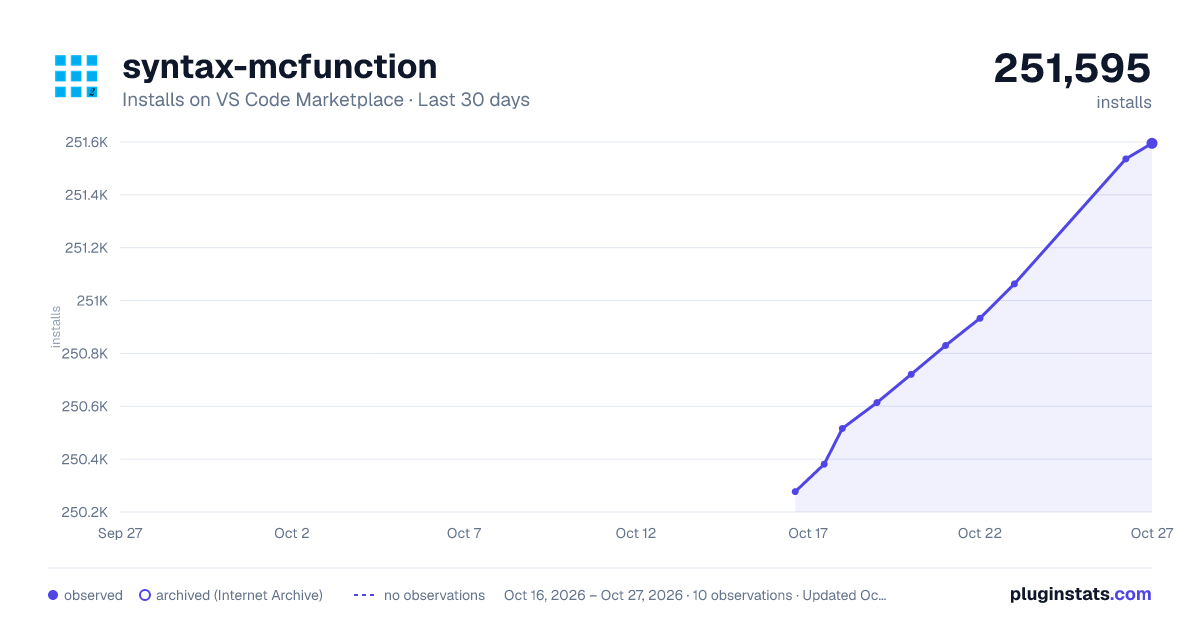
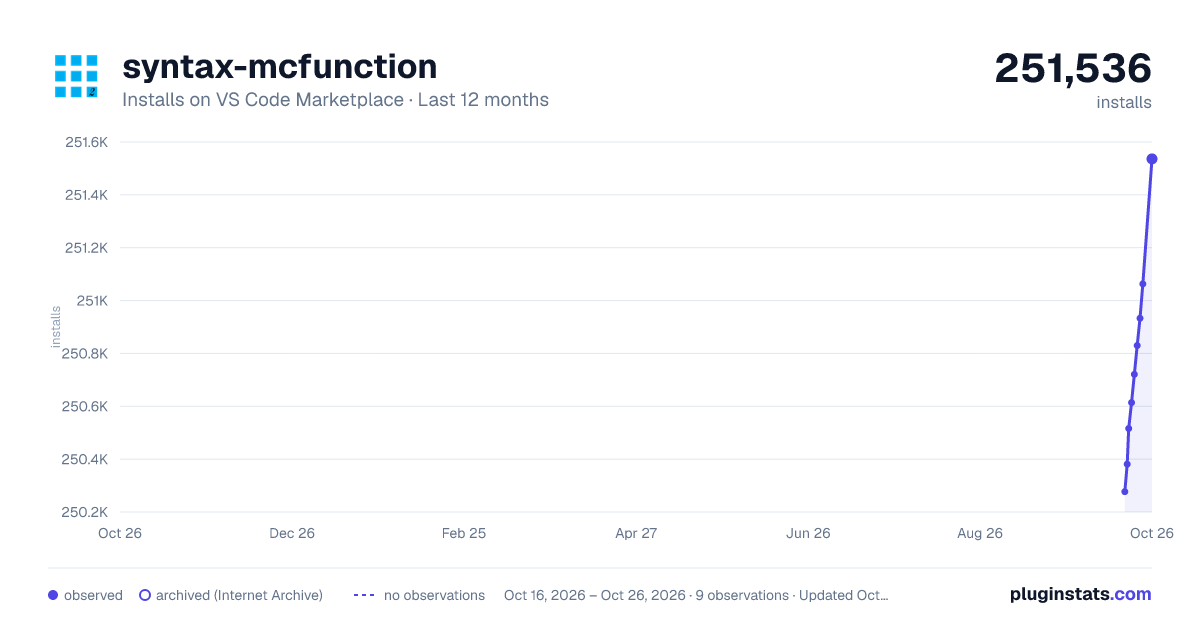
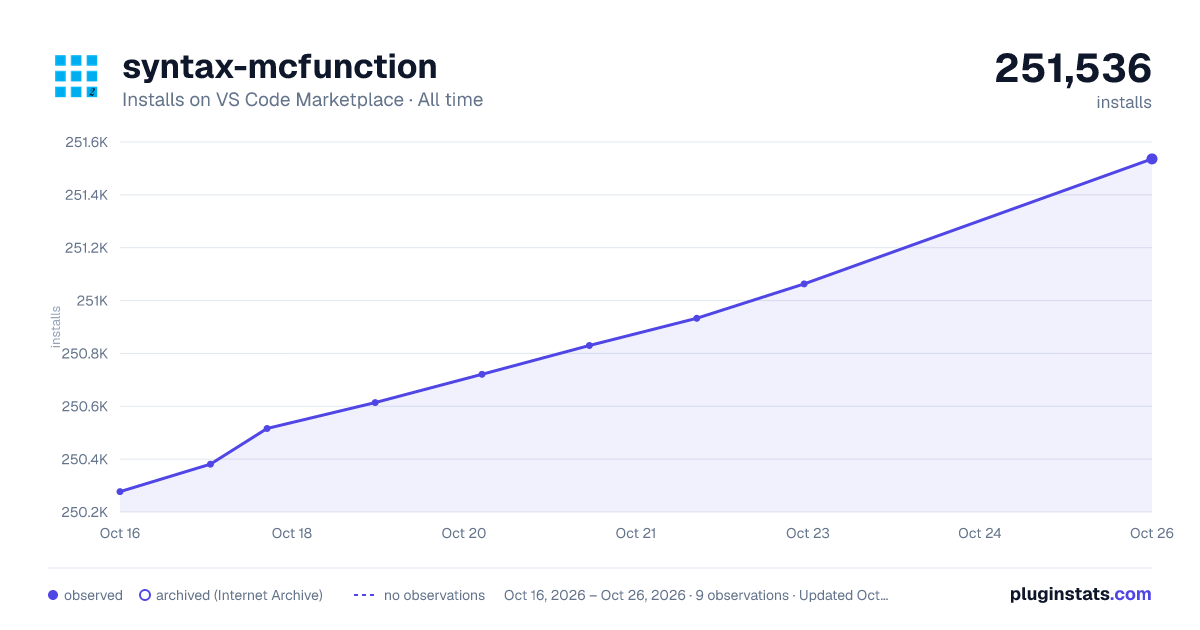

Adoption over time


7/30/90-day growth


Ranking history


Filled points are observed values; hollow points come from Internet Archive snapshots of the listing page. Dashed segments span periods with no observations — values between points are not interpolated.
Recent observations
Full history (3)Similar VS Code Marketplace Programming Languages plugins
Data source
Install counts, average rating, and rating counts come from the public Visual Studio Marketplace gallery API. Installs are cumulative and exclude updates.
Listing: https://marketplace.visualstudio.com/items?itemName=MinecraftCommands.syntax-mcfunction. First seen Oct 16, 2026; last successful collection Oct 18, 2026. See the methodology.