 PluginStats
Matplotlib Pilot (English) installs statistics
By litchi (2 listings) · VS Code Marketplace · Snippets
A VS Code Extension provides tools such as Matplotlib code snippets and templates.
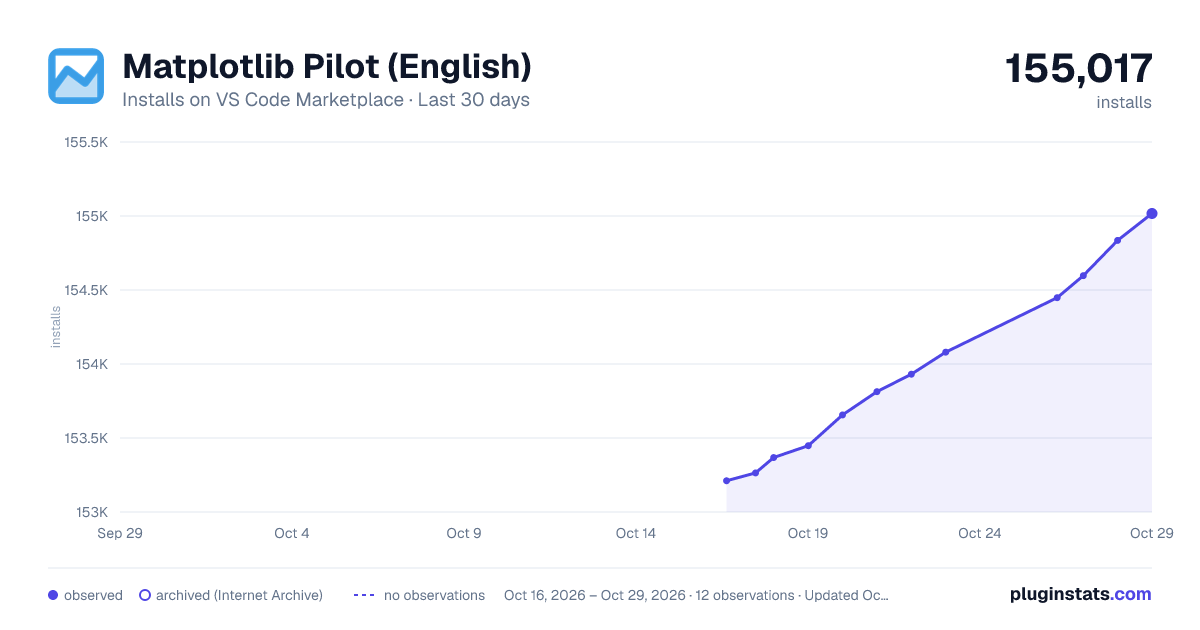
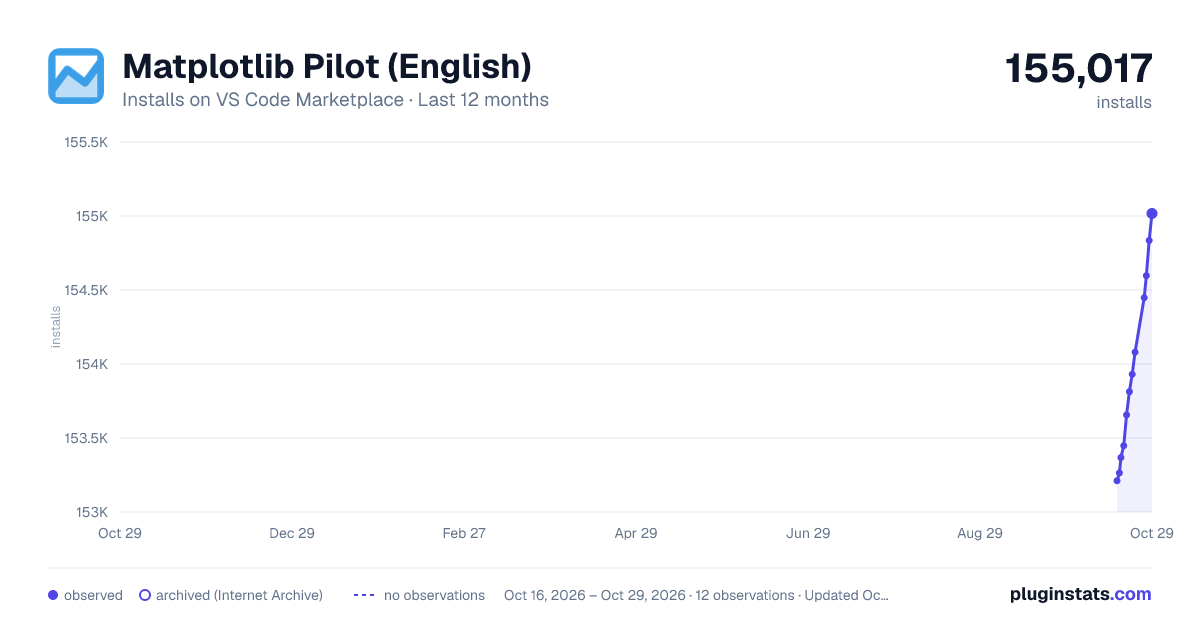
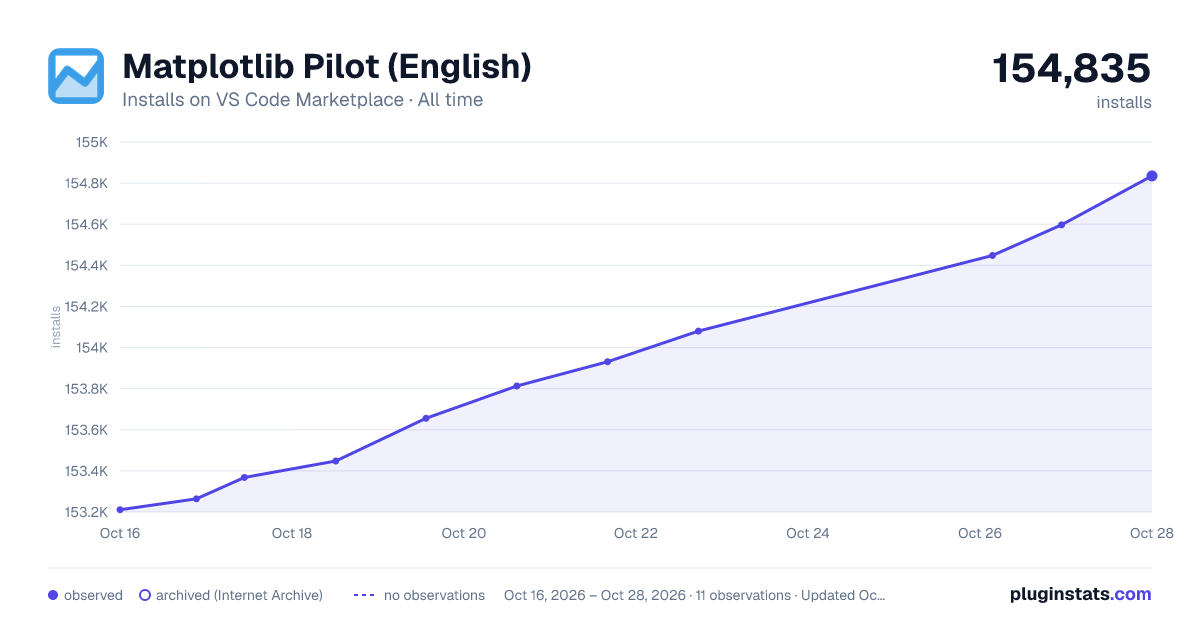
Matplotlib Pilot (English) has 153,448 recorded installs on VS Code Marketplace.
It ranks #1827 of 2,501 tracked VS Code Marketplace listings by installs.
It is rated 5.0 out of 5 from 1 ratings.
PluginStats has 4 daily observations since Oct 16, 2026; the latest is from Oct 19, 2026.
Rating: 5.00 / 5 from 1 ratings
About Matplotlib Pilot (English)
Matplotlib Pilot
Matplotlib Pilot is a VS Code Extension that provides Matplotlib code snippets. It aims to smooth the learning curve of Matplotlib and lower the threshold for its use.
It is highly recommended to configure this plugin on the right side of the main view (just drag the icon to the right side of the page) to avoid repeated switching of the sidebar.
If you have any questions, you can send an email to litchi.code@foxmail.com or leave a comment in the plugin review section.
At present, this is a non-commercial project. However, a small number of sponsored advertisements may be introduced in the future. Based on copyright requirements, it is necessary to state here that this plugin has no affiliation with Matplotlib Developers and NumFocus.
Features
1. Commonly used plotting APIs of Matplotlib are provided in the sidebar. Clicking on them will insert the corresponding code snippet at the cursor position in the editor. 2. Users can conveniently modify the sidebar, including editing code snippets and adding or deleting buttons. 3. The "color picker" in the sidebar can freely select a suitable color. After the selection is completed, the color string will be automatically copied. 4. The Concepts button can view locally attributes such as "color", "marker", "linestyle", and "cmap" in Matplotlib. 5. The Template button can open the template browser, which provides some frequently used plotting template "notebook" files. It will be continuously upgraded in the future. 6. The Custom Temp button can manage user-defined "notebook" template files after configuration, and it is not limited to "Matplotlib" scripts.
Dependency
Matplotlib is a Python package for data visualization. Make sure it is installed before use.
It is recommended to use this plugin in .ipynb files. After creating a file with the suffix .ipynb in VS Code, the Jupyter plugin will be automatically recommended. Depending on the network situation, manual installation may be required.ipykernel
At the same time, make sure that the version of VS Code is higher than 1.72.0.
Setting
• The command MP: refresh sidebar can refresh the sidebar from the default notebook file. • The command MP: modify sidebar calls out the notebook file corresponding to the default side panel view. After the user directly modifies this file and saves it, call the MP: refresh sidebar command. When the plugin is reloaded, the modified sidebar view can be used.
Modify the sidebar view and its code snippets
Users can customize the sidebar code snippet buttons. For example, modify the content of the code snippet corresponding to the font modification button to match the current local environment. Another example is that if you don't like the default drawing style, then you can create a new button and fill in the code you need.
1. Click Modify button or Press F1 to bring up the command panel in VS Code and enter MP: modify sidebar.
2. Save Notebook File to a stable local path. This notebook will be used to generate the sidebar view.
3. Now you can modify the notebook file as needed. After modification, save the file (Ctrl+S) and close it.
4. Click Refresh button or Press F1 to bring up the command panel in VS Code and enter MP: refresh sidebar. Click the corresponding button.
5. Restart VS Code to see the modified sidebar, if it wasn't happend automatically.
Custom templates
This plugin provides the function of customizing drawing task templates. Users can create their commonly used drawing scripts into notebook files (with the suffix .ipynb). Then, through the following process, they can call out the template browsing interface through the "Custom Template" button and use the corresponding templates to create new tasks. In fact, this is not limited to Matplotlib task scripts. Users can also add other commonly used scripts of their own, such as data filtering, fitting, and so on.
1. First, users need to prepare their own .ipynb files and corresponding cover images. It is recommended that the aspect ratio of the cover image be approximately 1:1, and the image size is recommended to be controlled below 100 kB. Then write an html file as follows. You can copy the following content. Then only need to modify the content in . The main parameter meanings are as follows:
• The content in h2: The title of several scripts in this group. It is recommended to add scripts with similar functions to the same group. • The src content in the img element: The relative path pointing to the cover image, relative to the path of the html file. • The id value: It is recommended to give a unique number, which can be group name + number or meaning. • The value of data-ipynbpath: The absolute path of the drawing script. • The characters of the button element: The text that will be displayed on the button. It is recommended to be a functional description of the script. Try to keep the number of words as short as possible and not exceed 12 Chinese characters.
2. After completion, press the F1 key in VS Code to bring up the command panel. Then enter define custom template and the corresponding command will be displayed. After clicking, a file selection dialog box will be called up. Selecting the html file written above will enter the template HTML production. Depending on the number of templates, the waiting time will also be different. Usually, it will be completed instantly. During the production process, it will not detect whether the notebook file exists, but it will read the cover file. If the reading fails, the default cover will be used as a substitute and a pop-up prompt will be displayed in VS Code.
3. After the template is made, use the shortcut key Ctrl +, in VS Code to bring up the settings interface. Select Extensions in the left directory and locate Matplotlib Pilot. Fill in the path of the template HTML made above in the item Custom Template HTML, for example:
TODO
• Improve template function.
Description from the VS Code Marketplace listing.
- Dnippets
- jupyter notebook
- matplotlib
- matplotlib style
- template
- Visualization
Charts
Images: 30d · 1y · all time · 1600×900 dark

Adoption over time


7/30/90-day growth


Ranking history


Ratings over time


Listing placement


Listing placement


Listing placement


Filled points are observed values; hollow points come from Internet Archive snapshots of the listing page. Dashed segments span periods with no observations — values between points are not interpolated.
Each band is one page of 20. Installs on a log scale. Placement is projected from installs, so it can differ from the marketplace's own sort order. Hover a dot to see the listing.
Recent observations
Full history (4)Similar VS Code Marketplace Snippets plugins
All 20 Matplotlib Pilot (English) alternativesData source
Install counts, average rating, and rating counts come from the public Visual Studio Marketplace gallery API. Installs are cumulative and exclude updates.
Listing: https://marketplace.visualstudio.com/items?itemName=litchi.matplotlib-pilot. First seen Oct 16, 2026; last successful collection Oct 19, 2026. See the methodology.