 PluginStats
Azure Logic Apps (Consumption) installs statistics
By Microsoft (223 listings) · VS Code Marketplace · Azure
Visual Studio Code extension for Azure Logic Apps (Consumption)
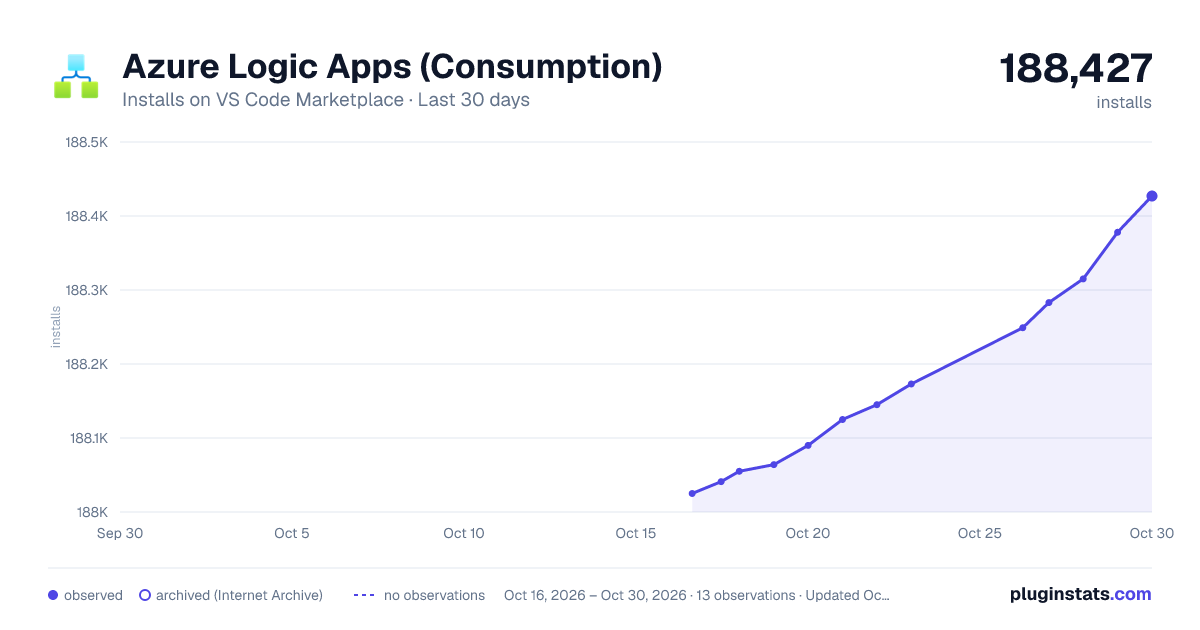
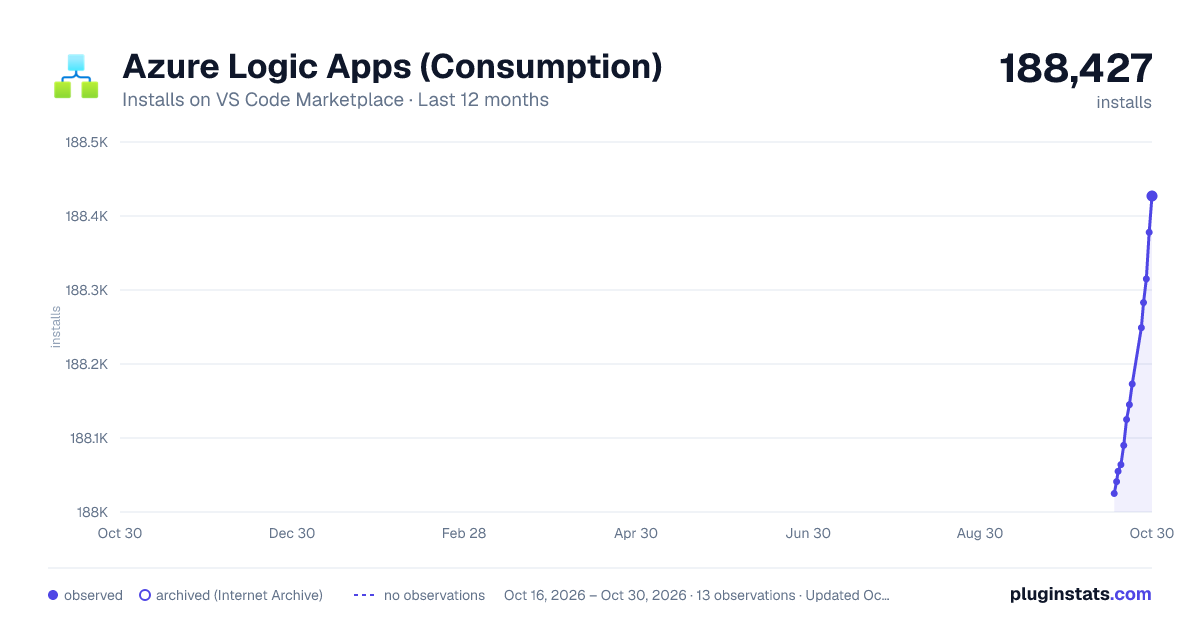
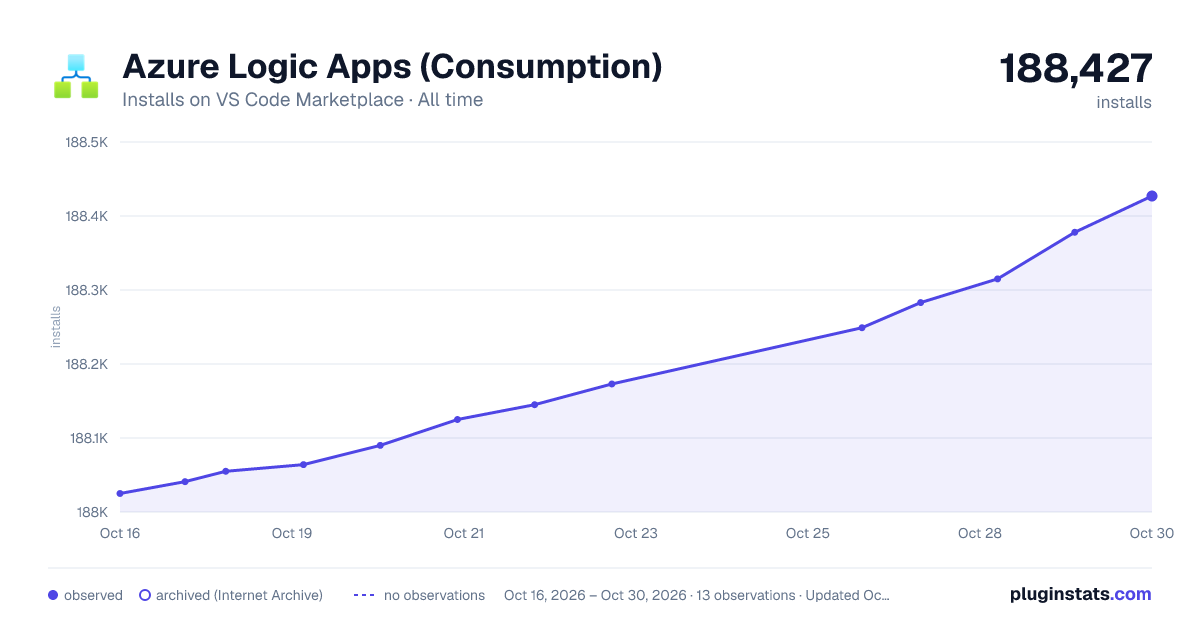
Azure Logic Apps (Consumption) has 188,055 recorded installs on VS Code Marketplace.
It ranks #1593 of 2,500 tracked VS Code Marketplace listings by installs.
It is rated 3.2 out of 5 from 5 ratings.
PluginStats has 3 daily observations since Oct 16, 2026; the latest is from Oct 18, 2026.
Rating: 3.20 / 5 from 5 ratings
About Azure Logic Apps (Consumption)
Azure Logic Apps (Consumption) for Visual Studio Code
Azure Logic Apps (Consumption) simplifies how you build automated scalable workflows that integrate apps and data across cloud services and on-premises systems.
Use the Azure Logic Apps (Consumption) extension for VS Code to quickly create, debug, and manage Azure Logic Apps and Integration Accounts.
Requirements
You must have Visual Studio Code 1.74.0 (November 2022) or later to install the extension.
All you need is an Azure Subscription to get started. If you don't have one, click here for a free subscription.
Features
• Browse, create, edit, and delete logic apps • Browse and run logic apps triggers • Browse and resubmit logic apps runs • Browse and promote logic apps versions • Browse, create, edit, and delete integration accounts, schema, map, partners, and agreements • IntelliSense support helping you quickly and easily adding triggers, actions, and properties • Create local logic apps project • Add logic apps from explorer to local project • Generate Azure resource manager deployment template for local project • Generate Azure DevOps pipeline definition for local project
Recommended Extensions
We recommend installing the following VS Code extensions for a better experience when working with different integration account artifacts.
• For XSLT, install XSLT Snippets • For Liquid, install Shopify Liquid Template Snippets
Managing Azure Subscriptions
If you are not signed in to Azure, you will see a "Sign in to Azure..." link. Alternatively, you can select "View->Command Palette" in the VS Code menu, and search for "Azure: Sign In".
If you don't have an Azure Account, you can sign up for one today for free and receive $200 in credits by selecting "Create a Free Azure Account..." or selecting "View->Command Palette" and searching for "Azure: Create an Account".
You may sign out of Azure by selecting "View->Command Palette" and searching for "Azure: Sign Out".
To select which subscriptions show up in the extension's explorer, click on the "Select Subscriptions..." button on any subscription node (indicated by a "filter" icon when you hover over it), or select "View->Command Palette" and search for "Azure: Select Subscriptions". Note that this selection affects all VS Code extensions that support the Azure Account and Sign-In extension.
Contributing
This project welcomes contributions and suggestions. Most contributions require you to agree to a Contributor License Agreement (CLA) declaring that you have the right to, and actually do, grant us the rights to use your contribution. For details, visit https://cla.microsoft.com.
When you submit a pull request, a CLA-bot will automatically determine whether you need to provide a CLA and decorate the PR appropriately (e.g., label, comment). Simply follow the instructions provided by the bot. You will only need to do this once across all repos using our CLA.
This project has adopted the Microsoft Open Source Code of Conduct. For more information see the Code of Conduct FAQ or contact opencode@microsoft.com with any additional questions or comments.
VS Code collects usage data and sends it to Microsoft to help improve our products and services. Read our privacy statement to learn more. If you don’t wish to send usage data to Microsoft, you can set the telemetry.enableTelemetry setting to false. Learn more in our FAQ.
Description from the VS Code Marketplace listing.
- Azure
- Integration Accounts
- Logic Apps
- snippet
Where Azure Logic Apps (Consumption) sits in the listing
Each band is one page of 20. Installs on a log scale. Placement is projected from installs, so it can differ from the marketplace's own sort order. Hover a dot to see the listing.


Charts
Images: 30d · 1y · all time · 1600×900 dark

Adoption over time


7/30/90-day growth


Ranking history


Filled points are observed values; hollow points come from Internet Archive snapshots of the listing page. Dashed segments span periods with no observations — values between points are not interpolated.
Recent observations
Full history (3)Similar VS Code Marketplace Azure plugins
Data source
Install counts, average rating, and rating counts come from the public Visual Studio Marketplace gallery API. Installs are cumulative and exclude updates.
Listing: https://marketplace.visualstudio.com/items?itemName=ms-azuretools.vscode-logicapps. First seen Oct 16, 2026; last successful collection Oct 18, 2026. See the methodology.