 PluginStats
JBoss Toolkit installs statistics
By Red Hat (18 listings) · VS Code Marketplace · Other
Allows a user to start, stop and deploy to Red Hat server and runtime products like Wildfly and JBoss EAP (Enterprise Application Platform).
JBoss Toolkit has 146,024 recorded installs on VS Code Marketplace.
It ranks #1887 of 2,501 tracked VS Code Marketplace listings by installs.
It is rated 4.0 out of 5 from 4 ratings.
PluginStats has 4 daily observations since Oct 16, 2026; the latest is from Oct 19, 2026.
Rating: 4.00 / 5 from 4 ratings
About JBoss Toolkit
JBoss Toolkit
A Visual Studio Code extension for interacting with Red Hat Servers and Runtimes like WildFly and Red Hat EAP.
Supported Servers
• WildFly 33 and below (WildFly 8) • Red Hat JBoss Enterprise Application Platform (EAP) 8.0 and below (EAP 4.3)
Commands and features
This extension depends on VSCode RSP UI Extension which is going to be installed automatically along with the JBoss Toolkit Extension. RSP UI, in conjunction with JBoss Toolkit Extension supports several commands for interacting with supported server adapters; these are accessible via the command menu (Cmd+Shift+P on macOS or Ctrl+Shift+P on Windows and Linux) and may be bound to keys in the normal way.
Available Commands
This extension provides no additional commands other than those available in rsp-ui
Extension Settings
This extension provides no additional settings other than those available in rsp-ui
Server Parameters
To change Server Parameters, right-click on the server you want to edit and select Edit Server.
This extension supports all global and provisional server parameters documented in vscode-rsp-ui, including mapProperty.launch.env for setting environment variables. The parameters below are specific to JBoss / WildFly.
• "args.vm.override.string" - allow to override VM arguments. Once you edit this flag, *make sure "args.override.boolean" is set to true before launching your server. Otherwise, the server will attempt to auto-generate the launch arguments as it normally does.* Supports ${env_var:NAME} substitution (see FAQ below). • "args.program.override.string" - allow to override program arguments. Once you edit this flag, *make sure "args.override.boolean" is set to true before launching your server. Otherwise, the server will attempt to auto-generate the launch arguments as it normally does.* Supports ${env_var:NAME} substitution (see FAQ below). • "args.shutdown.override.boolean" - allow to override shutdown program and VM arguments independently of the startup arguments. Works the same way as "args.override.boolean" but only affects the shutdown/stop launch. • "args.shutdown.vm.override.string" - allow to override shutdown VM arguments. Set "args.shutdown.override.boolean" to true and start the server once to generate this property, then edit as needed. • "args.shutdown.program.override.string" - allow to override shutdown program arguments. Set "args.shutdown.override.boolean" to true and start the server once to generate this property, then edit as needed. • "jboss.server.host" - allow to set the host you want the current JBoss/Wildfly instance to bind to (default localhost) • "jboss.server.port" - allow to set the port you want the current JBoss/Wildfly instance to bind to (default 8080) • "wildfly.server.config.file" - the configuration file for the current JBoss/WildFly instance. You may browse to the file using the file picker; absolute paths are automatically resolved relative to the configuration directory. (e.g. "wildfly.server.config.file": "standalone-ha.xml")
FAQ
1. How can I override program and VM arguments?
To override startup arguments:
1. Right-click your server -> Edit Server -> set "args.override.boolean" to true. 2. Start the server once. Two new properties will appear: "args.vm.override.string" and "args.program.override.string", pre-populated with the auto-generated defaults. 3. Edit those properties as needed. The server will use your values on subsequent launches. 4. To return to auto-generated arguments, set "args.override.boolean" back to false.
To override shutdown arguments (independently of startup):
1. Right-click your server -> Edit Server -> set "args.shutdown.override.boolean" to true. 2. Start (and stop) the server once. Two new properties will appear: "args.shutdown.vm.override.string" and "args.shutdown.program.override.string". 3. Edit those properties as needed. 4. To return to auto-generated shutdown arguments, set "args.shutdown.override.boolean" back to false.
Startup and shutdown overrides are independent — you can override one without affecting the other.
2. Can I use environment variables in VM or program arguments?
Yes. Argument override strings support Eclipse-style ${env_var:NAME} references. For example:
The RSP server resolves these against its own process environment before launching the server. Environment variables exported in your shell before starting VS Code will be available. If a variable is not set, the ${env_var:NAME} reference is left unchanged.
3. Can I run my WildFly Server on a different port than the default one?
Yes. To run a Wildfly Server on a different port you first have to edit the port in the standalone.xml file.
The next step is to add the following setting through the Server Editor in VScode.
Right-click your server -> Edit Server -> add "jboss.server.port": "8888". Change 8888 with the port you choose.
Now if you start the server it should run on the specified port.
4. Is there a video that explain how the JBoss Toolkit extension and the Runtime Server Protocol work?
Yes. This is the video you can watch to learn more about this extension https://www.youtube.com/watch?v=sP2Hlw-C_7I
Install extension locally
This is an open source project open to anyone. This project welcomes contributions and suggestions!!
Download the most recent adapters-.vsix file and install it by following the instructions here.
Stable releases are archived under http://download.jboss.org/jbosstools/adapters/snapshots/vscode-middleware-tools
Community, discussion, contribution, and support
Issues: If you have an issue/feature-request with the JBoss Toolkit extension, please file it here.
Contributing: Want to become a contributor and submit your code? Have a look at our development guide.
Chat: Open a Discussion on GitHub
UI Testing:
You can perform UI testing by running the following commands: 1. Download the package and its dependencies
2. Build the project
3. Run UI tests…
Description from the VS Code Marketplace listing.
- adapters
- eap
- enterprise application platform
- jboss
- middleware
- red hat
- runtimes
- server
- wildfly
Where JBoss Toolkit sits in the listing
Each band is one page of 20. Installs on a log scale. Placement is projected from installs, so it can differ from the marketplace's own sort order. Hover a dot to see the listing.


Charts
Images: 30d · 1y · all time · 1600×900 dark
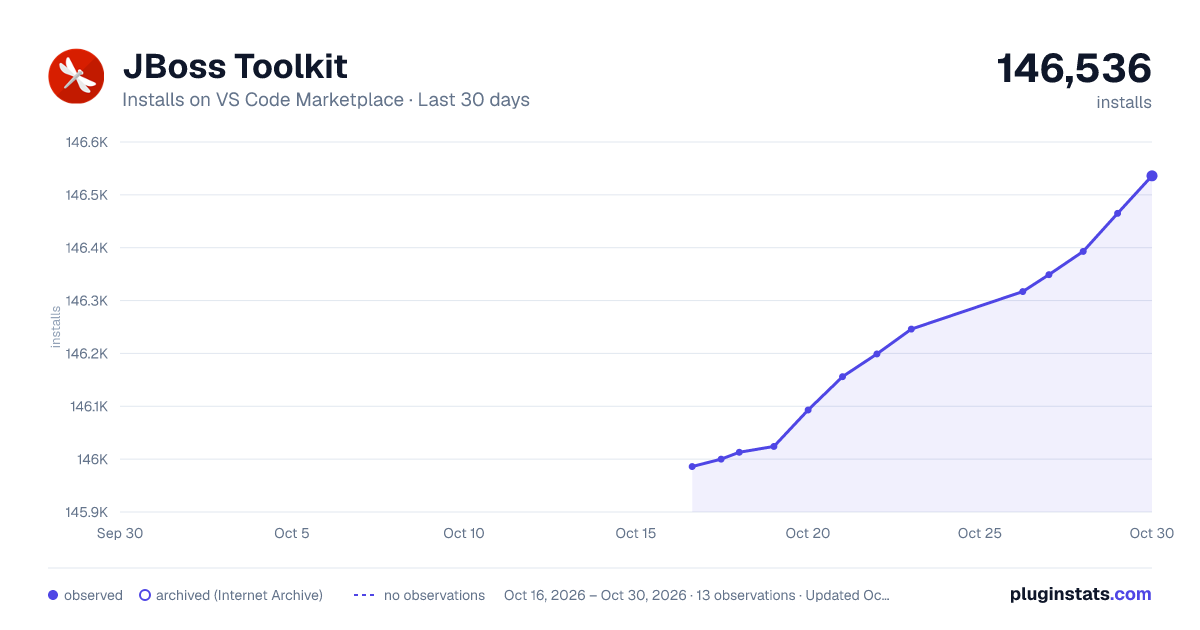
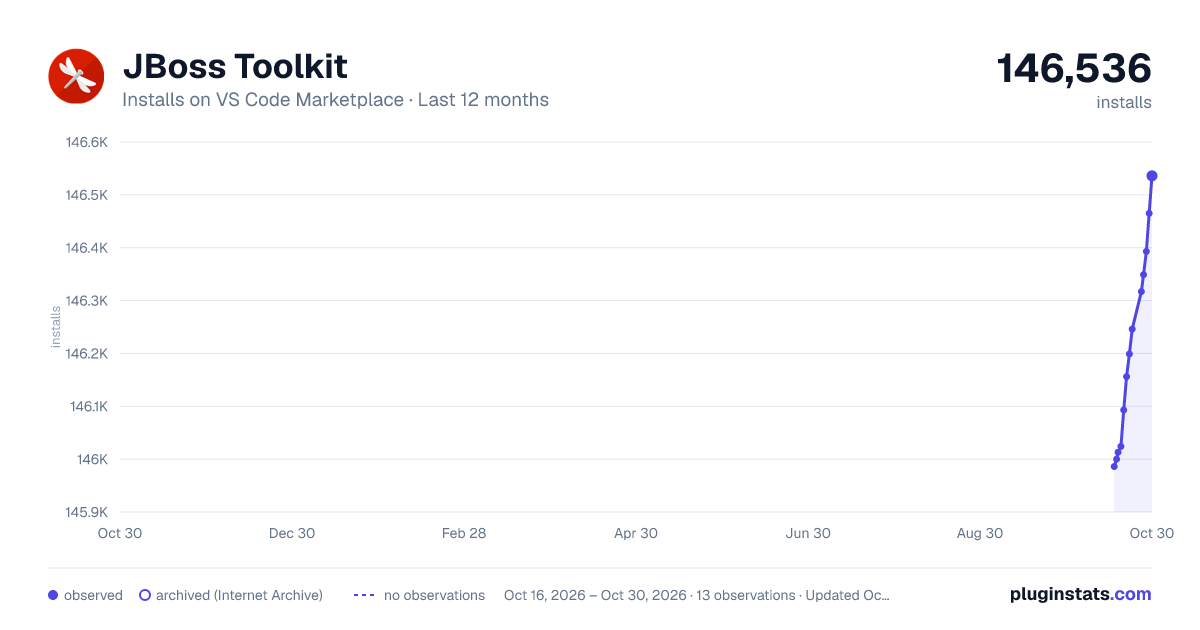
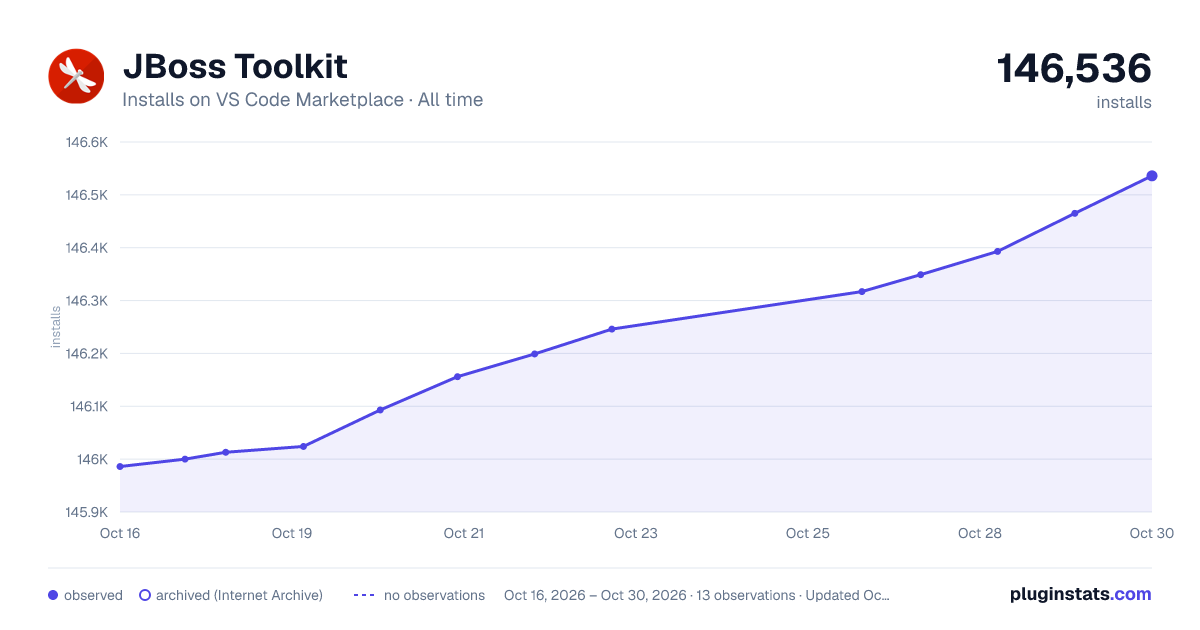

Adoption over time


7/30/90-day growth


Ranking history


Filled points are observed values; hollow points come from Internet Archive snapshots of the listing page. Dashed segments span periods with no observations — values between points are not interpolated.
Recent observations
Full history (4)Similar VS Code Marketplace Other plugins
Data source
Install counts, average rating, and rating counts come from the public Visual Studio Marketplace gallery API. Installs are cumulative and exclude updates.
Listing: https://marketplace.visualstudio.com/items?itemName=redhat.vscode-server-connector. First seen Oct 16, 2026; last successful collection Oct 19, 2026. See the methodology.