 PluginStats
Image Viewer installs statistics
By Easy VSCode · VS Code Marketplace · Visualization
A replacement for VS Code's default image viewer with zoom, pan, rotation, flip, and same-folder navigation. Includes a fast workspace gallery with folder search, filters, and Grid/Fill/List layouts.
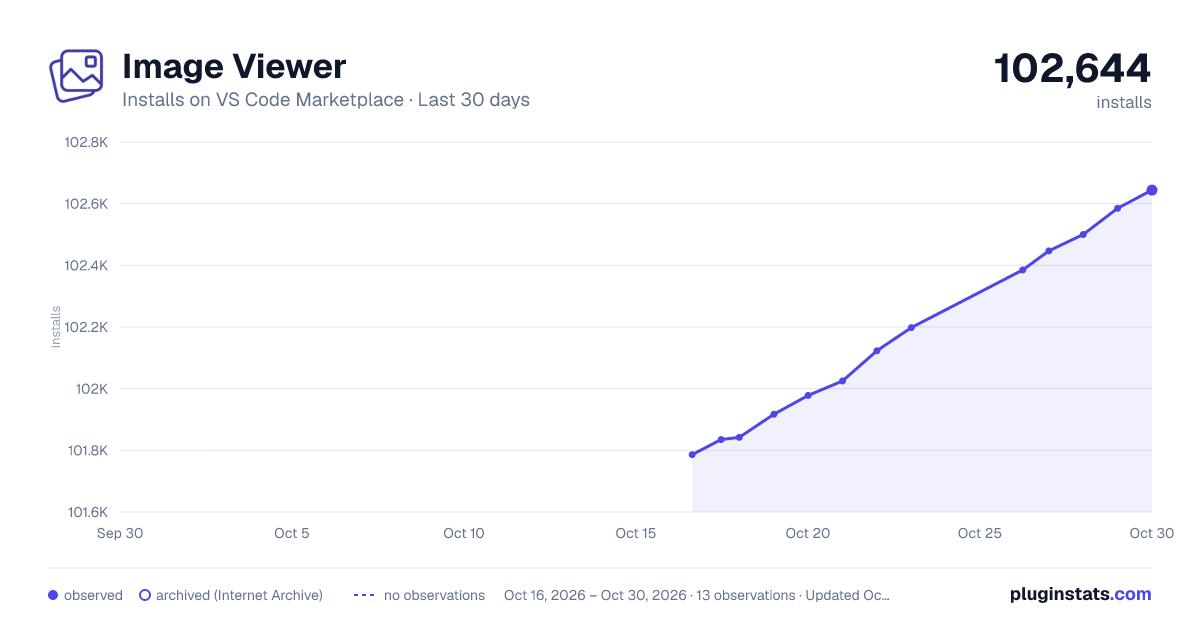
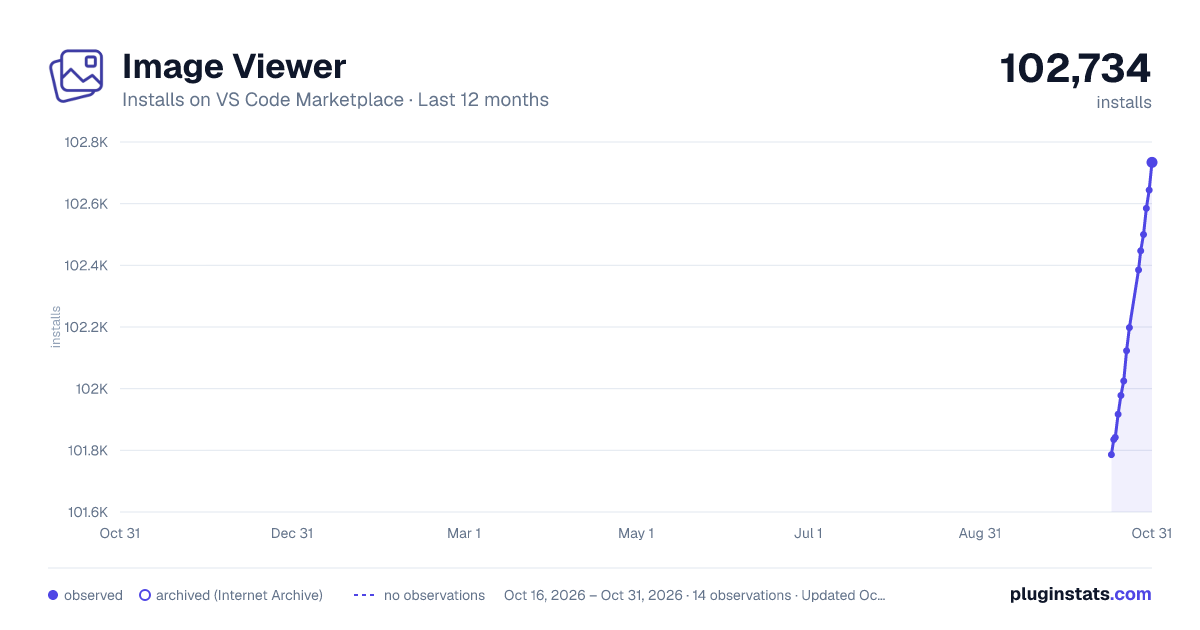
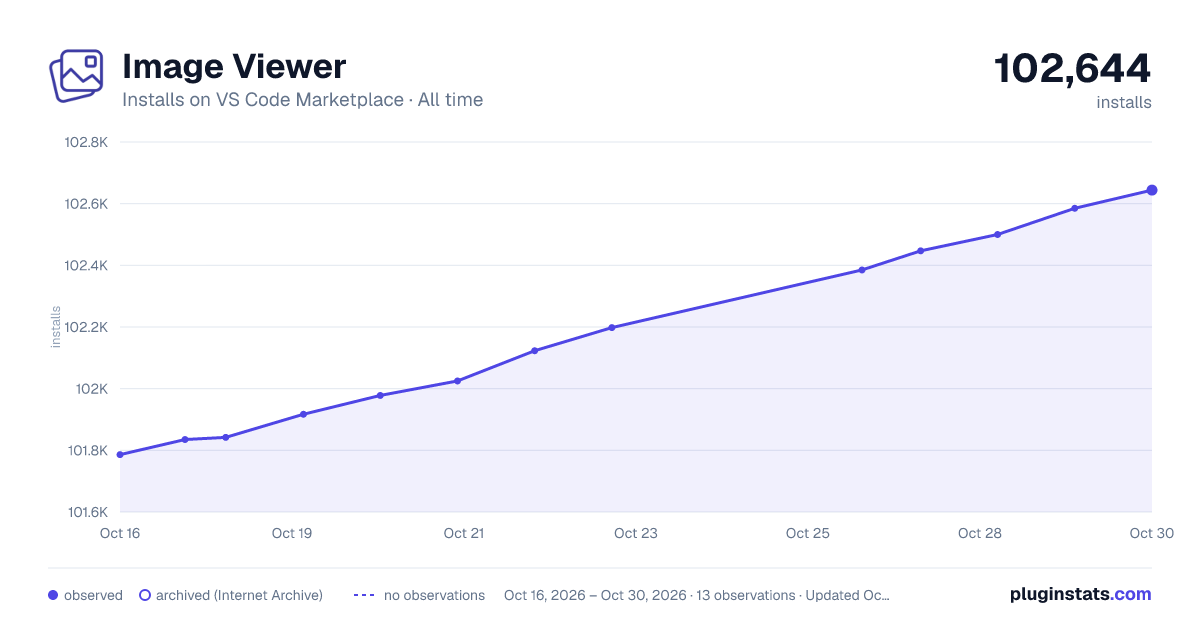
Image Viewer has 101,917 recorded installs on VS Code Marketplace.
It ranks #2341 of 2,501 tracked VS Code Marketplace listings by installs.
It is rated 4.5 out of 5 from 11 ratings.
PluginStats has 4 daily observations since Oct 16, 2026; the latest is from Oct 19, 2026.
Rating: 4.55 / 5 from 11 ratings
About Image Viewer
Image Viewer
English | 中文
Use Image Viewer as your default image viewer in VS Code. Get zoom up to 800% (1600% for tiny images), click/Space zoom cycling, rotation and flipping, a navigation minimap, and same-folder image navigation. Make it the default.
Browse project assets in VS Code and Cursor with a continuous image wall, folders, search, and filters.
Click any screenshot to view it at full size.
Video demo
Watch the image wall and folder navigation in action.
Watch or download the video.
Quick start
| To… | Do this |
| Open an image | Right-click an image in Explorer → Open With... / Reopen Editor With... → Image Viewer | | Use Image Viewer by default | Open the Command Palette (Ctrl+Shift+P / ⌘⇧P) → Image Viewer: Use as Default Image Editor | | Browse the workspace | Open a folder or workspace → run View Images 🌄 from the Command Palette | | Browse a specific folder | Right-click the folder in Explorer → View Images 🌄; opens the project gallery at that folder |
Single-image viewer
Zoom into details, pan with the minimap, and browse nearby images without changing the original files.
• Zoom and pan: use the mouse wheel, toolbar, or enter a percentage. Press Space or click the image to cycle through two or three zoom levels suited to its size. All zoom controls share an 800% ceiling. Once the original image has loaded, images with a longest edge of 64px or less, including tiny SVG icons, have an extra 1600% preset. Pinch zoom is continuous within the same ceiling. Fit is capped at 100%. • Inspect details: drag an enlarged image or navigate with the minimap. • Rotate and flip: the toolbar keeps clockwise rotation; use R / Shift+R to rotate clockwise / counter-clockwise. Mirror buttons are hidden by default. Enable Settings → General → Show mirror buttons in the gallery, or VS Code's imageViewer.showMirrorButtons setting, to show both horizontal and vertical mirror controls in all previews. These operations do not change the original file. • Navigate: browse other images in the same folder with toolbar buttons, side arrows, or keyboard controls. The order follows Explorer's sorting settings. • Unobstructed viewing: the preview has an opaque black background and controls fade when idle. Clicking the background does not close the single-image editor; use its close button or Esc. Images outside the workspace can also be opened.
Filmstrip and adjacent-image loading
Use the filmstrip button in the preview toolbar to show or hide thumbnails. The single-image editor and gallery remember their switches independently; both default to off. The single-image strip contains only images directly in the current image's folder, excluding subfolders. Gallery strips follow the filtered and sorted sequence captured when the preview opens.
Large raster images use 200px long-edge thumbnails, requested for the visible strip window with a shared limit of six generation tasks across galleries and previews. Compressed file size does not bypass this rule. SVG and browser-renderable rasters already at most 200px use their original files and may scale up in the strip. Formats requiring conversion, such as TIFF, still use generation; failures show a placeholder rather than loading the original into the strip. Unselected thumbnails retain their brightness.
Adjacent-image preloading is enabled in both preview entries, independently of the filmstrip switch. It warms the previous and next image and uses up to two display slots with the component's default 600ms settle delay. Browser memory reclamation can still require decoding again, so preloading does not guarantee instant navigation.
Make it the default
Run Image Viewer: Use as Default Image Editor to open supported image files with this viewer by default. Installing or updating the extension leaves your editor choice unchanged.
To remove these associations, run Image Viewer: Restore VS Code's Default Image Editor before uninstalling. This does not restore earlier custom associations overwritten by setup. More about editor associations.
Workspace gallery
New galleries start in Grid. Select a folder in the sidebar and browse one continuous image wall. Click any thumbnail to open the large-image preview. Grid and Fill support 1–20 columns, live thumbnail sizing, and a compact mode for denser browsing.
Grid — see the whole image (default)
Images keep their original proportions without cropping, useful for comparing portraits, landscapes, and panoramic images.
Fill — browse thumbnails
Square thumbnails fill the wall, making it easy to scan many images at once.
Compact and thumbnail size
Turn on Compact in the bottom toolbar. In Grid/Fill, it removes thumbnail gaps and the always-visible file names and sizes; hover to see a file name. Fill + Compact creates a seamless image wall, fitting more images on screen at the same column count.
Drag the Thumbnails slider to adjust 1–20 columns: right makes images larger with fewer columns; left fits more, smaller thumbnails. The tooltip shows the current pixel size and column count. Below, the six-column Fill example is changed to four columns + Compact.
List — inspect file information
View the file name, relative path, size, dimensions, and modified time alongside each thumbnail.
Screenshot credits and licenses.
Themes
Click the theme button beside the bottom-right gear to cycle between Follow, Light, and Dark.
• Follow (display icon): inherits your current VS Code/Cursor theme and color customizations, including your chosen custom theme, keeping the viewer's appearance consistent with the host editor. • Light (sun) and Dark (moon): use fixed palettes based on VS Code's default light/dark themes, independently of the editor's current theme.
Choose a thumbnail background separately: none, checkerboard for transparency, or a solid color.
Open from Explorer…
Description from the VS Code Marketplace listing.
- avif
- custom-editor
- default image viewer
- default-editor
- filter
- flip
- folder
- gallery
- gif
- image
- image gallery
- image preview
- image viewer
- jpg
- minimap
- pan
- photo viewer
- png
- preview
- rotate
Where Image Viewer sits in the listing
Each band is one page of 20. Installs on a log scale. Placement is projected from installs, so it can differ from the marketplace's own sort order. Hover a dot to see the listing.


Charts
Images: 30d · 1y · all time · 1600×900 dark

Adoption over time


7/30/90-day growth


Ranking history


Filled points are observed values; hollow points come from Internet Archive snapshots of the listing page. Dashed segments span periods with no observations — values between points are not interpolated.
Recent observations
Full history (4)Similar VS Code Marketplace Visualization plugins
Data source
Install counts, average rating, and rating counts come from the public Visual Studio Marketplace gallery API. Installs are cumulative and exclude updates.
Listing: https://marketplace.visualstudio.com/items?itemName=vscode-infra.image-viewer. First seen Oct 16, 2026; last successful collection Oct 19, 2026. See the methodology.