 PluginStats
Comment Translate installs statistics
By intellsmi · VS Code Marketplace · AI
This extension helps developers translate comments, strings, code hints, error messages, and variable names in their code.
Comment Translate has 714,635 recorded installs on VS Code Marketplace.
It ranks #678 of 2,500 tracked VS Code Marketplace listings by installs.
It is rated 4.9 out of 5 from 62 ratings.
PluginStats has 3 daily observations since Oct 16, 2026; the latest is from Oct 18, 2026.
Rating: 4.87 / 5 from 62 ratings
About Comment Translate
VSCode Comment Translation Extension
This extension helps developers translate comments, strings, code hints, error messages, and variable names in their code.
Introduction
【中文文档】 【日本語の文書】 【한국어】
Many excellent projects have extensive comments to help users quickly understand the code's intent. If users are not familiar with the language of the comments, it can be challenging to understand. This extension provides multiple translation scenarios to help developers comprehend and write multilingual code more easily. It supports common translation services like Google, Bing, AliCloud, and DeepL, and allows developers to add custom translation services.
Features
Markdown Translation Preview
The extension supports Markdown format translation preview, allowing you to quickly translate and preview content in Markdown files.
Code Reading
The extension identifies multilingual content like comments and strings in the source code using TextMate, translates them quickly, and displays them via Hover, minimizing disruption to development.
Hover Translation: Move the mouse over comments, strings, or selected areas to see the translated content in a hover box. Other hover content like exceptions and code documentation are also translated and displayed.
Immersive Reading: Turn on immersive comment translation to automatically translate comments and display them in the document. The translated results can be shown alongside the original text or in place of it; toggle the display mode with Ctrl+Shift+B.
Translation and Replacement
The extension can translate source code content and quickly replace it in the document. For instance, translate a description and use it as a variable name; in multilingual development scenarios, translate a string and replace it in the document.
Translate Variable Naming: Translate the current description into English and provide various variable names to choose from, then replace the original description.
Hover Replacement: The hover box provides the ability to replace text with the translation result, which replaces the original content.
Full Text Replacement Translation: Supports translating and replacing strings, comments, and selected areas with one click.
GitHub Copilot Chat Participant: @translate
- Requires pre-installation of the GitHub Copilot Chat extension and authorization. - For GitHub Copilot users, translation is currently supported in the Chat box, but not for comments, text, etc.
This extension extends GitHub Copilot by enabling translations in the Chat box using Copilot's AI model. The target language is set by CommentTranslate. Select text in the Editor and send it to GitHub Copilot Chat for quick translation using commands.
Useful Commands
Mac: ctrl+shift+? / Windows: alt+shift+?
The extension provides translation or replacement commands for various scenarios, with shortcuts for some common functionalities. Users can also customize shortcuts according to their habits. • Immersive Comment Translation: Toggle immersive translation reading for the current document ctrl+shift+z • Immersive Display Mode: Toggle cross-display/placeholder read mode ctrl+shift+b • Translate Variable Naming: Translate the current descriptive word and provide named variables ctrl+shift+n • Translation and Replacement: Translate selected content and replace it at the current location ctrl+shift+t • Copilot Quick Translation: Translate selected content or clipboard content in GitHub Copilot Chat ctrl+shift+y
Translation Services
The extension supports the following translation services: • Google Translate: Built-in, free version, used by default. • Note: Requires a network connection, some users may need a proxy. If encountering network issues, it is recommended to use Bing. • Bing Translate: Built-in, free version. • AliCloud Translate: Built-in, requires configuration of accessKeyId & accessKeySecret.
Third-party translation services can be found by searching for @tag:translateSource in the plugin market. Users can choose the desired translation service through the plugin configuration or expand it by customizing the translation service. More Links
Common Configurations
• commentTranslate.hover.enabled: Enable/disable hover translation (quickly set through status) • commentTranslate.hover.concise: Enable/disable concise mode. Only triggers hover translation when pressing ctrl or command • commentTranslate.hover.string: Enable/disable string hover translation • commentTranslate.hover.content: Enable/disable translation of hover content • commentTranslate.multilineMerge: Merge multiline comments • commentTranslate.targetLanguage: Translation target language, uses the local VSCode language if not set (quickly set through status) • commentTranslate.source: Translation service source configuration. It is recommended to set it through commands. Supports plugin extensions for translation service sources. example • commentTranslate.maxTranslationLength: Maximum translation length configuration to avoid excessive charges for long character translations • commentTranslate.browse.enabled: Enable/disable project immersive browsing translation function • commentTranslate.markdown.scopeFallback: Enable/disable TextMate scope fallback after Markdown fenced-code detection • commentTranslate.googleTranslate.mirror: Resolves the issue of domestic services being inaccessible. Documentation
Support Us
If you find this extension helpful, please consider supporting us in the following ways: • Give us a star on GitHub intellism/vscode-comment-translate • Submit feedback and suggestions • Share with your friends and colleagues
Description from the VS Code Marketplace listing.
- chat-participant
- comment
- GitHub Copilot Chat Participant
- google translate
- hover
- keybindings
- translate
- 注释
- 翻訳
- 翻译
Where Comment Translate sits in the listing
Each band is one page of 20. Installs on a log scale. Placement is projected from installs, so it can differ from the marketplace's own sort order. Hover a dot to see the listing.


Charts
Images: 30d · 1y · all time · 1600×900 dark
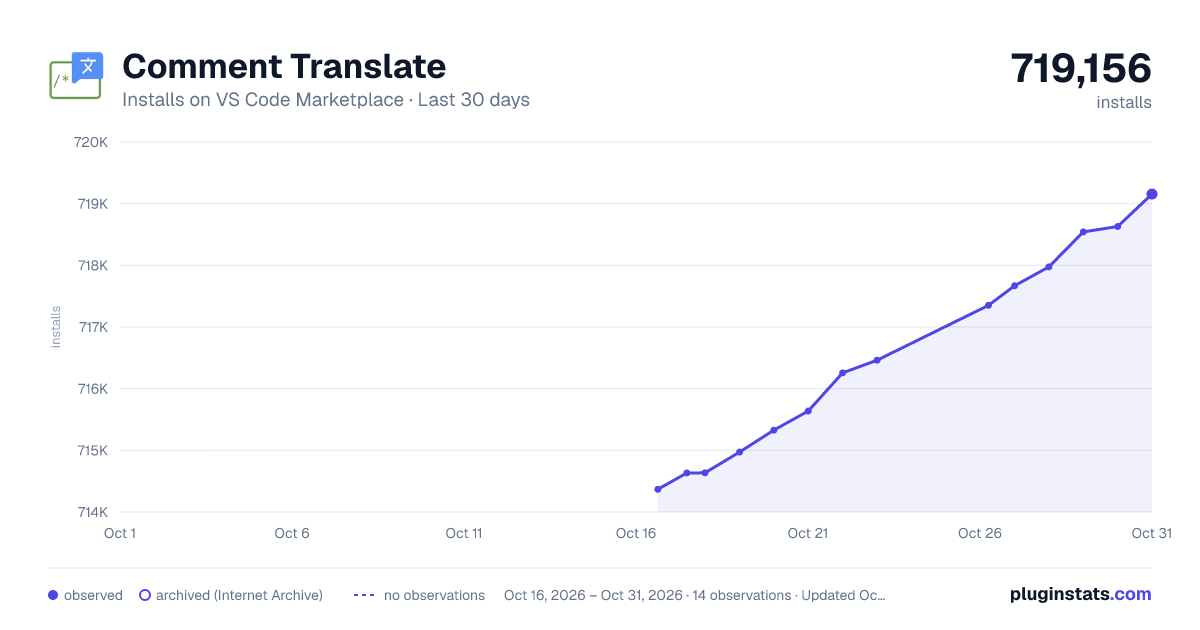
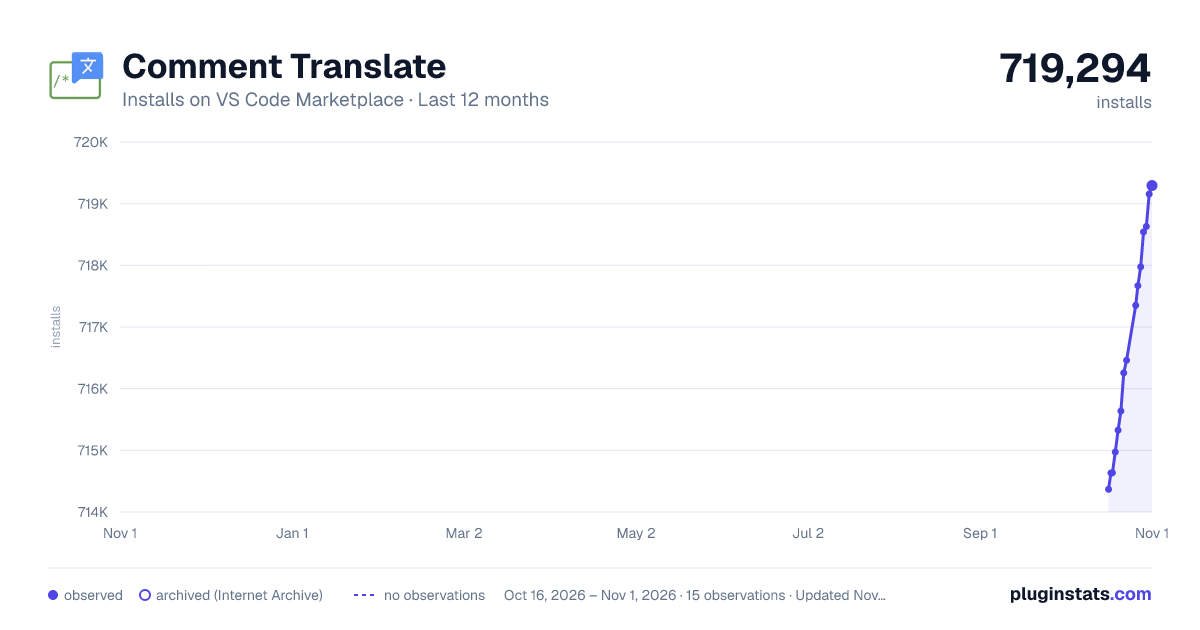
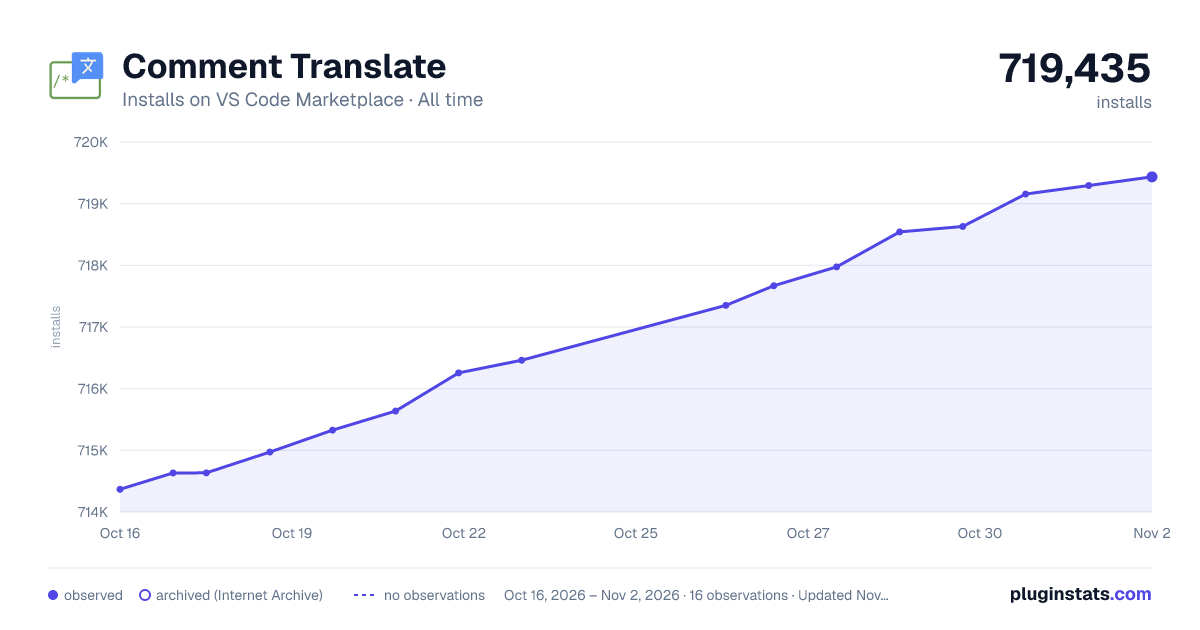

Adoption over time


7/30/90-day growth


Ranking history


Filled points are observed values; hollow points come from Internet Archive snapshots of the listing page. Dashed segments span periods with no observations — values between points are not interpolated.
Recent observations
Full history (3)Similar VS Code Marketplace AI plugins
Data source
Install counts, average rating, and rating counts come from the public Visual Studio Marketplace gallery API. Installs are cumulative and exclude updates.
Listing: https://marketplace.visualstudio.com/items?itemName=intellsmi.comment-translate. First seen Oct 16, 2026; last successful collection Oct 18, 2026. See the methodology.