 PluginStats
Manim Sideview installs statistics
By Rickaym · VS Code Marketplace · Visualization
Video/Image live previews and code snippets for manim.
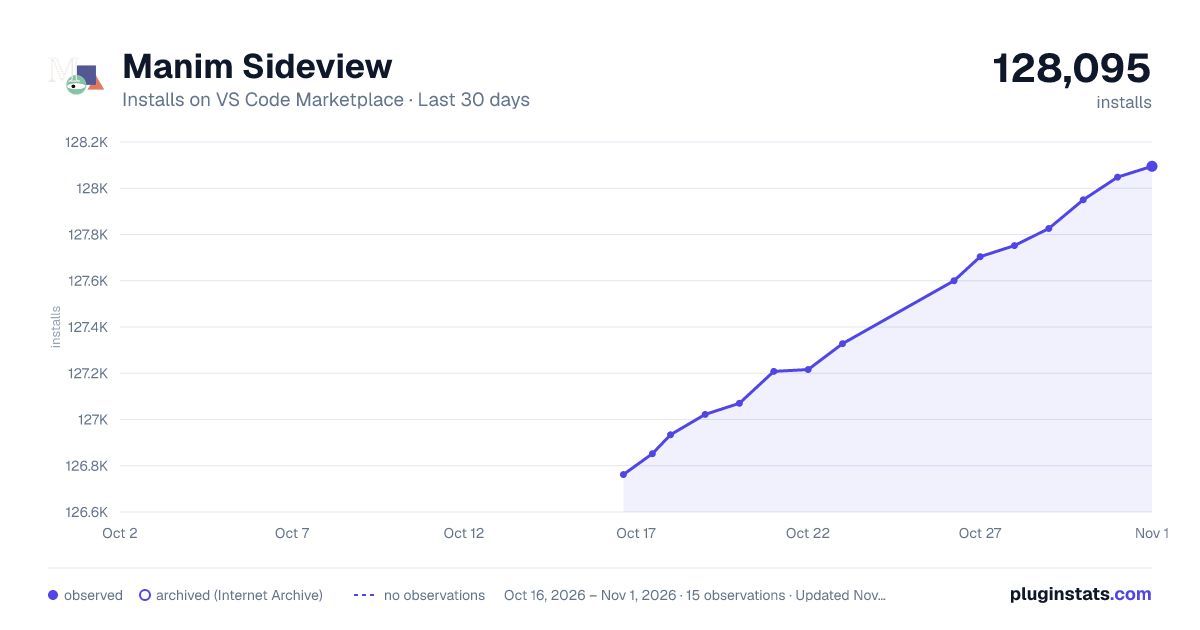
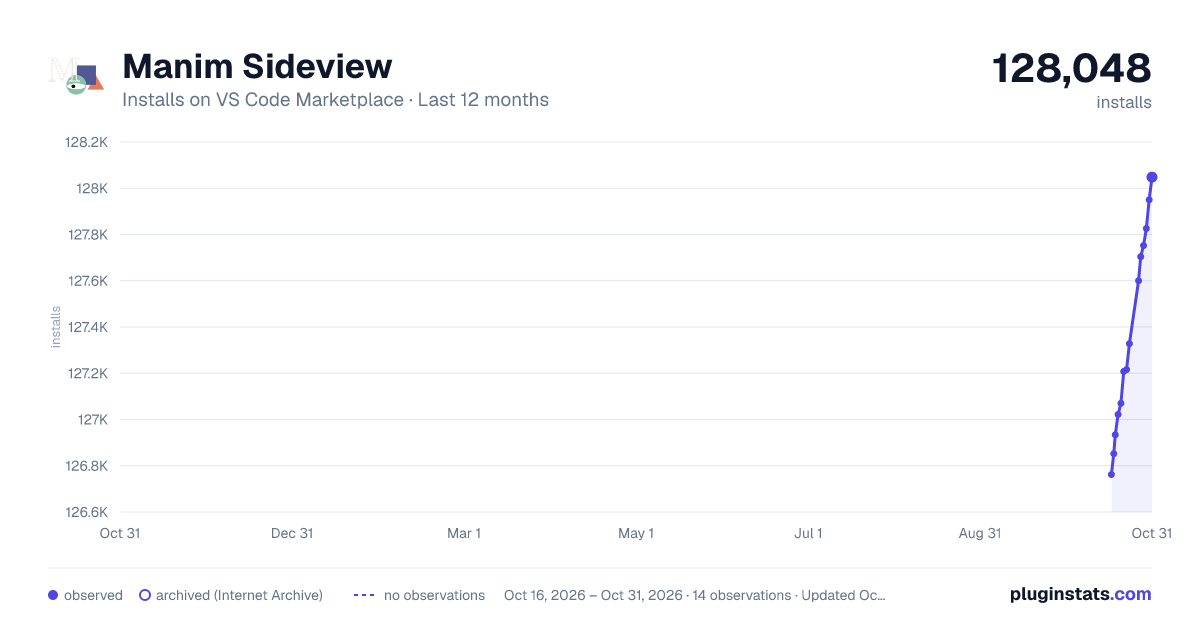
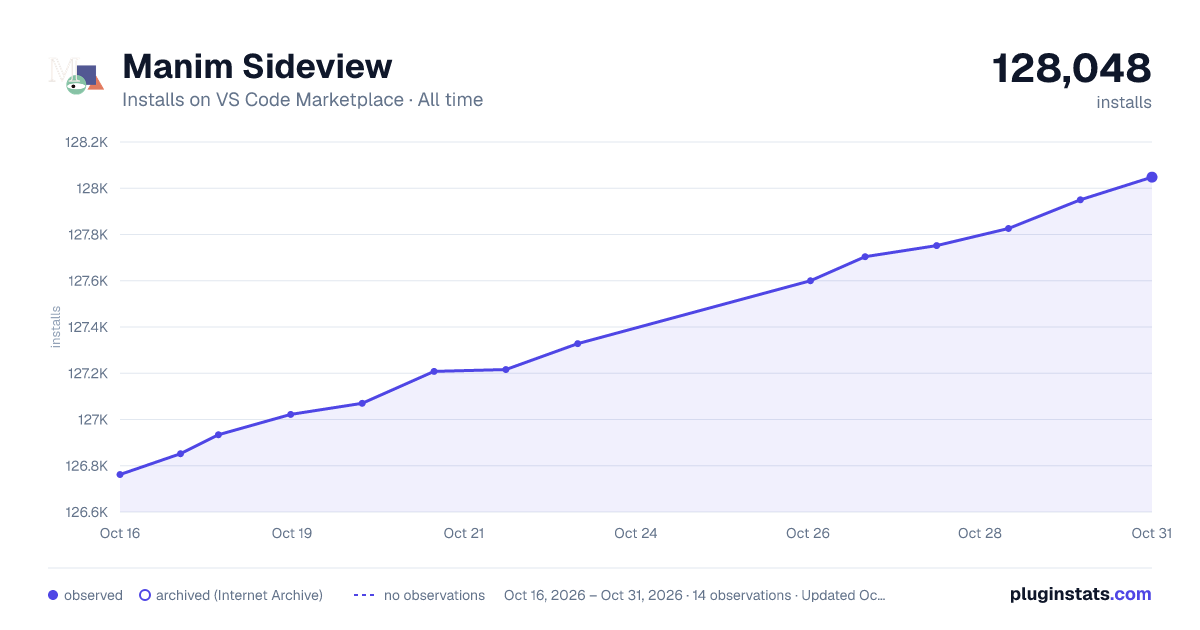
Manim Sideview has 126,934 recorded installs on VS Code Marketplace.
It ranks #2060 of 2,500 tracked VS Code Marketplace listings by installs.
It is rated 5.0 out of 5 from 8 ratings.
PluginStats has 3 daily observations since Oct 16, 2026; the latest is from Oct 18, 2026.
Rating: 5.00 / 5 from 8 ratings
About Manim Sideview
Manim Sideview
A Visual Studio Code extension that enhances your experience with manim, providing powerful features including gallery-based code snippet catalogs and live preview of videos and images with flexible configuration options.
Prerequisites
• Manim Installation: Ensure you have manim installed on your PATH. Check out the official installation guide. • Python Environment: The extension works with your active Python environment. • Custom Executable Path: If manim isn't on your PATH, you can set a custom executable path.
Table Of Contents
• Getting Started • Rendering Scenes • Configuring • Mobject Gallery • Frequently Asked Questions • Keyboard Shortcuts • Credits • Changelog
Getting Started
After the extension is installed, open the source file with the scene classes and press the icon from the menu bar or use Ctrl+' r to immediately start rendering with a live preview!
_That's it, folks!_
If you have any questions or find any issues, create a GitHub issue here, seek support through the extension development discord server or you can ping @rick.aym with a question on the official manim community discord server.
Rendering Scenes
Working with multiple scenes
After rendering a scene for the first time, the extension creates a persistent job tied to the source file to maintain your scene names and configurations.
Changing the Scene Name
Manim Sideview renders one scene at a time. To switch between scenes, you can:
1. Use the Manim: Set A New SceneName command through the command palette (Shift + Command + P on Mac / Ctrl + Shift + P on Windows/Linux) 2. Use the default hotkey Ctrl + ' followed by c 3. Click the render-change icon in the sideview:
Scene Auto-Detection
When you first render a file, the extension will scan for any class that inherits from a Scene class and present them as options for easy selection.
Configuring
You can configure your renders in two primary ways:
1. VS Code Settings
Set manim-sideview.commandLineArgs in your VS Code settings (File -> Preferences -> Settings) to pass CLI arguments to manim.
[!WARNING] Avoid using quality args like 'ql' that change the output file path. For output path configuration, use the manim.cfg file instead.
2. Configuration File
Create a manim.cfg file in your working directory following the Manim configuration guidelines.
Note: When a manim.cfg file is detected, all command line arguments from manim-sideview.commandLineArgs are ignored.
Mobject Gallery
The Mobject gallery is a web view that allows users to insert code snippets for commonly used manim objects, like squares, text, and also complex graphs.
How do I open the gallery?
1. Open the command palette using Shift + Command + P (Mac) / Ctrl + Shift + P 2. Use the command Manim: Open Mobject Gallery
You can place the cursor at the desired location and click the image of the manim object to insert the code into a Python file or Jupyter Notebook!
Frequently Asked Questions
1. How do I render on save? 2. How do I change the default manim executable path? 3. How do I execute a command after the rendering is finished? 4. Why isn't my Python environment being detected? 5. How do I fix rendering errors?
1. How do I render on save?
Enable the manim-sideview.runOnSave settings inside vscode File -> Preferences -> Settings menu.
2. How do I change the default manim executable path?
You can set the default manim executable path by changing the manim-sideview.defaultManimPath configuration in File -> Preferences -> Settings.
3. How do I execute a command after the rendering is finished?
We can achieve this via the extension preference manim-sideview.terminalCommand that accepts a command string.
The command is executed in an external terminal as soon as all the rendering is finished.
You can use the following variables in your terminal command:
1. {outputPath} - the path to the rendered media output (video/image) 2. {sourcePath} - the path to the source file 3. {sceneName} - the name of the scene rendered
4. Why isn't my Python environment being detected?
The extension uses the VS Code Python extension to detect your active Python environment. Make sure:
• You have the Python extension installed • You've selected a Python interpreter in VS Code • Your environment has manim installed
You can verify your active environment by checking the Python interpreter indicator in the VS Code status bar.
5. How do I fix rendering errors?
If you encounter errors during rendering:
1. Check the output terminal for specific error messages 2. Verify that your scene name exists in the file 3. Ensure manim is correctly installed in your Python environment 4. Try running the same command manually in a terminal to see detailed errors
For persistent issues, open the Manim Sideview output channel by running the Manim: Show Output Channel command.
Keyboard Shortcuts
| Action | Windows/Linux | Mac |
| Render current scene | Ctrl+' r | Ctrl+' r | | Change scene name | Ctrl+' c | Ctrl+' c | | Stop rendering | Ctrl+' s | Ctrl+' s | | Open mobject gallery | Via command palette | Via command palette |
You can customize these shortcuts in VS Code's keyboard shortcuts editor.
Credits
Icons made by Smashicons and Freepik from www.flaticon.com, mobject gallery by kolibril13 and ofcourse the logo by the manim/community project!
Made and Maintained with <3 by Ricky Consider supporting this project through starring the repository!!
Changelog
0.3.1
• Fix video player in portrait mode
0.3.0
• Fix infer type as video by default
0.2.19
• Fresh upgrade to the player U.I. • Added support for early process killing • Fix unending process • More eloquent logging
0.2.18
• More eloquent error messages • Added double checking & verification for the manim executable path
0.2.17
• Better error messages • Fix manim path detection • Update discord link • More verbose output
0.2.16…
Description from the VS Code Marketplace listing.
- animations
- keybindings
- manim
- manim sideview
Where Manim Sideview sits in the listing
Each band is one page of 20. Installs on a log scale. Placement is projected from installs, so it can differ from the marketplace's own sort order. Hover a dot to see the listing.


Charts
Images: 30d · 1y · all time · 1600×900 dark

Adoption over time


7/30/90-day growth


Ranking history


Filled points are observed values; hollow points come from Internet Archive snapshots of the listing page. Dashed segments span periods with no observations — values between points are not interpolated.
Recent observations
Full history (3)Similar VS Code Marketplace Visualization plugins
Data source
Install counts, average rating, and rating counts come from the public Visual Studio Marketplace gallery API. Installs are cumulative and exclude updates.
Listing: https://marketplace.visualstudio.com/items?itemName=Rickaym.manim-sideview. First seen Oct 16, 2026; last successful collection Oct 18, 2026. See the methodology.