 PluginStats
UI5 Language Assistant installs statistics
By SAP OSS (6 listings) · VS Code Marketplace · Programming Languages
Language Support For SAPUI5
UI5 Language Assistant has 194,979 recorded installs on VS Code Marketplace.
It ranks #1550 of 2,500 tracked VS Code Marketplace listings by installs.
It is rated 5.0 out of 5 from 8 ratings.
PluginStats has 3 daily observations since Oct 16, 2026; the latest is from Oct 18, 2026.
Rating: 5.00 / 5 from 8 ratings
About UI5 Language Assistant
UI5 Language Support
This VS Code extension provides SAPUI5 language editor support.
Features
XML Views Auto-Complete/Context-Assist
Description
The tool provides the following support:
• Relevant filters to suggestions. For example: • Only classes that match the parent aggregation's type are offered. • In a "full" aggregation with cardinality 0..1, no more suggestions are made. • Only classes inside the xmlns prefix used are offered. • Deprecated and experimental SAPUI5 nodes are not be offered by default (configurable). • Additional text for ease of use. For example: • Auto-insertion of name for closing tags for classes and aggregations. • Auto-insertion of ="" for attribute key suggestions. • Auto-insertion of the xmlns prefix for classes and aggregation tags. • Tooltips displayed while browsing the suggestions including a clickable link to the SAPUI5 SDK (Demo Kit).
Availability
The feature is available in the following:
• XML tags: • Classes • Aggregations • XML attribute keys: • Properties • Events • Associations • Namespace prefixes • XML attribute values: • Enum values • Boolean values • Namespaces fully qualified names • metaPath values in building blocks • contextPath values for Chart building blocks • filterBar values from the current file in building blocks • Property binding info when possible • Aggregation binding info when possible
XML View Validations
Description
The list of validations and their severity are currently hard-coded and cannot be configured by the end user.
Validation List
• Errors: • Invalid boolean values • Unknown attribute keys • Unknown eum values • Unknown xmlns namespace • Unknown tag names • Duplicate ID tags • Wrong cardinality of aggregation • Wrong type of tags inside aggregations • Missing or empty ID when flexEnabled is true in manifest.json (stableID) • Property binding info or aggregation binding info • missing key • missing or extra colon(s) • missing or wrong value • missing or extra comma(s) • duplicate keys • unknown key or char(s) • recursive composite bindings (only property binding info) • Warnings: • Use of deprecated classes • Use of deprecated aggregations • Use of deprecated properties • Use of deprecated events • Use of deprecated associations • References to annotations that cannot be found in current project • References to filter bars that cannot be found in current file • Use of context paths that do not lead to the annotations of types expected for the given building block
Relevant User/Workspace
• UI5LanguageAssistant.LimitUniqueIdDiagnostics is set off by default to check all *.fragment.xml and *.view.xml files for unique IDs. If you like to limit this validation to the current file, set it on.
XML View Quick Fix
Description
Quick Fix will be shown for some validations when hovering over a diagnostic or from the problems view.
Quick Fixes List
• Missing or empty ID when flexEnabled is true in manifest.json (stableID). • Will add a generated ID. • Supports both fixing a single missing ID or all missing IDs in an entire file.
XML View Hover Tooltips
Description
Tooltips will be shown when hovering over an item.
Availability
The feature is available in the following:
• XML tags: • Classes • Aggregations • XML attribute keys: • Properties • Events • Associations • Aggregations • XML attribute values: • Enum values • SAPUI5 Namespaces • Name of property binding info or aggregation binding info
XML View Go To Definition
Description
The tool provides navigation to project files referenced in xml fragments or views with Go To Definition. The standard keyboard shortcuts for Go To Definition are Ctr / Command + Click or F12.
Availability
The feature is available for:
• references to controller files in the following XML attributes: • controllerName • core:require • template:require
Semantic Highlighting
Description
Property binding info and aggregation binding are displayed semantically highlighted to let you easily grasp the sense of dense code.
Make sure that semantic highlighting is enabled. For more information, see Enablement of semantic highlighting
XML View Format
Description
The tool can format *.view.xml and *.fragment.xml files with prettier
Relevant User/Workspace settings
• UI5LanguageAssistant.SplitAttributesOnFormat is set on by default and places each attribute on a new line on formatting.
manifest.json Auto-Complete and Validations
Description:
Implemented using the UI5 manifest.json schema.
Installation
From the VS Code Marketplace
In the UI5 Language Assistant VS Code marketplace page, click Install.
From GitHub Releases
1. Go to GitHub Releases. 2. Search for the .vsix archive under ui5-language-assist\@x.y.z releases. (Replace x.y.z with the desired version number.) 3. Follow the instructions for installing an extension from a .vsix file in the VSCode's guide.
Usage
This extension's features are automatically enabled when opening/editing relevant SAPUI5 source files. For SAPUI5 XML views, this means:*.view.xml or *.fragment.xml files.
Note that the extension lazily downloads the SAPUI5 metadata needed for its features. This means that there may be a delay between starting VS Code and having the relevant features available.
When working with CAP projects, make sure you have @sap/cds module installed. For this, run npm install on your project. This command will download and install all necessary modules from the npm package repository.
Enabling offline work
You can set up a local web server to host one or more supported versions of SAPUI5 SDK and register it in the user/workspace setting "UI5LanguageAssistant.SAPUI5WebServer". This overrides the public CDN of SAPUI5 SDK in the extension and enables offline work with the apps having the matching hosted "minUI5Version" in manifest.json. When configuring local web server, make sure it responds to the exact UI5 version defined in manifest.json e.g /1.111.0…
Description from the VS Code Marketplace listing.
- json
- OpenUI5
- SAPUI5
- UI5
- xml
Where UI5 Language Assistant sits in the listing
Each band is one page of 20. Installs on a log scale. Placement is projected from installs, so it can differ from the marketplace's own sort order. Hover a dot to see the listing.


Charts
Images: 30d · 1y · all time · 1600×900 dark
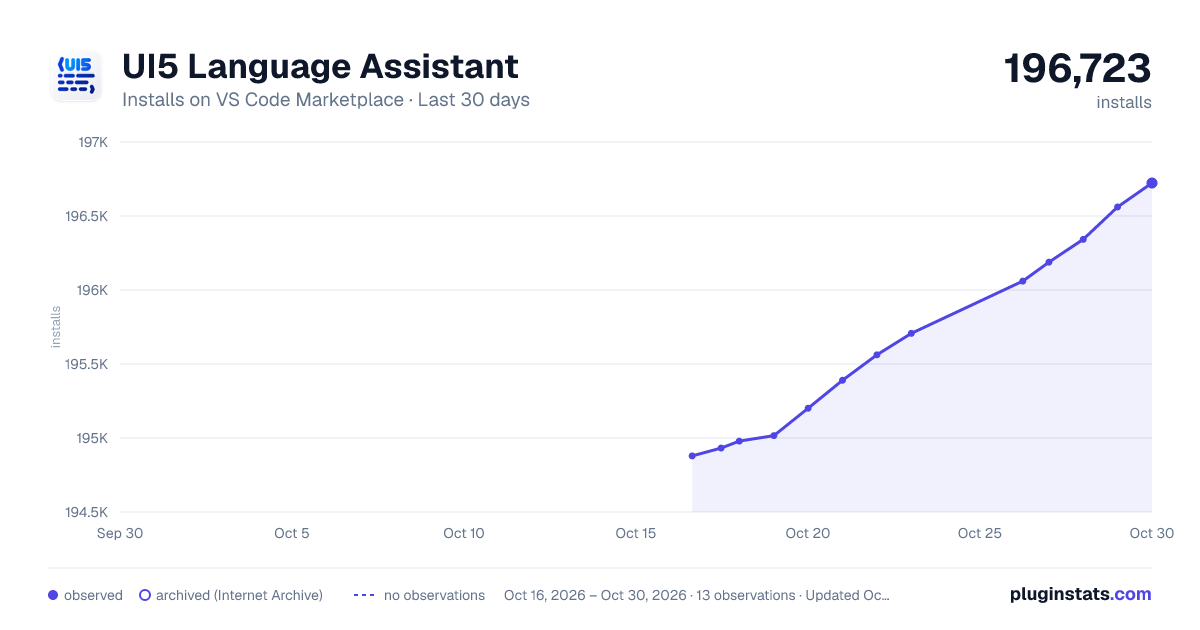
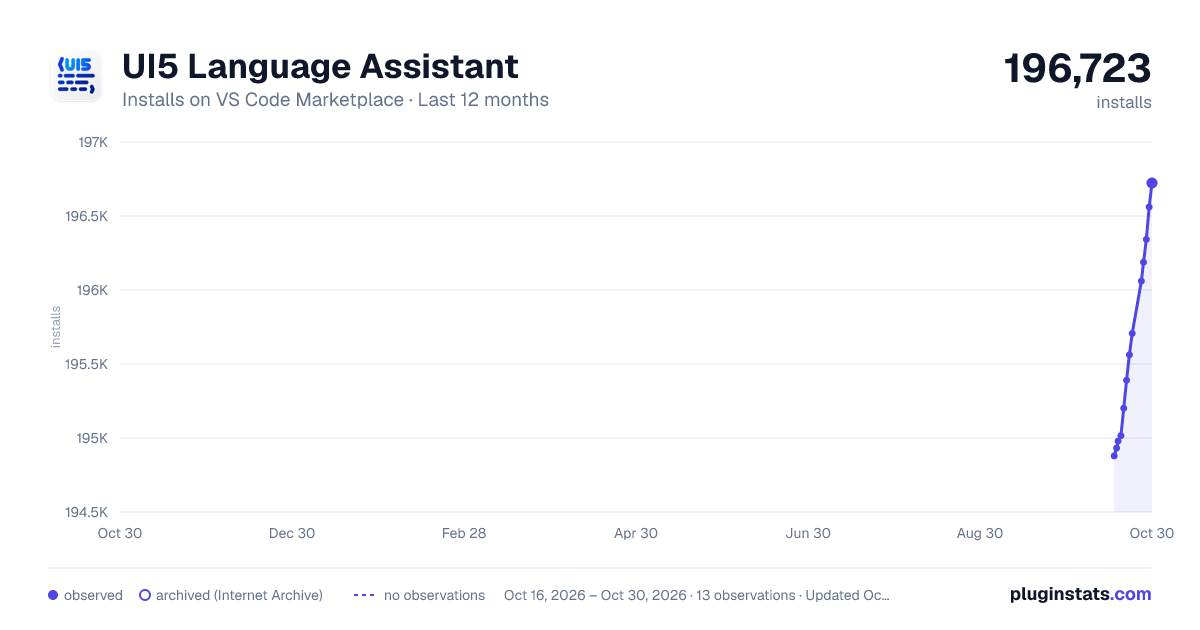


Adoption over time


7/30/90-day growth


Ranking history


Filled points are observed values; hollow points come from Internet Archive snapshots of the listing page. Dashed segments span periods with no observations — values between points are not interpolated.
Recent observations
Full history (3)Similar VS Code Marketplace Programming Languages plugins
Data source
Install counts, average rating, and rating counts come from the public Visual Studio Marketplace gallery API. Installs are cumulative and exclude updates.
Listing: https://marketplace.visualstudio.com/items?itemName=SAPOSS.vscode-ui5-language-assistant. First seen Oct 16, 2026; last successful collection Oct 18, 2026. See the methodology.