 PluginStats
Oxc has 398,256 recorded installs on VS Code Marketplace.
It ranks #971 of 2,501 tracked VS Code Marketplace listings by installs.
It is rated 4.6 out of 5 from 13 ratings.
PluginStats has 4 daily observations since Oct 16, 2026; the latest is from Oct 19, 2026.
Rating: 4.62 / 5 from 13 ratings
About Oxc
⚓ Oxc
The Oxidation Compiler is creating a suite of high-performance tools for JavaScript and TypeScript.
Installation
Any of the below options can be used to install the extension.
• Install through the VS Code extensions marketplace by searching for Oxc. Verify the identifier is oxc.oxc-vscode. • From within VS Code, open the Quick Open (Ctrl+P or Cmd+P on macOS) and execute ext install oxc.oxc-vscode.
The extension does not bundle the Oxc tools. For the recommended setup, install the tool you want to use locally in your project: oxlint for linting and oxfmt for formatting. If you install a tool while VS Code is already open and it is not detected, run the Oxc: Restart oxlint Server and/or Oxc: Restart oxfmt Server commands, then hover over the oxc status item or check the corresponding Oxc (Lint) or Oxc (Fmt) output channel.
For Vite+ projects, the extension runs vp lint --lsp and vp fmt --lsp from the locally installed vite-plus package, so the lint and fmt fields in vite.config.* are used. It resolves vite-plus from the workspace folders, like the standalone tools. Set oxc.path.oxlint or oxc.path.oxfmt to use a standalone tool instead.
See the official Oxlint editor setup and Oxfmt editor setup guides for installation details.
Oxlint
This is the linter for Oxc. The currently supported features are listed below.
• Highlighting for warnings or errors identified by Oxlint • Quick fixes to fix a warning or error when possible • JSON schema validation for supported Oxlint configuration files (does not include ESLint configuration files) • Command to fix all auto-fixable content within the current text editor. • Support for source.fixAll.oxc as a code action provider. Configure this in your settings editor.codeActionsOnSave to automatically apply fixes when saving the file. • Support for multi-root workspaces. • Support for type-aware linting when the oxlint-tsgolint package is installed and the oxc.typeAware setting is set to true.
Oxfmt
This is the formatter for Oxc. The currently supported features are listed below.
• Support for source.format.oxc as a code action provider.
To enable it as your default formatter, use a VS Code settings.json like:
To run Oxc formatting through VS Code code actions on save, configure editor.codeActionsOnSave:
Running formatting as a code action on save, allows to define the order of changes when both formatting and lint fixes are applied on save. For example, the below configuration will run the formatter first, and then apply lint fixes:
Configuration
For standalone Oxlint and Oxfmt, configuration file paths are optional:
• oxc.configPath for Oxlint • oxc.fmt.configPath for Oxfmt
Leave these settings unset (null) to let each tool automatically discover configuration files. Nested configuration lookup is enabled by default; it can be disabled with oxc.disableNestedConfig for Oxlint or oxc.fmt.disableNestedConfig for Oxfmt.
Set a path only when you want to use a specific configuration file, such as one with a custom name or location. Specifying a path disables nested configuration lookup for that tool.
See the Oxlint configuration guide and Oxfmt configuration guide for supported configuration files and discovery details.
Window Configuration
Following configurations are supported via settings.json and affect the window editor:
| Key | Default Value | Possible Values | Description |
| oxc.enable | null | true \| false \| | This is a master toggle for both oxc.enable.oxlint and oxc.enable.oxfmt. | | oxc.enable.oxfmt | true | true \| false | Enable oxfmt (formatter). Falls back to oxc.enable if not set. | | oxc.enable.oxlint | true | true \| false | Enable oxlint (linter). Falls back to oxc.enable if not set. | | oxc.path.node | - | | Path to a Node.js binary. Will be added to the oxfmt and oxlint PATH environment. Supports variables. | | oxc.path.oxfmt | - | | Path to an Oxc formatter binary. Default: auto detection in node_modules. Supports variables. | | oxc.path.oxlint | - | | Path to an Oxc linter binary. Default: auto detection in node_modules. Supports variables. | | oxc.path.tsgolint | - | | Path to an Oxc tsgolint binary. Default: auto detection from oxlint. Supports variables. | | oxc.suppressProgramErrors | false | true \| false | Suppress tsconfig errors from tsgolint and still lint files under partially-valid tsconfig projects. When enabled, sets OXLINT_TSGOLINT_DANGEROUSLY_SUPPRESS_PROGRAM_DIAGNOSTICS=true. Note: Type-aware lint rules may produce degraded results when the tsconfig is broken. | | oxc.trace.server | off | off \| messages \| verbose | Traces the communication between VS Code and the language server. | | oxc.useExecPath | false | true \| false | Whether to use the extension's execPath (Electron's bundled Node.js) as the JavaScript runtime for running Oxc tools, instead of looking for a system Node.js installation. | | Deprecated | | | | | oxc.path.server | - | | Path to Oxc language server binary. Mostly for testing the language server. Supports variables. |
Workspace Configuration
Following configurations are supported via settings.json and can be changed for each workspace:
| Key | Default Value | Possible Values | Description |…
Description from the VS Code Marketplace listing.
- astro
- css
- formatter
- graphql
- handlebars
- html
- javascript
- javascriptreact
- json
- json5
- jsonc
- less
- linter
- markdown
- mdx
- mjml
- oxc
- oxfmt
- oxlint
- scss
Where Oxc sits in the listing
Each band is one page of 20. Installs on a log scale. Placement is projected from installs, so it can differ from the marketplace's own sort order. Hover a dot to see the listing.


Charts
Images: 30d · 1y · all time · 1600×900 dark
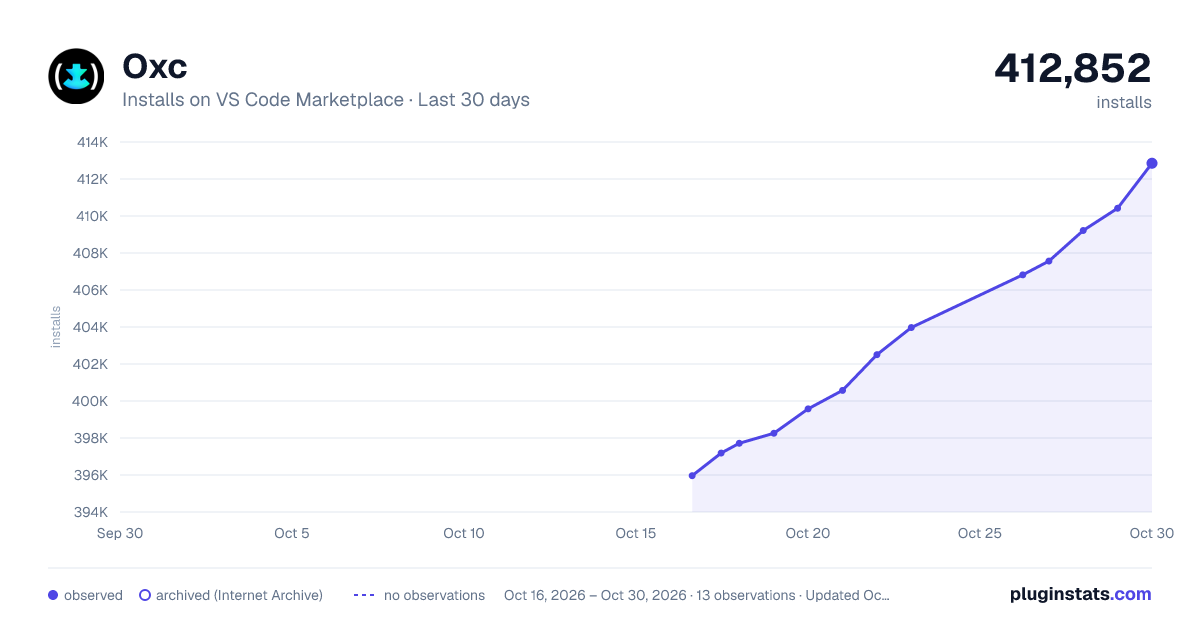
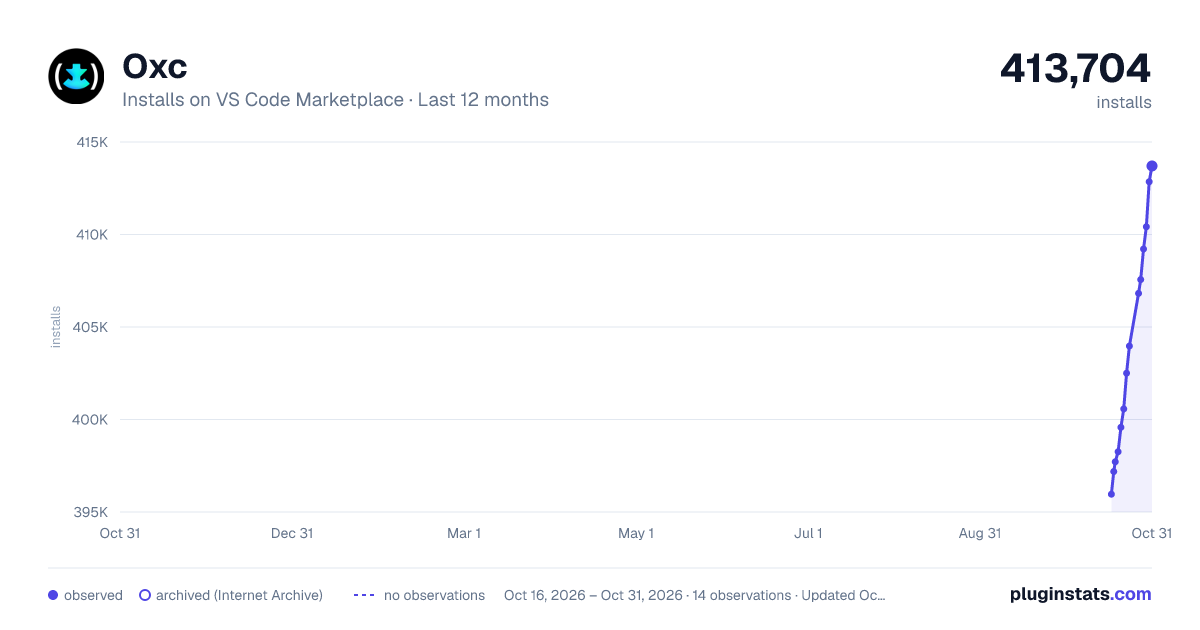
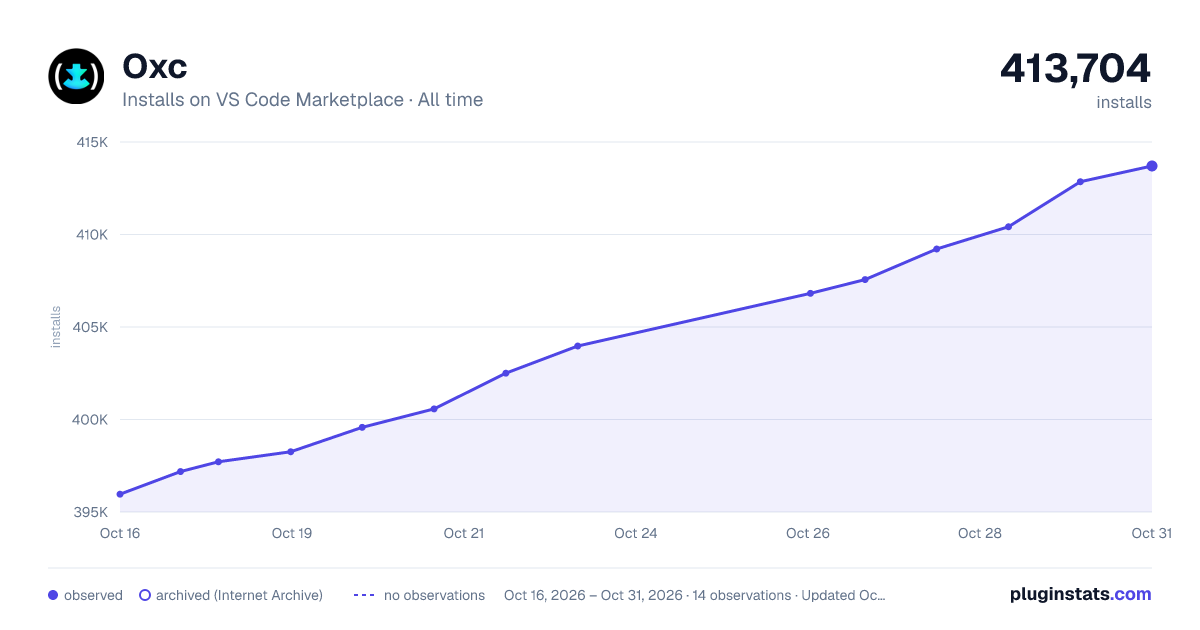

Adoption over time


7/30/90-day growth


Filled points are observed values; hollow points come from Internet Archive snapshots of the listing page. Dashed segments span periods with no observations — values between points are not interpolated.
Recent observations
Full history (4)Similar VS Code Marketplace Linters plugins
Data source
Install counts, average rating, and rating counts come from the public Visual Studio Marketplace gallery API. Installs are cumulative and exclude updates.
Listing: https://marketplace.visualstudio.com/items?itemName=oxc.oxc-vscode. First seen Oct 16, 2026; last successful collection Oct 19, 2026. See the methodology.