 PluginStats
Chat for Claude Code installs statistics
By Andre Pimenta · VS Code Marketplace · Programming Languages
Beautiful Claude Code Chat Interface for VS Code
Chat for Claude Code has 546,579 recorded installs on VS Code Marketplace.
It ranks #807 of 2,500 tracked VS Code Marketplace listings by installs.
It is rated 4.3 out of 5 from 27 ratings.
PluginStats has 3 daily observations since Oct 16, 2026; the latest is from Oct 18, 2026.
Rating: 4.30 / 5 from 27 ratings
About Chat for Claude Code
🚀 Claude Code Chat - Beautiful Claude Code Chat Interface for VS Code
No more terminal commands. Chat with Claude Code through a beautiful, intuitive interface right inside VS Code.
Ditch the command line and experience Claude Code like never before. This extension brings a stunning chat interface directly into your editor, making AI assistance accessible, visual, and enjoyable.
🤖 Built by Claude Code for Claude Code - This extension was entirely developed using Claude Code itself. Claude Code created its own chat interface!
✨ Why Choose Claude Code Chat?
🖥️ No Terminal Required - Beautiful chat interface replaces command-line interactions ⏪ Restore Checkpoints - Undo changes and restore code to any previous state 🔌 MCP, Skills & Plugins - Browse, search, and install from curated marketplaces 💾 Conversation History - Automatic conversation history and session management 🎨 VS Code & Cursor - Works in VS Code, Cursor, and other compatible editors 🧠 Plan and Ultrathink modes - Plan First and Ultrathink modes ⚡ Smart Context - Reference files, paste images, and create custom commands 🐧 Windows/WSL Support - Full native Windows and WSL support
🌟 Key Features
💬 Beautiful Chat Graphical Interface
• No terminal required - everything through the UI • Real-time streaming responses with typing indicators • One-click message copying with visual feedback • Enhanced markdown support with syntax highlighting • Auto-resizing input that grows with your content • Copy-to-clipboard for code blocks
⏪ Checkpoint & Session Management
• Restore Checkpoints - Instantly undo changes and restore to any previous state • Automatic Git-based backup system for safe experimentation • Browse and restore from any conversation checkpoint • Automatic conversation saving and restoration • Real-time cost and token tracking • Session statistics and performance metrics
📝 Inline Diff Viewer
• Full Diff Display - See complete file changes directly in Edit, MultiEdit, and Write messages • Open in VS Code Diff - One-click button to open VS Code's native side-by-side diff editor • Smart Truncation - Long diffs are truncated with an expand button for better readability • Syntax Highlighting - Proper code highlighting in diff views • Visual Change Indicators - Clear green/red highlighting for additions and deletions
🔌 MCP, Skills & Plugins Marketplace ⭐ NEW IN V2.0
• MCP Servers - Browse 30+ featured servers (GitHub, Slack, Stripe, Notion, etc.) with dual registry search • Skills - Browse and install curated skills from skills.sh with project or global scope • Plugins - Browse and install plugins to extend Claude Code • Smart Search - Search across add-mcp curated and official Anthropic registries with relevance ranking • Project or Global Install - Install MCP servers to .mcp.json or ~/.claude.json, skills to .claude/skills/ • One-Click Install - Pre-filled configuration with env vars, headers, and OAuth authentication
🖼️ Image Preview & Attachments ⭐ NEW IN V2.0
• Paste Images - Paste images with thumbnail preview before sending • File Picker - Select images through VS Code's native file picker • Preview Strip - See attached images above the text box with remove buttons • Inline Detection - Image paths in messages are automatically detected and sent as base64 • Multiple Images - Attach multiple images to a single message
🔒 Advanced Permissions System
• Interactive Permission Dialogs - Detailed tool information with command previews • Always Allow Functionality - Smart command pattern matching for common tools (npm, git, docker) • YOLO Mode - Skip all permission checks for power users • Workspace Permissions - Granular control over what tools can execute • Real-time Permission Management - Add/remove permissions through intuitive UI
📱 Sidebar Integration
• Native VS Code Sidebar - Full chat functionality in the sidebar panel • Smart Panel Management - Automatic switching between main and sidebar views • Persistent Sessions - State maintained across panel switches • Activity Bar Integration - Quick access from VS Code's activity bar
📁 Smart File Integration
• Type @ to instantly search and reference workspace files • Image attachments via file browser and copy-paste screenshots • Lightning-fast file search across your entire project • Seamless context preservation for multi-file discussions
🛠️ Tool Management
• Visual dashboard showing all available Claude Code tools • Real-time tool execution with formatted results • Inline stop button replaces send during processing • Smart permission system for secure tool execution
🎨 VS Code Integration
• Native theming that matches your editor • Status bar with support button • Activity bar panel for quick access • Responsive design for any screen size
🤖 Model Selection
• Quick Buttons - GPT, Gemini, MiniMax, Kimi, GLM, DeepSeek above the text box • Opus - Most capable model for complex tasks requiring deep reasoning • Sonnet - Balanced model offering great performance for most use cases • Default - Uses your configured model setting • 150+ OpenCredits Models - Browse and switch to any available model • Model preference persists across sessions • Provider choice (OpenCredits vs Anthropic) for Claude models
⚡ Slash Commands Integration
• Slash Commands Modal - Type "/" to access all Claude Code commands instantly • 23+ Built-in Commands - /agents, /cost, /config, /memory, /review, and more • Custom Command Support - Execute any Claude Code command with session context • Session-Aware Execution - All commands run with current conversation context • Terminal Integration - Commands open directly in VS Code terminal with WSL support
🧠 Advanced AI Modes…
Description from the VS Code Marketplace listing.
- ai
- anthropic
- assistant
- chat
- chatbot
- claude
- claude code
- code
- code explanation
- code generation
- code summary
- code transform
- copilot
- development
- keybindings
- productivity
- programming
- prompt language
- vibe coding
Where Chat for Claude Code sits in the listing
Each band is one page of 20. Installs on a log scale. Placement is projected from installs, so it can differ from the marketplace's own sort order. Hover a dot to see the listing.


Charts
Images: 30d · 1y · all time · 1600×900 dark
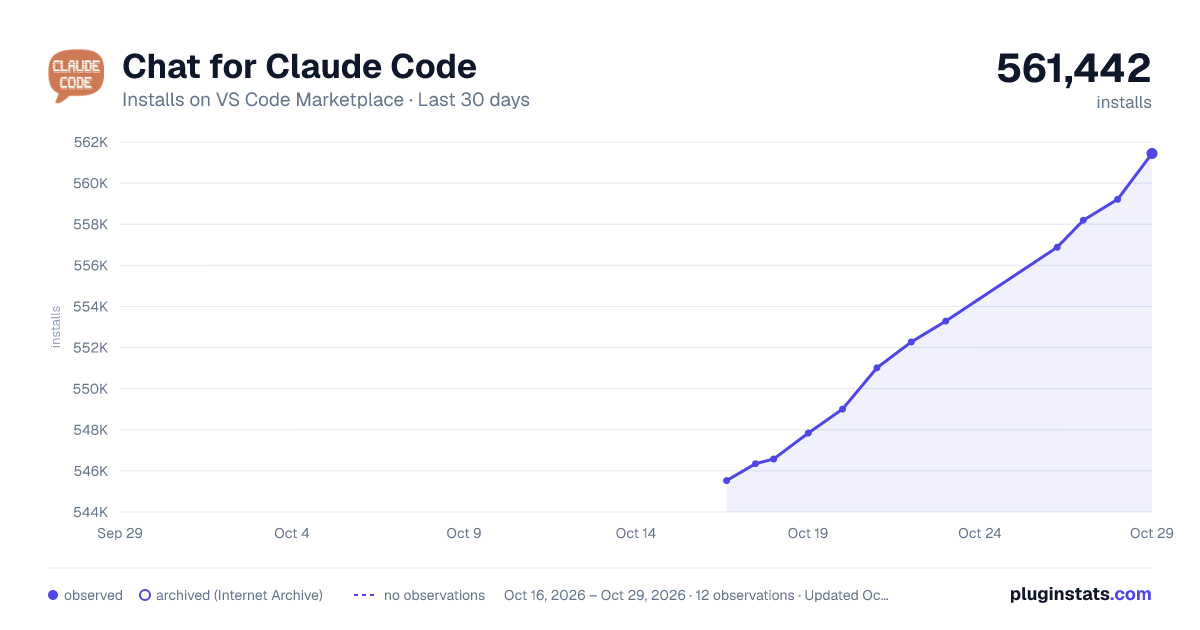
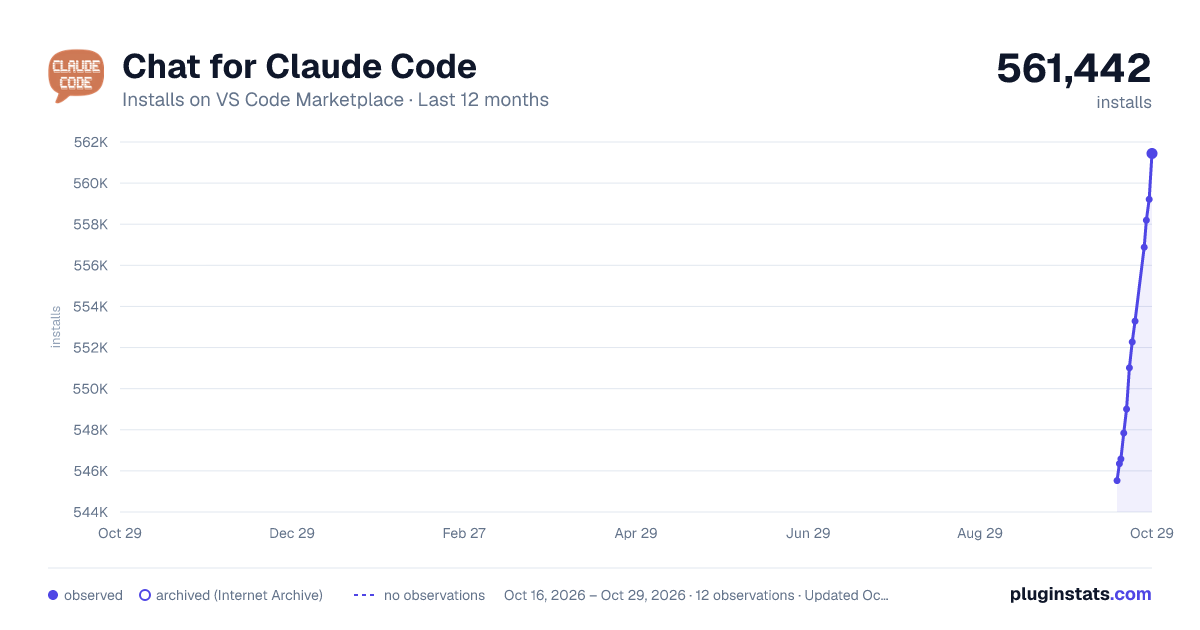
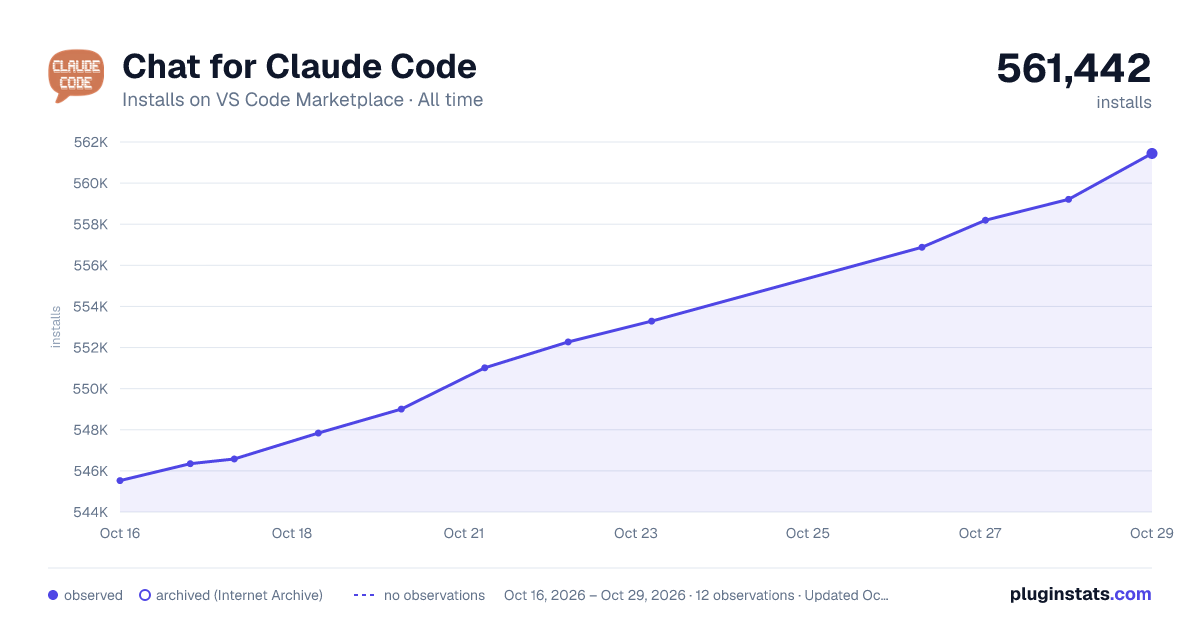

Adoption over time


7/30/90-day growth


Ranking history


Filled points are observed values; hollow points come from Internet Archive snapshots of the listing page. Dashed segments span periods with no observations — values between points are not interpolated.
Recent observations
Full history (3)Similar VS Code Marketplace Programming Languages plugins
Data source
Install counts, average rating, and rating counts come from the public Visual Studio Marketplace gallery API. Installs are cumulative and exclude updates.
Listing: https://marketplace.visualstudio.com/items?itemName=AndrePimenta.claude-code-chat. First seen Oct 16, 2026; last successful collection Oct 18, 2026. See the methodology.