 PluginStats
PHPUnit & Pest Test Explorer installs statistics
By Recca0120 · VS Code Marketplace · Debuggers
Run PHPUnit and Pest tests in VS Code with the native Test Explorer. Supports Docker, SSH, Laravel Sail, ParaTest, and Xdebug step-debugging.
PHPUnit & Pest Test Explorer has 296,736 recorded installs on VS Code Marketplace, ranking #1166 of 2,501 tracked listings.
Rating: 5.00 / 5 from 22 ratings
About PHPUnit & Pest Test Explorer
PHPUnit & Pest Test Explorer for VS Code



Run PHPUnit and Pest tests directly in VS Code using the native Test Explorer UI.
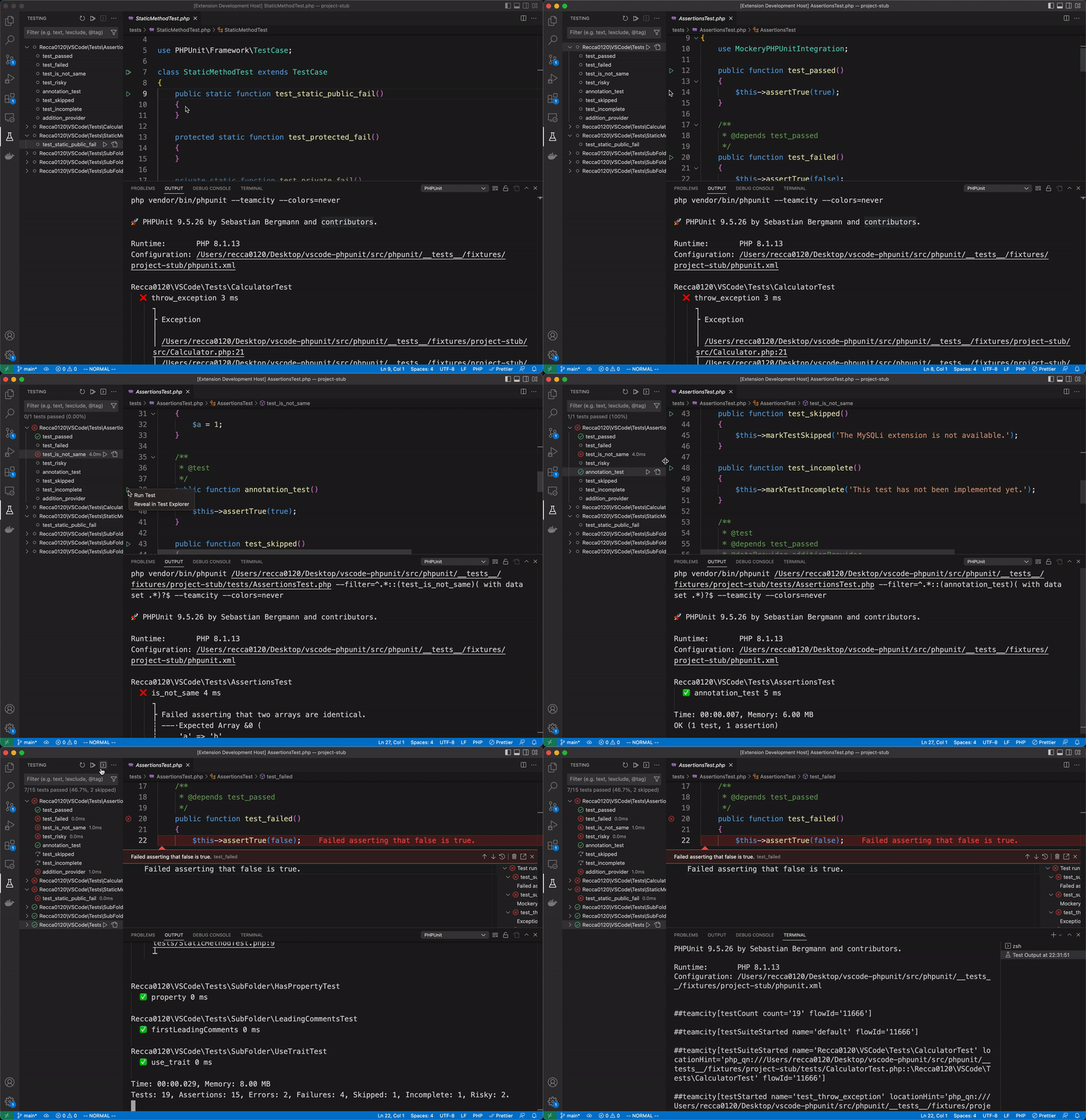
Quick Start
- Install the extension from the VS Code Marketplace
- Open a PHP project that contains a
phpunit.xmlorphpunit.xml.dist - Tests appear automatically in the Test Explorer sidebar — click to run
PHPUnit and Pest are auto-detected from
vendor/bin. No configuration needed in most projects.
Features
- Test Explorer integration — discover, run, and debug tests from the sidebar
- PHPUnit 7 – 12 & Pest 1 – 4 — broad version support
- Auto-detect binary — reads
composer.jsonto usevendor/bin/pestfor Pest projects automatically - Auto-reload — reloads all tests when
phpunit.xmlorcomposer.lockchanges - Colored output — syntax-highlighted results with embedded PHP source snippets
- Clickable stack traces — jump to file:line directly from error output
- Remote environments — Docker, SSH, Laravel Sail, DDEV via custom commands
- Multi-workspace Docker — single shared container for multiple workspace folders
- Parallel execution — ParaTest support
- Xdebug debugging — step-through debugging with one click
- Continuous runs — auto-run tests on file changes
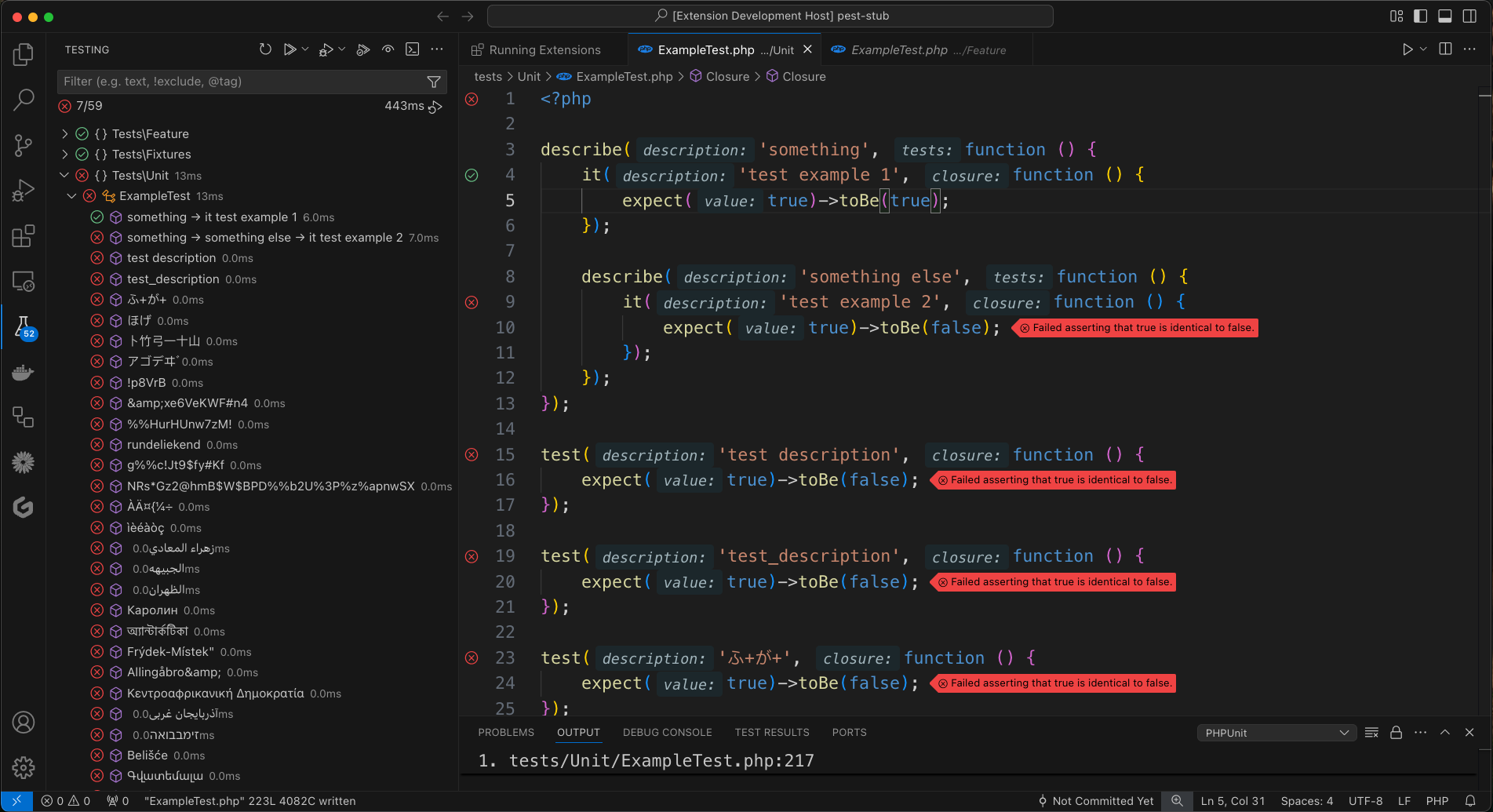
Settings
Add to .vscode/settings.json. All settings use the phpunit.* prefix.
{
  // Path to the PHP binary (default: "php")
  "phpunit.php": "php",

  // Path to PHPUnit or Pest binary
  // Auto-detected from composer.json: uses "vendor/bin/pest" if pestphp/pest is a dependency,
  // otherwise defaults to "vendor/bin/phpunit". Only set this if auto-detection is not sufficient.
  "phpunit.phpunit": "vendor/bin/phpunit",

  // Custom command template
  // Variables: ${php}, ${phpargs}, ${phpunit}, ${phpunitargs}, ${phpunitxml}, ${cwd}
  //   ${workspaceFolder}         — absolute path to the workspace folder
  //   ${workspaceFolderBasename} — folder name only (e.g. "myproject")
  //   ${userHome}                — user home directory
  //   ${pathSeparator}           — OS path separator ("/" or "\")
  "phpunit.command": "\"${php}\" ${phpargs} \"${phpunit}\" ${phpunitargs}",

  // Extra arguments passed to PHPUnit
  "phpunit.args": [],

  // Path mappings for remote environments { "local/path": "remote/path" }
  "phpunit.paths": {},

  // Environment variables set before running
  "phpunit.environment": {},

  // Save all open files before running tests (default: false)
  "phpunit.saveBeforeTest": false,

  // Output format preset: "collision" (detailed per-test), "progress" (dot-progress), or "pretty" (per-test without icons)
  "phpunit.output.preset": "collision",

  // Override individual format fields from the preset (see phpunit package docs)
  "phpunit.output.format": {},

  // Clear debug output channel before each run (default: true)
  "phpunit.clearDebugOutputOnRun": true,

  // Control when Test Results panel opens automatically (VS Code built-in setting):
  // - "openOnTestStart"    — open as soon as a run starts
  // - "openOnTestFailure"  — open only when a test fails (useful for seeing dd() output)
  // - "neverOpen"          — never open automatically
  // "testing.openTesting": "openOnTestFailure"

  // launch.json configuration name for debugging
  "phpunit.debuggerConfig": "",

  // Xdebug port, 0 = random (default: 0)
  "phpunit.xdebugPort": 0
}
Configuration Examples
Local
For most local projects, zero configuration is needed. To use a different test runner:
// Pest
{ "phpunit.phpunit": "vendor/bin/pest" }

// Laravel Artisan
{ "phpunit.phpunit": "artisan test" }

// ParaTest (parallel execution)
{ "phpunit.phpunit": "vendor/bin/paratest" }
Docker
When running tests inside a Docker container, you need two things:
phpunit.command— tells the extension how to execute commands in the containerphpunit.paths— maps your local file paths to container paths so the extension can locate test files and parse error output
Important:
${workspaceFolder}may not resolve correctly on macOS or WSL. If you encounter path issues, replace it with the actual absolute path (e.g./home/user/myproject).
docker exec (existing container):
{
  "phpunit.command": "docker exec -t my_container /bin/sh -c \"${php} ${phpargs} ${phpunit} ${phpunitargs}\"",
  "phpunit.paths": {
    "${workspaceFolder}": "/app"
  }
}
docker run (ephemeral container):
{
  "phpunit.command": "docker run --rm -t -v ${PWD}:/app -w /app php:latest ${php} ${phpargs} ${phpunit} ${phpunitargs}",
  "phpunit.paths": {
    "${workspaceFolder}": "/app"
  }
}
Docker Compose:
{
  "phpunit.command": "docker compose exec -t app /bin/sh -c \"${php} ${phpargs} ${phpunit} ${phpunitargs}\"",
  "phpunit.paths": {
    "${workspaceFolder}": "/app"
  }
}
If your docker-compose.yml is not in the workspace root, use the -f flag:…
Description from the VS Code Marketplace listing.
- keybindings
- laravel
- pest
- php
- phpunit
- test
README badge
Show your rank in a README or on your website. The badge updates automatically.
Charts
Images: 30d · 1y · all time · 1600×900 dark
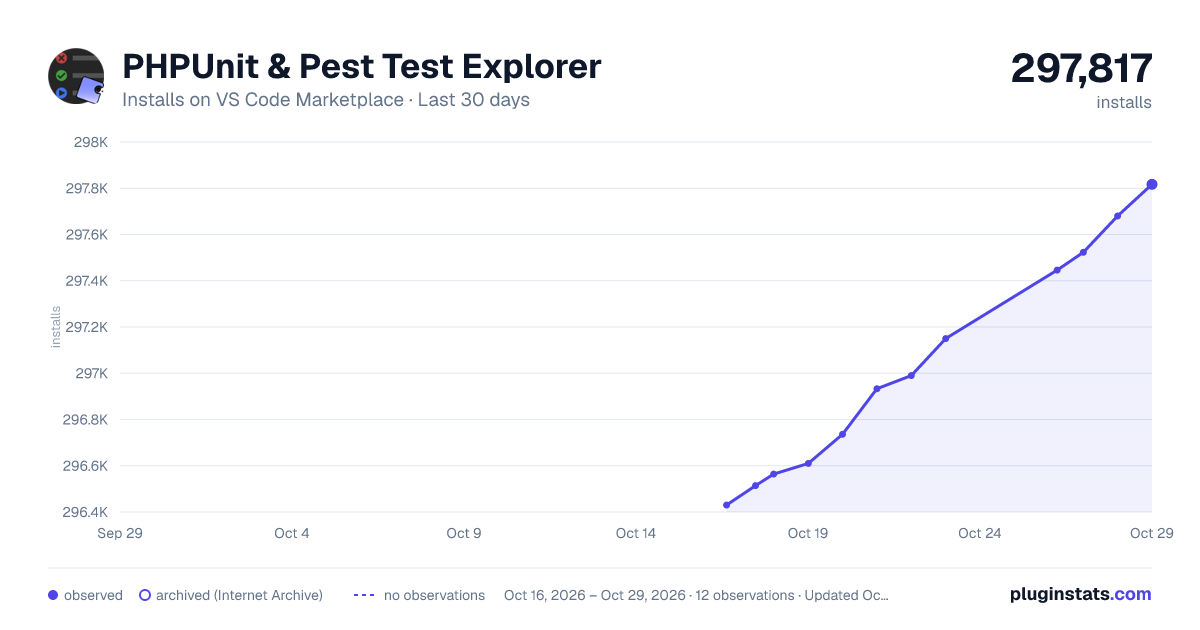
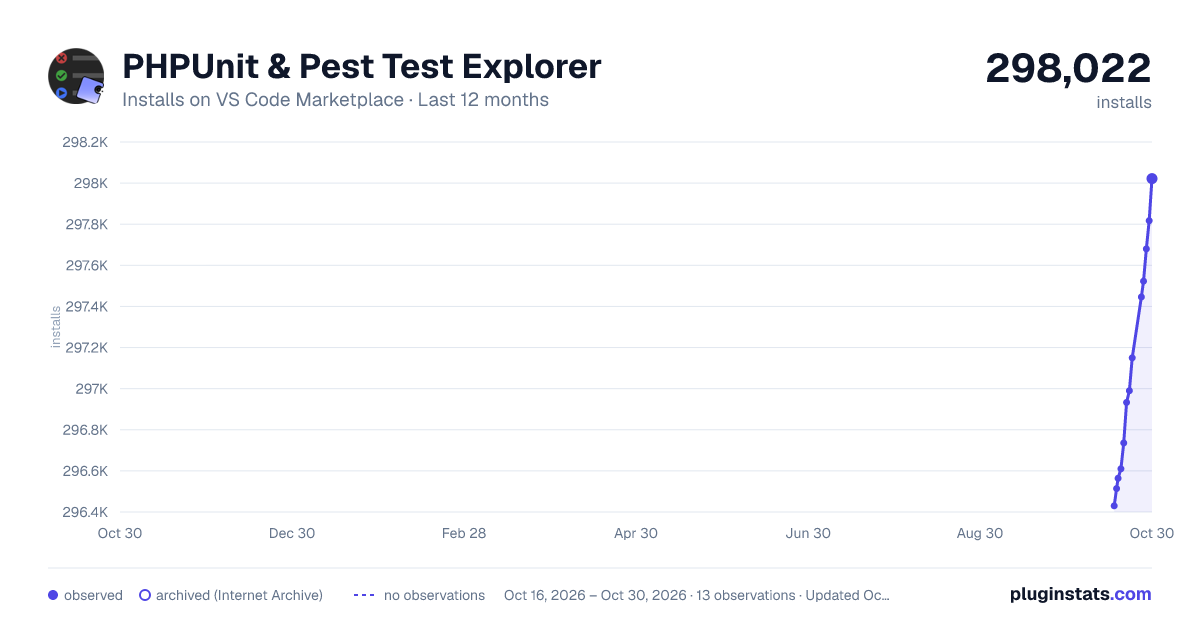
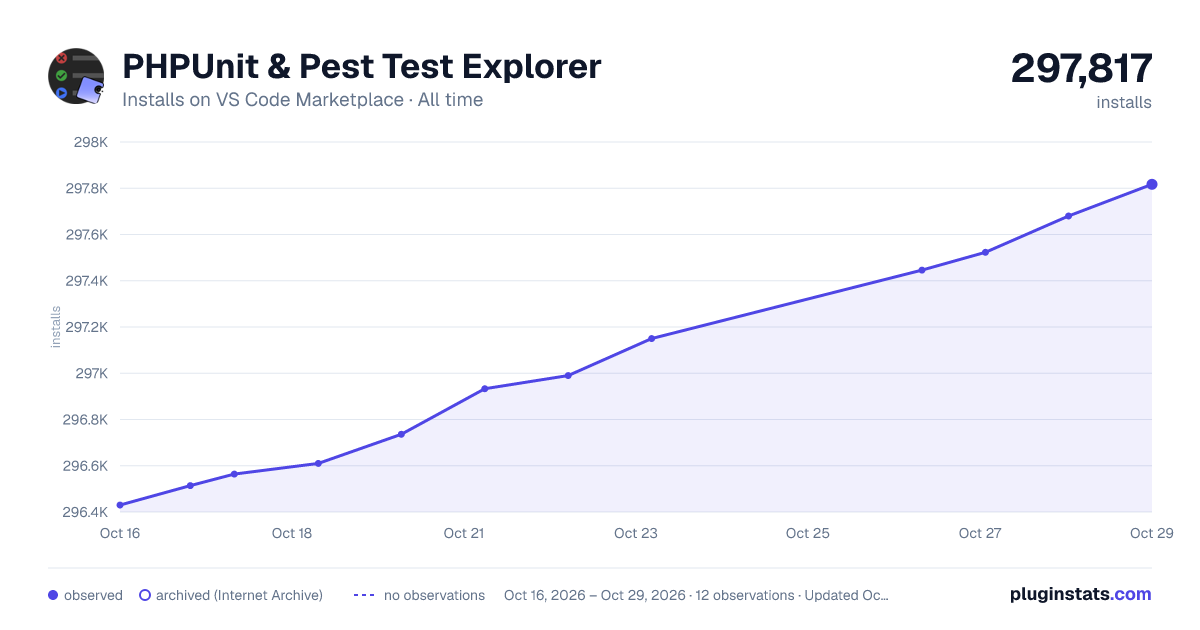

Adoption over time
7/30/90-day growth
Ranking history
Ratings over time
Listing placement
Listing placement
Listing placement
Filled points are observed values; hollow points come from Internet Archive snapshots of the listing page. Dashed segments span periods with no observations — values between points are not interpolated.
Each band is one page of 20. Installs on a linear scale. Placement is projected from installs, so it can differ from the marketplace's own sort order. Hover a dot to see the listing.
Recent observations
Full history (5)Similar VS Code Marketplace Debuggers plugins
All 20 PHPUnit & Pest Test Explorer alternativesData source
Install counts, average rating, and rating counts come from the public Visual Studio Marketplace gallery API. Installs are cumulative and exclude updates.
Listing: https://marketplace.visualstudio.com/items?itemName=recca0120.vscode-phpunit. First seen Oct 16, 2026; last successful collection Oct 20, 2026. See the methodology.