 PluginStats
Playwright Test for VSCode installs statistics
By Microsoft (223 listings) · VS Code Marketplace · Testing
Run Playwright Test tests in Visual Studio Code.
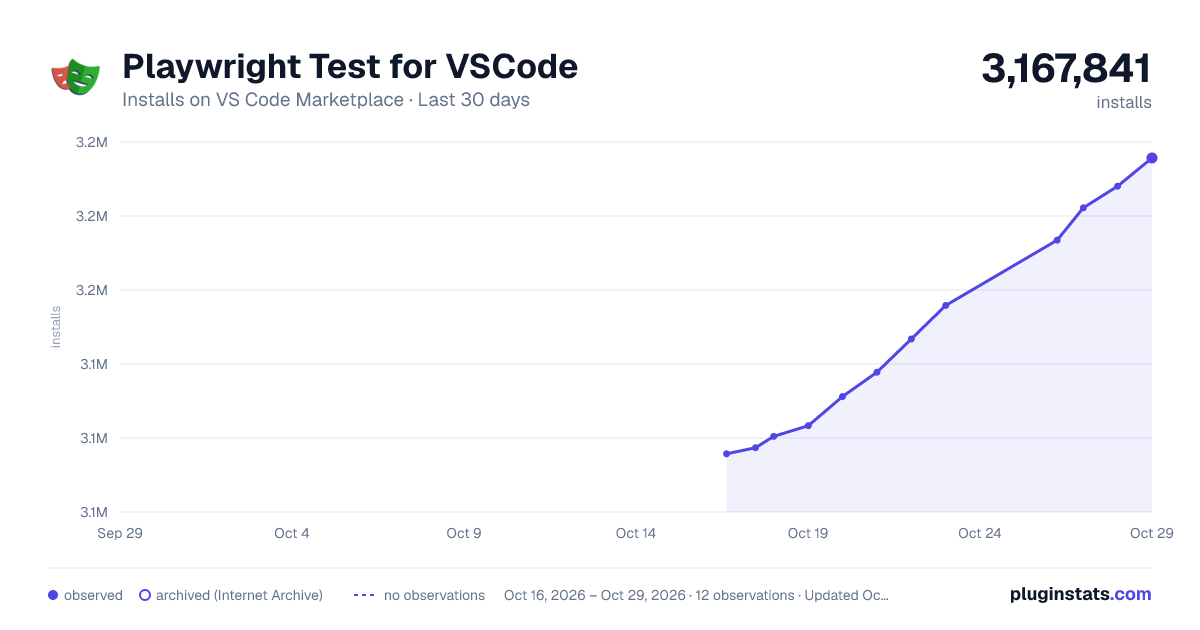
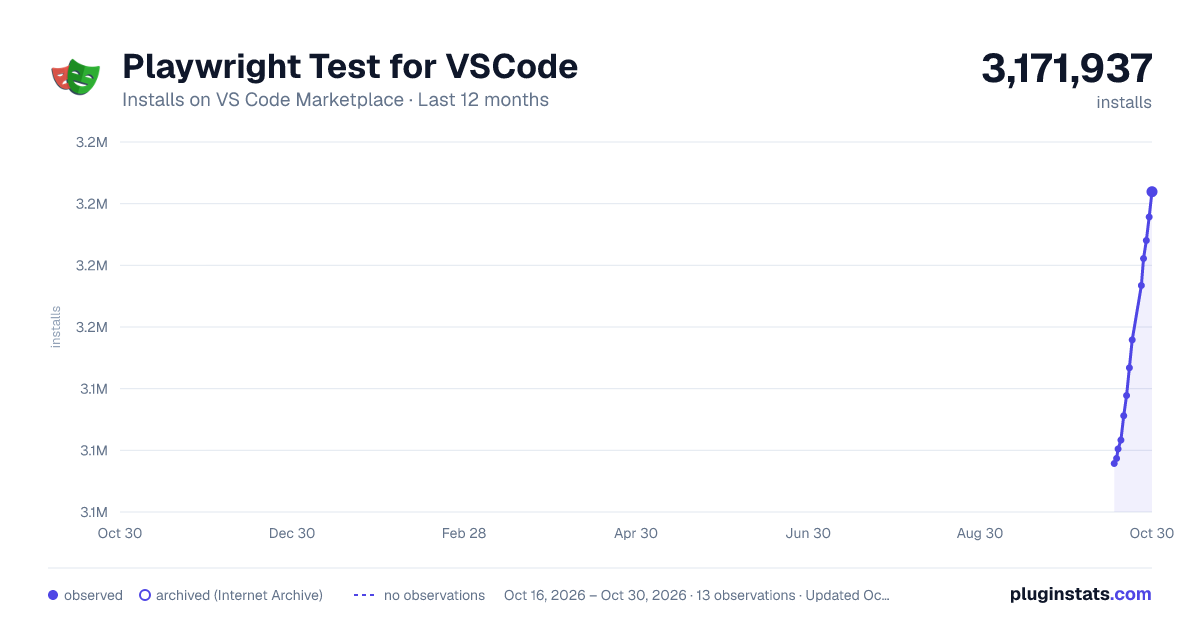
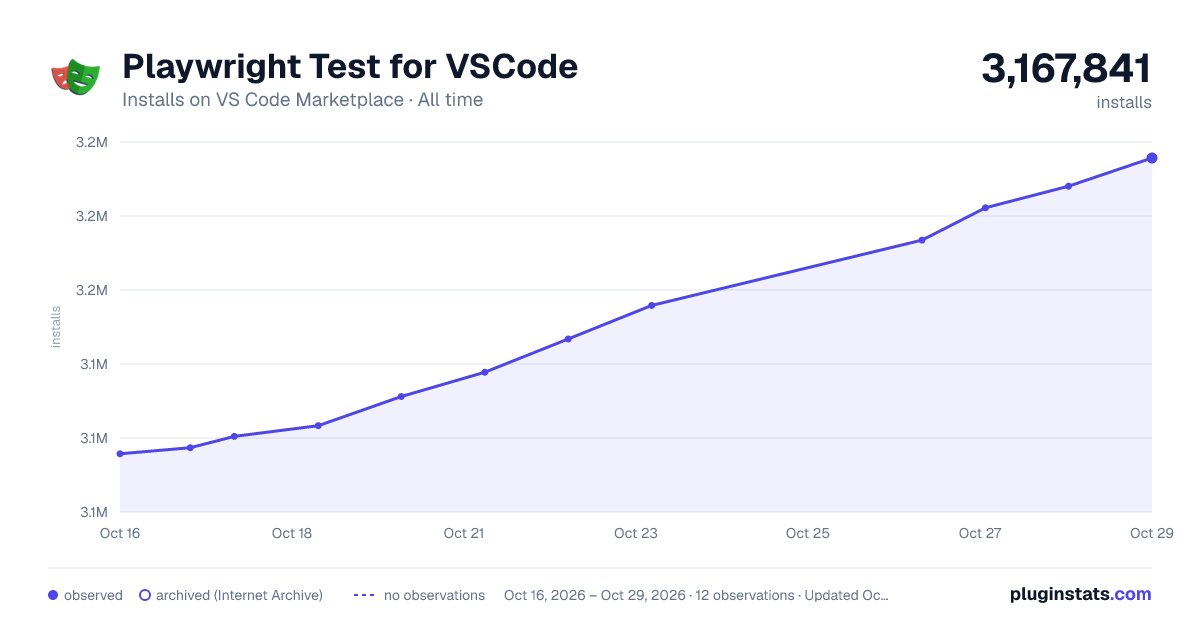
Playwright Test for VSCode has 3,130,219 recorded installs on VS Code Marketplace.
It ranks #247 of 2,500 tracked VS Code Marketplace listings by installs.
It is rated 4.0 out of 5 from 42 ratings.
PluginStats has 3 daily observations since Oct 16, 2026; the latest is from Oct 18, 2026.
Rating: 4.00 / 5 from 42 ratings
About Playwright Test for VSCode
Playwright Test for VS Code
This extension integrates Playwright into your VS Code workflow. Here is what it can do:
• Playwright Test for VS Code • Requirements • Install Playwright • Run tests with a single click • Run multiple tests • Run tests in watch mode • Show browsers • Show trace viewer • Pick locators • Debug step-by-step, explore locators • Tune locators • Record new tests • Record at cursor
Requirements
This extension works with [Playwright] version v1.38+ or newer.
Install Playwright
If you don't have the Playwright NPM package installed in your project, or if you are starting with a new testing project, the "Install Playwright" action from the command panel will help you get started.
Pick the browsers you'd like to use by default, don't worry, you'll be able to change them later to add or configure the browsers used. You can also choose to add a GitHub Action so that you can easily run tests on Continuous Integration on every pull request or push.
The extension automatically detects if you have [Playwright] installed and loads the browsers, known as [Playwright] projects, into Visual Studio Code. By default it will select the first project as a run profile. Inside the test explorer in VS Code you can change this behavior to run a single test in multiple or different browsers.
Run tests with a single click
Click the green triangle next to the test you want to run. You can also run the test from the testing sidebar by clicking the grey triangle next to the test name.
Run multiple tests
You can use the Testing sidebar to run a single test or a group of tests with a single click. While tests are running, the execution line is highlighted. Once the line has completed, the duration of each step of the test is shown.
Run tests in watch mode
Click the "eye" icon to run tests in watch mode. This will re-run the watched tests when you save your changes.
Show browsers
Check the "show browsers" checkbox to run tests with the browser open so that you can visually see what is happening while your test is running. Click on "close all browsers" to close the browsers.
Show trace viewer
Check the "show trace viewer" checkbox to see a full trace of your test.
Pick locators
Click the "pick locator" button and hover over the browser to see the locators available. Clicking an element will store it in the locators box in VS Code. Pressing enter will save it to the clip board so you can easily paste it into your code or press the escape key to cancel.
Debug step-by-step, explore locators
Right click and start breakpoint debugging. Set a breakpoint and hover over a value. When your cursor is on some Playwright action or a locator, the corresponding element (or elements) are highlighted in the browser.
Tune locators
You can edit the source code to fine-tune locators while on a breakpoint. Test out different locators and see them highlighted in the browser.
Record new tests
Record new tests by clicking on the "record tests" button in the testing sidebar. This will open a browser window where you can navigate to a URL and perform actions on the page which will be recorded to a new test file in VS Code.
Record at cursor
This generates actions into the existing test at the current cursor position. You can run the test, position the cursor at the end of the test and continue generating the test.
Description from the VS Code Marketplace listing.
Where Playwright Test for VSCode sits in the listing
Each band is one page of 20. Installs on a log scale. Placement is projected from installs, so it can differ from the marketplace's own sort order. Hover a dot to see the listing.
Charts
Images: 30d · 1y · all time · 1600×900 dark
Adoption over time
7/30/90-day growth
Ranking history
Filled points are observed values; hollow points come from Internet Archive snapshots of the listing page. Dashed segments span periods with no observations — values between points are not interpolated.
Recent observations
Full history (3)Similar VS Code Marketplace Testing plugins




Data source
Install counts, average rating, and rating counts come from the public Visual Studio Marketplace gallery API. Installs are cumulative and exclude updates.
Listing: https://marketplace.visualstudio.com/items?itemName=ms-playwright.playwright. First seen Oct 16, 2026; last successful collection Oct 18, 2026. See the methodology.