 PluginStats
Agentforce Vibes Autocomplete installs statistics
By Salesforce (33 listings) · VS Code Marketplace · Other
AI-powered code completions for Salesforce development
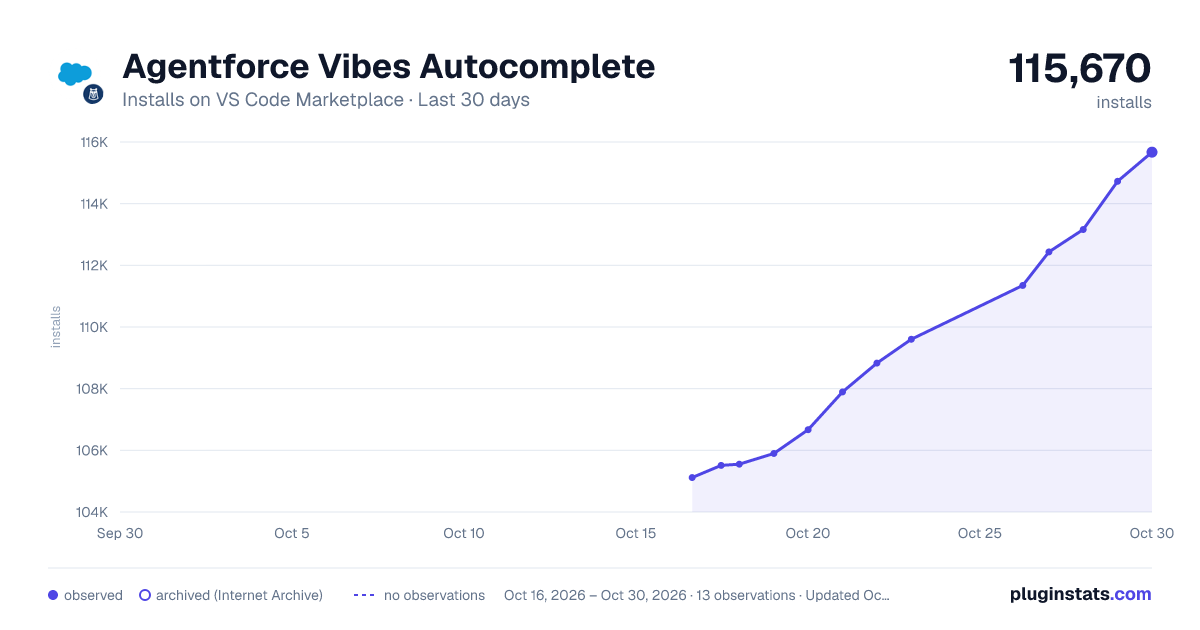
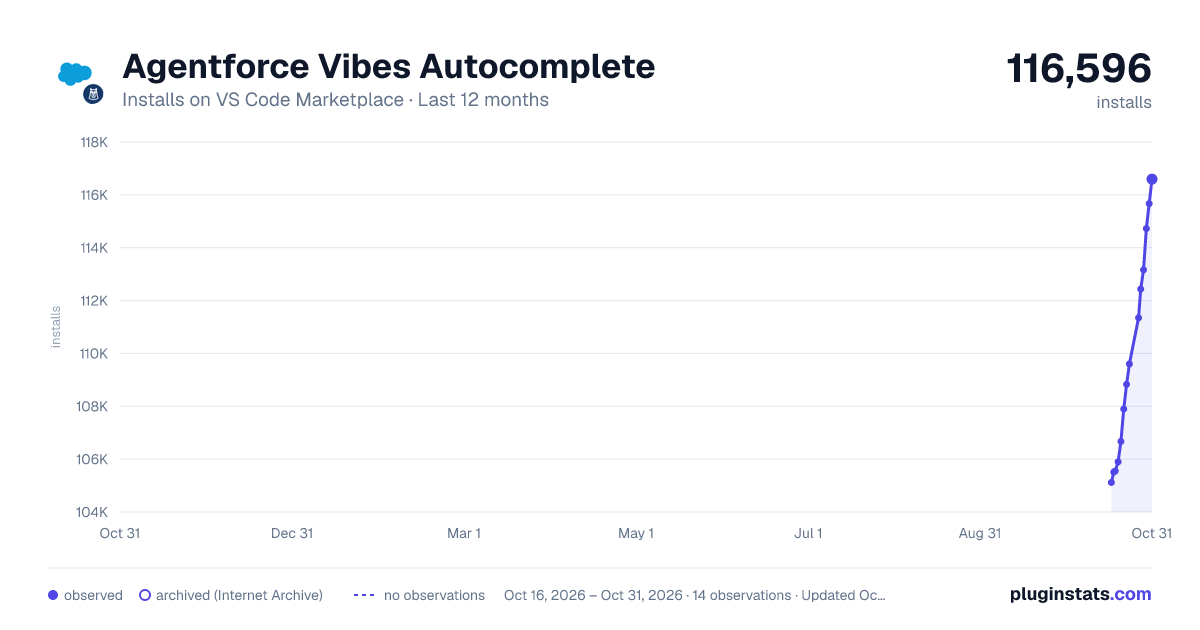
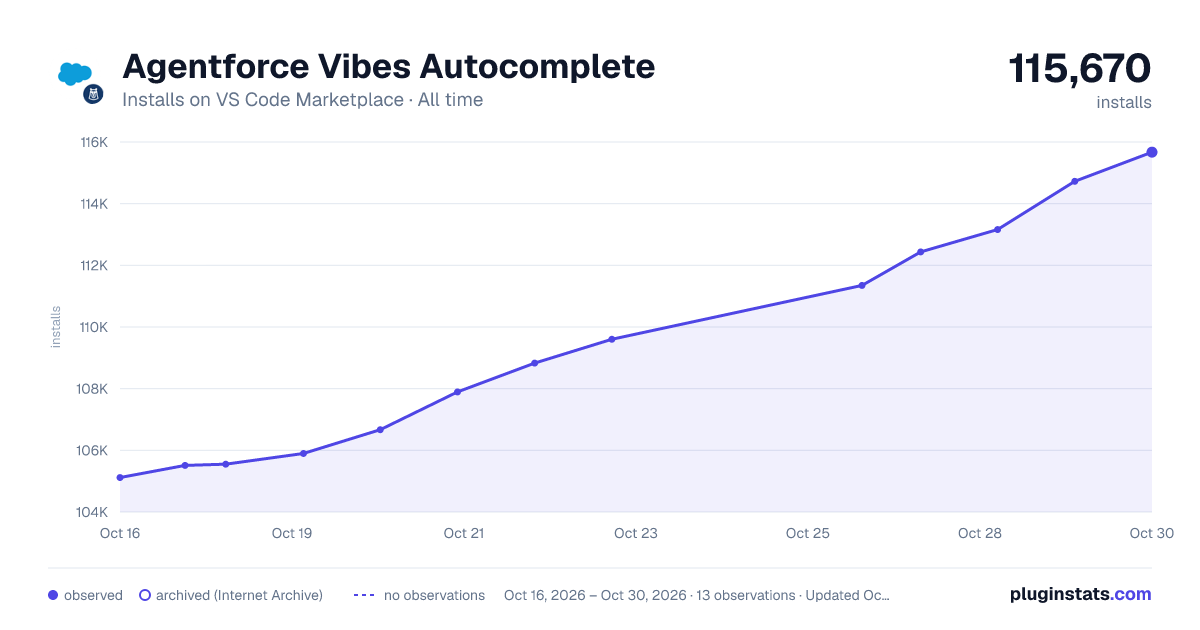
Agentforce Vibes Autocomplete has 105,551 recorded installs on VS Code Marketplace.
It ranks #2290 of 2,500 tracked VS Code Marketplace listings by installs.
PluginStats has 3 daily observations since Oct 16, 2026; the latest is from Oct 18, 2026.
About Agentforce Vibes Autocomplete
Overview
Agentforce Vibes Autocomplete is an AI-powered inline autocomplete feature that suggests code as you write it in Visual Studio Code. The feature is built on premium third-party models.
Inline autocomplete works in Apex, JavaScript, HTML, and CSS files (including Lightning Web Component files). It is enabled by default for any developer with access to a Salesforce org.
Go to the Agentforce Vibes Extension Setup Documentation to learn more about the full extension pack.
Prerequisites
Before you use inline autocomplete, make sure your development environment meets these requirements.
• Visual Studio Code. See Minimum VS Code version. • Salesforce Extensions for Visual Studio Code and its prerequisites. • Salesforce CLI • An SFDX project open in VS Code that contains a valid sfdx-project.json. To create one, see Create Project. • An authenticated Salesforce org. To connect one, run sf org login web --alias . See Change or Open Your Default Org. • Agentforce Vibes enabled in your org. An admin must enable Agentforce Vibes in Setup and accept terms and conditions before developers can use the extension. See Set Up Agentforce Vibes for Your Org.
Required Editions
Available in: Developer, Enterprise, Partner Developer, Performance, and Unlimited Editions.
Inoperable in: Group, Professional, and Essentials Editions.
Not Available in: EU Operating Zone and Government Cloud. Agentforce Vibes is supported in orgs in the EU that are not part of EU Operating Zone, per standard product terms and conditions.
Use Inline Autocomplete
As you type in a supported file, Agentforce Vibes autocomplete automatically generates suggestions and displays them as grayed (ghost) text. For example, after you assign a value to an SObject field such as Account.name = abc, pause the cursor and Agentforce Vibes suggests completions for the remaining fields.
Keyboard Shortcuts
| Action | Key |
| Trigger suggestions manually | Option (⌥)\\ | | Accept entire suggestion | Tab | | Accept next word (requires VS Code Inline Suggest) | ⌘→ (macOS) / ⌥→ (Windows, Linux) | | Dismiss suggestion | Esc |
You can always trigger suggestions manually with Option (⌥)\\, even when Auto Completions are off.
Enable or Disable Inline Autocomplete
Inline autocomplete is enabled by default. The Agentforce Vibes status icon in the VS Code status bar (bottom panel) shows whether the feature is active. Click the status icon to open the command palette for quick access to enable and disable commands.
To toggle inline autocomplete from the command palette:
• Run Agentforce: Toggle Auto Completions to turn the feature off or on for all supported file types. • Run Agentforce: Toggle Auto Completions for Current File Type to toggle it only for the currently active file type.
To enable or disable inline autocomplete from Settings:
1. Select File > Preferences > Settings (Windows or Linux) or Code > Settings > Settings (macOS). 2. Under Agentforce Vibes, select Enable Auto Completions, then select the language for which to enable the feature.
Note: Agentforce Vibes Autocomplete turns off inline autocomplete when you're idle. The sleeping Agentforce status icon in the status bar indicates this state. To re-enable, restart VS Code or press Option (⌥)\\ to trigger suggestions manually. Inline autocomplete also re-enables automatically after 1 hour of inactivity.
Settings Reference
The following VS Code settings control inline autocomplete behavior. Access them via File > Preferences > Settings and search for Agentforce Vibes Autocomplete.
| Setting | Default | Effect |
| Enable Auto Completions | On | Enables inline autocomplete suggestions as you type. Can be toggled per language (Apex, JavaScript, HTML, CSS). | | Show an indicator to signal that Agentforce is making an autocomplete request | Off | Displays a visual indicator in the editor while a completion is being generated. |
Privacy and Telemetry
When inline autocomplete is active, code context from your active file is sent to the Salesforce LLM Gateway to generate suggestions. This context includes the code surrounding your cursor position. Salesforce does not use this data to train its models.
Telemetry is required to use Agentforce Vibes in Code Builder. In VS Code, telemetry can be disabled after initial setup if your organization's policy permits. See Salesforce CLI data collection and metrics for details about what data is collected and how it is used.
Known Issues
• Agentforce Vibes Autocomplete sometimes formats completions incorrectly. Run Prettier after you accept a suggestion. • Completions sometimes populate piecemeal. Accept the partial suggestion and the remainder populates. • If you have multiple AI-based inline completion extensions enabled, suggested completions from all providers appear as ghost text. Scroll through them to find the Agentforce Vibes Autocomplete's suggestion, or disable competing extensions as described in Set Up Agentforce Vibes.
Description from the VS Code Marketplace listing.
- keybindings
Where Agentforce Vibes Autocomplete sits in the listing
Each band is one page of 20. Installs on a log scale. Placement is projected from installs, so it can differ from the marketplace's own sort order. Hover a dot to see the listing.


Charts
Images: 30d · 1y · all time · 1600×900 dark

Adoption over time


7/30/90-day growth


Ranking history


Filled points are observed values; hollow points come from Internet Archive snapshots of the listing page. Dashed segments span periods with no observations — values between points are not interpolated.
Recent observations
Full history (3)Similar VS Code Marketplace Other plugins
Data source
Install counts, average rating, and rating counts come from the public Visual Studio Marketplace gallery API. Installs are cumulative and exclude updates.
Listing: https://marketplace.visualstudio.com/items?itemName=salesforce.agentforce-vibes-autocomplete. First seen Oct 16, 2026; last successful collection Oct 18, 2026. See the methodology.