 PluginStats
Robot Developer Extensions for URDF installs statistics
By Ranch Hand Robotics LLC (3 listings) · VS Code Marketplace · Other
A robust URDF editor for ROS packages.
Robot Developer Extensions for URDF has 189,143 recorded installs on VS Code Marketplace.
It ranks #1585 of 2,500 tracked VS Code Marketplace listings by installs.
PluginStats has 3 daily observations since Oct 16, 2026; the latest is from Oct 18, 2026.
About Robot Developer Extensions for URDF
Robot Developer Extensions for URDF
This extension provides developer tooling for Unified Robot Description Format (URDF) and Xacro Editing and Preview.
Features
Core URDF/Xacro Editing
• 3D Preview: Real-time rendering with BabylonJS engine • Link & Joint Visualization: Visual representation of robot structure • Interactive Controls: Camera controls, rotation gizmos, and axis visualization • Collision Visualization: Toggle collision geometry display • Schema Validation: XML schema validation for URDF and Xacro files • Syntax Highlighting: Full syntax support for URDF, Xacro, and OpenSCAD
IntelliSense & Navigation
• Go to Definition (F12): • Jump to URDF links, joints, xacro macros, and properties • Navigate to OpenSCAD modules and functions across files • Resolve package paths and file references • Cross-file symbol resolution via includes • Enhanced Hover Documentation: • URDF/Xacro elements with full XML signatures and inline attributes • OpenSCAD modules/functions with parameters from comments • Built-in element documentation with types and defaults • Source file location for imported definitions • Code Completion: • URDF/Xacro element snippets with placeholders • OpenSCAD built-in functions and transformations • Xacro property reference completion (${}) • Contextual suggestions based on cursor position
OpenSCAD Support
• Integrated Editing: Full OpenSCAD language support with syntax highlighting • Live Preview: Automatic STL conversion and 3D rendering • Export Menu: Export STL, Export SVG, or batch Export Parts from the OpenSCAD context menu, with an optional workspace-relative parts output directory • Library Management: Automatic discovery of libraries from workspace and system paths • Performance Optimizations: Fast preview mode with configurable timeouts • Documentation Generation: Extract module/function docs from comments • Snippets: Common OpenSCAD patterns for quick coding
Visual Customization
• Color Settings: Background, grid, and mirror customization • Camera Configuration: Distance, angles, and view presets • Grid Properties: Line color, spacing, opacity controls • Mirror Effects: Reflective ground plane with configurable reflectivity • Debug UI: Optional BabylonJS inspector for advanced debugging
AI-Assisted Development
• GitHub Copilot Integration: Custom prompts for URDF/Xacro/OpenSCAD • Model Context Protocol (MCP) Server: AI visual verification tools • Screenshot capture of 3D previews • OpenSCAD validation and error checking • OpenSCAD library documentation access • Visual feedback loop for code generation • Vibe Coding: AI can see rendered output and suggest improvements
Virtual Reality
• WebXR Preview: Immersive VR viewing of robot models • Interactive Exploration: Navigate and inspect models in VR • Learn more about WebXR
Coming Soon
• Physics Emulation • Kinematics Visualization • External URDF / Xacro References
Quick Start
1. Open a URDF, .xacro, or OpenSCAD file 2. Right-click and select "Preview" or press Ctrl+Shift+P → "URDF: Preview" 3. Use F12 (Go to Definition) on any link, joint, or module name to navigate 4. Hover over elements to see inline documentation with parameters
Navigation Tips
• F12 on link/joint names → Jump to definition • F12 on xacro macro calls → Jump to macro definition • F12 on OpenSCAD module calls → Jump to module (even in libraries) • F12 on file paths → Open the referenced file • Hover on elements → See full signature with parameters and types
For detailed configuration options, see the Configuration Guide.
OpenSCAD Library Configuration
The extension automatically loads OpenSCAD libraries from: • SCAD file directory: The directory containing the SCAD file (highest priority). Only this directory and its subdirectories are loaded from the workspace. • OS-specific default paths: • Windows: %USERPROFILE%\Documents\OpenSCAD\libraries • Linux: $HOME/.local/share/OpenSCAD/libraries • macOS: $HOME/Documents/OpenSCAD/libraries
Performance Note: The workspace root is no longer automatically included to avoid copying large directories like .git, node_modules, or virtual environments. Files in the same directory as the SCAD file can still reference each other.
To add additional custom library paths: 1. Open VS Code settings (Ctrl+,) 2. Search for "urdf-editor.OpenSCADLibraryPaths" 3. Add additional library directories (supports ${workspaceFolder} variable)
Example settings.json:
OpenSCAD Exported Parts Directory
By default, Export Parts writes generated STL and SVG files beside the source .scad file. To place generated parts in a separate directory, set a workspace-relative path:
${workspaceFolder} expands to the workspace folder containing the source file; a plain relative value such as build/openscad-parts works too. The directory is created automatically. Leave the setting empty to retain the default behavior. Absolute paths and paths outside the workspace are rejected. See the OpenSCAD guide for details.
Package Search Paths Configuration
The extension automatically discovers ROS packages from: 1. Workspace folders: Current VS Code workspace directories 2. ROS distro directory: System-installed ROS packages (configured via ROS2.distro and ROS2.pixiRoot) 3. User-specified search paths: Additional directories you configure
How it works: The extension scans for package.xml files and extracts package names from the element to build a package-to-path mapping.
To add custom package search paths: 1. Open VS Code settings (Ctrl+,) 2. Search for "urdf-editor.PackageSearchPaths" 3. Add additional directories to search for ROS packages
Example settings.json:
Variable Substitution: • ${workspaceFolder} is replaced with your workspace root directory
Package Precedence: • Workspace packages take precedence over ROS distro packages • This allows you to override system packages with local development versions…
Description from the VS Code Marketplace listing.
- 3D
- editor
- MCP
- openscad
- preview
- rde
- robotics
- ROS
- ROS 2
- scad
- snippet
- URDF
- viewer
- WebXR
- Xacro
- xml
Where Robot Developer Extensions for URDF sits in the listing
Each band is one page of 20. Installs on a log scale. Placement is projected from installs, so it can differ from the marketplace's own sort order. Hover a dot to see the listing.


Charts
Images: 30d · 1y · all time · 1600×900 dark
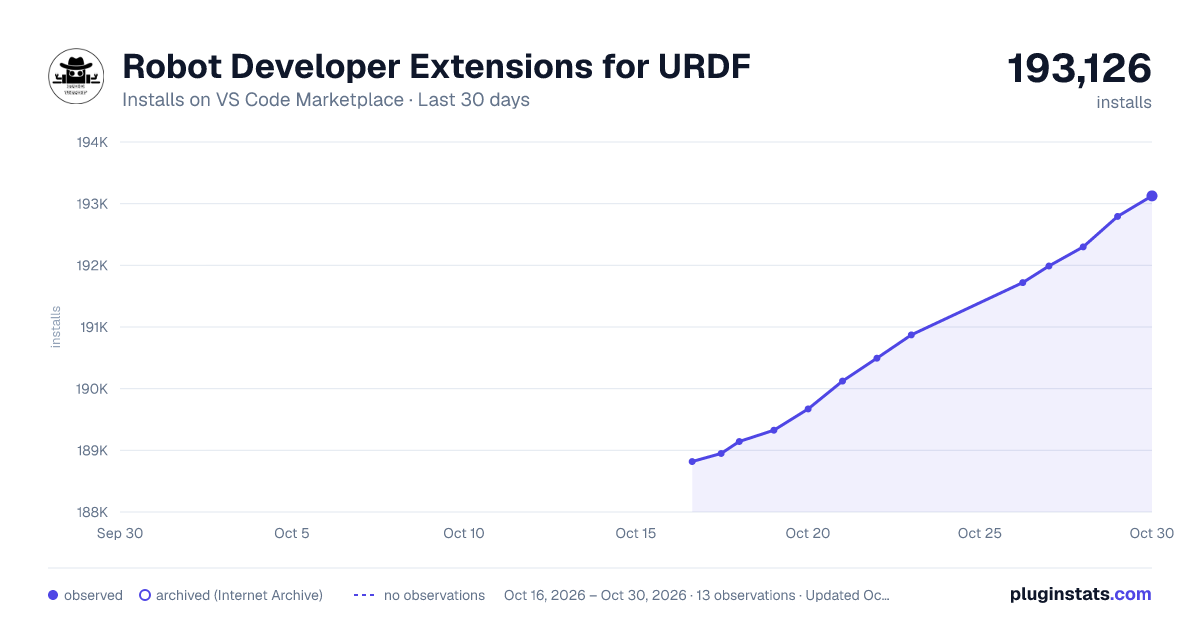
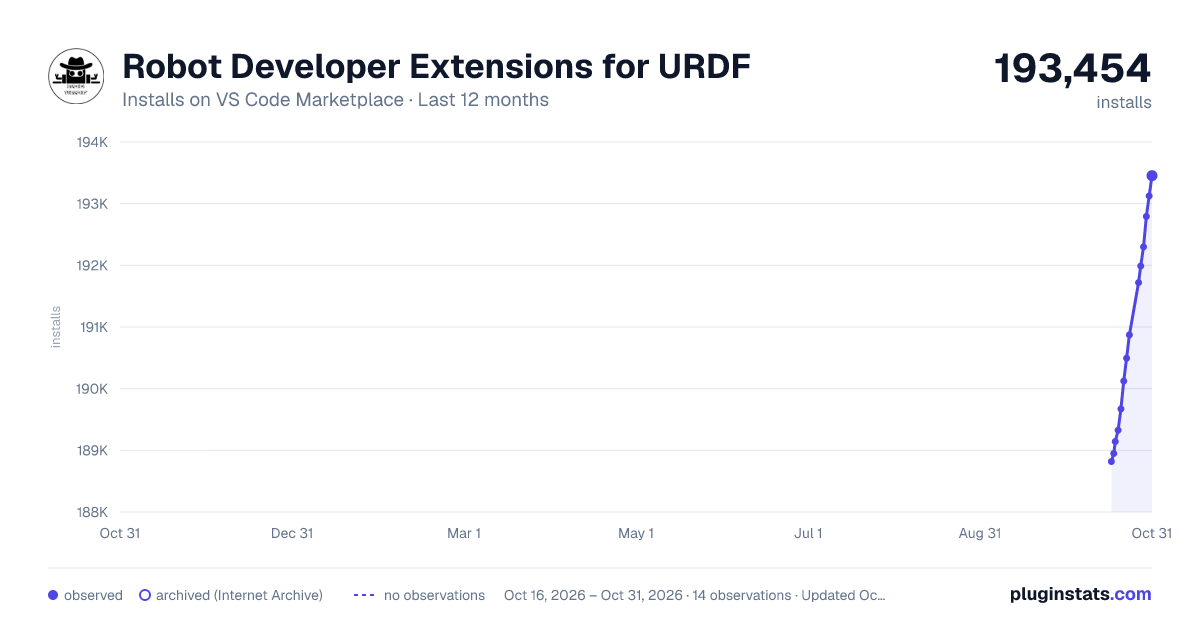
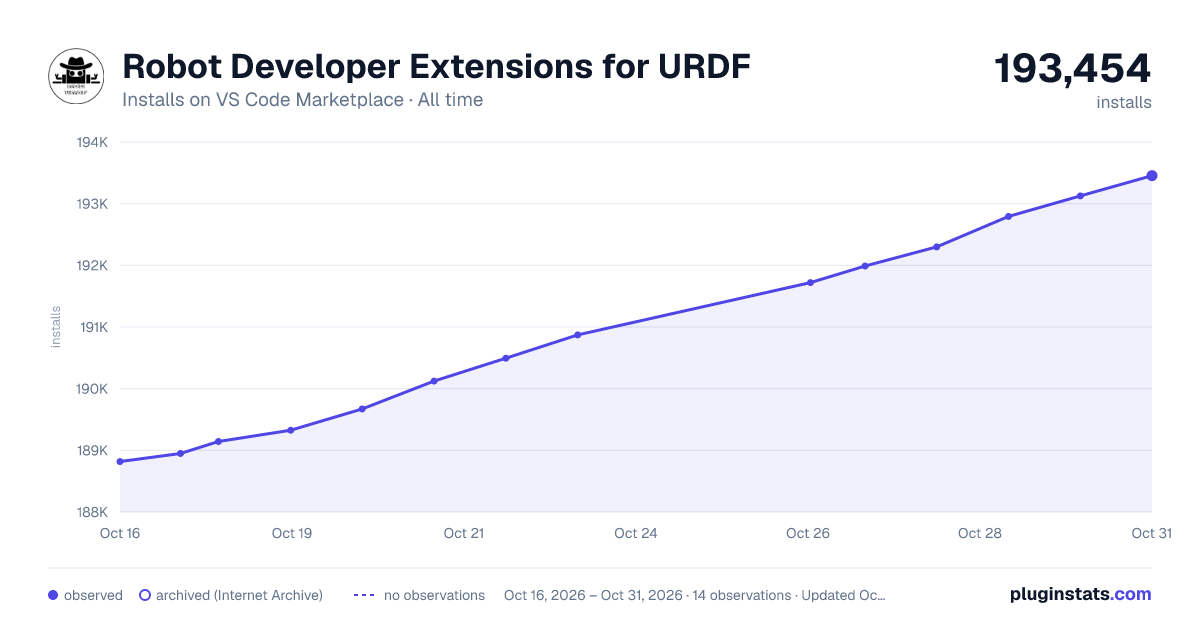

Adoption over time


7/30/90-day growth


Ranking history


Filled points are observed values; hollow points come from Internet Archive snapshots of the listing page. Dashed segments span periods with no observations — values between points are not interpolated.
Recent observations
Full history (3)Similar VS Code Marketplace Other plugins
Data source
Install counts, average rating, and rating counts come from the public Visual Studio Marketplace gallery API. Installs are cumulative and exclude updates.
Listing: https://marketplace.visualstudio.com/items?itemName=Ranch-Hand-Robotics.urdf-editor. First seen Oct 16, 2026; last successful collection Oct 18, 2026. See the methodology.