 PluginStats
Monkey C installs statistics
By Garmin · VS Code Marketplace · Programming Languages
Monkey C Language Support
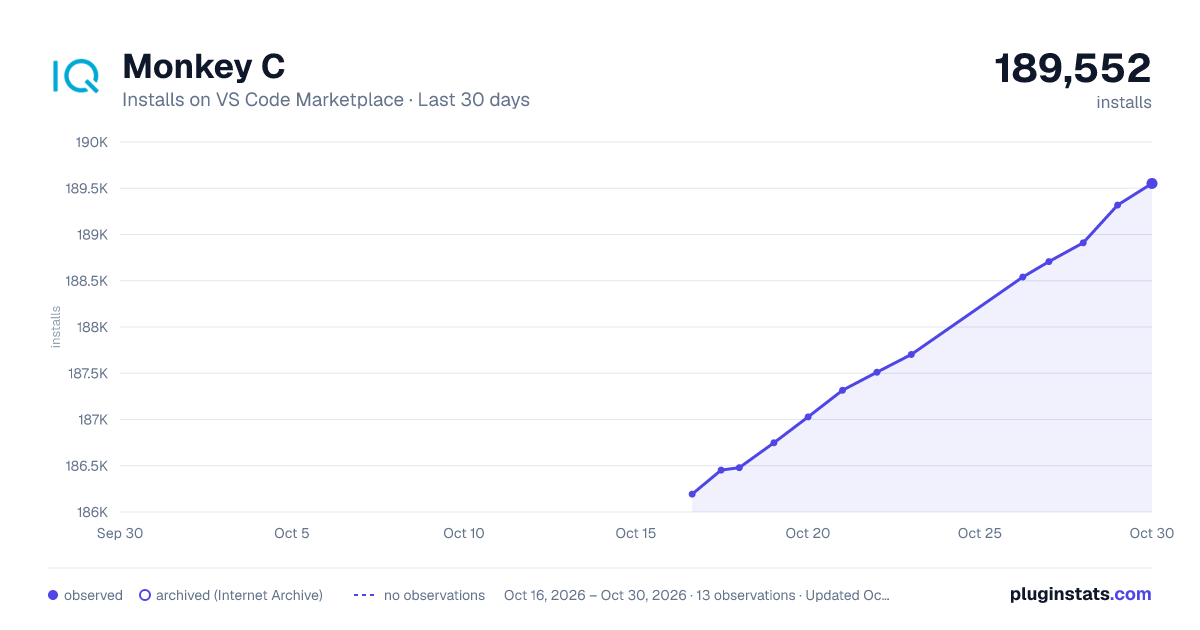
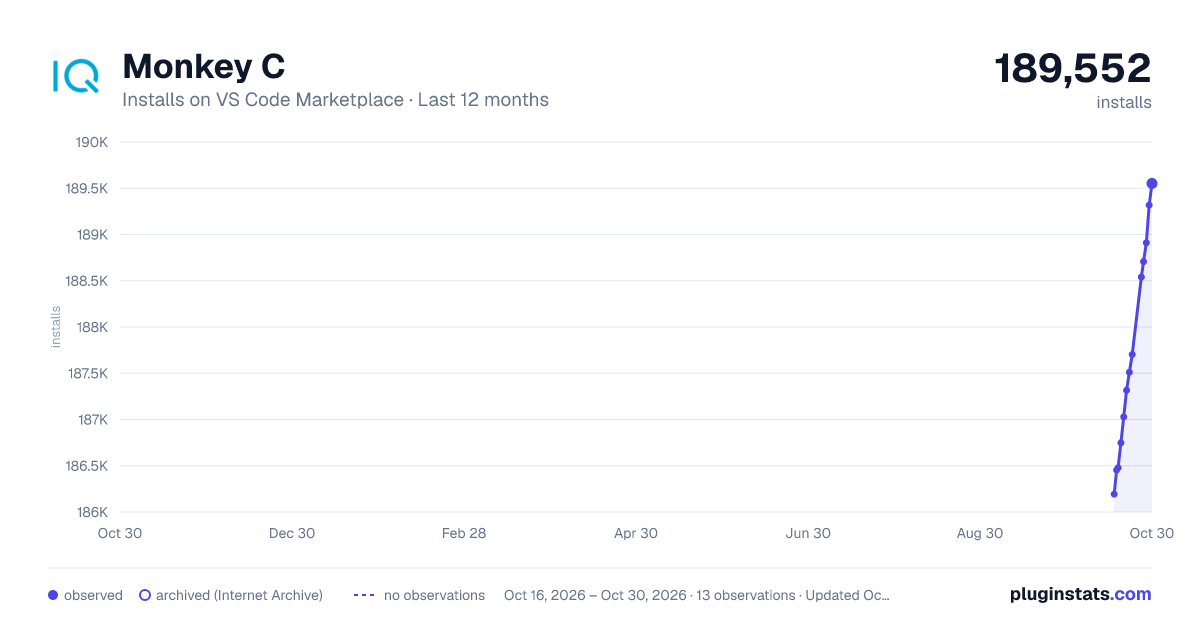
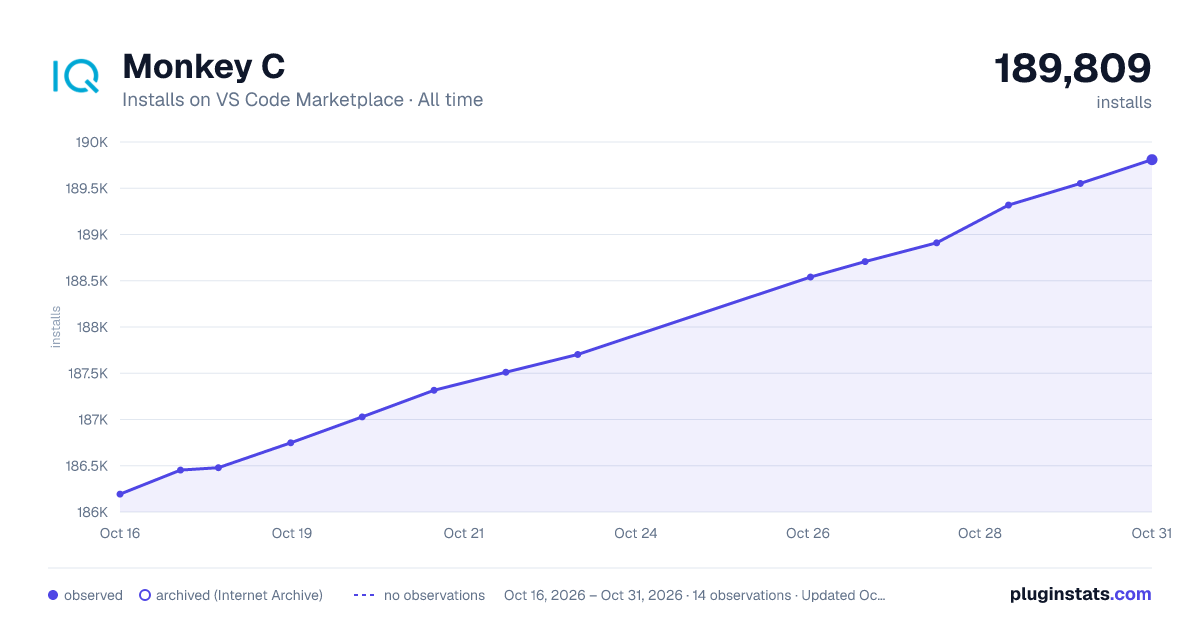
Monkey C has 186,748 recorded installs on VS Code Marketplace.
It ranks #1599 of 2,501 tracked VS Code Marketplace listings by installs.
It is rated 4.1 out of 5 from 9 ratings.
PluginStats has 4 daily observations since Oct 16, 2026; the latest is from Oct 19, 2026.
Rating: 4.11 / 5 from 9 ratings
About Monkey C
Connect IQ
The Monkey C extension adds support for using the Connect IQ SDK. Building and running a Connect IQ app requires the [Connect IQ SDK Manager][downloadSdkManager].
This extension requires Connect IQ SDK 4.0.6 or greater. For more information see [Getting Started guide][gettingStartedGuide].
Quick Start
1. Install extension 2. Download the [Connect IQ SDK Manager][downloadSdkManager] 3. Download an SDK and set it as the current SDK using the SDK Manager 4. Download devices using the SDK Manager 5. Run the Monkey C: Verify Installation command to ensure the development environment is correctly setup
Features
The Monkey C extension allows for creating, building, running, and debugging a Connect IQ app.
The extension supports the following features for .mc, .jungle, and .mss files:
• Autocomplete • Folding Ranges • Real time errors • Renaming • Syntax highlighting
The extension additionally supports the following features for .mc files:
• Find symbols in workspace or document • Find all references for a value • Highlight uses of the value that is currently selected • Hover over a member to see its documentation • Jump to definitions • Show type hierarchy
The following commands are supported:
• Build Current Project: compile an app • Build for Device: launch the Build for Device wizard to select the device, location, and build mode of the build • Clean Project: remove the output folder of the project • Configure Monkey Barrel: add or remove a barrel to the current project • Edit Annotations: add or remove annotations to a barrel project • Edit Application: set the app type, minimum SDK, and other application settings in manifest.xml • Edit Languages: select the translations provided by the app • Edit Permissions: select the permissions needed by the app • Edit Products: select individual products to support • Export Project: generate a .iq file for upload or a .barrel file for distribution • Generate a Developer Key: create a new developer key and set as the current key • Launch Native Pairing: launch the app in native pairing mode • New Project: launch the New Project wizard • Open Monkey Graph: opens the Monkey Graph FIT tool • Open Monkey Motion: opens the Monkey Motion animation tool • Open ERA Viewer: opens the ERA Viewer • Open Samples Folder: opens the folder containing the samples • Open SDK Manager: opens the SDK Manager • Regenerate UUID: regenerate the UUID for the app • Run Tests: run an app's tests • Set Products by Product Category: select products to support based on device grouping and support Connect IQ versions • Verify Installation: verify that the Connect IQ SDK is correctly installed • View Documentation: view the documentation that is found in the SDK
The commands Build Current Project, Run Tests, and New Project can also be launched through the context menu by right-clicking on a folder or file in the Explorer Side Bar.
Extension Settings
This extension contributes the following settings:
• monkeyC.compilerOptions: additional parameters to pass to the compiler • monkeyC.compilerWarnings: show warnings from the compiler, default is true • monkeyC.debugLogLevel: the debug log level to apply when compiling • monkeyC.developerKeyPath: the path to your Connect IQ developer key • monkeyC.javaPath: the path to the root Java SDK folder to use for running Java based tools • monkeyC.jungleFiles: the jungle file(s) to use for compilation, default is monkey.jungle • monkeyC.optimizationLevel: the level of optimization to apply when compiling with SDK 4.1.6 or greater • monkeyC.typeCheckLevel: the level of type checking to apply when using CIQ 4.0 or greater • monkeyC.developerId: developer ID to use with the ERA Viewer
Feedback
Provide any feedback or submit bug reports using the [Connect IQ Development Forums][connectIQForums]
Attributions
This extension uses the following libraries: • The [GSON library][gson] which is licensed under the [Apache 2.0 License][gsonLicense]. • The [LSP4J library][lsp4j] which is licensed under the [Eclipse Public License v2.0][lsp4jLicense]. • The [Apache Commons project][commons] which is licensed under the [Apache 2.0 License][commonsLicense].
Description from the VS Code Marketplace listing.
- debuggers
- jungle
- Monkey C
- monkeyc
- mss
Charts
Images: 30d · 1y · all time · 1600×900 dark

Adoption over time


7/30/90-day growth


Ratings over time


Listing placement


Listing placement


Filled points are observed values; hollow points come from Internet Archive snapshots of the listing page. Dashed segments span periods with no observations — values between points are not interpolated.
Each band is one page of 20. Installs on a log scale. Placement is projected from installs, so it can differ from the marketplace's own sort order. Hover a dot to see the listing.
Recent observations
Full history (4)Similar VS Code Marketplace Programming Languages plugins
All 20 Monkey C alternativesData source
Install counts, average rating, and rating counts come from the public Visual Studio Marketplace gallery API. Installs are cumulative and exclude updates.
Listing: https://marketplace.visualstudio.com/items?itemName=garmin.monkey-c. First seen Oct 16, 2026; last successful collection Oct 19, 2026. See the methodology.