 PluginStats
LLDB DAP installs statistics
By LLVM (2 listings) · VS Code Marketplace · Debuggers
Debugging with LLDB in Visual Studio Code
LLDB DAP has 939,636 recorded installs on VS Code Marketplace.
It ranks #559 of 2,501 tracked VS Code Marketplace listings by installs.
It is rated 5.0 out of 5 from 6 ratings.
PluginStats has 4 daily observations since Oct 16, 2026; the latest is from Oct 19, 2026.
Rating: 5.00 / 5 from 6 ratings
About LLDB DAP
LLDB DAP
Procuring the lldb-dap binary
The extension requires the lldb-dap (formerly lldb-vscode) binary. This binary is not packaged with the VS Code extension.
There are multiple ways to obtain this binary:
• Use the binary provided by your toolchain (for example xcrun -f lldb-dap on macOS) or contact your toolchain vendor to include it. • Download one of the release packages from the LLVM release page. The LLVM-19.1.0-{operating_system}.tar.xz packages contain a prebuilt lldb-dap binary. • Build it from source (see LLDB's build instructions).
By default, the VS Code extension will expect to find lldb-dap in your PATH. Alternatively, you can explicitly specify the location of the lldb-dap binary using the lldb-dap.executable-path setting.
Usage with other IDEs
The lldb-dap binary is a command line tool that implements the Debug Adapter Protocol. It is used to power the VS Code extension but can also be used with other IDEs and editors that support DAP. The protocol is easy to run remotely and also can allow other tools and IDEs to get a full featured debugger with a well defined protocol.
Launching & Attaching to a debugee
Launching or attaching a debugee require you to create a launch configuration. This file defines arguments that get passed to lldb-dap and the configuration settings control how the launch or attach happens.
Launching a debugee
This will launch /tmp/a.out with arguments one, two, and three and adds FOO=1 and bar to the environment:
Launch in integrated terminal
This will launch process in IDE's integrated terminal.
Setup IO redirection
This will launch process and connect stdin to in.txt, both of stdout and stderr to out.txt.
Attaching to a process
When attaching to a process using LLDB, you can attach in multiple ways:
1. Attach to an existing process using the process ID 2. Attach to an existing process by name 3. Attach by name by waiting for the next instance of a process to launch
Attach using PID
This will attach to a process a.out whose process ID is 123:
Attach by Name
This will attach to an existing process whose base name matches a.out. All we have to do is leave the pid value out of the above configuration:
If you want to ignore any existing a.out processes and wait for the next instance to be launched you can add the "waitFor" key value pair:
This will work as long as the architecture, vendor and OS supports waiting for processes. Currently MacOS is the only platform that supports this.
Loading a Core File
This loads the coredump file /cores/123.core associated with the program /tmp/a.out:
Connect to a Debug Server on the Current Machine
This connects to a debug server (e.g. lldb-server, gdbserver) on the current machine, that is debugging the program /tmp/a.out and listening locally on port 2345.
You can also use the gdb-remote-port parameter to send an attach request to a debug server running on the current machine, instead of using the custom command attachCommands.
Connect to a Debug Server on Another Machine
This connects to a debug server running on another machine with hostname hostname. Which is debugging the program /tmp/a.out and listening on port 5678 of that other machine.
You can also use the gdb-remote-hostname and gdb-remote-port parameters to send an attach request to a debug server running on a different machine, instead of custom command attachCommands. The default hostname being used localhost.
Launching via vscode:// URIs
Debugging sessions can also be starting using special URIs.
The vscode://llvm-vs-code-extensions.lldb-dap/start?config={launch-config} URI accepts a URL-encoded JSON launch config. The most frequently used arguments (request, program, args, cwd, pid, ...) can also specified directly, e.g. vscode://llvm-vs-code-extensions.lldb-dap/start?request=attach&pid=1234, or vscode://llvm-vs-code-extensions.lldb-dap/start?program=ls&args=-a&args=/etc.
This is useful for integration with custom scripts to start debugging sessions. The URI might be printed to the terminal, potentially using OSC-8 hyperlinks, or passed to code --open-url or xdg-open, although mileage may vary depending on your specific debugging setup. E.g., code --open-url will not work when using a SSH remote session. Furthermore, placeholders such as ${workspaceFolder} are not supported within launch URLs.
Configuration Settings Reference
For both launch and attach configurations, lldb-dap accepts the following lldb-dap specific key/value pairs:
| Parameter | Type | Req | |…
Description from the VS Code Marketplace listing.
- C
- C++
- debuggers
- Disassembly
- LLDB
- lldb.disassembly
- LLVM
Where LLDB DAP sits in the listing
Each band is one page of 20. Installs on a log scale. Placement is projected from installs, so it can differ from the marketplace's own sort order. Hover a dot to see the listing.


Charts
Images: 30d · 1y · all time · 1600×900 dark
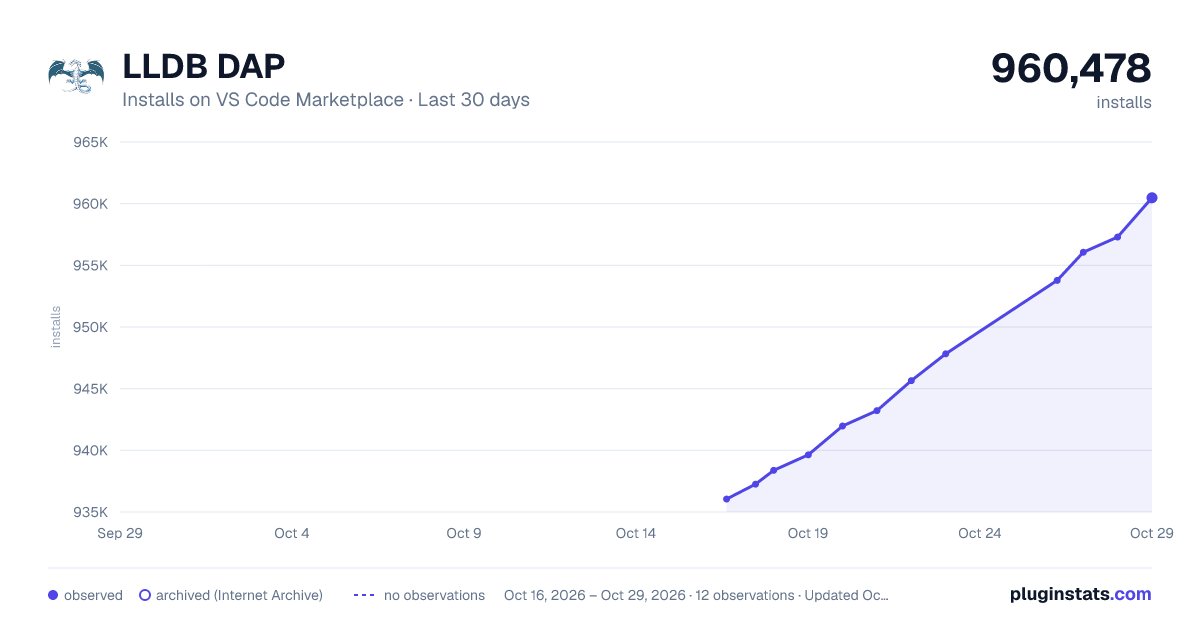
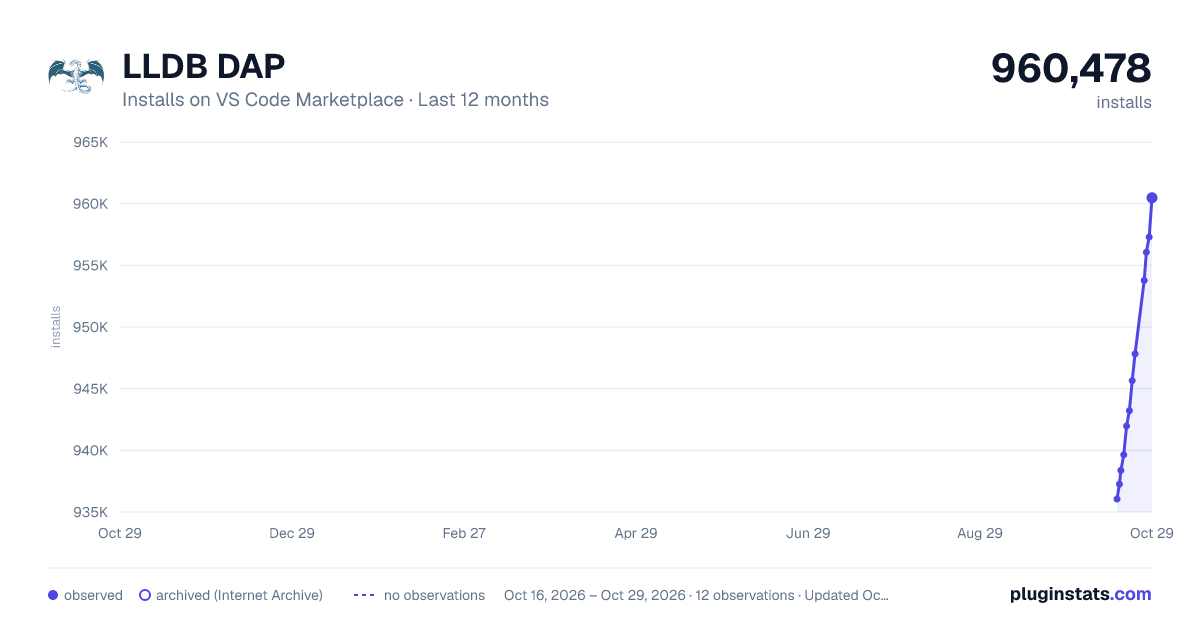
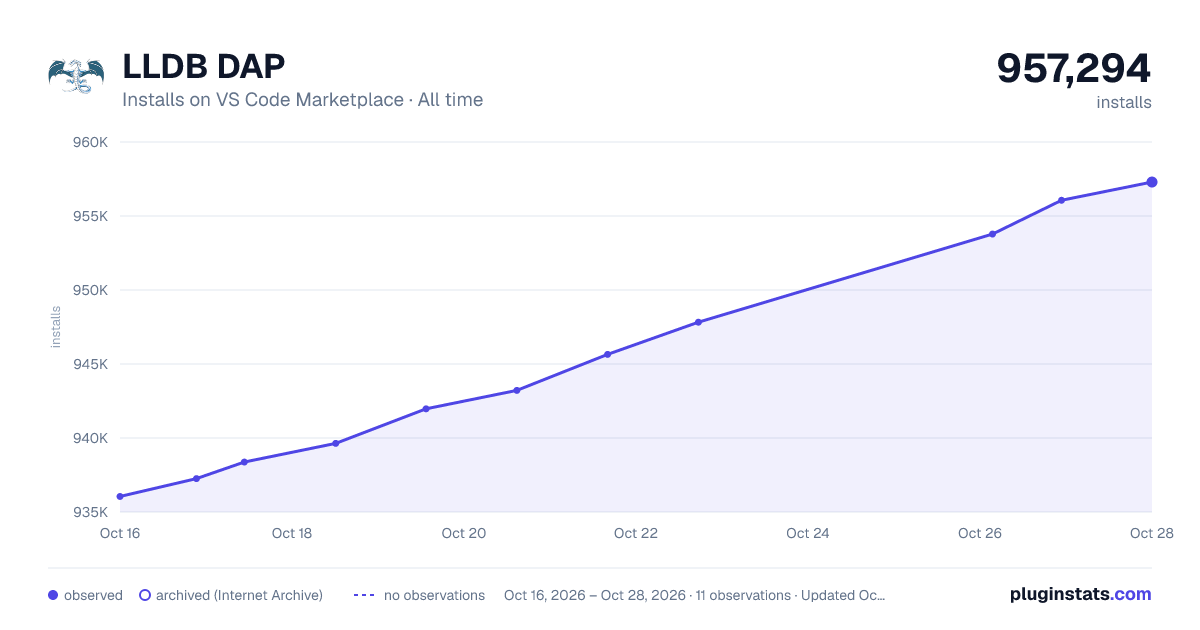

Adoption over time


7/30/90-day growth


Filled points are observed values; hollow points come from Internet Archive snapshots of the listing page. Dashed segments span periods with no observations — values between points are not interpolated.
Recent observations
Full history (4)Similar VS Code Marketplace Debuggers plugins
Data source
Install counts, average rating, and rating counts come from the public Visual Studio Marketplace gallery API. Installs are cumulative and exclude updates.
Listing: https://marketplace.visualstudio.com/items?itemName=llvm-vs-code-extensions.lldb-dap. First seen Oct 16, 2026; last successful collection Oct 19, 2026. See the methodology.