 PluginStats
Argutec Azure Repos installs statistics
By Argutec · VS Code Marketplace · SCM Providers
Connect to Azure Repos and work with Git and Team Foundation Version Control (TFVC) repositories. Manage your pull requests, work items, and more.
Argutec Azure Repos has 95,457 recorded installs on VS Code Marketplace.
It ranks #2439 of 2,501 tracked VS Code Marketplace listings by installs.
It is rated 3.7 out of 5 from 7 ratings.
PluginStats has 4 daily observations since Oct 16, 2026; the latest is from Oct 19, 2026.
Rating: 3.71 / 5 from 7 ratings
About Argutec Azure Repos
Azure Repos Extension for Visual Studio Code
This extension allows you to connect to Azure DevOps Services and Team Foundation Server and provides support for Team Foundation Version Control (TFVC). It allows you to monitor your builds and manage your pull requests and work items for your TFVC or Git source repositories. The extension uses your local repository information to connect to either Azure DevOps Services or Team Foundation Server 2015 Update 2 (and later).
Here is the Walkthrough of the Azure Repos extension for Visual Studio Code video that shows many of the features of the extension.
Prerequisites
Azure DevOps Services
If you are using the extension with Azure DevOps Services, ensure you have an Azure DevOps Services organization. If you do not have one, sign up for Azure DevOps Services.
Team Foundation Server
If you are planning on using the extension with Team Foundation Server, you must be running Team Foundation Server 2015 Update 2 or later. Earlier versions of Team Foundation Server are not supported.
Clone your Git repository
With Git, the extension uses the remote origin of your repository to determine how to connect to Azure DevOps Services (or your Team Foundation Server), in most cases you will need to have a Git repository already cloned locally. If you intend on cloning an existing repository, do so before proceeding. If you do not have a Git repository cloned locally but already have an Azure DevOps Services organization (or a Team Foundation Server instance), you may create a local repository (via git init) and once you set the "origin" remote for that local repository, the extension will detect the change to the remote and attempt to contact Azure DevOps Services (or Team Foundation Server).
Create your TFVC workspace
With TFVC, the extension uses information about the current workspace to determine how to connect to Azure DevOps Services (or your Team Foundation Server). Workspaces can be created using the Visual Studio IDE, Eclipse or with the JetBrains IDEs (e.g, Android Studio, IntelliJ).
Note: At this time, you will need to have a *local* TFVC workspace already available on your local machine. More information about the difference between the two types (and how to determine which one you're using) can be found here. The issue tracking support for Server workspaces is here.
Installation
First, you will need to install Visual Studio Code 1.12.0 or later.
To install the extension with the latest version of Visual Studio Code (version 1.13.1 is the latest as of this writing), bring up the Visual Studio Code Command Palette (F1), type install and choose Extensions: Install Extensions. In the Search Extensions in Marketplace text box, type team. Find the Azure Repos extension published by *Microsoft* and click the Install button. Restart Visual Studio Code.
Authentication
Azure DevOps Services
If you are connecting to Azure DevOps Services, you will need a personal access token (PAT). With the release of v1.121.0 of the extension, you have a choice of whether you would like to create a token yourself manually and provide it when prompted, or use a new experience in which you are authenticated to Azure DevOps Services using your web browser. In the new experience, a personal access token is still created on your behalf but only after you are authenticated. The created token has *All Scopes* permissions but can be updated in your profile settings. Both tokens (manual or the new experience) are stored securely on your machine.
Manual Token Creation
Should you wish to create a personal access token yourself, go here to read how. You can also view our video on how to do the same. • Git repositories require that you create your token with the Build (read), Code (read) and Work items (read) scopes to ensure full functionality. You can also use *All Scopes*, but the minimum required scopes are those listed above. • TFVC repositories require tokens with *All Scopes*. Anything less will cause the extension to fail.
Browser-based Authentication
When using the new authentication experience, you will be prompted to copy a *device code* used to identify yourself to the authentication system. Once you accept the prompt to begin authentication, your default web browser will be opened to a login page. After supplying that device code and having it verified, you will then be prompted to authenticate with Azure DevOps Services normally (e.g., username and password, multi-factor authentication, etc.). Once you are authenticated to Azure DevOps Services, a personal access token will be created for you and the extension will be initialized normally. To see what this experience is like, view this video.
Team Foundation Server
If you are connecting to Team Foundation Server, you will only need your NTLM credentials (domain name, server name and password). It is assumed that you have the proper permissions on the TFS Server.
Details on how to connect to either Azure DevOps Services or Team Foundation Server are found in the next section.
TFVC Support
Once you have a local TFVC workspace available, you must configure the TFVC support in Visual Studio Code. You can find that information (including demo videos) in our TFVC documentation.
Open a local Repository folder
Once you have installed the extension, open either the root folder or a sub-folder of the repository. Once an Azure DevOps Services or Team Foundation Server 2015 Update 2 (or later) repository is detected by the extension, you will need to provide your credentials (if credentials weren't already found). If you are required to provide your credentials, there will be an indicator in the status bar whose message will indicate that you need to sign in.
The indicator looks like this:…
Description from the VS Code Marketplace listing.
- Azure Repos
- git
- Team Foundation Server
- Team Services
- TFVC
- Visual Studio Team Services
- VSTS
Where Argutec Azure Repos sits in the listing
Each band is one page of 20. Installs on a log scale. Placement is projected from installs, so it can differ from the marketplace's own sort order. Hover a dot to see the listing.


Charts
Images: 30d · 1y · all time · 1600×900 dark
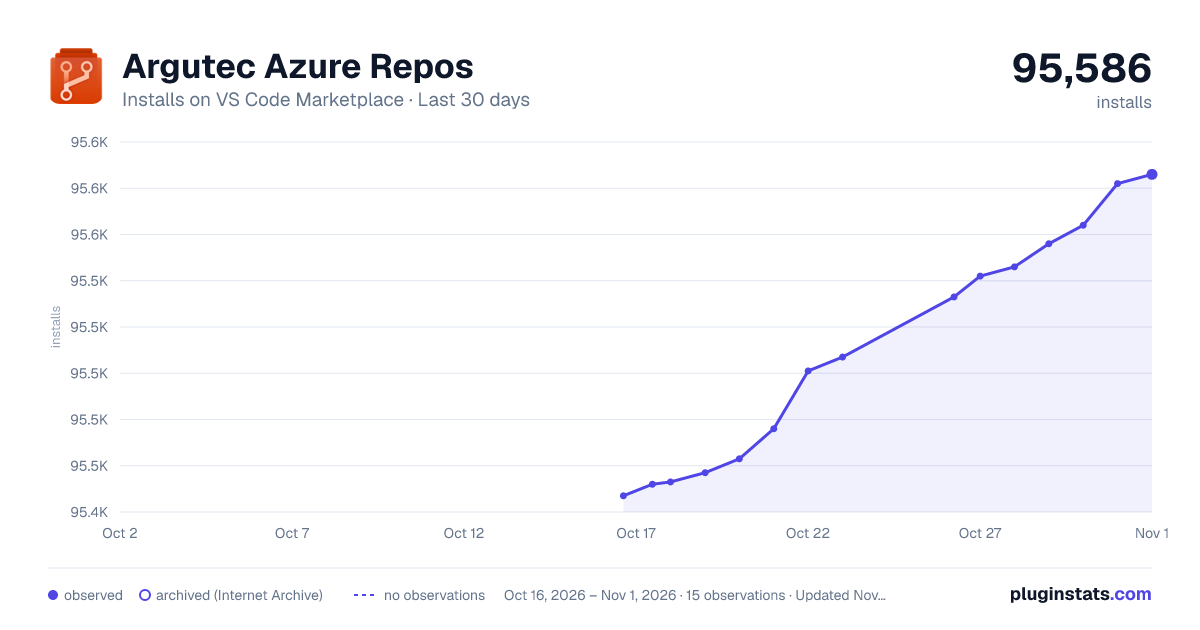
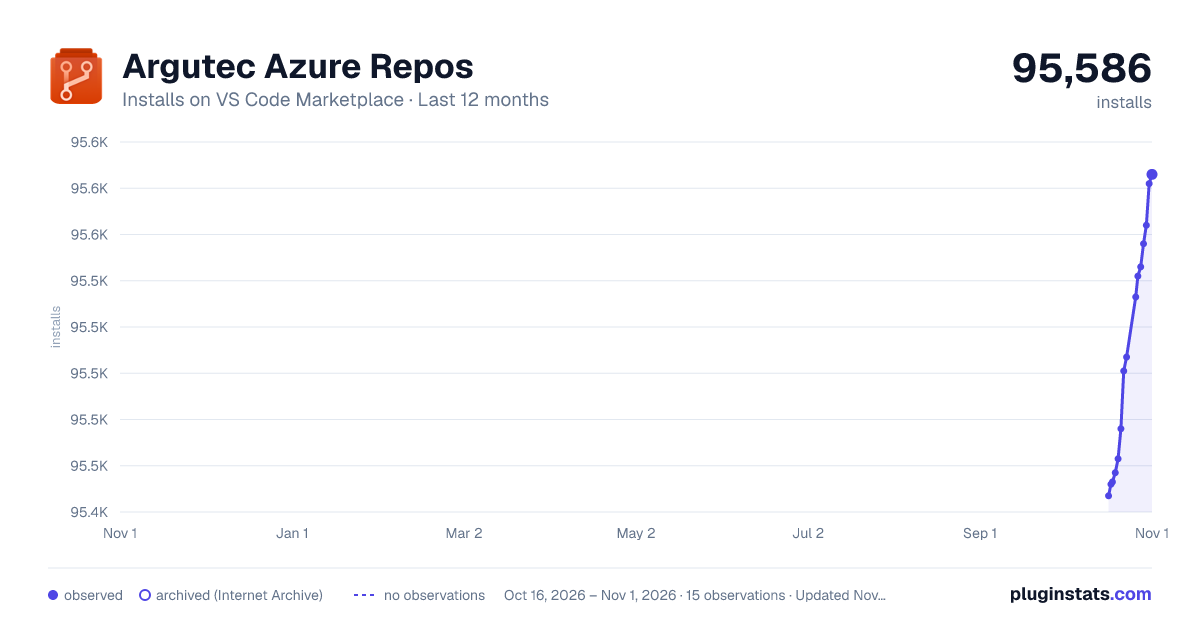
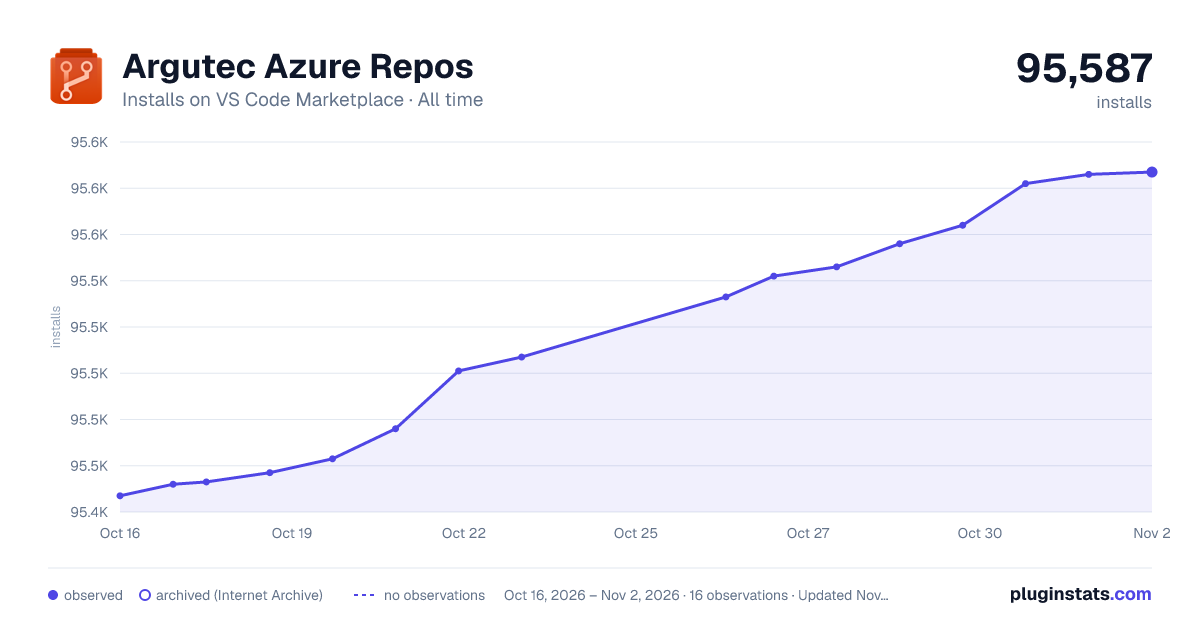

Adoption over time


7/30/90-day growth


Ranking history


Filled points are observed values; hollow points come from Internet Archive snapshots of the listing page. Dashed segments span periods with no observations — values between points are not interpolated.
Recent observations
Full history (4)Similar VS Code Marketplace SCM Providers plugins
Data source
Install counts, average rating, and rating counts come from the public Visual Studio Marketplace gallery API. Installs are cumulative and exclude updates.
Listing: https://marketplace.visualstudio.com/items?itemName=argutec.argutec-azure-repos. First seen Oct 16, 2026; last successful collection Oct 19, 2026. See the methodology.