 PluginStats
APKLab installs statistics
By Surendrajat · VS Code Marketplace · Programming Languages
Android Reverse-Engineering Workbench
APKLab has 151,045 recorded installs on VS Code Marketplace.
It ranks #1844 of 2,501 tracked VS Code Marketplace listings by installs.
It is rated 4.4 out of 5 from 7 ratings.
PluginStats has 4 daily observations since Oct 16, 2026; the latest is from Oct 19, 2026.
Rating: 4.43 / 5 from 7 ratings
About APKLab
APKLab
The ultimate Android RE experience right inside your VS Code.
APKLab seamlessly integrates the best open-source tools: Apktool, smali-lsp, Jadx, uber-apk-signer, apk-mitm and more to the excellent VS Code so you can focus on app analysis and get it done without leaving the IDE.
Features
• Decode/Edit/Rebuild app resource files • Disassemble/Mod/Rebuild an APK to/from Smali • Decompile the APK to Java source • Excellent Smali language support with smali-lsp — go to definition, find references, hover, call/type hierarchy, code lens, completion, diagnostics • Analyze & mod effectively in VS Code with full IDE features • Sign & Install the APK after rebuild • Generate Frida hooks for any smali methods • Inject Frida gadget into APK with automatic main activity patching • Initialize git repo in project dir to track changes • Apply MITM patch for HTTPS inspection • Interactive Malware Analysis Report • Support for Apktool-style projects (apktool.yml) • Support for Apktool 3.0+ CLI arguments • Android resource frameworks management • Support for user-provided keystore for APK signing • Check for update and install needed tools automatically • Supports Linux, Mac and WSL2
Requirements
• JDK 17+
Run java -version in your Shell, if not found, download from here.
• quark-engine >=21.01.6 (optional - for malware analysis)
Run quark in your Shell, if not found, check official docs.
• adb (optional) Run adb devices in your Shell, if not found, check this guide.
Getting Started
Open APK or Apktool project
• Open the Command Palette (Ctrl+Shift+P) ➜ APKLab: Open an APK • Or Just open an existing Apktool project folder
Apply MITM patch
• Right-Click on or inside apktool.yml file ➜ APKLab: Prepare for HTTPS inspection
ReBuild and Sign APK
• Right-Click on or inside apktool.yml file ➜ APKLab: Rebuild the APK
Install APK to device
• Right-Click on .apk file (in dist directory) ➜ APKLab: Install the APK
Generate Frida Hook
• Right-Click inside a .method in a .smali file ➜ APKLab: Generate Frida Hook • Hook is appended to frida_hooks.ts in the project root
Inject Frida Gadget
• Right-Click on or inside apktool.yml file ➜ APKLab: Inject Frida Gadget • Select the gadget .so file, target architecture, and the main activity is patched automatically
Clean ApkTool frameworks dir
• Open the Command Palette (Ctrl+Shift+P) ➜ APKLab: Empty ApkTool Framework Dir
Extension Settings
Dependency Paths
• apklab.apktoolPath: Full Path of apktool.jar. If you want to use a different version of it, change it like:
"apklab.apktoolPath": "/home/oozer/downloads/apktool_2.4.1.jar"
• apklab.apkSignerPath: Full Path of uber-apk-signer.jar. If you want to use a different version of it, change it like:
"apklab.apkSignerPath": "/home/oozer/downloads/uber-apk-signer-1.1.0.jar"
• apklab.jadxDirPath: Full Path of jadx-x.y.z dir. If you want to use a different version of it, change it like:
"apklab.jadxDirPath": "/home/oozer/downloads/jadx-1.1.0"
• apklab.smaliLspPath: Full Path of smali-lsp.jar. If you want to use a different version of it, change it like:
"apklab.smaliLspPath": "/home/oozer/downloads/smali-lsp.jar"
• apklab.javaPath: Path to the Java executable (default: java). Change it if Java is not on your PATH:
"apklab.javaPath": "/usr/lib/jvm/java-17/bin/java"
Keystore configuration
• apklab.keystorePath: Put the absolute path of your Java keystore(.jks or .keystore) file here.
"apklab.keystorePath": "/home/oozer/downloads/debug.keystore"
• apklab.keystorePassword: Put the password of your keystore here. • apklab.keyAlias: Put the alias of the used key in the keystore here. • apklab.keyPassword: Put the password of the used key in the keystore here.
Additional configuration
• apklab.initProjectDirAsGit: Initialize project output directory as Git repository. • apklab.updateTools: Whether APKLab should check for tools (for apklab, jadx...) update and show a notification. • smaliLsp.trace.server: Traces the communication between VS Code and the Smali Language Server (off, messages, verbose).
Known Issues
Please check our Bug tracker for known issues.
Contribution Guide
For bug reports, feature requests or simply discussing an idea, please open an issue here. PRs are always welcome.
Changelog
Credits
• Feimaomii for the awesome logo • Aman Sharma for active contribution • Niklas Higi for apk-mitm • Shaun Dang, JunWei Song & KunYu Chen for Quark-Engine • iBotPeaches, brutall and JesusFreke for Apktool & Smali • patrickfav for uber-apk-signer • skylot for Jadx
Description from the VS Code Marketplace listing.
- analysis
- android
- apk
- apk editor
- apksigner
- apktool
- bytecode
- dalvik
- decompiler
- disassembler
- jadx
- re
- reverse engineering
- smali
Where APKLab sits in the listing
Each band is one page of 20. Installs on a log scale. Placement is projected from installs, so it can differ from the marketplace's own sort order. Hover a dot to see the listing.


Charts
Images: 30d · 1y · all time · 1600×900 dark
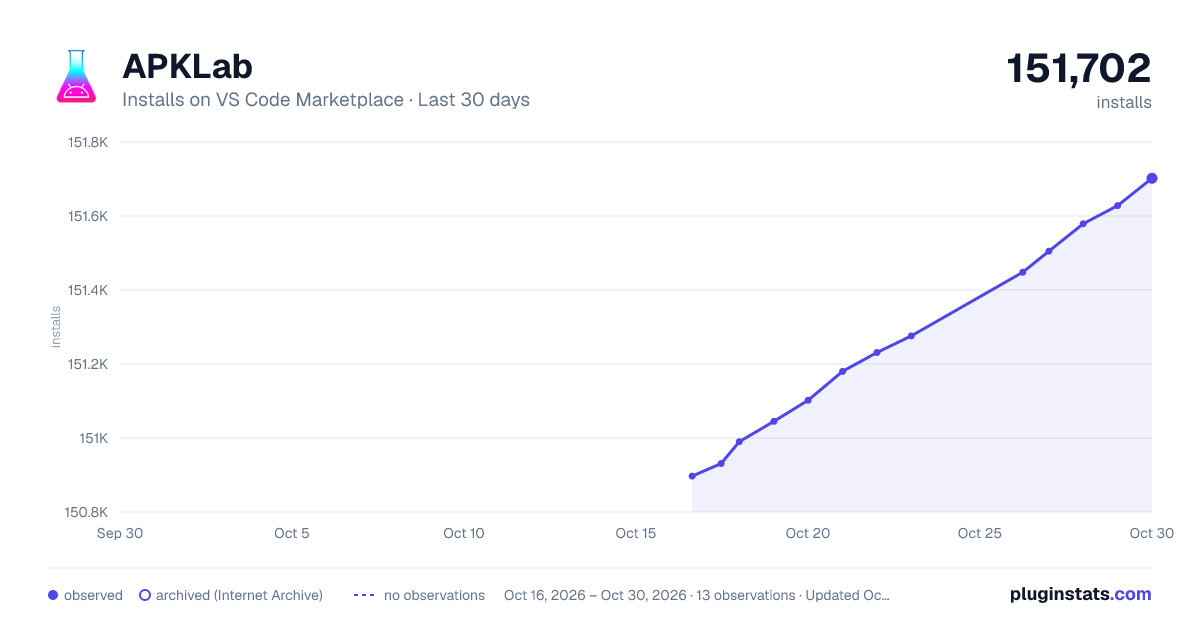
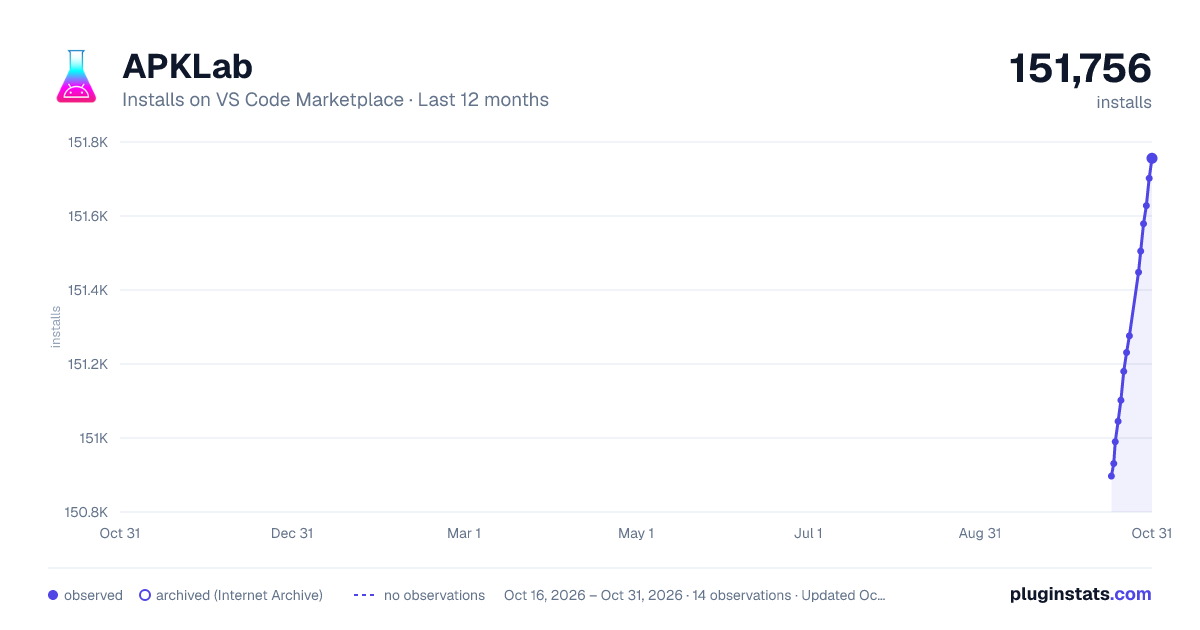
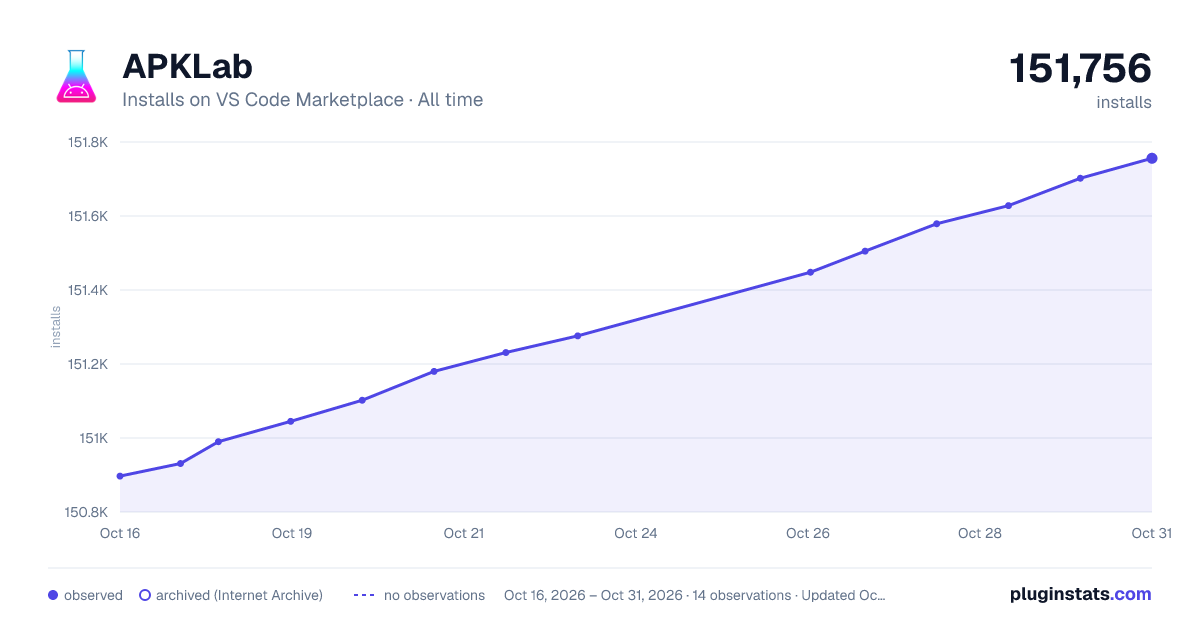

Adoption over time


7/30/90-day growth


Filled points are observed values; hollow points come from Internet Archive snapshots of the listing page. Dashed segments span periods with no observations — values between points are not interpolated.
Recent observations
Full history (4)Similar VS Code Marketplace Programming Languages plugins
Data source
Install counts, average rating, and rating counts come from the public Visual Studio Marketplace gallery API. Installs are cumulative and exclude updates.
Listing: https://marketplace.visualstudio.com/items?itemName=Surendrajat.apklab. First seen Oct 16, 2026; last successful collection Oct 19, 2026. See the methodology.