 PluginStats
Raspberry Pi Pico installs statistics
By Raspberry Pi · VS Code Marketplace · Snippets
The official VS Code extension for Raspberry Pi Pico development. It includes several features to simplify project creation and deployment. (Single folder workspaces only)
Raspberry Pi Pico has 291,621 recorded installs on VS Code Marketplace.
It ranks #1180 of 2,501 tracked VS Code Marketplace listings by installs.
It is rated 3.7 out of 5 from 15 ratings.
PluginStats has 4 daily observations since Oct 16, 2026; the latest is from Oct 19, 2026.
Rating: 3.67 / 5 from 15 ratings
About Raspberry Pi Pico
Raspberry Pi Pico Visual Studio Code extension
Note: The extension is currently under development.
This is the official Visual Studio Code extension for Raspberry Pi Pico development. This extension equips you with a suite of tools designed to streamline your Pico projects using Visual Studio Code and the official Pico SDK.
For comprehensive setup instructions, refer to the Getting Started guide PDF.
If you have any issues while installing, please check out the Troubleshooting section.
Download latest Beta 📀
Features
Project Setup and Management
• Project Generator: Easily create and configure new projects with support for advanced Pico features like I2C and PIO. The generator targets the Ninja build system and allows customization during project creation. • Quick Project Setup: Initiate new Pico projects directly from the Explorer view, when no workspace is open. • MicroPython Support: Create and develop MicroPython-based Pico projects with support provided through the MicroPico extension.
Configuration and Tool Management
• Automatic CMake Configuration: Automatically configures CMake when loading a project. • Version Switching: Seamlessly switch between different versions of the Pico SDK and tools. • No Manual Setup Required: Automatically handles environment variables, toolchain, SDK, and tool management. • Includes an Uninstaller: Easily remove the extension along with all automatically installed tools and SDKs.
Build, Debug, and Documentation
• One-Click Compilation and Debugging: Automatically configure OpenOCD, Ninja, and CMake, allowing you to compile and debug with a single click. • Offline Documentation: Conveniently access Pico SDK documentation directly within the editor, even when offline. • Version Switching: Seamlessly switch between different versions of the Pico SDK and tools. • No Manual Setup Required: The extension handles environment variables, toolchain, SDK, and tool management for you. • One-Click Compilation: Compile projects directly from the status bar with your selected SDK and tools. • Offline Documentation: Access Pico SDK documentation offline. • Quick Project Setup: Quickly create new Pico projects from the Explorer view when no workspace is open. • MicroPython Support: Create MicroPython-based Pico projects with support provided through the MicroPico extension. • Rust Support: Create and develop Rust-based Pico projects based on the rp-hal crate. • Zephyr Support: Create and develop Zephyr-based Pico projects using the official Zephyr SDK.
Requirements by OS
Supported Platforms: Raspberry Pi OS (64-bit), Windows 10/11, macOS Sonoma (14.0) and newer, Linux x64 and arm64
• Visual Studio Code v1.105.1 or later
Raspberry Pi OS and Windows
Not including Raspberry Pi OS Lite - see Other Linux for that
No additional requirements are needed.
macOS
To meet the requirements for macOS, run the following command in Terminal to install necessary tools:
This command installs all of the necessary tools, including but not limited to: • Git 2.28 or later (ensure it's in your PATH) • Tar (ensure it's in your PATH)
You may also need to accept the xcode license with sudo xcodebuild -license
Other Linux
• Python 3.10 or later (ensure it’s in your PATH or set in settings) • Git 2.28 or later (ensure it’s in your PATH) • Tar (ensure it’s in your PATH) • \[Optional\] gdb-multiarch for debugging (x86_64 only) • \[Optional\] udev rules installed to use OpenOCD and picotool without sudo, for debugging and loading • For \[Ubuntu 22.04\], install libftdi1-2 and libhidapi-hidraw0 packages to use OpenOCD
Extension Settings
This extension provides the following settings:
• raspberry-pi-pico.cmakePath: Specify a custom path for CMake. • raspberry-pi-pico.python3Path: Specify a custom path for Python 3 _(machine scoped)_. • raspberry-pi-pico.ninjaPath: Specify a custom path for Ninja. • raspberry-pi-pico.gitPath: Specify a custom path for Git. • raspberry-pi-pico.cmakeAutoConfigure: Enable/Disable automatic CMake configuration when project is opened • raspberry-pi-pico.useCmakeTools: Enable/Disable the CMake Tools Extension Integration (see below) • raspberry-pi-pico.githubToken: Provide a GitHub personal access token (classic) with the public_repo scope. This token is used to check for available versions of the Pico SDK and other tools. Without it, the extension uses the unauthenticated GitHub API, which has a lower rate limit and may lead to restricted functionality if the limit is exceeded. The unauthenticated rate limit is per public IP address, so a token is more necessary if your IP is shared with many users.
CMake Tools Extension Integration
For more complex projects, such as those with multiple executables or when the project name is defined as a variable, this extension can integrate with the CMake Tools extension to enhance CMake parsing. You can enable the CMake Tools Extension integration during project generation, using the checkbox at the bottom of the page. To enable it for an existing project, you should re-import the project with the option selected, which will update the relevant files.
You should continue using this extension for running & debugging, and we recommend still using the buttons from this extension for compilation too, only using the CMake Tools extension for configuration. If prompted, select the Pico kit in CMake Tools.
Additional Rust Prerequisites
• rustup – Installs and manages Rust. Get it from rustup.rs. • A C compiler for your system: • Linux: gcc • macOS: clang • Windows: MSVC
Zephyr notes
Unfortunately, the Zephyr project requires numerous external dependencies. Most of these are covered automatically, but for wget we were not able to identify a reliable upstream source that provides official binaries for all three supported platforms.…
Description from the VS Code Marketplace listing.
- pi
- pico
- pico sdk
- pico w
- raspberry
- raspberry pi
- raspberry pi pico
- raspberry pi pico w
Where Raspberry Pi Pico sits in the listing
Each band is one page of 20. Installs on a log scale. Placement is projected from installs, so it can differ from the marketplace's own sort order. Hover a dot to see the listing.


Charts
Images: 30d · 1y · all time · 1600×900 dark
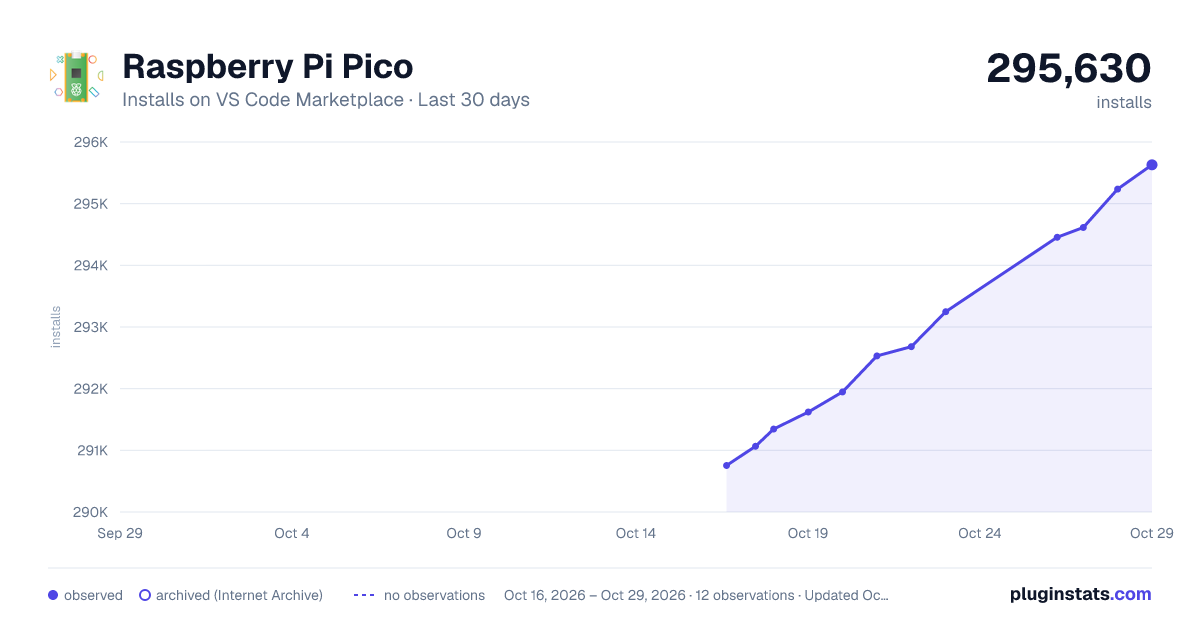
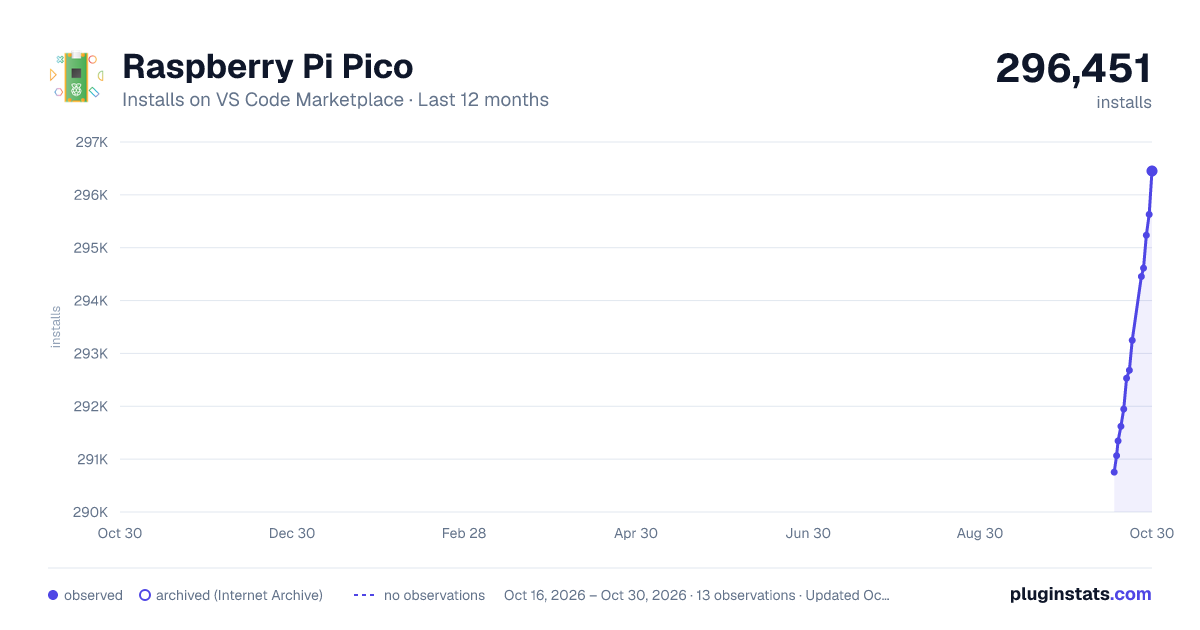
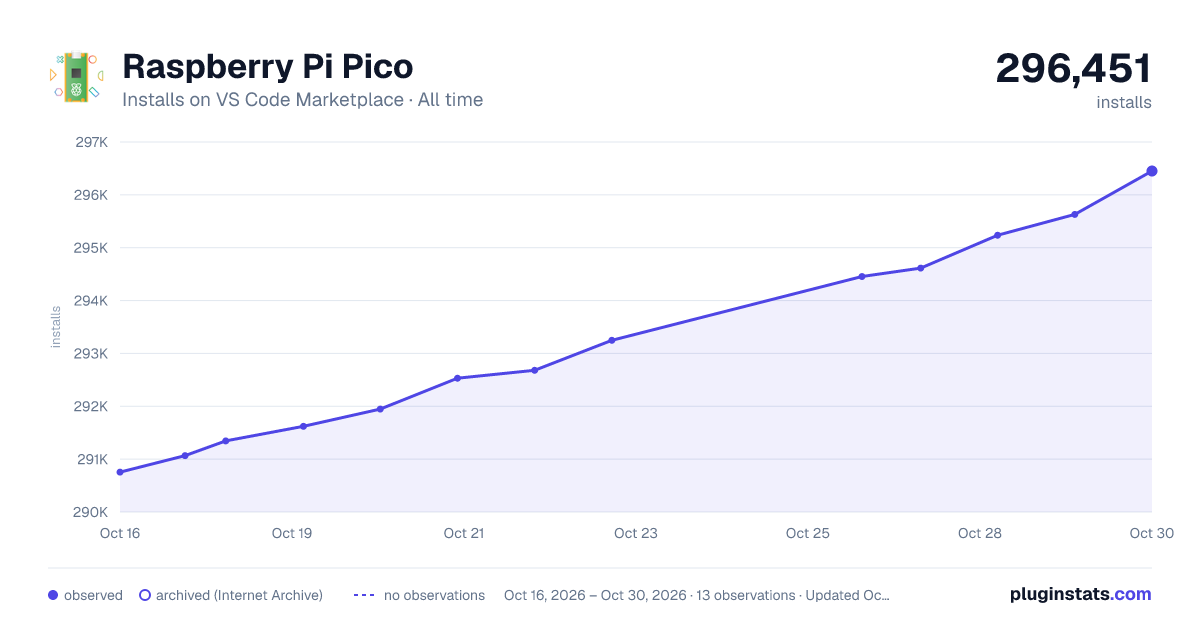

Adoption over time


7/30/90-day growth


Ranking history


Filled points are observed values; hollow points come from Internet Archive snapshots of the listing page. Dashed segments span periods with no observations — values between points are not interpolated.
Recent observations
Full history (4)Similar VS Code Marketplace Snippets plugins
Data source
Install counts, average rating, and rating counts come from the public Visual Studio Marketplace gallery API. Installs are cumulative and exclude updates.
Listing: https://marketplace.visualstudio.com/items?itemName=raspberry-pi.raspberry-pi-pico. First seen Oct 16, 2026; last successful collection Oct 19, 2026. See the methodology.