 PluginStats
Perl installs statistics
By Gerald Richter · VS Code Marketplace · Programming Languages
Language Server and Debugger for Perl
Perl has 313,208 recorded installs on VS Code Marketplace.
It ranks #1119 of 2,501 tracked VS Code Marketplace listings by installs.
It is rated 3.5 out of 5 from 21 ratings.
PluginStats has 4 daily observations since Oct 16, 2026; the latest is from Oct 19, 2026.
Rating: 3.48 / 5 from 21 ratings
About Perl
Perl::LanguageServer
Language Server and Debug Protocol Adapter for Perl
Features
• Language Server • Syntax checking • Symbols in file • Symbols in workspace/directory • Goto Definition • Find References • Call Signatures • Supports multiple workspace folders • Document and selection formatting via perltidy • Run on remote system via ssh • Run inside docker container • Run inside kubernetes • Debugger • Run, pause, step, next, return • Support for coro threads • Breakpoints • Conditional breakpoints • Breakpoints can be set while program runs and for modules not yet loaded • Variable view, can switch to every stack frame or coro thread • Set variable • Watch variable • Tooltips with variable values • Evaluate perl code in debuggee, in context of every stack frame of coro thread • Automatically reload changed Perl modules while debugging • Debug multiple perl programs at once • Run on remote system via ssh • Run inside docker container • Run inside kubernetes
Requirements
You need to install the perl module Perl::LanguageServer to make this extension work, e.g. run cpan Perl::LanguageServer on your target system.
Please make sure to always run the newest version of Perl::LanguageServer as well.
NOTE: Perl::LanguageServer depend on AnyEvent::AIO and Coro. There is a warning that this might not work with newer Perls. It works fine for Perl::LanguageServer. So just confirm the warning and install it.
Perl::LanguageServer depends on other Perl modules. It is a good idea to install most of then with your linux package manager.
e.g. on Debian/Ubuntu run:
e.g. on Centos 7 run:
In case any of the above packages are not available for your os version, just leave them out. The cpan command will install missing dependencies. In case the test fails, when running cpan install, you should try to run force install.
Extension Settings
This extension contributes the following settings:
• perl.enable: enable/disable this extension • perl.sshAddr: ip address of remote system • perl.sshPort: optional, port for ssh to remote system • perl.sshUser: user for ssh login • perl.sshCmd: defaults to ssh on unix and plink on windows • perl.sshWorkspaceRoot: path of the workspace root on remote system • perl.perlCmd: defaults to perl • perl.perlArgs: additional arguments passed to the perl interpreter that starts the LanguageServer • useTaintForSyntaxCheck: if true, use taint mode for syntax check • perl.sshArgs: optional arguments for ssh • perl.pathMap: mapping of local to remote paths • perl.perlInc: array with paths to add to perl library path. This setting is used by the syntax checker and for the debuggee and also for the LanguageServer itself. • perl.fileFilter: array for filtering perl file, defaults to [*.pm,*.pl] • perl.ignoreDirs: directories to ignore, defaults to [.vscode, .git, .svn] • perl.debugAdapterPort: port to use for connection between vscode and debug adapter inside Perl::LanguageServer. • perl.debugAdapterPortRange: if debugAdapterPort is in use try ports from debugAdapterPort to debugAdapterPort + debugAdapterPortRange. Default 100. • perl.showLocalVars: if true, show also local variables in symbol view • perl.logLevel: Log level 0-2. • perl.logFile: If set, log output is written to the given logfile, instead of displaying it in the vscode output pane. Log output is always appended. Only use during debugging of LanguageServer itself. • perl.disableCache: If true, the LanguageServer will not cache the result of parsing source files on disk, so it can be used within readonly directories • perl.containerCmd: If set Perl::LanguageServer can run inside a container. Options are: 'docker', 'docker-compose', 'kubectl' • perl.containerArgs: arguments for containerCmd. Varies depending on containerCmd. • perl.containerMode: To start a new container, set to 'run', to execute inside an existing container set to 'exec'. Note: kubectl only supports 'exec' • perl.containerName: Image to start or container to exec inside or pod to use
Debugger Settings for launch.json
• type: needs to be perl • request: only launch is supported (this is a restriction of perl itself) • name: name of this debug configuration • program: path to perl program to start • stopOnEntry: if true, program will stop on entry • args: optional, array or string with arguments for perl program • env: optional, object with environment settings • cwd: optional, change working directory before launching the debuggee • reloadModules: if true, automatically reload changed Perl modules while debugging • sudoUser: optional, if set run debug process with sudo -u \. • useTaintForDebug: optional, if true run debug process with -T (taint mode). • containerCmd: If set debugger runs inside a container. Options are: 'docker', 'docker-compose', 'podman', 'kubectl' • containerArgs: arguments for containerCmd. Varies depending on containerCmd. • containerMode: To start a new container, set to 'run', to debug inside an existing container set to 'exec'. Note: kubectl only supports 'exec' • containerName: Image to start or container to exec inside or pod to use • pathMap: mapping of local to remote paths for this debug session (overwrites global perl.path_map)
Remote syntax check & debugging
If you developing on a remote machine, you can instruct the Perl::LanguageServer to run on that remote machine, so the correct modules etc. are available for syntax check and debugger is started on the remote machine. To do so set sshAddr and sshUser, preferably in your workspace configuration.
Example:
Also set sshWorkspaceRoot, so the local workspace path can be mapped to the remote one.
Example: if your local path is \\10.11.12.13\share\path\to\ws and on the remote machine you have /path/to/ws
The other possibility is to provide a pathMap. This allows one to having multiple mappings.
Examples:
Syntax check & debugging inside a container…
Description from the VS Code Marketplace listing.
- debuggers
- perl
Charts
Images: 30d · 1y · all time · 1600×900 dark
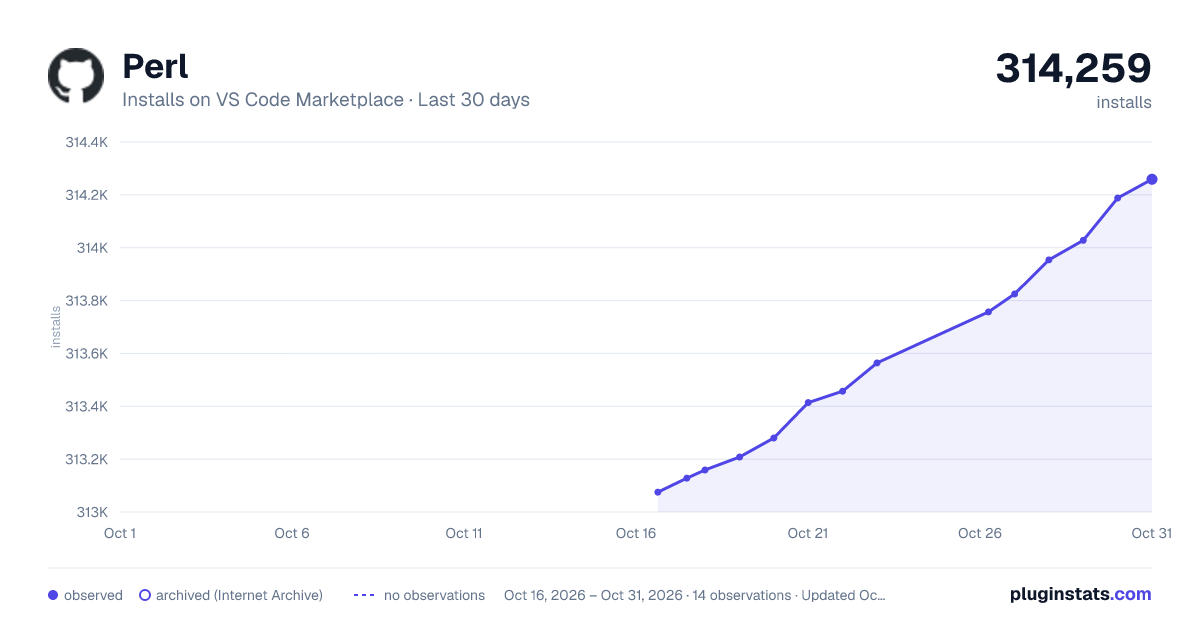
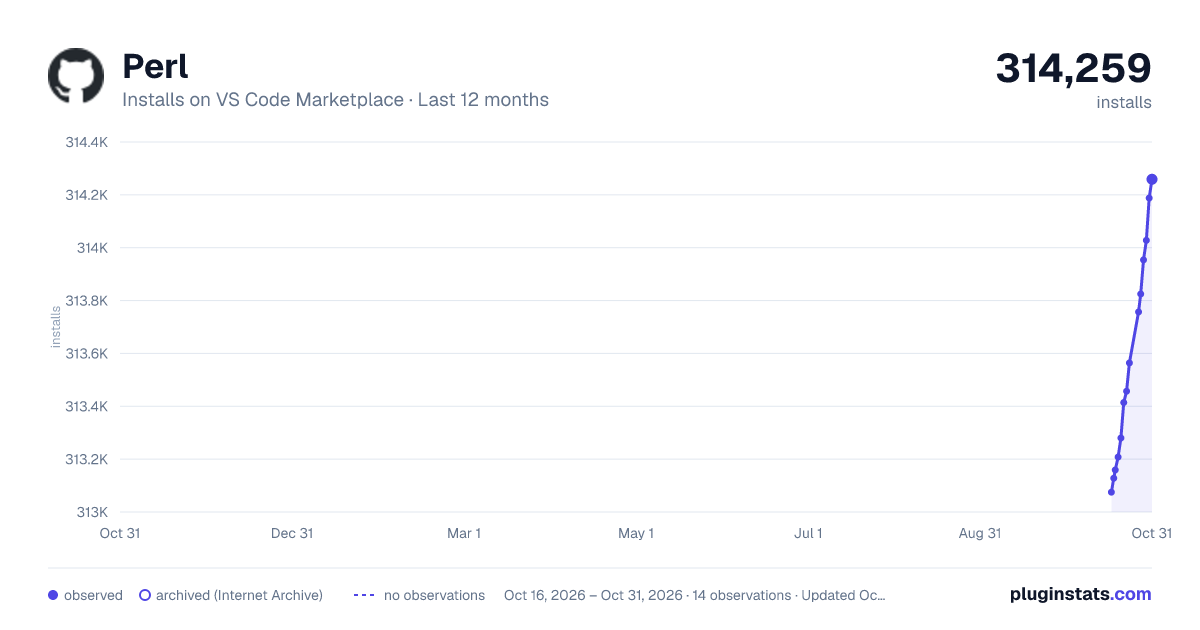
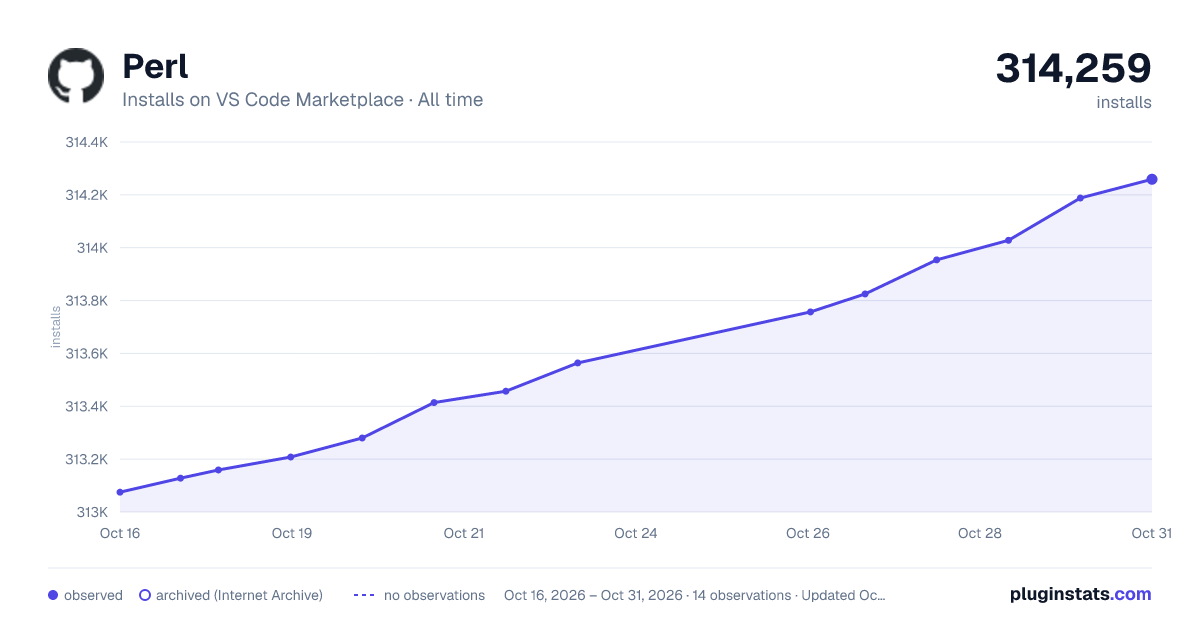

Adoption over time


7/30/90-day growth


Ratings over time


Listing placement


Listing placement


Listing placement


Filled points are observed values; hollow points come from Internet Archive snapshots of the listing page. Dashed segments span periods with no observations — values between points are not interpolated.
Each band is one page of 20. Installs on a log scale. Placement is projected from installs, so it can differ from the marketplace's own sort order. Hover a dot to see the listing.
Recent observations
Full history (4)Similar VS Code Marketplace Programming Languages plugins
All 20 Perl alternativesPerl on other marketplaces
Data source
Install counts, average rating, and rating counts come from the public Visual Studio Marketplace gallery API. Installs are cumulative and exclude updates.
Listing: https://marketplace.visualstudio.com/items?itemName=richterger.perl. First seen Oct 16, 2026; last successful collection Oct 19, 2026. See the methodology.