 PluginStats
Cucumber installs statistics
By Cucumber · VS Code Marketplace · Programming Languages
Cucumber for Visual Studio Code
Cucumber has 462,830 recorded installs on VS Code Marketplace.
It ranks #883 of 2,500 tracked VS Code Marketplace listings by installs.
It is rated 3.6 out of 5 from 16 ratings.
PluginStats has 3 daily observations since Oct 16, 2026; the latest is from Oct 18, 2026.
Rating: 3.56 / 5 from 16 ratings
About Cucumber
Cucumber for VSCode
Official Visual Studio Code extension for Cucumber and Gherkin
Maintained by the Cucumber team and powered by the Cucumber Language Server.
Available from the Open VSX Registry and Visual Studio Marketplace.
Features
• ⌨️ Autocomplete steps • 📍 Go to step definition • 🪄 Generate step definition • 💄 Syntax highlighting • ✨ Formatting • 🌎 Gherkin localisation • 📖 Language support • C#/SpecFlow • Go/Godog • Java • JavaScript • PHP • Python/Behave • Ruby • Rust • TypeScript • 🗂 Document outline • 🥒 Feature file icons
Autocomplete
When you start typing a step, you will see auto-complete suggestions based on existing step definitions and Gherkin steps.
The suggestions are more helpful if your step definitions use Cucumber Expressions but you'll also get suggestions if they use Regular Expressions.
Go to step definition
You can quickly navigate from a Gherkin step to a step definition.
Generate step definition
Generate step definition snippets with a quick fix - ⌘ + . (MacOS) or Ctrl + . (Windows).
_IMPORTANT_: Generate step definition will only be enabled if there is at least one existing step definition. This is so that the extension can determine the programming language for the step definition, and provide choices for existing files to add it to.
Syntax highlighting
Gherkin keywords and step parameters are highlighted. Undefined steps and syntax errors are underlined.
Formatting
Gherkin documents are formatted using two space indentation.
Numeric cells are right-aligned (as in Excel). Non-numeric cells are left-aligned.
Document Outline
The Outline panel displays an outline of the Gherkin document, making it easy to navigate between scenarios.
Gherkin Localisation
Gherkin supports many translations. To specify a translation, include a # language: header in your feature file, with a supported language key from the localisation documentation.
New translations or updates are welcome and can be submitted through the gherkin parser.
Language Support
Step definitions support is provided for different languages and frameworks.
If you experience an issue with a supported language, please raise a detailed bug report or reach out for help through our Discord community.
If your language or framework is unsupported, please open an issue or raise a pull request in the Cucumber Language Service - where language support is implemented.
Feature File Icons
The Cucumber icon is applied to all feature files in your workspace. This replaces the default document icon, making it easier to identify your feature files at a glance.
Extension Settings
In most cases you shouldn't need to specify any settings as the extension comes with reasonable defaults.
If your .feature files and step definition files are in an unconventional file structure, you need to change the settings to make autocomplete work properly.
With multi-root workspaces, you will need to either specify glob paths for each workspace individually (e.g. workspace-a/features/*.feature and workspace-b/features/*.feature) or specify a glob path that matches all of them (e.g. **/features/*.feature). See VSCode documentation for configuring a multi-root workspace.
cucumber.features
The cucumber.features setting overrides where the extension should look for .feature files.
If no feature files are found, autocomplete will not work.
Default value:
cucumber.glue
The cucumber.glue setting overrides where the extension should look for source code where step definitions and parameter types are defined.
If no glue files are found, autocomplete will not work, and all Gherkin steps will be underlined as undefined. Generate step definition will not work either.
Default value:
cucumber.parameterTypes
Override the cucumber.parameterTypes setting if your Cucumber Expressions are using Custom Parameter Types that are defined outside your cucumber.glue setting.
Parameter Types in the cucumber.glue globs will be picked up automatically.
Default value:
For example, if you're using the actor parameter type from @cucumber/screenplay you'll have to declare this in the parameterTypes setting:
`
Feedback
If you discover a bug, or have a suggestion for a feature request, please submit an issue.
Description from the VS Code Marketplace listing.
- Cucumber
- Feature
- Gherkin
Where Cucumber sits in the listing
Each band is one page of 20. Installs on a log scale. Placement is projected from installs, so it can differ from the marketplace's own sort order. Hover a dot to see the listing.


Charts
Images: 30d · 1y · all time · 1600×900 dark
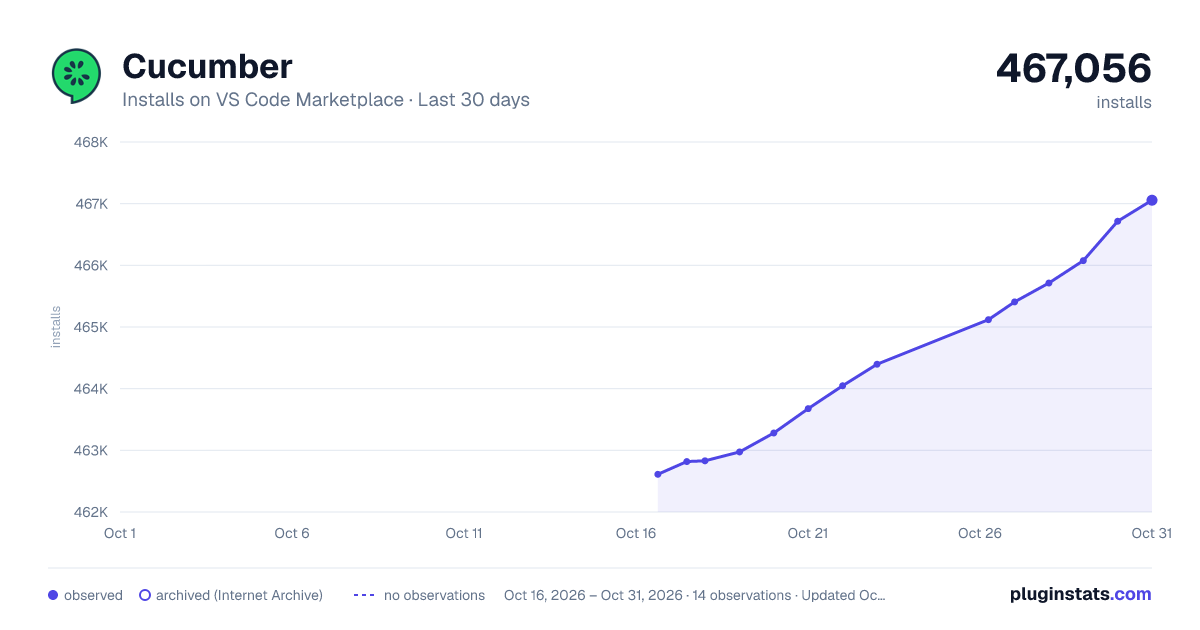
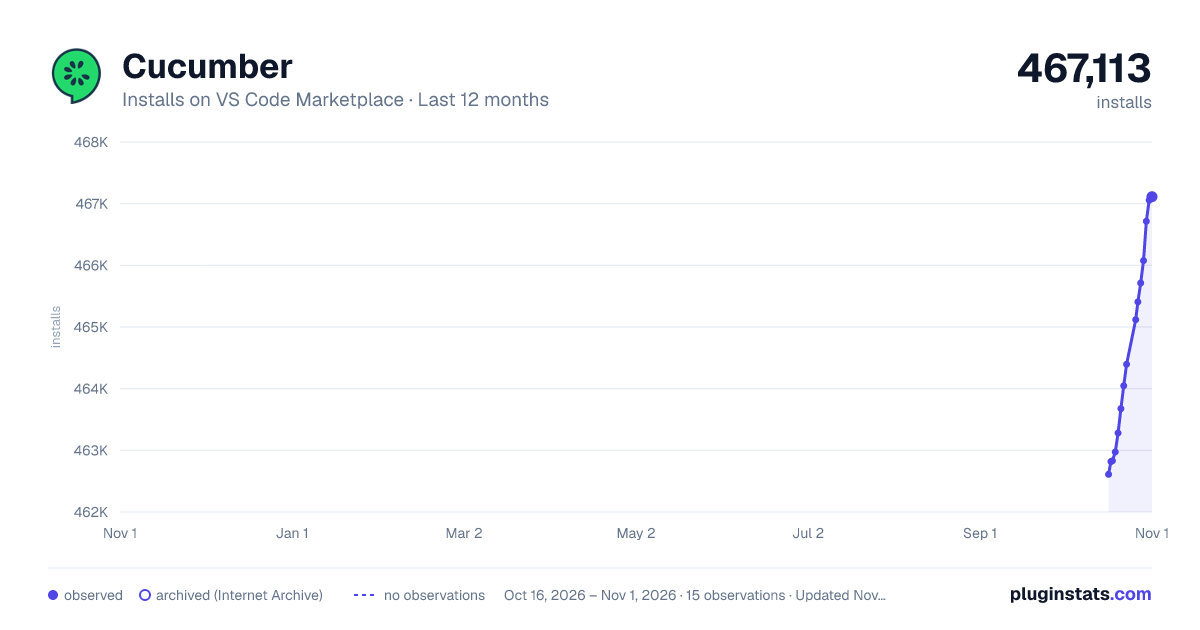
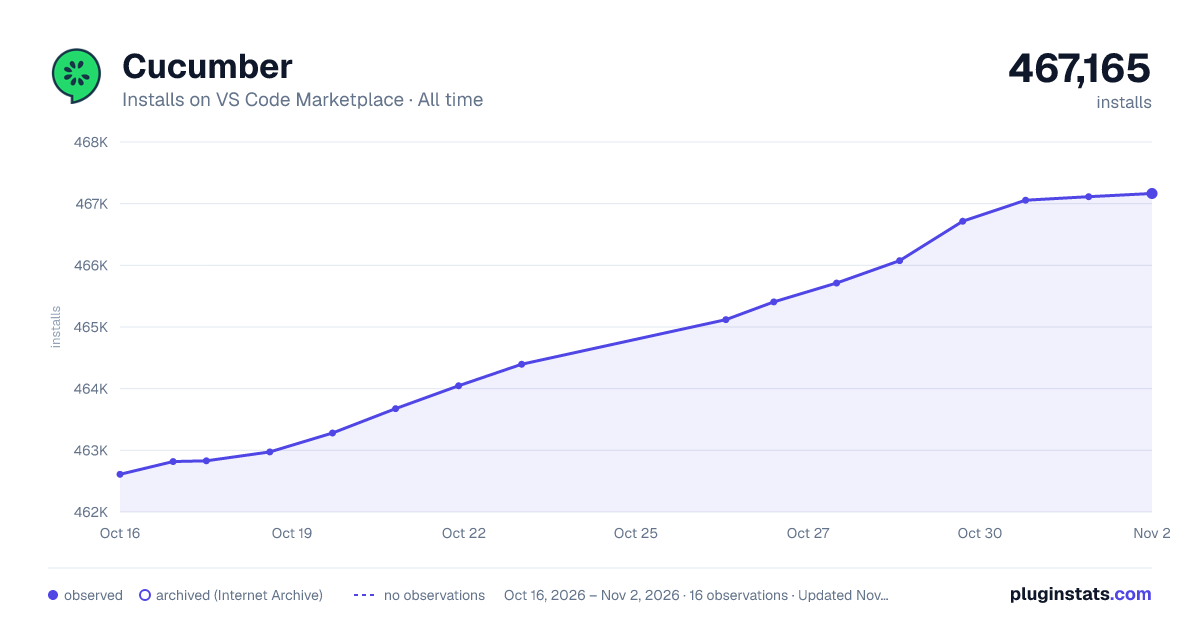

Adoption over time


7/30/90-day growth


Filled points are observed values; hollow points come from Internet Archive snapshots of the listing page. Dashed segments span periods with no observations — values between points are not interpolated.
Recent observations
Full history (3)Similar VS Code Marketplace Programming Languages plugins
Data source
Install counts, average rating, and rating counts come from the public Visual Studio Marketplace gallery API. Installs are cumulative and exclude updates.
Listing: https://marketplace.visualstudio.com/items?itemName=CucumberOpen.cucumber-official. First seen Oct 16, 2026; last successful collection Oct 18, 2026. See the methodology.