 PluginStats
Mermaid Preview installs statistics
By Mermaid OSS · VS Code Marketplace · Visualization
Mermaid diagram previewer for Visual Studio Code, now maintained by the creators of Mermaid.js
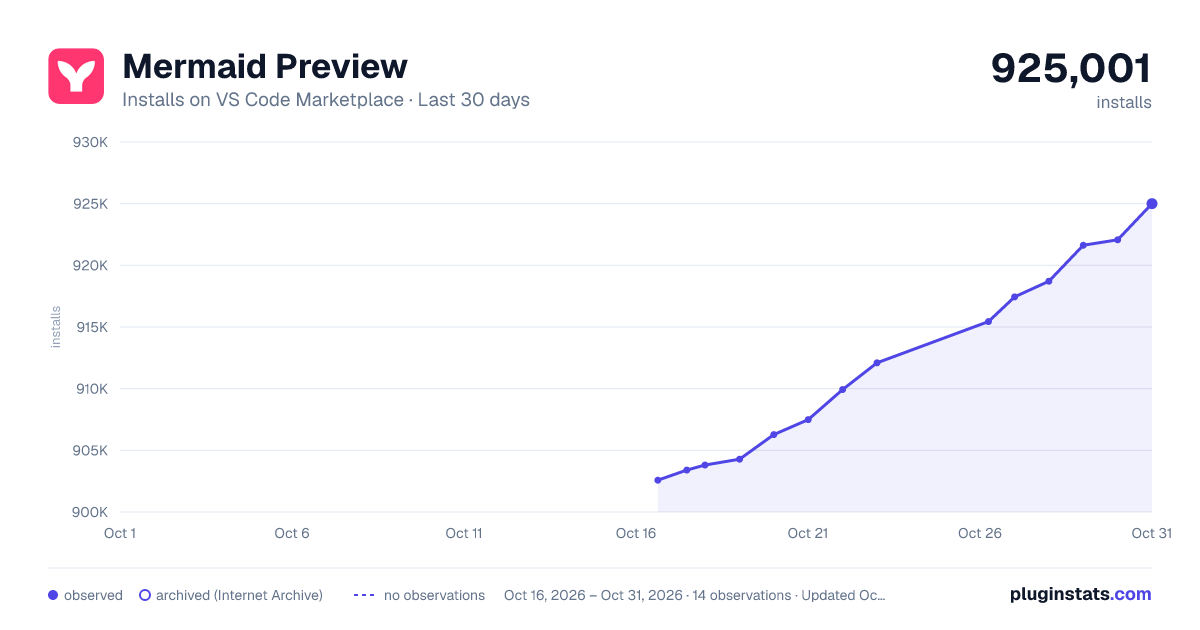
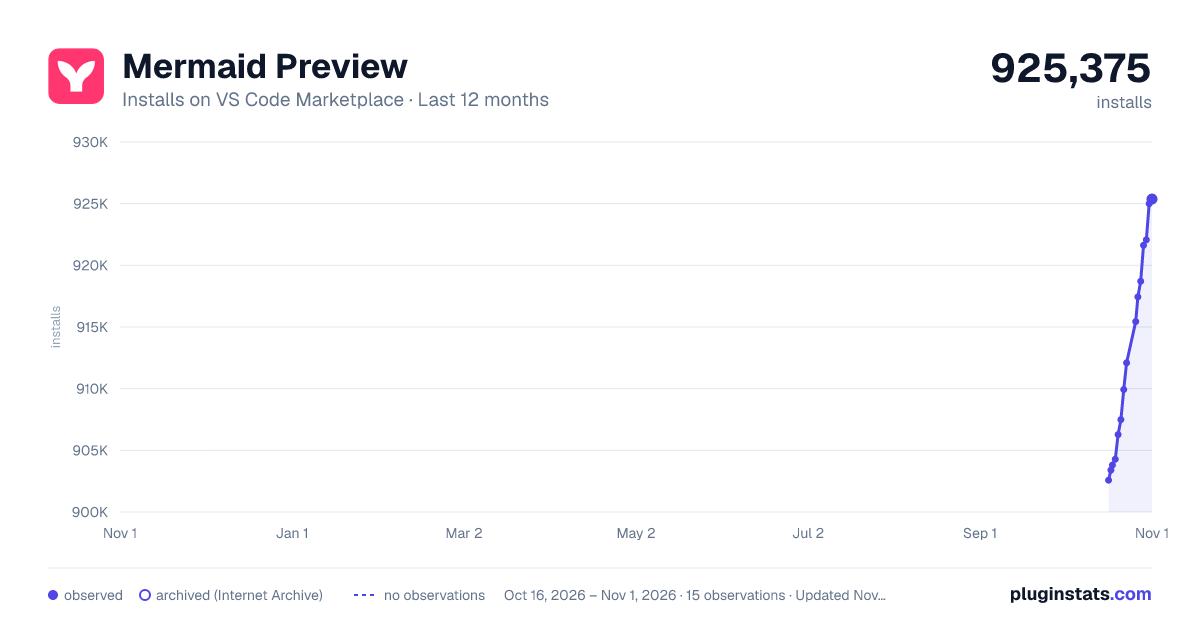
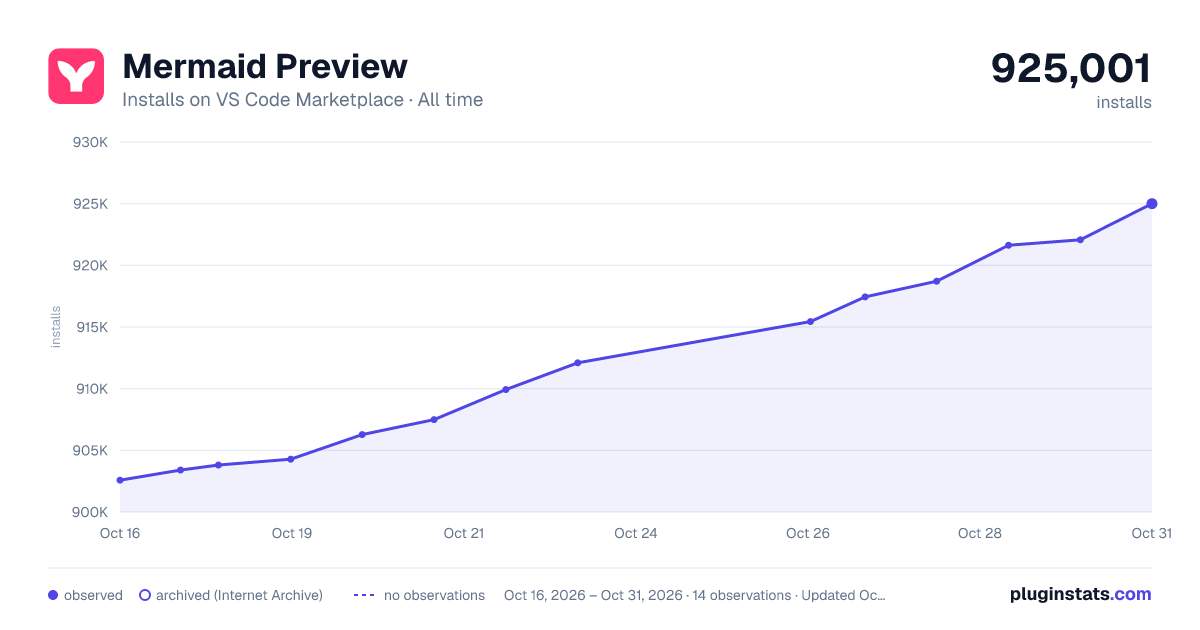
Mermaid Preview has 904,281 recorded installs on VS Code Marketplace.
It ranks #575 of 2,501 tracked VS Code Marketplace listings by installs.
It is rated 2.9 out of 5 from 28 ratings.
PluginStats has 4 daily observations since Oct 16, 2026; the latest is from Oct 19, 2026.
Rating: 2.89 / 5 from 28 ratings
About Mermaid Preview
Mermaid diagram previewer for Visual Studio Code
🚀 Now Proudly Maintained by the Creators of Mermaid.js 🚀
Mermaid Preview is focused on free, local diagram previewing. Account login, cloud sync, and AI features now live in the Mermaid extension.
Features
Works with Latest Mermaid Version
We are the same team behind Mermaid.js, and our official extension works with the latest Mermaid version to provide support for new diagrams, enhancements and bug fixes.
Supported Diagrams
Currently supported diagrams and charts: • Flowchart • Sequence • Block • Class • Entity Relationship • Gantt • Mindmap • State • Timeline • Gitgraph • C4 • Sankey • Pie chart • Quadrant • Requirement • User Journey • Sankey • XY chart • Kanban • Architecture • Packet • Radar
Mermaid Preview Sidebar
There is no login in Mermaid Preview anymore, because everything in this extension is free. Open the Mermaid icon in the activity bar and you can start a new diagram right away with Open preview — no account, no sign-up, no trial. If you also want AI diagramming and cloud save, those features live in the Mermaid extension, and the sidebar links straight to it.
The icons in the sidebar title bar give you diagram help, a reload of the panel, settings, and the feedback form.
Settings
The settings section has two toggles, and both are on by default.
• Share usage analytics — when you turn this off, the extension stops recording and sending any analytics or logs, including preview failure reports. VS Code's own telemetry setting is still respected on top of this, so turning telemetry off in VS Code also disables ours. • "Feature moved" popups — some commands moved to the Mermaid extension, and Sync Diagram, Connect Diagram, and Link Diagram now show a notice saying so instead of running. Turn this off if you do not want those notices anymore.
Use Open VS code Mermaid settings for the full list of extension settings, such as diagram themes and zoom limits. The reload icon in the title bar puts both toggles back to their defaults.
Send us feedback
If something does not work or gets in your way, you can report it from the sidebar without leaving the editor and without an account. Open the feedback section and click Open feedback form.
Tell us what you were doing, how often it happens, and describe the problem. Your email is required so we can reply to you there once we have looked into it. You can send one feedback submission per day, and the reload icon clears the form if you want to start over.
Real-Time local Edit & Preview
Now you get a side-by-side real time preview of the mermaid diagram while editing the diagram locally. This helps the user to see the true power of a mermaid's text-based diagram, where each change in text is reflected immediately on the diagram.
Syntax Highlighting
We now support syntax highlighting for all Mermaid diagrams when writing the Mermaid code. The syntax highlighting works well with the developer selected theme for VS Code.
The extension also provides syntax highlighting for Mermaid diagrams embedded in Markdown files, with specific highlighting based on diagram types.
Pan & Zoom
We now support Pan and Zoom for the diagram preview, where the user pan to a specific part of a large diagram, and also set different levels of zoom based on his preference. We implemented the zoom with stickiness, so that zoom levels are not changed when you edit your diagram Users can of course use the reset option to resize the preview diagram to fit the screen.
Export Diagrams
Export your diagrams easily in both SVG and PNG formats. This makes it simple to: • Include diagrams in documentation • Share with team members • Use in presentations • Version control your diagram assets
The exported files maintain high quality and can be used across different platforms and tools.
Error Highlighting
While writing the mermaid code, if you encounter syntax errors, the extension highlights the syntax error with an error message, and also indicates which line in the code might be causing the error. This helps the user to locate and fix the error.
Auto-Detect Mermaid diagrams in Markdown files
The extension automatically detects mermaid diagrams in the markdown files using the code block.
This gives a unique opportunity for the users, they can now preview and edit the diagrams by clicking the edit diagram link directly from within the markdown file.
Mermaid Diagram Preview in Markdown File
This extension enables live preview of Mermaid diagrams directly within the Markdown preview in VS Code. No need to leave your editor!
Support .mmd file extension as Mermaid Markdown file
Now we provide native support for the .mmd extension. All the local mermaid diagrams will be loaded as a .mmd file. You can notice that the .mmd also has the Mermaid logo in the file explorer view.
Smart Auto-Suggest with code snippets
Now based on the diagram type auto suggestions for code snippets will be triggered on type of "m", and it will start showing relevant code snippets shorthand, that once selected, will expand to the proper code snippet.
Diagram Help
If you get stuck with a diagram's syntax or want to learn about other features for a given diagram, now you can directly access the respective diagram's detailed documentation on the official mermaid.js docs.
Commands
| Command | Description |
| Mermaid Preview: Create Diagram | Creates a new Mermaid diagram in the editor. | | Mermaid Preview: Preview Diagram | Opens a preview of the selected Mermaid diagram within the editor. | | Mermaid Preview: Diagram help | Opens the official Mermaid documentation for the current diagram type. | | Mermaid Preview: Settings | Opens the settings section in the Mermaid Preview sidebar. | | Mermaid Preview: Reload | Reloads the Mermaid Preview sidebar. |
Extension Settings…
Description from the VS Code Marketplace listing.
- architecture
- class diagram
- color-theme
- diagram
- entity relationship diagram
- flow
- flow chart
- flowchart
- gantt
- gantt chart
- javascript
- journey
- mermaid
- Mermaid architecture
- Mermaid blockDiagram
- Mermaid C4 Diagram
- mermaid chart
- mermaid charts
- Mermaid Class Diagram
- Mermaid Er Diagram
Where Mermaid Preview sits in the listing
Each band is one page of 20. Installs on a log scale. Placement is projected from installs, so it can differ from the marketplace's own sort order. Hover a dot to see the listing.


Charts
Images: 30d · 1y · all time · 1600×900 dark

Adoption over time


7/30/90-day growth


Ranking history


Filled points are observed values; hollow points come from Internet Archive snapshots of the listing page. Dashed segments span periods with no observations — values between points are not interpolated.
Recent observations
Full history (4)Similar VS Code Marketplace Visualization plugins
Data source
Install counts, average rating, and rating counts come from the public Visual Studio Marketplace gallery API. Installs are cumulative and exclude updates.
Listing: https://marketplace.visualstudio.com/items?itemName=vstirbu.vscode-mermaid-preview. First seen Oct 16, 2026; last successful collection Oct 19, 2026. See the methodology.