 PluginStats
ADB Interface for VSCode installs statistics
By Vinicios Clarindo · VS Code Marketplace · Other
An interface that allows ADB commands inside IDE with no need to have terminal access.
ADB Interface for VSCode has 198,165 recorded installs on VS Code Marketplace.
It ranks #1526 of 2,500 tracked VS Code Marketplace listings by installs.
It is rated 4.2 out of 5 from 5 ratings.
PluginStats has 3 daily observations since Oct 16, 2026; the latest is from Oct 18, 2026.
Rating: 4.20 / 5 from 5 ratings
About ADB Interface for VSCode
🔌 ADB Interface for VSCode
This simple ADB wrapper try to makes easy connect to android devices over wifi, without console use, and do other things.
Chinese Guide 简体中文指南
You can help with Code or with Energy everthing are welcome ;)
⚠️ ONLY TESTED IN WINDOWS (For while, you need have ADB Interface installed in your system)
Attach ADB to an Device via WIFI
1. First connect your device trough USB 2. Run ADB:📱 Disconnect from any devices 3. And run ADB:📱 Reset connected devices port to :5555 4. And Then ADB:📱 Connect to device IP enter your device (settings > status > ip address) IP address and be fine
Installing APK files throught ADB
1. Pick apk file with command ADB:📱 Pick .APK file and install 2. Allow ADB install on device screen 3. Wait until copy de file and icon appear 4. Now you can run the APP
Table of contents
• 🔌 ADB Interface for VSCode • 📱 Demo GIFs • Attach ADB to an Device via WIFI • Installing APK files throught ADB • Table of contents • Commands Available • How it works • ADB location resolution strategy • Tests
Commands Available
• ADB:📱 Reset connected devices port to :5555 (Open current device port with (equivalent adb tcpip 5555)) • ADB:📱 Connect to device IP (Need type the IP from device (equivalent adb connect ${your ip}:5555)) • ADB:📱 Disconnect from any devices (Disconnect ever device attached (equivalent adb disconnect)) • ADB:📱 Connect to device from List (Show an list from devices attached to connect (equivalent adb devices)) • ADB:📱 Pick .APK file and install (Install on current active device (Will prompt user on Android Screen)) • ADB:📱 Setup custom ADB location (Configure location of ADB) • ADB:📱 Remove custom ADB location (Clear custom ADB location) • ADB:🔥 Enable Firebase events debug mode (Run firebase events in debug mode) • ADB:🔥 Disable Firebase events debug mode (Run firebase events in debug mode) • ADB:⚠️ Kill ADB server (Kill ADB Server runing (equivalent adb kill-server))
How it works
ADB location resolution
By default the extension is looking for ADB in the following locations:
• Linux - $HOME/Android/Sdk • MacOS - $HOME/Library/Android/sdk/platform-tools • Windows - %USERPROFILE%\AppData\Local\Android\Sdk\platform-tools (if the %USERPROFILE% environment variable is not defined the path to the profile directory of the current user will be used as the starting point)
The extension will resolve the ADB location each time an ADB command is executed.
The ADB location can be customized using the Setup custom ADB location command. The custom ADB location can be cleared using the Remove custom ADB location command.
Tests
All done with Jest you can read more about here.
We need help to incrase test coverage report, if you can learn, send a pull request !
How to run tests:
You can also use the project alias that watch file changes while developing:
Commits
All commits are done runing the command npm run cm to ensure some rules used during CHANGELOG.md generation with npm run release-it
Type your commit info like type, scope, short.
Confirm information to create new release and update CHAGELOG.md
Now we can run npm publish to publish new version.
Description from the VS Code Marketplace listing.
- terminal
Where ADB Interface for VSCode sits in the listing
Each band is one page of 20. Installs on a log scale. Placement is projected from installs, so it can differ from the marketplace's own sort order. Hover a dot to see the listing.


Charts
Images: 30d · 1y · all time · 1600×900 dark
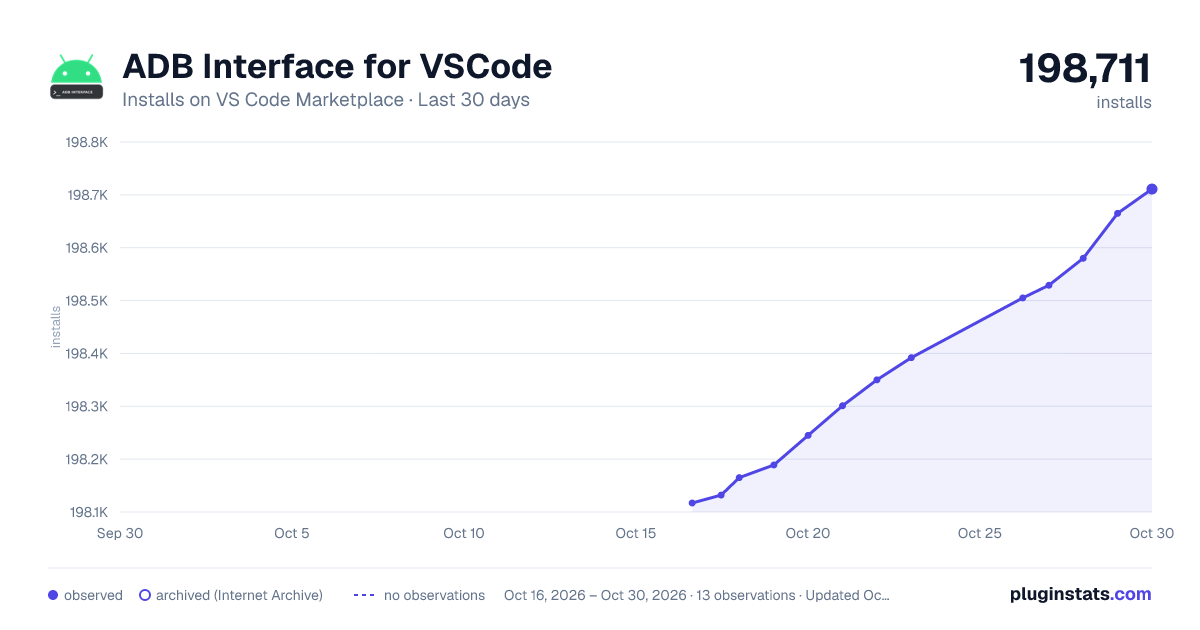
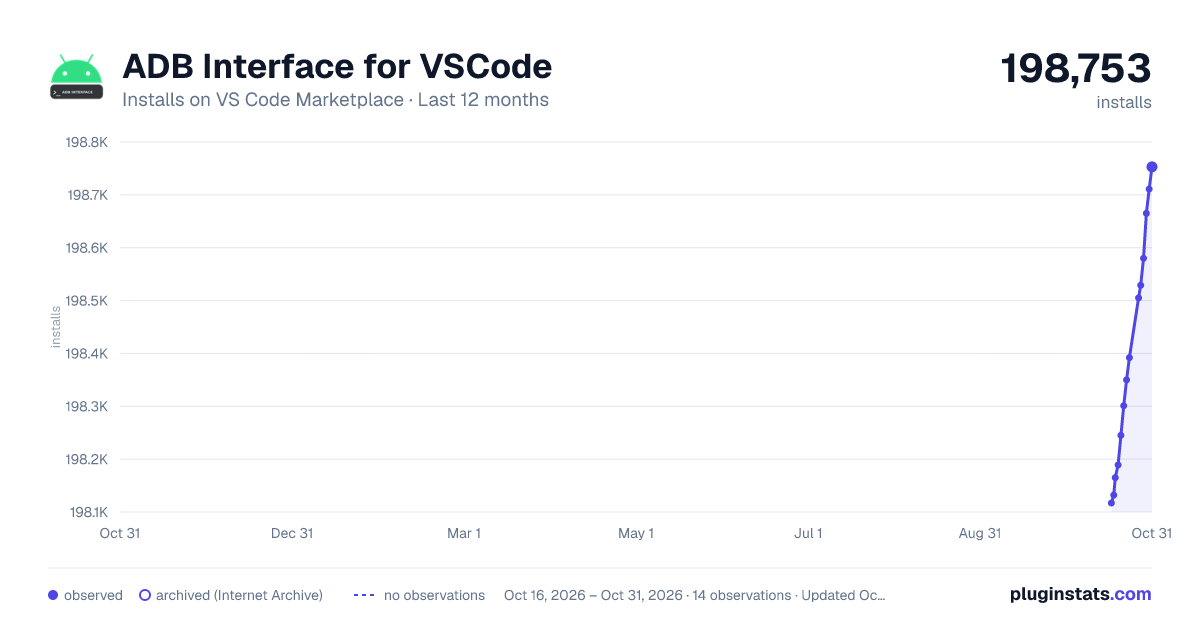
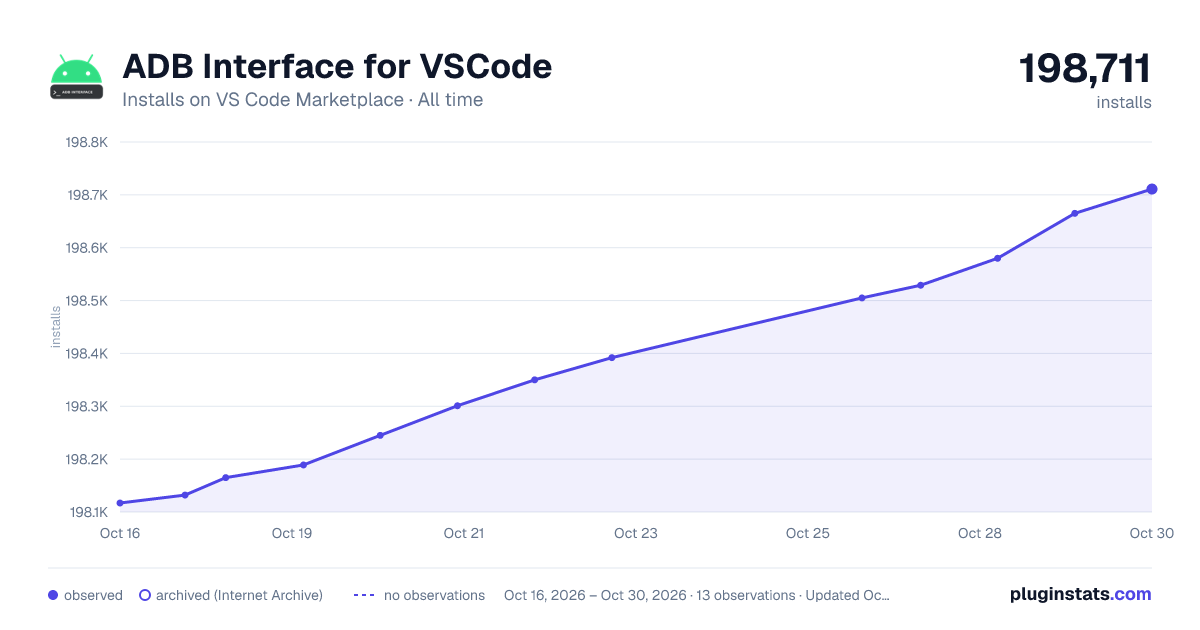

Adoption over time


7/30/90-day growth


Ranking history


Filled points are observed values; hollow points come from Internet Archive snapshots of the listing page. Dashed segments span periods with no observations — values between points are not interpolated.
Recent observations
Full history (3)Similar VS Code Marketplace Other plugins
Data source
Install counts, average rating, and rating counts come from the public Visual Studio Marketplace gallery API. Installs are cumulative and exclude updates.
Listing: https://marketplace.visualstudio.com/items?itemName=vinicioslc.adb-interface-vscode. First seen Oct 16, 2026; last successful collection Oct 18, 2026. See the methodology.