 PluginStats
Tools for MicroProfile installs statistics
By Red Hat (18 listings) · VS Code Marketplace · Programming Languages
Language Support for Eclipse MicroProfile
Tools for MicroProfile has 472,433 recorded installs on VS Code Marketplace.
It ranks #870 of 2,501 tracked VS Code Marketplace listings by installs.
PluginStats has 4 daily observations since Oct 16, 2026; the latest is from Oct 19, 2026.
About Tools for MicroProfile
Tools for MicroProfile
Description
This Visual Studio Code extension provides support for the development of MicroProfile®-based applications, via the LSP4MP project, which consists of:
• a language server for MicroProfile. • a jdt.ls extension for MicroProfile.
MicroProfile properties Features
In microprofile-config.properties files, you will benefit with:
• Completion support for MicroProfile properties • Hover support for MicroProfile properties • Definition support for MicroProfile properties • Format support for MicroProfile properties • Validation and Quick Fix support for MicroProfile properties • Outline support (flat or tree view)
MicroProfile Java Features
In Java files, you will benefit with:
• Completion support for MicroProfile • Hover support for MicroProfile • Validation and Quick Fix support for MicroProfile • Code Lens support for MicroProfile • Workspace symbols • Code snippets
Requirements
• Language Support for Java(TM) by Red Hat • Java JDK (or JRE) 21 or more recent is required except on the following platforms : win32-x64, linux-x64, linux-arm64, darwin-x64, darwin-arm64. See JDK Tooling for details.
Supported VS Code settings
The following settings are supported:
• microprofile.tools.formatting.surroundEqualsWithSpaces : Insert spaces around the equals sign when formatting the application.properties file. Default is false. • microprofile.tools.trace.server : Trace the communication between VS Code and the MicroProfile Language Server in the Output view. • microprofile.tools.symbols.showAsTree : Show MicroProfile properties as tree (Outline). Default is true. • microprofile.tools.validation.enabled : Enables MicroProfile validation. Default is true. • microprofile.tools.validation.duplicate.severity : Validation severity for duplicate properties for MicroProfile *.properties files. Default is warning. • microprofile.tools.validation.syntax.severity : Validation severity for property syntax checking for MicroProfile *.properties files. Default is error. • microprofile.tools.validation.required.severity : Validation severity for required properties for MicroProfile *.properties files. Default is none. • microprofile.tools.validation.expression.severity : Validation severity for property expressions for MicroProfile *.properties files. Default is error. • microprofile.tools.validation.unknown.severity : Validation severity for unknown properties for MicroProfile *.properties files. Default is warning. • microprofile.tools.validation.unknown.excluded : Array of properties to ignore for unknown properties validation. Patterns can be used ('\*' = any string, '?' = any character). Default is ["*/mp-rest/providers/*/priority", "mp.openapi.schema.*", "kafka-streams.*", "camel.*"]. • microprofile.tools.codeLens.urlCodeLensEnabled : Enable or disable the URL code lenses for REST services. Default istrue. • microprofile.tools.validation.value.severity: Validation severity for property values for MicroProfile *.properties files. Default is error. • microprofile.tools.validation.unassigned.excluded: Array of properties to ignore for unassigned properties validation in Java files. Patterns can be used ('\*' = any string, '?' = any character). • microprofile.tools.inlayHint.enabled: Enable or disable all MicroProfile Config inlay hints. Default is true. • microprofile.tools.inlayHint.converters.enabled: Show inlay hints indicating the MicroProfile Config converter used to convert configuration values from strings. Default is false. • microprofile.tools.inlayHint.defaultValues.enabled: Show inlay hints displaying the default value of configuration properties. Default is true. • microprofile.tools.inlayHint.types.enabled: Show inlay hints displaying the Java type of configuration properties. Default is false. • microprofile.tools.inlayHint.resolveExpressions.enabled: Show inlay hints displaying the resolved expressions of configuration properties. Default is true.
Note for MicroProfile Rest Client properties:
Due to this issue, the MP Rest property: /mp-rest/providers//priority reports an unknown error.
To avoid having this error, you must configure the following in settings.json:
This settings is set by default.
Extending Tools for MicroProfile
By default, Tools for MicroProfile provides:
• Support for the microprofile-config.properties file (completion, validation, etc.) for the properties of MicroProfile specs (config, health, fault tolerance, etc.). • Support in java files (diagnostics, codelens, etc.) taking into account the API of each of the MicroProfile specs.
The support for properties and java files can be extended with:
• Additional language features (diagnostics, quick fixes, etc.) in Java files for modules other than MicroProfile specs. • Additional properties support for properties other than those defined by MicroProfile specs (Ex. Quarkus properties) • Additional language / document selectors to allow MicroProfile language features in files other than microprofile-config.properties (Ex. the application.properties file for Quarkus)
To contribute these features, you must create a vscode-extension that declares the microprofile contributions in its package.json. These contributions will be picked up automatically by vscode-microprofile when it starts up the language server.
Contributing to properties and Java support
LSP4MP can be extended to support custom completion, hover, validation, etc by using the Java Service Provider Interface (SPI). vscode-microprofile provides the ability to use your custom lsp4mp extension by contributing external JARs to the classpath of lsp4mp.
To contribute an external JAR you must create a vscode extension which embeds your lsp4mp extension JAR and declares the path to your JAR in the extensions package.json…
Description from the VS Code Marketplace listing.
- java
- json
- maven
- MicroProfile
- MicroProfileproperties
- microprofile-properties
Where Tools for MicroProfile sits in the listing
Each band is one page of 20. Installs on a log scale. Placement is projected from installs, so it can differ from the marketplace's own sort order. Hover a dot to see the listing.


Charts
Images: 30d · 1y · all time · 1600×900 dark
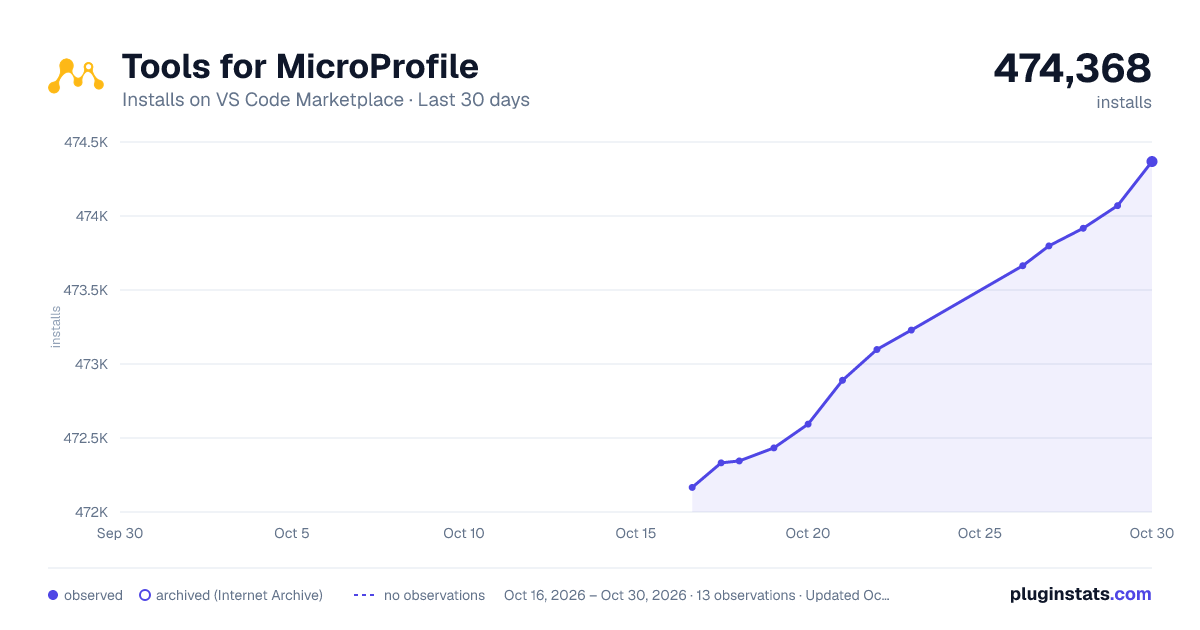
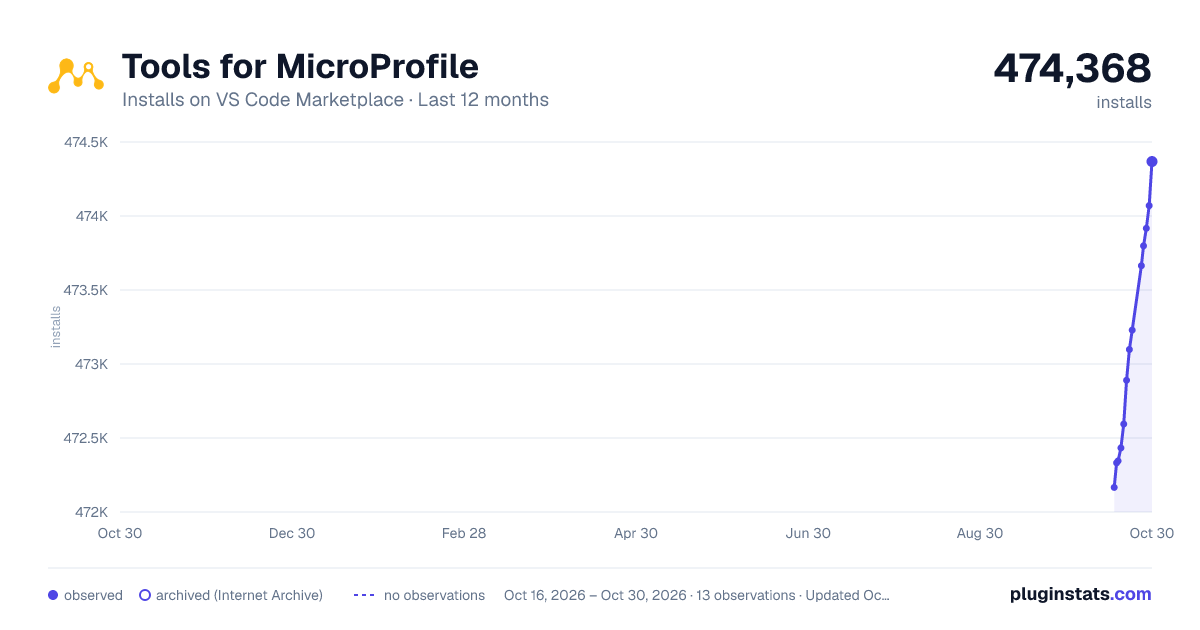
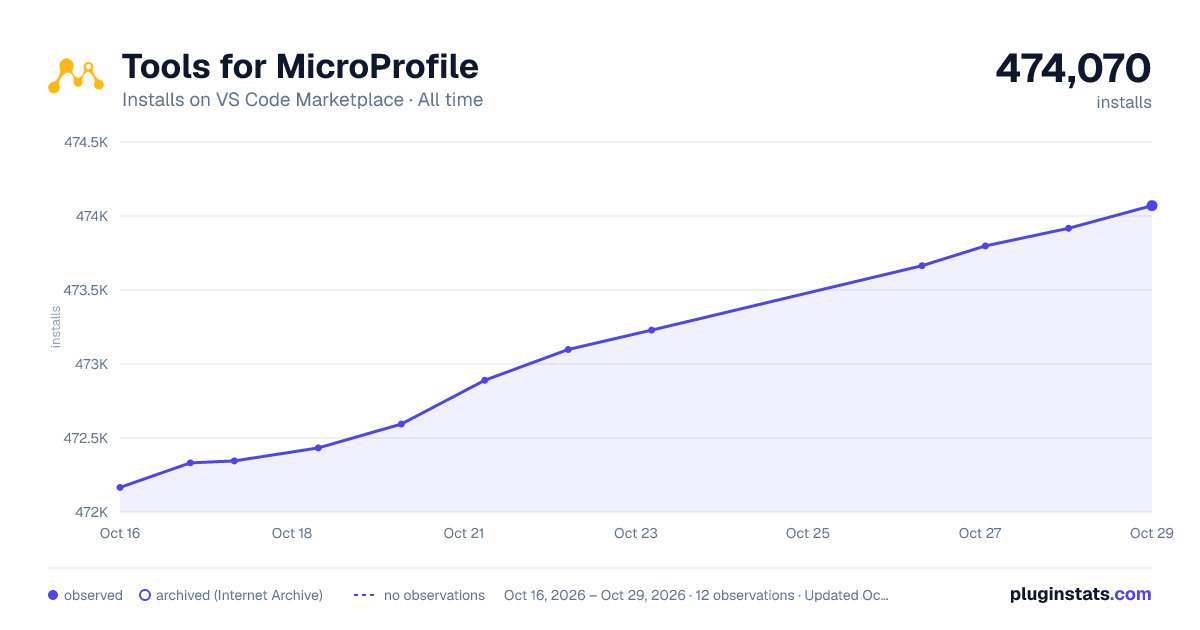

Adoption over time


7/30/90-day growth


Ranking history


Filled points are observed values; hollow points come from Internet Archive snapshots of the listing page. Dashed segments span periods with no observations — values between points are not interpolated.
Recent observations
Full history (4)Similar VS Code Marketplace Programming Languages plugins
Data source
Install counts, average rating, and rating counts come from the public Visual Studio Marketplace gallery API. Installs are cumulative and exclude updates.
Listing: https://marketplace.visualstudio.com/items?itemName=redhat.vscode-microprofile. First seen Oct 16, 2026; last successful collection Oct 19, 2026. See the methodology.