 PluginStats
Excalidraw installs statistics
By pomdtr · VS Code Marketplace · Visualization
Draw schemas in VS Code using Excalidraw
Excalidraw has 565,411 recorded installs on VS Code Marketplace.
It ranks #794 of 2,501 tracked VS Code Marketplace listings by installs.
It is rated 4.9 out of 5 from 33 ratings.
PluginStats has 4 daily observations since Oct 16, 2026; the latest is from Oct 19, 2026.
Rating: 4.94 / 5 from 33 ratings
About Excalidraw
Excalidraw
This extension integrates Excalidraw into VS Code. To use it, create an empty file with a .excalidraw, .excalidraw.json, .excalidraw.svg or .excalidraw.png extension and open it in Visual Studio Code.
Try the web version at :
• Features • Edit Images • Draw from your browser • Switch Editor Theme • Import Public Library • View Drawing Source • Associate Additional Extensions with the Excalidraw Editor • Sharing your Library • Configure Language • Contact • Note for Contributors
Features
Edit Images
The source of the drawing can be embedded directly in a PNG or SVG image. Just create a new .excalidraw.png or .excalidraw.svg file. You can also switch between text and image format by updating the file extension (ex: rename a .excalidraw file to .excalidraw.png).
You can control the default export options using the excalidraw.image setting:
Draw from your browser
You can install this extension in github.dev or vscode.dev. Editing an Excalidraw schema stored in a GitHub repository has never been easier !
Switch Editor Theme
The extension support three theme options:
• light (default) • dark • auto (sync with VS Code Theme)
Import Public Library
Check out the available libraries at libraries.excalidraw.com, and don't hesitate to contribute your own !
View Drawing Source
You can switch between the Excalidraw editor and the source (text or image) using the editor toolbar.
Associate Additional Extensions with the Excalidraw Editor
By default, this extension only handles *.excalidraw, *.excalidraw.svg and *.excalidraw.png files.
Add this to your VS Code settings.json file if you want to associate it with additional file extensions (ex: SVG):
You won't be able to edit arbitrary SVG files though - only those that have been created with Excalidraw or this extension!
Sharing your Library
If you want to use a workspace specific library (and share it with other contributors), set the excalidraw.workspaceLibraryPath in your Visual Studio Code workspace settings file (.vscode/settings.json):
The workspaceLibraryPath path is relative to your workspace root. Absolute path are also supported, but it will be specific to your device.
Configure Language
By default, the extension will use the Visual Studio Code Display Language to determine the language to use. You can overwrite it using the excalidraw.language setting:
Contact
Only bug reports / feature requests specifics to the VS Code integration should go to the extension repository. If it is not the case, please report your issue directly to the Excalidraw project.
Note for Contributors
Thank you for considering contributing to the extension :sparkling_heart: !
This extension only goal is to integrate Excalidraw to the Visual Studio Code ecosystem. Users should be able to use both the website and the extension with a minimal amount of friction. As such, we will not accept any contribution that significantly modify the user experience compared to the Excalidraw website.
There are exceptions to this rule (for example, the switch theme icon was deported to Visual Studio Code editor toolbar to allow a better integration). In case of uncertainty, create a thread in the project Discussion Page.
Description from the VS Code Marketplace listing.
- draw
- excalidraw
- graphics
- json
- keybindings
- paint
- schemas
Where Excalidraw sits in the listing
Each band is one page of 20. Installs on a log scale. Placement is projected from installs, so it can differ from the marketplace's own sort order. Hover a dot to see the listing.


Charts
Images: 30d · 1y · all time · 1600×900 dark
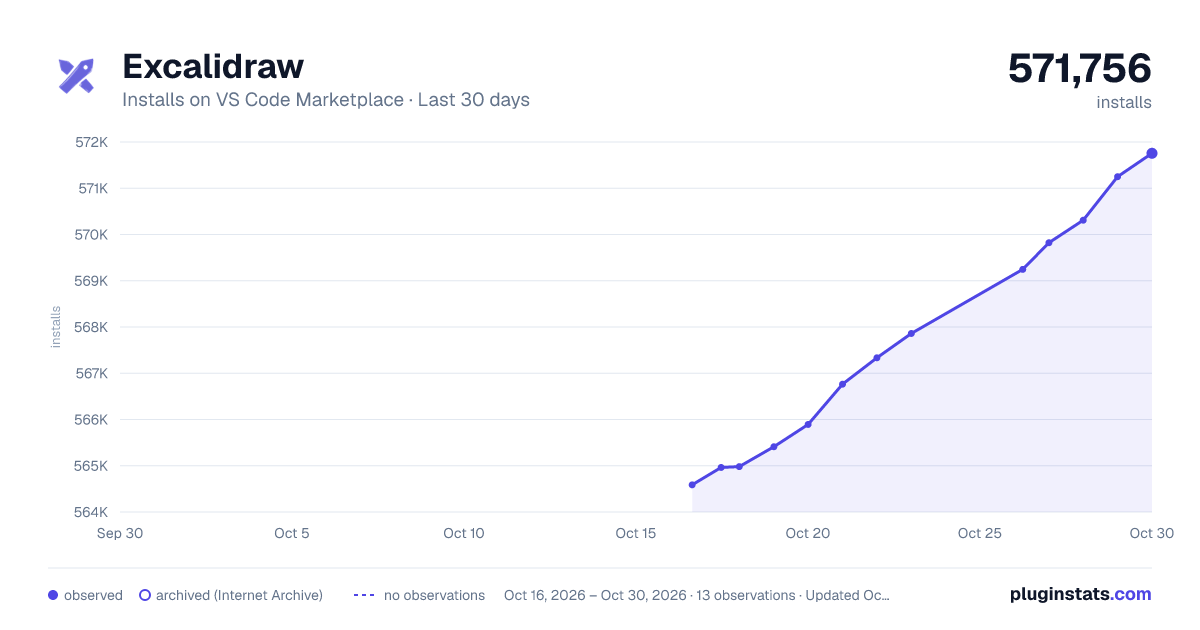
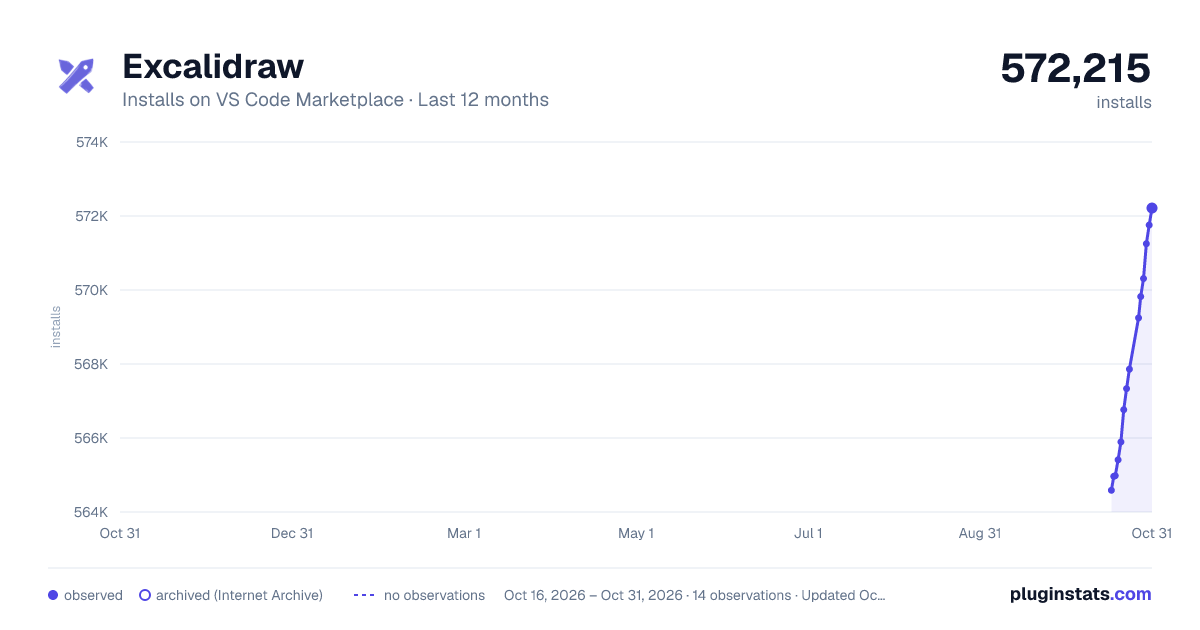
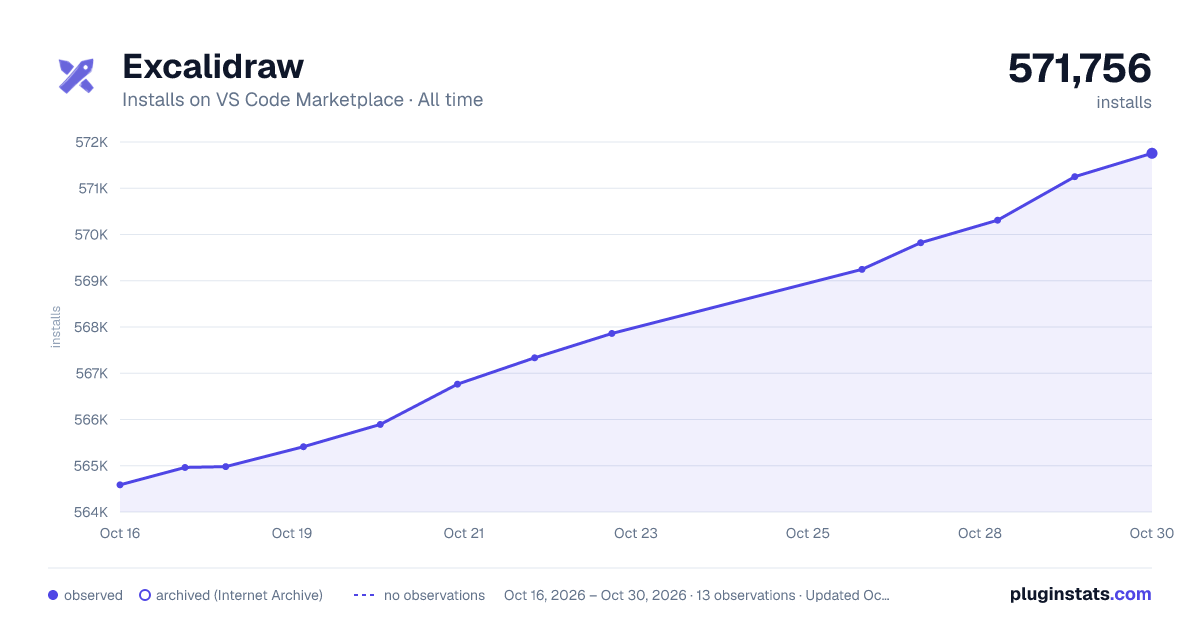

Adoption over time


7/30/90-day growth


Ranking history


Filled points are observed values; hollow points come from Internet Archive snapshots of the listing page. Dashed segments span periods with no observations — values between points are not interpolated.
Recent observations
Full history (4)Similar VS Code Marketplace Visualization plugins
Data source
Install counts, average rating, and rating counts come from the public Visual Studio Marketplace gallery API. Installs are cumulative and exclude updates.
Listing: https://marketplace.visualstudio.com/items?itemName=pomdtr.excalidraw-editor. First seen Oct 16, 2026; last successful collection Oct 19, 2026. See the methodology.