 PluginStats
Tencent Cloud CodeBuddy installs statistics
By Tencent Cloud (2 listings) · VS Code Marketplace · Programming Languages
Your AI pair programmer
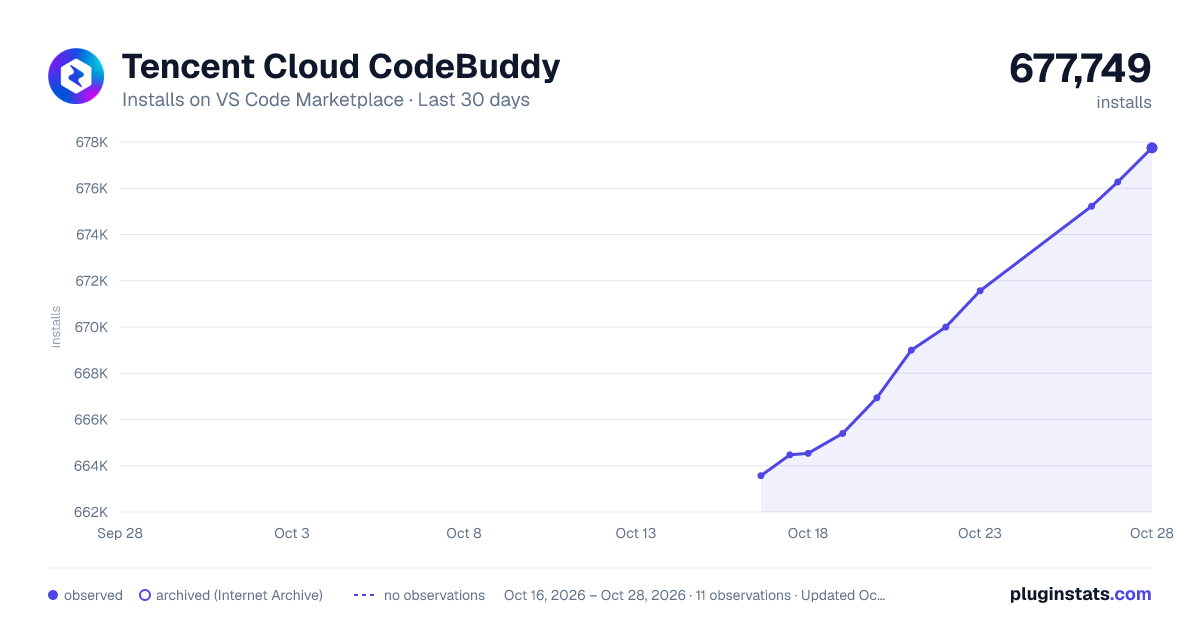
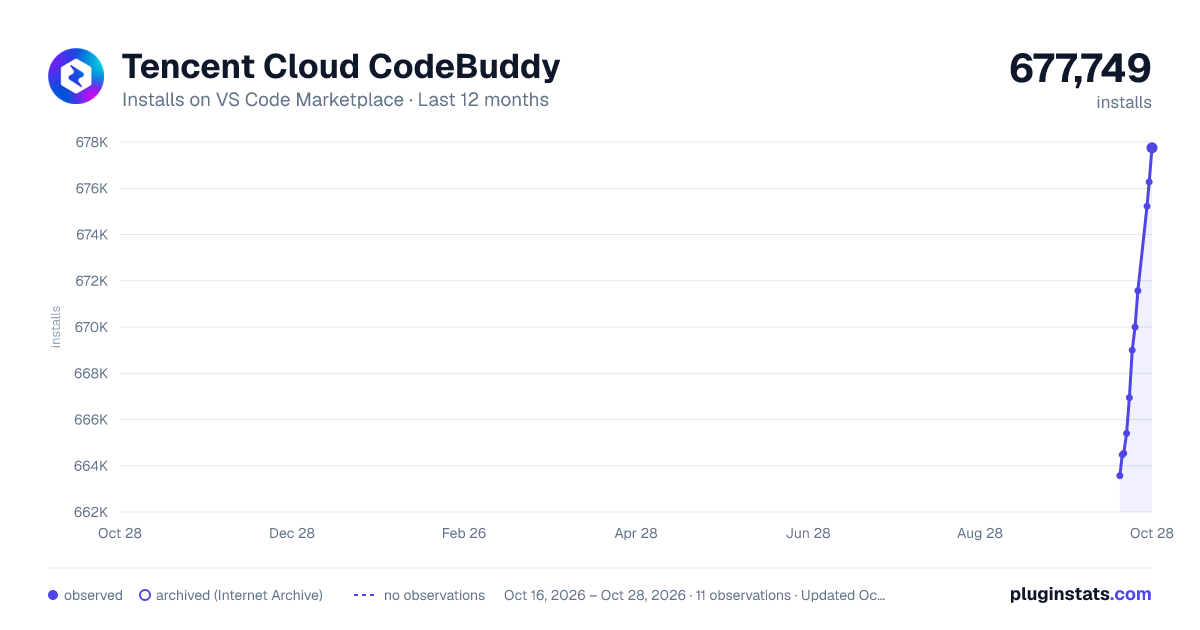
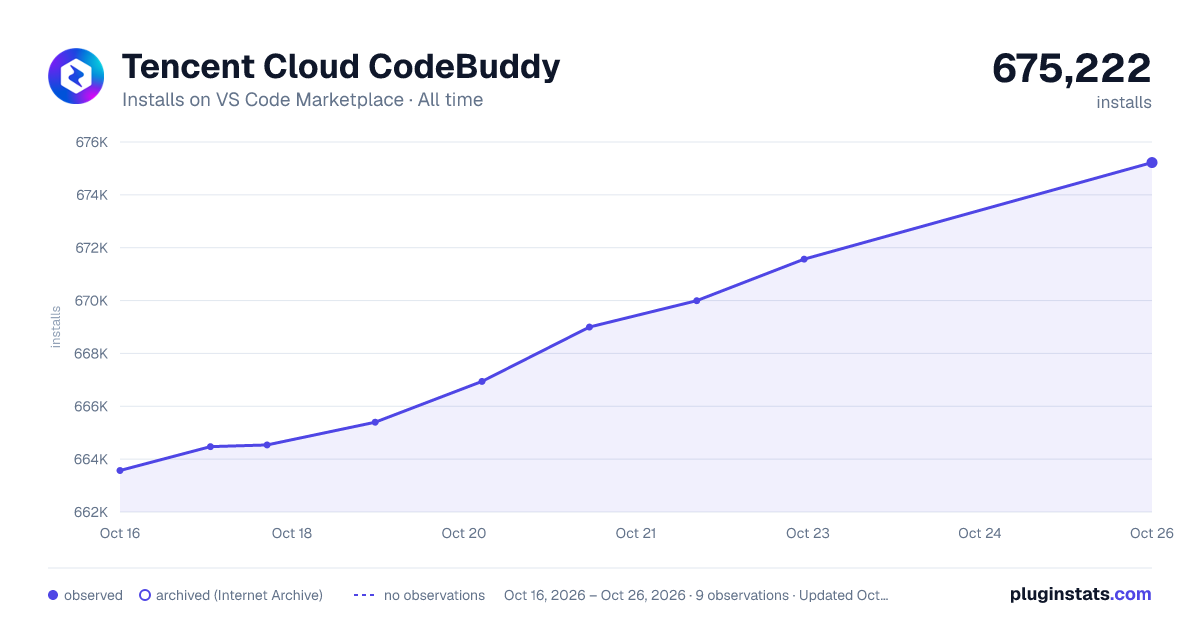
Tencent Cloud CodeBuddy has 664,537 recorded installs on VS Code Marketplace.
It ranks #717 of 2,500 tracked VS Code Marketplace listings by installs.
It is rated 4.0 out of 5 from 126 ratings.
PluginStats has 3 daily observations since Oct 16, 2026; the latest is from Oct 18, 2026.
Rating: 3.98 / 5 from 126 ratings
About Tencent Cloud CodeBuddy
腾讯云代码助手 CodeBuddy
产品介绍 Product Introduction
腾讯云代码助手(Tencent Cloud CodeBuddy,以下简称 CodeBuddy),由腾讯云自研的一款开发编程提效辅助工具,基于腾讯混元 + DeepSeek、GLM 多轮模型驱动,构建对开发者友好,好用易用的代码助手,为开发者提供AI技术问答、Craft软件编码智能体、智能代码补全、单元测试、智能评审、代码修复等 Agent 智能体拓展能力,新增 Rules 规则管理,兼容 MCP 开放生态,并可支持团队知识库管理、自定义智能体与指令管理、多模型接入、企业账号集成等功能,辅助开发者提升编码效率和质量,助力研发团队提质增效。
Tencent Cloud CodeBuddy (hereinafter referred to as CodeBuddy) is a developer productivity tool independently developed by Tencent Cloud. Powered by Tencent Hunyuan + DeepSeek and GLM multi-turn models, it delivers a developer-friendly, easy-to-use coding assistant.CodeBuddy provides AI technical Q&A, Craft coding Agents, intelligent code completion, unit testing, smart code review, code repair, and other Agent-based capabilities. It introduces Rules for rule management, is compatible with the MCP open ecosystem, and supports team knowledge base management, custom Agents and command management, multi-model integration, and enterprise account integration.CodeBuddy helps developers improve coding efficiency and quality, supporting R&D teams in achieving higher productivity and better results.
主要特点
• 兼容 Visual Studio Code、JetBrains IDEs (IntelliJ IDEA、Rider、Pycharm、Android Studio、鸿蒙DevEco Studio)、Visual Studio、CloudStudio 、微信开发者小程序工具等主流 IDE)。 • 编程语言及框架:支持 Java、Python、Go、C/C++、JavaScript、TypeScript、HTML、PHP、Ruby、Rust、Swift、Scala、Lua、 Dart、Node.JS、CSS3 等主流编程语言。 • 免费体验:访问 https://copilot.tencent.com 了解更多。
(注:产品功能存在持续更新,部分IDE因版本发布原因,存在滞后,请以官方文档最新信息为准)
Key Features
• Compatible with major IDEs: Visual Studio Code, JetBrains IDEs (IntelliJ IDEA, Rider, PyCharm, Android Studio, HarmonyOS DevEco Studio), Visual Studio, CloudStudio, WeChat Mini Program Developer Tools, and more. • Programming languages & frameworks: Supports mainstream languages including Java, Python, Go, C/C++, JavaScript, TypeScript, HTML, PHP, Ruby, Rust, Swift, Scala, Lua, Dart, Node.js, CSS3, and more. • Free trial: Visit https://copilot.tencent.com to learn more.
(Note: Product features are continuously updated, and some IDEs may experience delays due to version release schedules. Please refer to the latest information in the official documentation.)
产品特性 Product Features
全新软件开发智能体 Craft
自主完成多文件代码生成和改写
New software development intelligent agent Craft: autonomously completes multi-file code generation and rewriting
输入指令,AI 深度理解,支持多文件代码编写与修改,自动生成可执行的应用。
Simply input your instructions—AI deeply comprehends your requirements, supports multi-file coding and editing, and automatically generates executable applications.
AI 技术对话
人工智能技术对话,复杂问题轻松解决
AI-Powered Tech Chat: Intelligent AI-driven conversations to effortlessly tackle complex technical challenges.
• 基于海量技术文档、微信开发文档、腾讯云API文档等进行训练,并支持团队自定义知识库管理,轻松问答。 Trained on vast technical documentation, WeChat development docs, Tencent Cloud API references, and more—with support for team-customized knowledge base management for seamless Q&A. • 支持灵活配置和切换多种模型,并支持第三方 DeepSeek 模型接入 Supports flexible configuration and switching between multiple models, including third-party DeepSeek model integration. • 技术对话集成 IDE,支持将对话代码内容一键插入编译区当中,快速问答 Integrated IDE Tech Chat: Supports one-click insertion of code from conversations directly into the compilation area for rapid Q&A. • 支持框选或全选编译区代码内容,进行代码规范检查与错误修复 Supports selecting or highlighting code in the compilation area for automated code compliance checks and error fixes. • 智能生成代码注释,清晰解释既有代码,快速接手历史项目 Intelligent Code Annotation: Automatically generates clear explanations for existing code, enabling faster onboarding for legacy projects.
代码补全
智能补全 · 高效完成编程工作
Code Completion: Smart suggestions to efficiently complete your programming tasks.
• 支持 200种语言及框架生成,20 多种语法深度学习,31+种补全策略,支持注释描述的补全,变量补全,函数补全等,按照Enter 回车补全,Tab 一键采纳 With compatibility for 200+ programming languages and frameworks, deep learning models trained on 20+ syntax types, and 31+ intelligent completion strategies—including comment-driven suggestions, variable name generation, and function implementation—seamlessly integrate suggestions by pressing Enter and instantly accept them with Tab. • 基于上下文理解以及开发者编辑行为,智能感知当前编码环境,实时提供下一步代码编辑建议,并给出相应推荐,Tab 即可轻松完成编码,激发研发心流,极大提升编码效率 Context-Aware Intelligent Coding Assistance: Leveraging deep contextual understanding and real-time analysis of developer behavior, it intelligently adapts to your coding environment—providing instant suggestions for the next logical step. Simply press Tab to accept recommendations, seamlessly maintaining your flow state and significantly boosting productivity.
支持MCP协议
兼容MCP开放生态,与外部系统实现标准化连接
兼容 MCP 开放生态,推动 AI 与外部系统标准化连接,串联端到端的开发全流程
• MCP兼容性:无缝对接MCP开放生态,实现标准化系统连接 • AI-系统桥梁:提供统一的AI驱动外部平台交互能力 • 端到端开发流:贯通从编码到部署的全研发生命周期
Supports MCP protocol and is compatible with the MCP open ecosystem, enabling standardized connections with external systems.
Compatible with the MCP open ecosystem, it promotes standardized AI-to-external-system connectivity and streamlines end-to-end development workflows.
• MCP Compatibility: Seamlessly integrates with the MCP open ecosystem for standardized system connections • AI-System Bridge: Delivers unified AI-driven interaction capabilities with external platforms • End-to-End Development Flow: Connects the entire development lifecycle from coding to deployment
智能代码评审智能体 Intelligent Code Review Agent
支持代码批量评审,及时发现问题,并给出优化建议。自动生成commit message,规范开发流程
Supports batch code reviews, promptly identifies issues, and provides optimization suggestions. Automatically generates commit messages to standardize the development process.
支持自定义创建规则
支持创建用户规则和项目规则,通过给大模型提供上下文,从而规范大模型的行为。
Support creating user rules and project rules, providing context to the model to standardize its behavior.
开始使用 CodeBuddy Get Started with CodeBuddy
快速安装 Installation
打开你的IDE,在插件市场中搜索「腾讯云代码助手 CodeBuddy 」,下载安装与登陆即可。
Open your IDE, search for "Tencent Cloud Code Assistant CodeBuddy" in the plugin marketplace, then download, install, and log in.…
Description from the VS Code Marketplace listing.
- Code Assistant
- CodeBuddy
- Codebuddy Code Assistant
- keybindings
- tencent
- Tencent AI Code Assistant
- tencent cloud
- Tencent Cloud AI Code Assistant
- Tencent Cloud Code Assistant
- Tencent Cloud AI Code Assistant
- Tencent Cloud Codebuddy
- Tencent Cloud CodeBuddy代码助手
- Tencent Code Assistant
- Tencent Codebuddy
- Tencent CodeBuddy 代码助手
- 代码助手
- 代码助手CodeBuddy
- 腾讯CodeBuddy
- 腾讯云AI代码助手
- 腾讯云AI代码助手Codebuddy
Where Tencent Cloud CodeBuddy sits in the listing
Each band is one page of 20. Installs on a log scale. Placement is projected from installs, so it can differ from the marketplace's own sort order. Hover a dot to see the listing.


Charts
Images: 30d · 1y · all time · 1600×900 dark

Adoption over time


7/30/90-day growth


Ranking history


Filled points are observed values; hollow points come from Internet Archive snapshots of the listing page. Dashed segments span periods with no observations — values between points are not interpolated.
Recent observations
Full history (3)Similar VS Code Marketplace Programming Languages plugins
Data source
Install counts, average rating, and rating counts come from the public Visual Studio Marketplace gallery API. Installs are cumulative and exclude updates.
Listing: https://marketplace.visualstudio.com/items?itemName=Tencent-Cloud.coding-copilot. First seen Oct 16, 2026; last successful collection Oct 18, 2026. See the methodology.