 PluginStats
Microsoft 365 Agents Toolkit installs statistics
By Microsoft (223 listings) · VS Code Marketplace · Snippets
Create, debug, and deploy agents with Microsoft 365 Agents Toolkit
Microsoft 365 Agents Toolkit has 514,568 recorded installs on VS Code Marketplace.
It ranks #832 of 2,500 tracked VS Code Marketplace listings by installs.
It is rated 3.5 out of 5 from 40 ratings.
PluginStats has 3 daily observations since Oct 16, 2026; the latest is from Oct 18, 2026.
Rating: 3.53 / 5 from 40 ratings
About Microsoft 365 Agents Toolkit
Microsoft 365 Agents Toolkit - an evolution of Teams Toolkit
What is Microsoft 365 Agents Toolkit?
The Microsoft 365 Agents Toolkit, an evolution of Teams Toolkit, is designed to help developers create and deploy agents or apps for multiple Microsoft 365 platforms including Microsoft 365 Copilot, Microsoft Teams and Microsoft 365. It can significantly ease your development life by providing integrated Microsoft 365 identity, cloud storage access, data from Microsoft Graph, and other services in Azure with a "zero-configuration" approach.
Extensive Templates Spectrum
No matter you are building custom extensions for Microsoft 365 Copilot, Microsoft Teams or Microsoft 365. It is easy to find the right template to start with in Microsoft 365 Agents Toolkit.
Build for Microsoft 365 Copilot
You can bring your custom knowledge, skills, and process automation into Microsoft 365 Copilot for your specific needs. You can build your own agents for specific tasks, such as retrieving information, summarizing data, and taking actions like sending emails or updating records. There are two types of agents:
Declarative Agents are leveraging the models and AI services built in Copilot. You tailor Copilot by declaring instructions, actions and retrieving knowledge from specified APIs to meet your unique business needs. Custom Engine Agents are specialized agent experiences built on any large language model (LLM) and tailored for a specific domain or workflows. You can build your custom orchestrators, foundation models, and you can customize your agent business logic.
Build for Microsoft Teams
Microsoft Teams platform provides diverse extensible features for developers to customize for their own business scenarios.
Teams Bot allows users to interact with your web service through text, interactive cards, and task modules. There are chat bots, notification bots, and various bots for different scenarios. And you can evolve Teams bots to conversational agents for Teams with the Microsoft Teams SDK. Agents in Teams can understand and respond to user chat in natural language to handle QnA interactions or engage in commands/actions interacting with back-end services. Teams Tabs are webpages embedded directly within Teams. They can be integrated as part of a channel inside a team, in group chats, or as personal apps designed for individual users.
Teams Message extensions allow users to interact with your web service directly from the Teams client. They support searching for information or triggering actions in external systems. The outcome can be delivered as a richly formatted card within the conversation.
Build for Office and Outlook.
You can build your custom Office Add-ins that extend and interact with content in Excel, Word, PowerPoint, OneNote and Outlook. You only need to build one solution and it can run in Office across all these apps.
Getting started
Open Microsoft 365 Agents Toolkit to create a new agent/app and start coding!
Follow the Get Started instructions to start with a new project.
You can easily discover all available commands by activating Microsoft 365 Agents Toolkit in the sidebar:
or search keyword " > Microsoft 365 Agents" in VS Code. (Invoke search pad with the shortcut ctrl+shift+P)
Useful links
Microsoft 365 Agents Toolkit Documentation
Microsoft 365 Agents Toolkit CLI and CLI documentation
Create new Agent/App
Preview and customize the manifest file
Debug and preview
Deploy to Azure
Upload app and publish to organization
Publish app to Teams Store
Prerequisites
Verify you have the right prerequisites for building apps and install some recommended development tools. Read more details.
Node.js
As a fundamental runtime context for app, Node.js is required. If you develop SPFx Tab app, please install v22.x.
Microsoft 365
A Microsoft 365 work or organization account is required where your app is registered and deployed.
Azure
The Microsoft 365 Agents Toolkit may require an Azure account and subscription to create the Azure resources.
Don’t have a Microsoft 365 account to experience building app? Sign up for Microsoft Developer Program, which allows you to have a testing tenant with preconfigured permissions.
Explore Code Samples
Explore our samples to help you quickly get started with the basic app concepts and code structures.
Contributing
There are many ways in which you can participate in the project, for example:
• Download our latest builds. • Submit bugs and feature requests, and help us verify as they are checked in • Review source code changes • Review the documentation and make pull requests for anything from typos to new content
Reporting security issues
Give security researchers information on how to privately report security vulnerabilities found in your open-source project. See more details Reporting security issues.
Telemetry
The software may collect information about you and your use of the software and send it to Microsoft. Microsoft may use this information to provide services and improve our products and services. You may turn off the telemetry as described in the repository. There are also some features in the software that may enable you and Microsoft to collect data from users of your applications. If you use these features, you must comply with applicable law, including providing appropriate notices to users of your applications together with a copy of Microsoft's privacy statement. Our privacy statement is located at Microsoft Privacy Statement. You can learn more about data collection and use in the help documentation and our privacy statement. Your use of the software operates as your consent to these practices.
Telemetry Configuration
Telemetry collection is on by default. To opt out, please set the telemetry.enableTelemetry setting to false. Learn more in our FAQ.
Code of conduct
See Microsoft Open Source code of conduct.
Trademark…
Description from the VS Code Marketplace listing.
- Azure
- Microsoft 365
- Microsoft Agents
- teamsfx-toolkit-output
Where Microsoft 365 Agents Toolkit sits in the listing
Each band is one page of 20. Installs on a log scale. Placement is projected from installs, so it can differ from the marketplace's own sort order. Hover a dot to see the listing.


Charts
Images: 30d · 1y · all time · 1600×900 dark
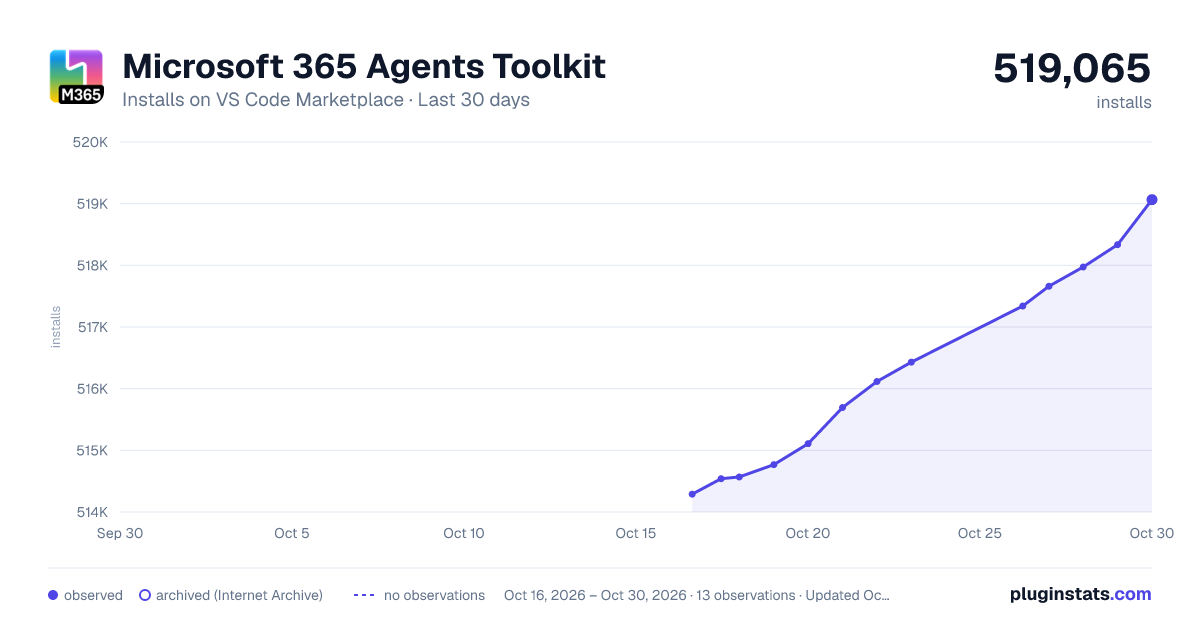
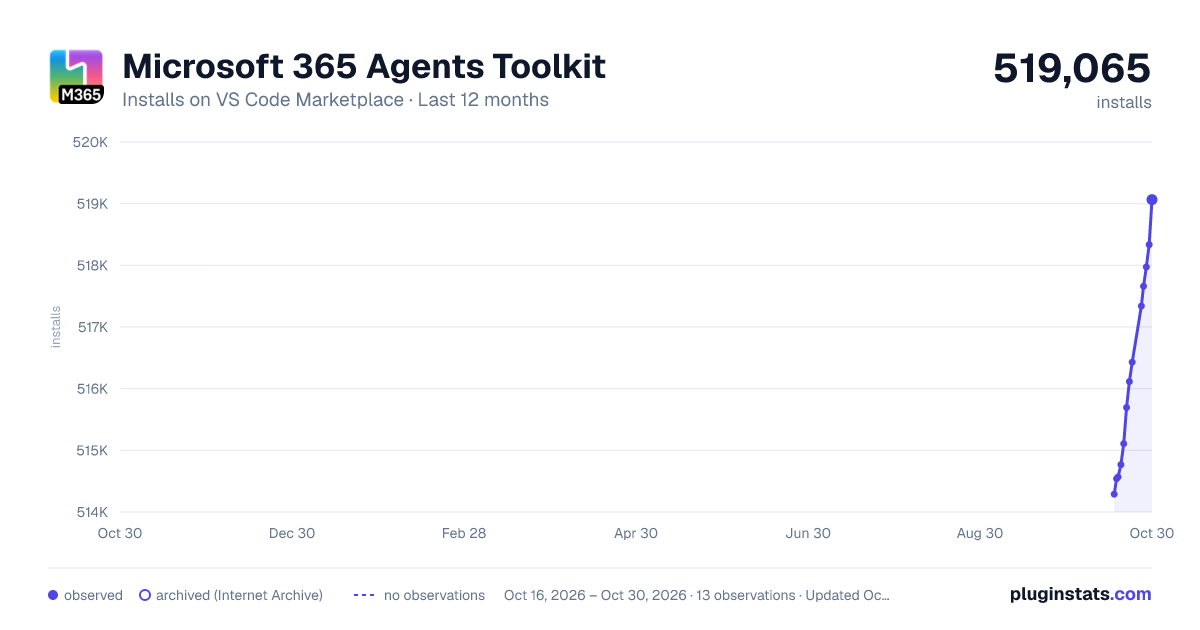
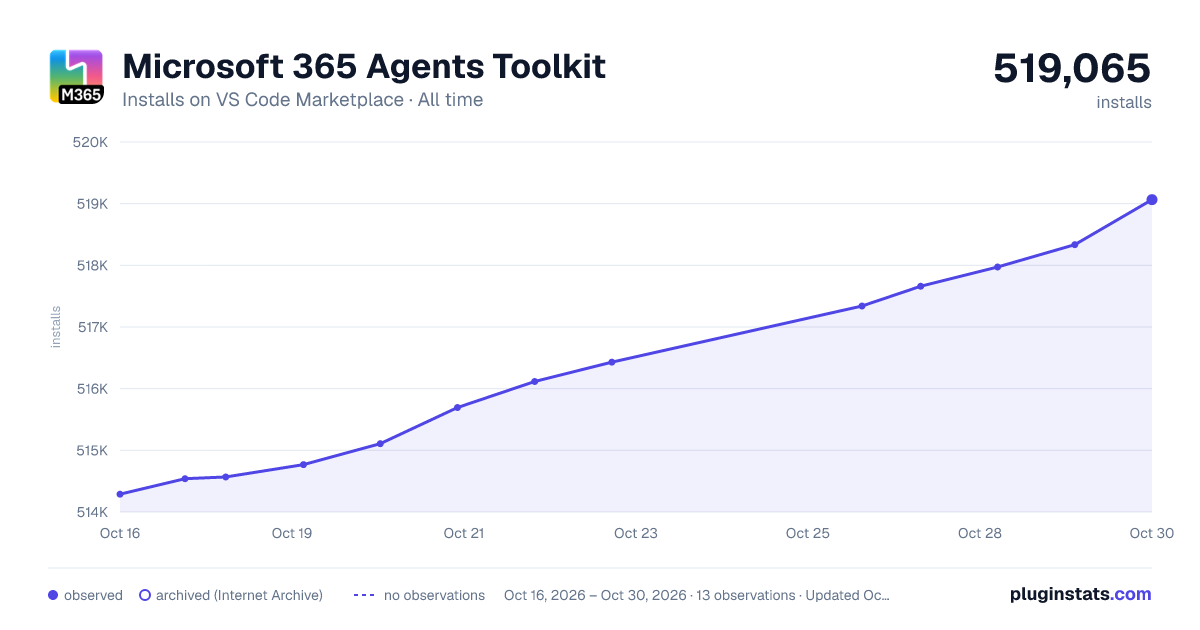

Adoption over time


7/30/90-day growth


Ranking history


Filled points are observed values; hollow points come from Internet Archive snapshots of the listing page. Dashed segments span periods with no observations — values between points are not interpolated.
Recent observations
Full history (3)Similar VS Code Marketplace Snippets plugins
Data source
Install counts, average rating, and rating counts come from the public Visual Studio Marketplace gallery API. Installs are cumulative and exclude updates.
Listing: https://marketplace.visualstudio.com/items?itemName=TeamsDevApp.ms-teams-vscode-extension. First seen Oct 16, 2026; last successful collection Oct 18, 2026. See the methodology.