 PluginStats
Text Power Tools installs statistics
By Dániel Tar · VS Code Marketplace · Other
All-in-one solution with 240+ commands for text manipulation: filter lines (grep), remove lines, insert number sequences and GUIDs, sorting, change case, converting numbers, generating fake data and more. Great for finding information in logs.
Text Power Tools has 169,018 recorded installs on VS Code Marketplace, ranking #1710 of 2,501 tracked listings.
Rating: 4.97 / 5 from 32 ratings
About Text Power Tools
Text Power Tools
Text Power Tools is an all-in-one text manipulation extension for VS Code inspired by TextFX for Notepad++ and Filter Lines and Text Pastry for Sublime Text. All commands supports multiple selections where it is applicable, and many of them can target new documents, so the original source remains unchanged.
All features are available from either the Command Palette or the editor context menu. To access the commands from the Command Palette use Ctrl+Shift+P, and enter tpt or part of your favourite Text Power Tool command name (e.g. filter, guid etc.) to quickly access the list of available commands. Almost all commands are available from the editor context menu, which is accessible from the Text Power Tools submenu after right clicking in the editor area.
Availability:
- VS Code Marketplace: https://marketplace.visualstudio.com/items?itemName=qcz.text-power-tools
- OpenVSX: https://open-vsx.org/extension/qcz/text-power-tools
Text Power Tools is also available as a Web Extension so it can be used on sites like vscode.dev.
Note: Due to current architectural limitations of VSCode, no extension can access files larger than 50 Megabytes. Vote for VSCode issue 31078, which once implemented, will allows this extension to work with these large files. In the meantime you can trick VSCode by opening a new file and copying the content of the large file there (without saving).
Features
- Filter lines using strings or regular expressions (grep like experience): Filter line commands take an input – a raw text, a regular expression or the selected text – and filter – exclude or include – the selected lines using that input. It works like the
grepcommand but inside VS Code.- Protip: The command provides a history feature with the last 10 filter texts available to use immediately.
- Protip: Filter commands can project the results to a new editor, so the original content is not modified. This way you can create multiple projections from your content without reloading the file or reverting the changes made by the filter command. Search for commands with
into a new editorat the end to use this feature. - Protip: There are commands to copy or cut resulting lines to the clipboard.
- Protip: These commands search/match in a case insensitive manner. To use case sensitive search/match, set the value of the
textPowerTools.caseSensitiveFilteringsetting totrue.
- Change case of text (camelCase, PascalCase, snake_case, CONSTANT_CASE, dash-case, dot.case, Title Case, sPoNgE cAsE) and swap casing.
- Note: UPPER CASE and lower case is not implemented in this extension as it is available in VS Code by default via the Transform to Title Case, Transform to Uppercase and Transform to Lower Case commands.
- Separate words with spaces, forward slashes and backslashes
- Reverse, slugify and latizine text (latinize removes all diacritic characters)
- Insert decimal, hexadecimal and Roman numbers: Inserts increasing/decreasing decimal, hex or Roman numbers. You can even specify the starting number and the step size for them. You can use one selection and it will prompt for how many elements to insert, or you can use multiple selections and it will insert the a number from the sequence into every selection.
- Protip: When inserting hex numbers, by default they will be uppercase. To insert lowercase hex numbers, set the value of the
textPowerTools.insertUppercaseHexNumberssetting tofalse.
- Protip: When inserting hex numbers, by default they will be uppercase. To insert lowercase hex numbers, set the value of the
- Convert numbers from decimal to hexadecimal and vice versa
- Insert series of items from predefined list of items: Inserts sequence of items from a predefined set. You can use one selection and it will prompt for how many elements to insert, or you can use multiple selections and it will insert the a number from the sequence into every selection. Currently the following predefined sequences are supported:
- Uppercase letters
- Lowercase letters
- Uppercase Greek letters
- Lowercase Greek letters
- NATO phonetic alphabet
- Long english month names
- Short english month names
- Long english day names
- Short english day names
- Long current/custom locale month names
- Short current/custom locale month names
- Long current/custom locale day names
- Short current/custom locale day names…
Description from the VS Code Marketplace listing.
- base64
- case
- clipboard
- converter
- converting
- fake data
- faker
- filter
- filter lines
- filter text
- filtering
- grep
- html entities
- idna
- ipsum
- join
- json
- keybindings
- logs
- lorem
README badge
Show your rank in a README or on your website. The badge updates automatically.
Charts
Images: 30d · 1y · all time · 1600×900 dark
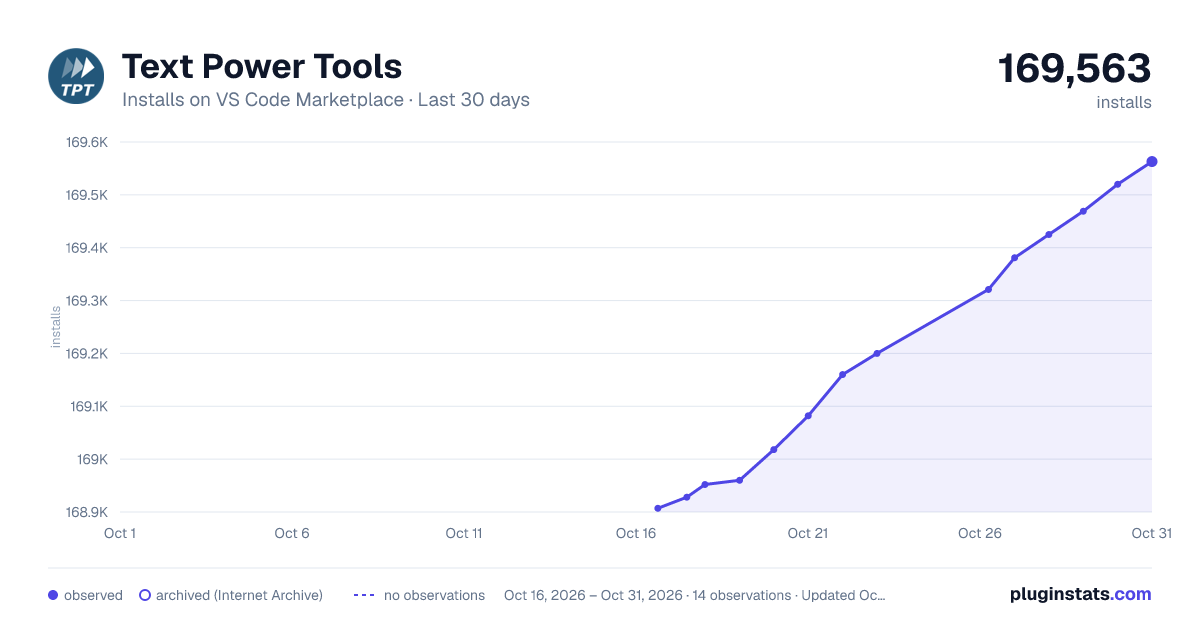
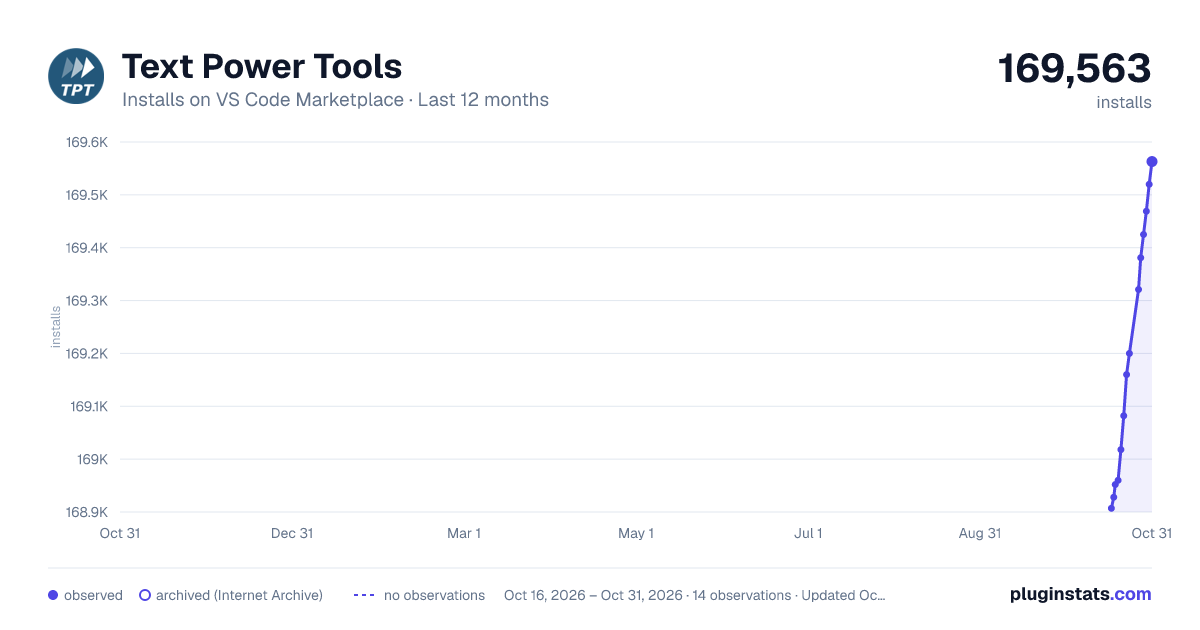
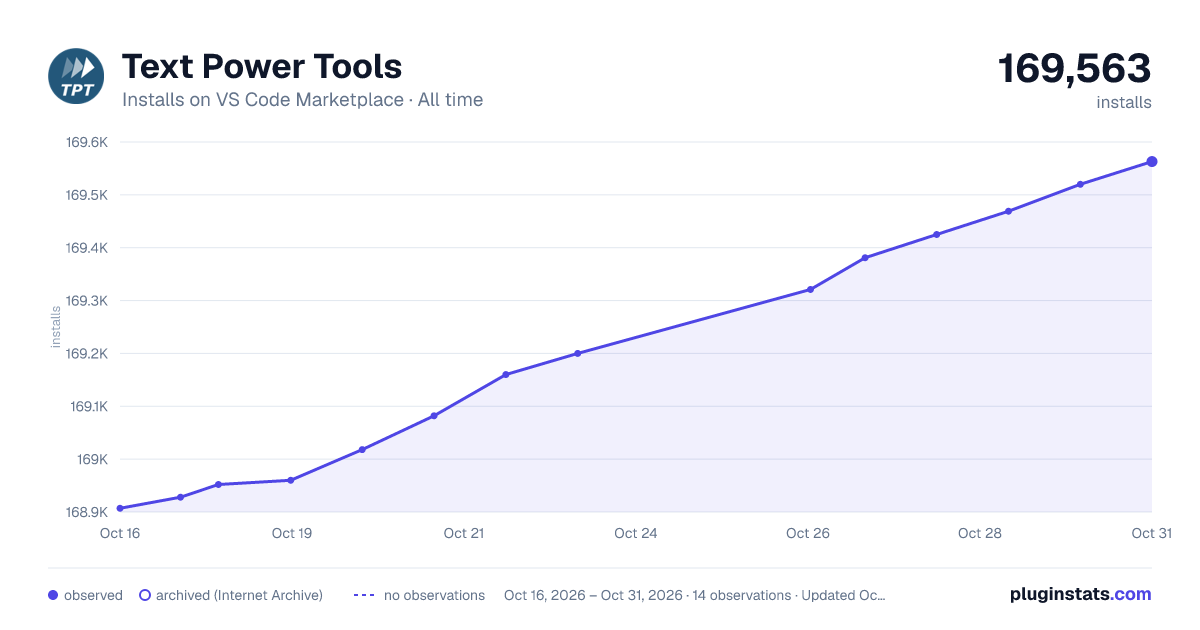

Adoption over time
7/30/90-day growth
Ranking history
Ratings over time
Listing placement
Listing placement
Filled points are observed values; hollow points come from Internet Archive snapshots of the listing page. Dashed segments span periods with no observations — values between points are not interpolated.
Each band is one page of 20. Installs on a linear scale. Placement is projected from installs, so it can differ from the marketplace's own sort order. Hover a dot to see the listing.
Recent observations
Full history (5)Similar VS Code Marketplace Other plugins
All 20 Text Power Tools alternativesData source
Install counts, average rating, and rating counts come from the public Visual Studio Marketplace gallery API. Installs are cumulative and exclude updates.
Listing: https://marketplace.visualstudio.com/items?itemName=qcz.text-power-tools. First seen Oct 16, 2026; last successful collection Oct 20, 2026. See the methodology.