 PluginStats
XSLT/XPath for Visual Studio Code installs statistics
By DeltaXignia · VS Code Marketplace · Programming Languages
XSLT 3.0/4.0 and XPath 3.1/4.0 language support - linting, auto-completion, code documentation and Quick Run with Saxon
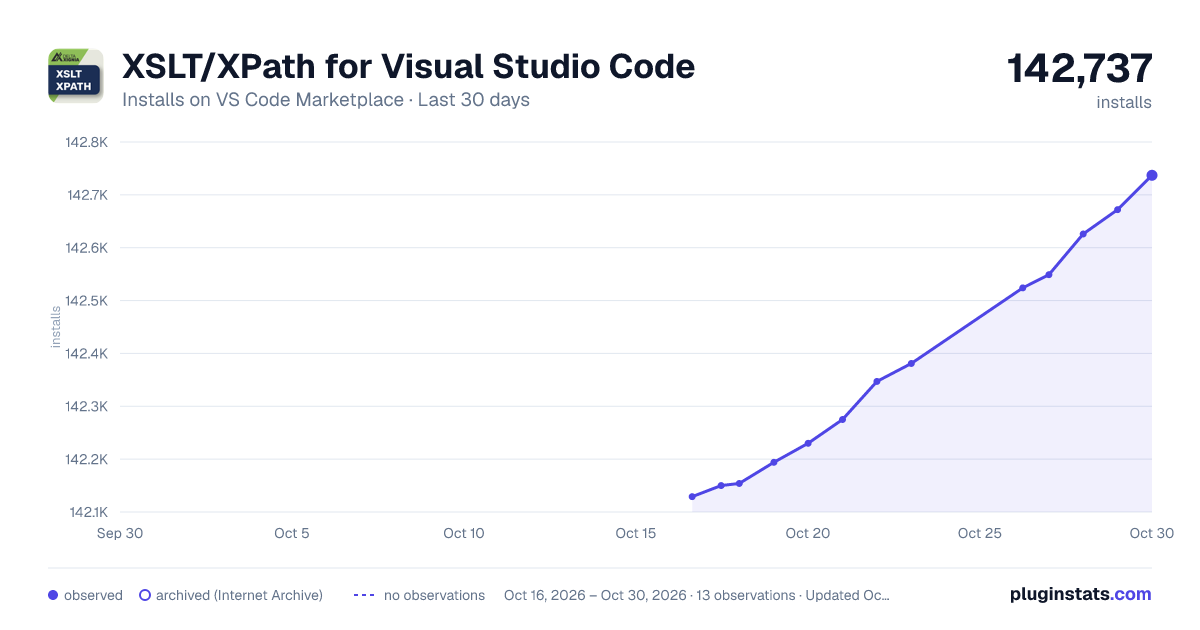
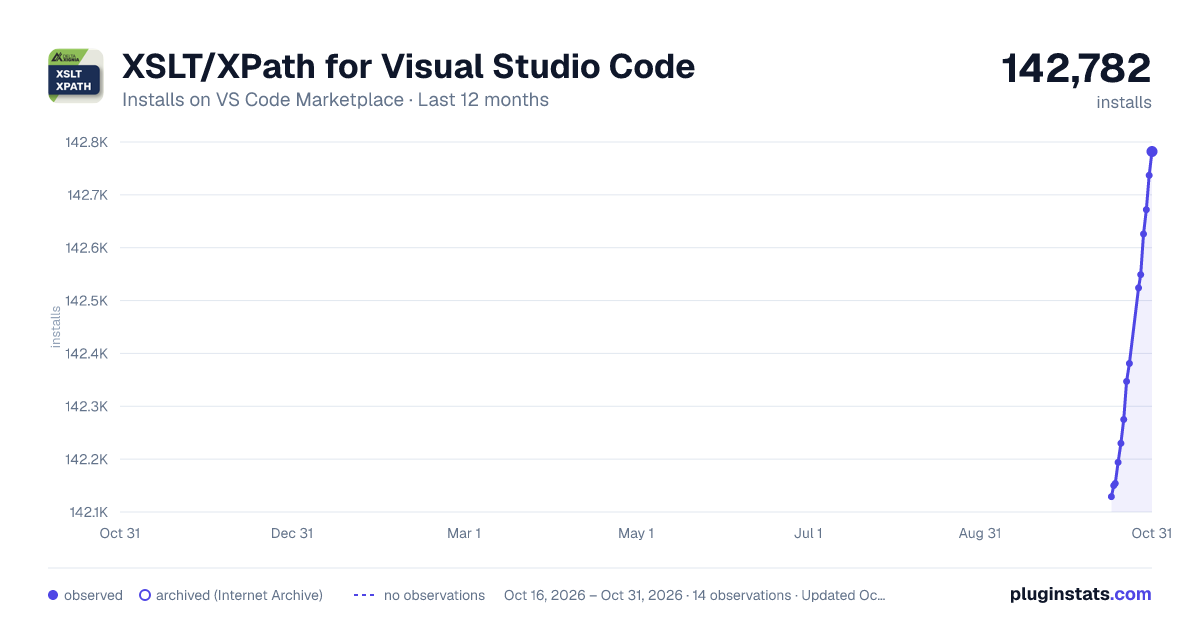
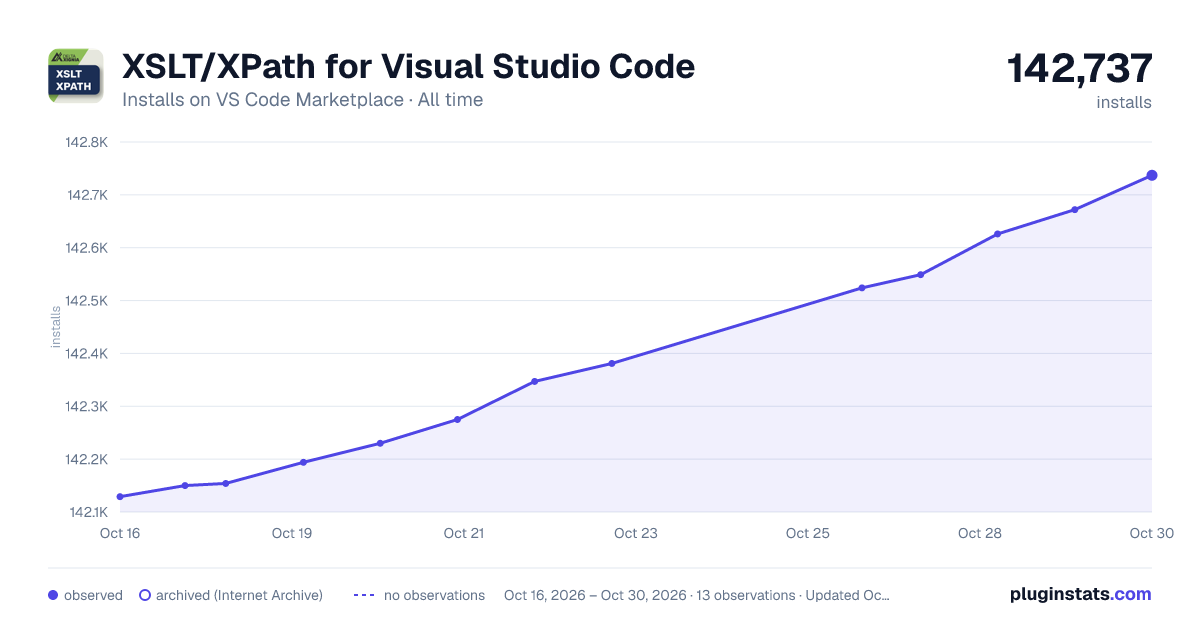
XSLT/XPath for Visual Studio Code has 142,154 recorded installs on VS Code Marketplace.
It ranks #1918 of 2,500 tracked VS Code Marketplace listings by installs.
It is rated 4.2 out of 5 from 9 ratings.
PluginStats has 3 daily observations since Oct 16, 2026; the latest is from Oct 18, 2026.
Rating: 4.22 / 5 from 9 ratings
About XSLT/XPath for Visual Studio Code
XSLT/XPath for Visual Studio Code
The XSLT/XPath extension for VSCode provides comprehensive language support for XSLT 3.0 and XPath 3.1, and for the XSLT 4.0 and XPath 4.0 features implemented in Saxon 13. This ReadMe is merely a 'quick start' guide, see the XSLT/XPath User Guide for more comprehensive help.
XSLT 4.0 with a documentation note, its hover help where the function is called, and the XSLT Imports view:
Features
This release adds full support for XSLT 4.0 in Saxon 13 - see Release 2.0 Highlights.
XSLT & XPath languages
• XSLT 3.0 and XPath 3.1 • XSLT 4.0 and XPath 4.0, as in Saxon 13 • SaxonJS interactive extensions (IXSL) • .xpath files, as XPath 4.0 • Fast semantic highlighting
XSLT 4.0
• Record and enum types, with type-aware checks • Named item types: xsl:item-type • xsl:switch, with missing-case quick fixes • Keyword arguments and optional parameters • Functions in no namespace
Editing
• Context-aware auto-completion, incl. node names • Signature help and hover help • Snippets, incl. new stylesheets for 3.0 and 4.0 • Formatting of instructions and multi-line XPath • Rename symbol, across imported modules • Semantic highlighting from a full XPath parser
Code documentation
• xsl:note with Markdown and xqDoc-style tags • Shown in hover and signature help • @see references, with navigation and rename • Checks of @param and @field tags • Module notes for stylesheets • Highlighting and auto completion for tags or references
Linter
• XPath syntax and XSLT instructions • Types, records, enums and function arguments • Unused XSLT and XPath variables or parameters • References across imported modules • Saxon errors from runs, in the Problems panel • Quick fixes for common problems
Navigation
• Go to (or peek) definition, and find references • Go to the declarations of record fields • Outline, breadcrumbs and Go to Symbol • Links for xsl:import and xsl:include • XSLT Imports view, with inferred top-level stylesheets • Filterable dropdown listing all symbols and modes
Refactoring
• Context-aware with safe symbol renaming • Extract xsl:function or xsl:template • Extract xsl:variable from an XPath expression • Extract a record type from a map • Wrap with... an instruction (⌥⇧W / Alt+Shift+W) • Add a documentation note
Running XSLT
• Quick Run (⌘⌥R / Ctrl+Alt+R) • Tasks for SaxonJ, SaxonJS and SaxonC • xsl:param defaults pre-filled by Quick Run • xsl:param values controlled by tasks • XML catalogs for xsl:import URIs • File pickers for task inputs
Debugging & tools
• xsl:message for all in-scope variables • Formatted, colored output with xdm:debug() • Companion XPath Notebook extension • Test XPath against the current XML file • The full User Guide
XML editing
• Well-formedness and namespace checks • Formatting and tree-view outline • Auto tag-close, tag rename and self-close • Comment command (⌘/) • XML snippets
\* *Problem-reporting currently depends on the VSCode symbol-provider. To ensure problems are always reported in VSCode, use the following VSCode setting: "breadcrumbs.enabled": true*
XML Commands
The XML selection commands are also in the XML Selection submenu of the editor's context menu (right-click), and in the XML: Select Element... quick pick (⇧⌘2 / Ctrl+Shift+2) - both show their key-bindings.
| Command | Key-Binding (macOS / Windows, Linux) | Details |
| XML: Goto XPath | | Initially shows current XPath at the text prompt | | XML: Select Element... | ⇧⌘2 / Ctrl+Shift+2 | Quick pick of the XML selection commands, and Goto XPath | | XML: Select current element | ⇧⌘0 / Ctrl+Shift+0 | Includes start/end tags | | XML: Select parent element | ⇧⌘9 / Ctrl+Shift+9 | Includes start/end tags | | XML: Select first child element | ⇧⌘8 / Ctrl+Shift+8 | Includes start/end tags | | XML: Select following element | ⇧⌘7 / Ctrl+Shift+7 | Includes start/end tags | | XML: Select preceding element | ⇧⌘6 / Ctrl+Shift+6 | Includes start/end tags | | XSLT: Add XSLT Inputs to Tasks File ||For file-selection prompt when running XSLT| | New XPath Notebook | - | DeltaXignia's XPath Notebook extension is required
Introduction
For lexical analysis, this extension processes code character-by-character. This analysis is exploited for all features including *all* syntax highlighting. Avoiding the much more common use of regular expressions on a line-by-line basis brings significant benefits. These benefits include improved responsiveness, lower CPU load, improved code maintainability and greater integrity for syntax highlighting.
Auto-completion is provided for XSLT and XPath. This includes context-aware completion items for all code symbol names. XSLT and XPATH function signatures and descriptions are shown in the description alongside function completion items. The last active non-XSLT file is used as the source to compute available node names for XPath location steps.
This extension's linter performs a comprehensive set of checks on the code. The linter ensures that any code symbols within XSLT or XPath with problems are accurately identified at the symbol-level. Asynchronous processing for xsl:include/xsl:import dependencies allows checking of references to symbol definitions regardless of the location of the definition.
Running XSLT
*(1) XSLT in active editor, (2) the Saxon processor, (3) the XML context file - click the play button to run*
The quickest way to run the stylesheet in the active editor is Quick Run (⌘⌥R / Ctrl+Alt+R): the first run creates a task for you, which later runs reuse.
XSLT transforms for SaxonJava, SaxonJS and SaxonC are configured and run as special VSCode Tasks.
XSLT task JSON properties can reference special commands. The special commands allow file-selection via a File Explorer or 'Recent Files' list, an example using: "xsltFile": "${command:xslt-xpath:pickXsltFile}". A sample screenshot is shown below:
For more a full description on using VSCode tasks to run XSLT, see Running XSLT.
Release Notes…
Description from the VS Code Marketplace listing.
- bpmn
- dcp
- formatter
- highlighter
- keybindings
- linter
- linters
- saxon
- saxonjs
- sch
- Schematron
- xml
- xml catalog
- xpath
- xpath 3.1
- xpath 4.0
- XPathSignature
- xpath-signature
- xsl
- xslt
Where XSLT/XPath for Visual Studio Code sits in the listing
Each band is one page of 20. Installs on a log scale. Placement is projected from installs, so it can differ from the marketplace's own sort order. Hover a dot to see the listing.


Charts
Images: 30d · 1y · all time · 1600×900 dark

Adoption over time


7/30/90-day growth


Ranking history


Filled points are observed values; hollow points come from Internet Archive snapshots of the listing page. Dashed segments span periods with no observations — values between points are not interpolated.
Recent observations
Full history (3)Similar VS Code Marketplace Programming Languages plugins
Data source
Install counts, average rating, and rating counts come from the public Visual Studio Marketplace gallery API. Installs are cumulative and exclude updates.
Listing: https://marketplace.visualstudio.com/items?itemName=deltaxml.xslt-xpath. First seen Oct 16, 2026; last successful collection Oct 18, 2026. See the methodology.