 PluginStats
Twig Language installs statistics
By mblode (3 listings) · VS Code Marketplace · Programming Languages
Snippets, Syntax Highlighting, Hover, and Formatting for Twig
Twig Language has 237,978 recorded installs on VS Code Marketplace.
It ranks #1344 of 2,501 tracked VS Code Marketplace listings by installs.
It is rated 4.1 out of 5 from 10 ratings.
PluginStats has 4 daily observations since Oct 16, 2026; the latest is from Oct 19, 2026.
Rating: 4.10 / 5 from 10 ratings
About Twig Language
Twig Language
Syntax highlighting, 110 snippets, hover documentation, and Twig formatting for Twig templates
Twig Language keeps VS Code’s HTML language mode and IntelliSense for Twig files. It now uses the same formatter as Twig Language 2, which uses a separate twig language mode. Choose one extension for your workspace.
Install
Paste that into Quick Open (cmd+P), or search "Twig Language" in the Extensions panel.
Quickstart
Open a .twig file. Highlighting and hover apply straight away. Type a snippet prefix and press tab, so entries becomes:
Snippets
110 of them, all in src/snippets/snippets.json:
• Twig tags: if, for, block, embed, filter, macro, set, use, include, autoescape, verbatim, and every closing form. • Craft CMS queries: entries, assets, categories, tags, users, and feed, each with a loop body, plus cache, nav, paginate, switch, and redirect. • Forms: formlogin, formuserregistration, formuserprofile, formforgotpassword, formsetpassword, formsearch, and formsearchresults, each a complete Craft form. • Helpers: csrf, head, endbody, the craft.app.request getters, and the maths filters (ceil, floor, round, min, max, random, shuffle).
Snippets write Twig strings with double quotes, such as {% include "template" %}. Set twig-language.snippetQuotes to single for {% include 'template' %}; HTML attribute quotes stay double. Set twig-language.craftSnippets to false to hide the Craft CMS queries, forms, helpers and tags such as switch, nav and cache, and keep the plain Twig snippets. Craft snippets are marked "craft": true in the snippet file.
Go to template
Ctrl/Cmd-click, Go to Definition (F12) or Peek Definition on a template name opens it. This works for include, extends, embed, import, from and use tags, include() and source() calls, and arrays of names. Names resolve against twig-language.templatePaths in the workspace folder (templates, views, src/templates, then the folder itself), then the current file's folder. Names without an extension also try .twig, .html.twig, .html and index files, as in Craft. @Namespace/ names use twig-language.templateNamespaces, for example { "App": "src/App/templates" }. Names built at runtime, and names that do not match a file, have no definition.
Hover
Hold the cursor over Twig code to get its documentation: 33 filters, 15 functions, and 28 language constructs. Turn it off with twig-language.hover.
Add your project's own tests, filters and functions with twig-language.customTests, customFilters and customFunctions, for example { "numeric": "True when the value is numeric." }. They are offered as completions inside Twig tags and show their description on hover. Any name after is or is not is highlighted as a test.
MJML
MJML tags keep their names and nesting when formatted, and bodies are highlighted and formatted as CSS. .mjml.twig files open in this extension. To use it for plain .mjml files that contain Twig, add "files.associations": { "*.mjml": "html" }; this replaces the MJML extension's language mode for those files.
Formatting
Version 0.10 replaces PrettyDiff with a formatter built for Twig and HTML. Run Format Document, Format Selection, or enable format on save:
Twig expressions are recognized before HTML attributes, so comparisons and nested quotes stay intact. Formatting preserves attribute case and order, inline text boundaries, string contents, comments, whitespace trim markers, and raw/verbatim/pre/textarea bodies. HTML and Twig nesting are tracked separately to support conditional HTML wrappers. Selection formatting uses the surrounding document's indentation and edits only complete selected lines.
JavaScript and CSS in script/style elements use bundled Prettier when safely parseable. Twig-generated code that cannot be parsed independently, custom js/css/scss blocks, data scripts, and multiline Twig expressions stay unchanged. No PHP, Rust, project dependencies, or Prettier configuration is required. Workspace Prettier plugins and Tailwind class sorting are not loaded.
Existing line breaks and blank lines are retained; inline elements and text are not expanded or reflowed. Leading line indentation can change rendered whitespace, especially with CSS white-space rules or captured template output. Keep exact-whitespace sections inside an ignore region:
HTML comment markers and paired prettier-ignore-start/end and legacy parse-ignore-start/end markers also work. Unclosed tokens return no edits and a short status message, with details in the Twig Language Output channel. Formatting runs in a cancellable worker with a 2 MiB document limit.
Configuration
Settings apply immediately and support workspace, folder, and [html] overrides.
| Setting | Default | Description |…
Description from the VS Code Marketplace listing.
- beautify
- craft
- html
- php
- snippets
- twig
Where Twig Language sits in the listing
Each band is one page of 20. Installs on a log scale. Placement is projected from installs, so it can differ from the marketplace's own sort order. Hover a dot to see the listing.


Charts
Images: 30d · 1y · all time · 1600×900 dark
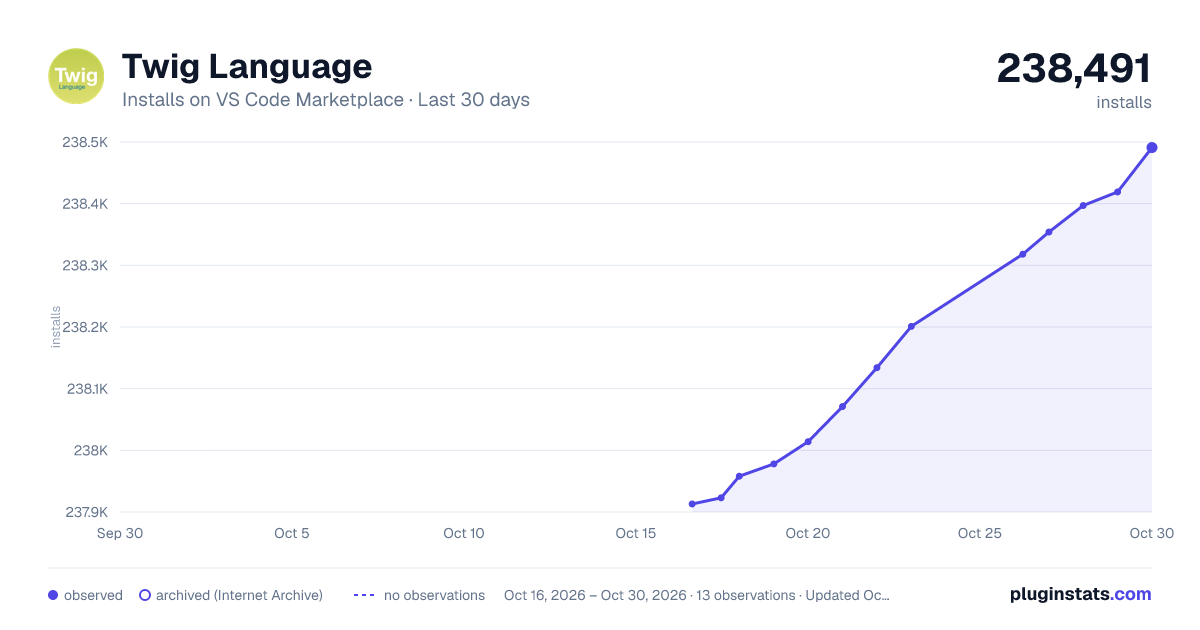
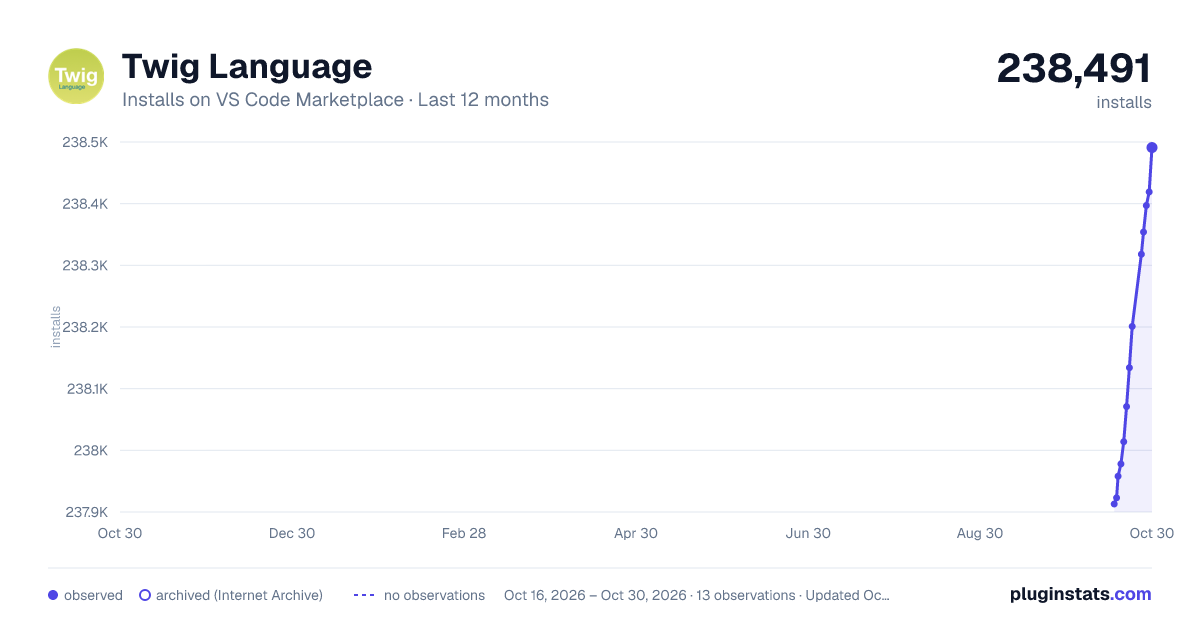
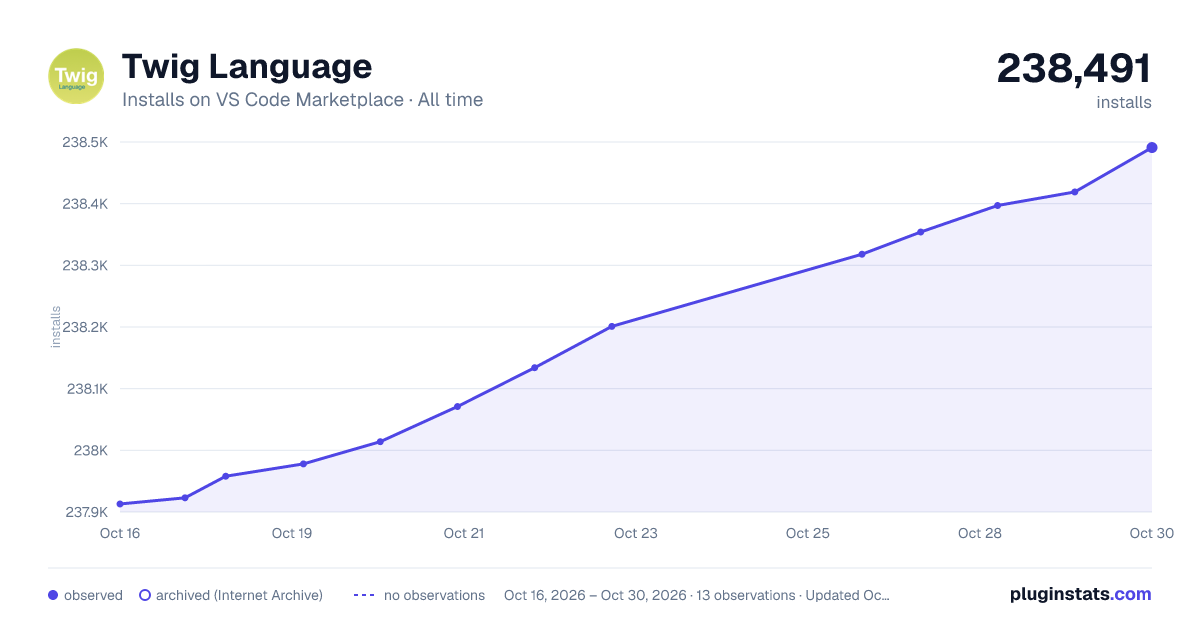

Adoption over time


7/30/90-day growth


Ranking history


Filled points are observed values; hollow points come from Internet Archive snapshots of the listing page. Dashed segments span periods with no observations — values between points are not interpolated.
Recent observations
Full history (4)Similar VS Code Marketplace Programming Languages plugins
Data source
Install counts, average rating, and rating counts come from the public Visual Studio Marketplace gallery API. Installs are cumulative and exclude updates.
Listing: https://marketplace.visualstudio.com/items?itemName=mblode.twig-language. First seen Oct 16, 2026; last successful collection Oct 19, 2026. See the methodology.