 PluginStats
Angular Extension Pack installs statistics
By Will 保哥 (6 listings) · VS Code Marketplace · Snippets
Popular Visual Studio Code extensions for Angular Development
Angular Extension Pack has 234,705 recorded installs on VS Code Marketplace.
It ranks #1359 of 2,500 tracked VS Code Marketplace listings by installs.
It is rated 4.8 out of 5 from 53 ratings.
PluginStats has 3 daily observations since Oct 16, 2026; the latest is from Oct 18, 2026.
Rating: 4.77 / 5 from 53 ratings
About Angular Extension Pack
Angular Extension Pack
This extension pack groups Angular-focused extensions for language support, code generation, snippets, linting, and daily development tasks. The bundled extensions are installed automatically with the pack. If you have suggestions for new extensions or improvements, please open an issue.
Extensions Included
Angular-specific Tools
• Angular Language Service • Angular template IntelliSense, diagnostics, quick info, and navigation. • Angular Schematics • Run Angular CLI schematics from the Explorer or Command Palette. • angular2-switcher • Quickly switch between an Angular component and its HTML template.
Angular Code Snippets
• Angular Snippets (Version 22) • Angular component, template, routing, forms, HTTP, and RxJS snippets. • Angular 17 Snippets - TypeScript, Html, Angular Material, ngRx, RxJS & Flex Layout • Snippets for Angular, Angular Material, RxJS, NgRx, tests, and related tooling. • Use "editor.snippetSuggestions": "top" to prioritize snippet completions.
TypeScript Productivity
• Auto Import • Suggests and inserts imports for symbols from project and package dependencies. • JavaScript (ES6) code snippets • Import and export • imp→ imports entire module import fs from 'fs'; • imn→ imports entire module without module name import 'animate.css' • ime→ imports everything as alias from the module import * as localAlias from 'fs'; • imd→ imports only a portion of the module using destructing import { rename } from 'fs'; • ima→ imports only a portion of the module as alias import { rename as localRename } from 'fs'; • enf→ exports name function export const log = (parameter) => { console.log(parameter);}; • edf→ exports default function export default (parameter) => { console.log(parameter);}; • ecl→ exports default class export default class Calculator { }; • ece→ exports default class by extending a base one export default class Calculator extends BaseClass { }; • Class helpers • con→ adds default constructor in the class constructor() {} • met→ creates a method inside a class add() {} • pge→ creates a getter property get propertyName() {return value;} • pse→ creates a setter property set propertyName(value) {} • Various methods • fre→ forEach loop in ES6 syntax array.forEach(currentItem => {}) • fof→ for ... of loop for(let item of object) {} • fin→ for ... in loop for(let item in object) {} • anfn→ creates an anonymous function (params) => {} • nfn→ creates a named function const add = (params) => {} • sti→ set interval helper method setInterval(() => {}); • sto→ set timeout helper method setTimeout(() => {}); • prom→ creates a new Promise return new Promise((resolve, reject) => {}); • thenCatch→ adds then and catch declaration to a promise .then((res) => {).catch((err) => {}); • Console methods • clg→ console log console.log(object) • cdi→ console dir console.dir • clt→ console table console.table • refactorix • Applies source transformations such as semicolon changes, accessors, and arrow-function simplification. • Paste JSON as Code (Refresh) • Generates typed models and serializers from sample JSON data. • Document This • Generates documentation comments for JavaScript and TypeScript declarations.
Template Productivity
• Enable VSCode built-in Linked Editing (Auto update tags) feature.
Code Analysis
• ESLint • Integrates ESLint diagnostics and fixes into VS Code using the project's ESLint configuration. • Gremlins tracker for Visual Studio Code • Highlights invisible or visually ambiguous characters that can be difficult to detect in source files.
Workbench
• EditorConfig for VS Code • Applies .editorconfig rules consistently across supported editors and projects. • Todo Tree • Finds TODO, FIXME, and other configured tags and displays them in a navigable tree.
Some other extensions you may need (Optional)
You need to install the following extensions manually.
• Prettier - Code formatter • The code formatting is a subjective preferences. Your choice matters. I choose Prettier! • Setting: "prettier.singleQuote": true • We love single quote on strings. Isn't it? • Setting: "editor.formatOnSave": false • Prettier use AST to parse your source code so you can safely enable editor.formatOnSave setting. • Recommended reading: Setting up Prettier in an Angular CLI Project • Live Share • Real-time collaborative development from the comfort of your favorite tools. • Peacock • Subtly change the workspace color of your workspace. Ideal when you have multiple VS Code instances and you want to quickly identify which is which. • Output Colorizer • This colorize your messages in the Output/Debug/Extensions panel and all the *.log files. • angular2-inline • I don't use inline template at all. If you need it, you can install this extension. I don't like to mix HTML with TypeScript anyway. • Git Extension Pack • Popular Visual Studio Code extensions for Git version control • GitLens — Git supercharged • Setting: "gitlens.currentLine.enabled": false • Git Graph • gitignore • Open in GitHub, Bitbucket, Gitlab, VisualStudio.com ! • GitHub Repositories • JavaScript Debugger • An extension for debugging Node.js programs and Chrome. • Wallaby.js • Integrated Continuous Testing Tool for JavaScript. • Quokka.js • Live Scratchpad for JavaScript. • NGINX Configuration Language Support • If you want to use ng-nginx snippet, you might want to install this extension for authoring nginx.conf file. • Material Icon Theme • VSCode simpler Icons with Angular • Nx Console • This let you spend less time looking up command line arguments. Really useful! • SCSS Formatter • SCSS IntelliSense
Other manual setup (Optional)…
Description from the VS Code Marketplace listing.
- angular
- javascript
- snippet
Where Angular Extension Pack sits in the listing
Each band is one page of 20. Installs on a log scale. Placement is projected from installs, so it can differ from the marketplace's own sort order. Hover a dot to see the listing.


Charts
Images: 30d · 1y · all time · 1600×900 dark
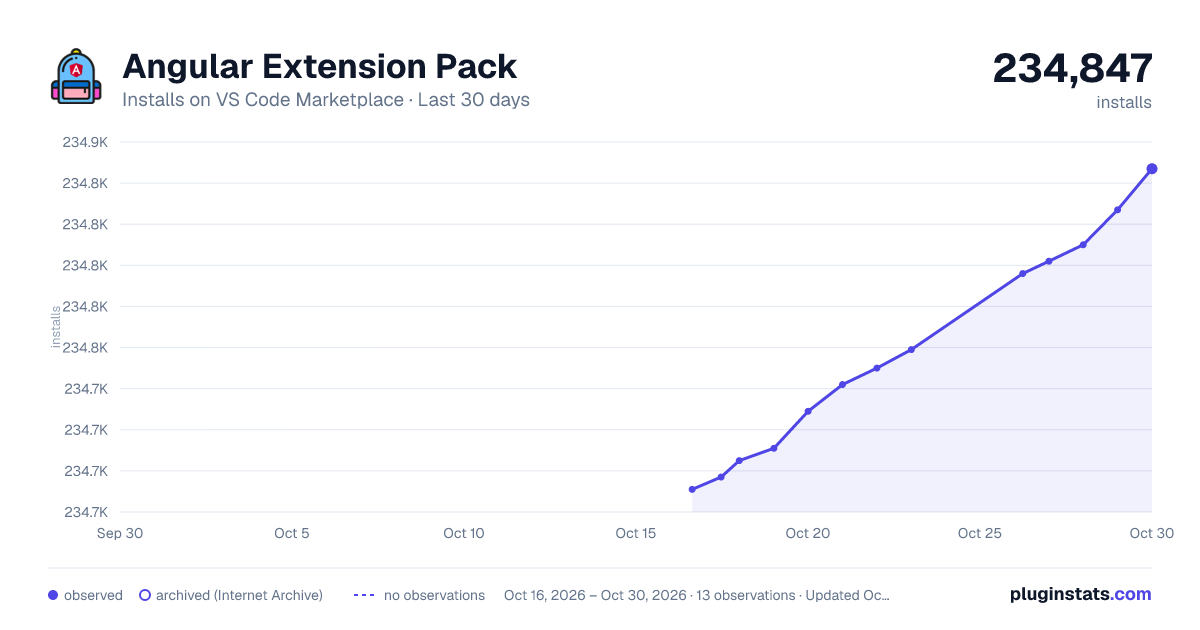
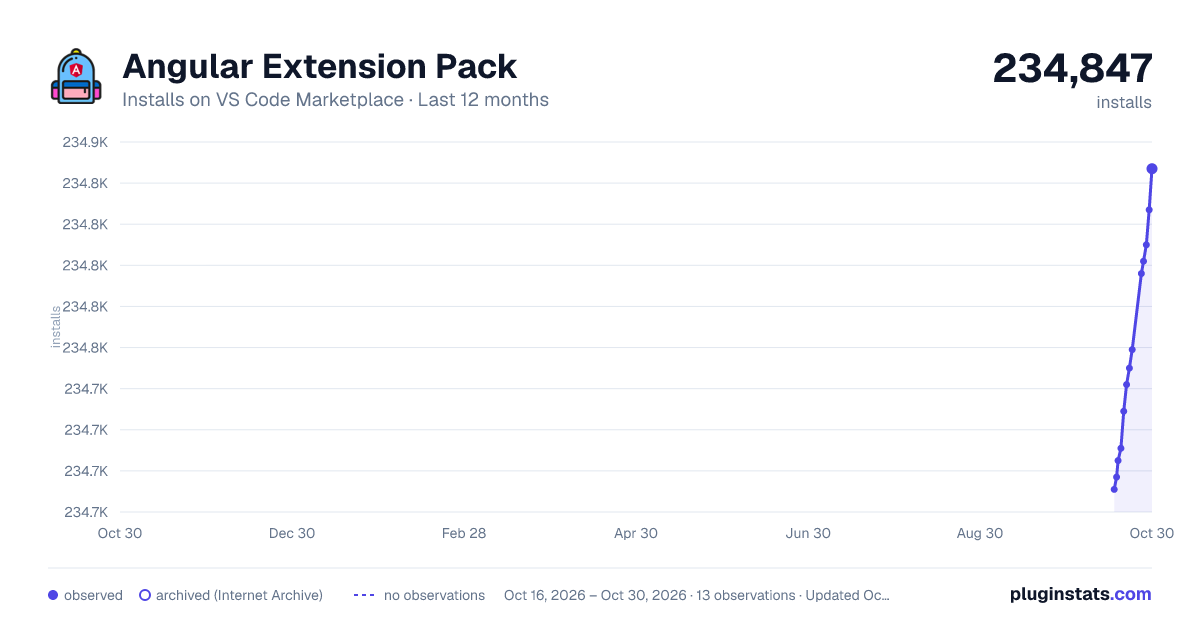
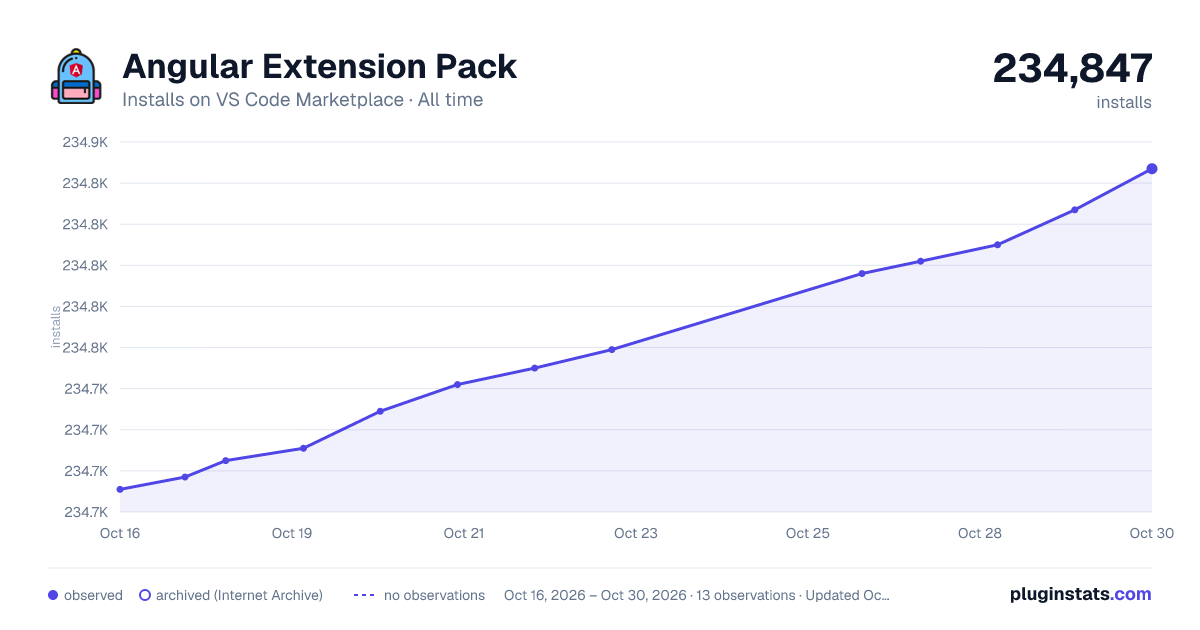

Adoption over time


7/30/90-day growth


Ranking history


Filled points are observed values; hollow points come from Internet Archive snapshots of the listing page. Dashed segments span periods with no observations — values between points are not interpolated.
Recent observations
Full history (3)Similar VS Code Marketplace Snippets plugins
Data source
Install counts, average rating, and rating counts come from the public Visual Studio Marketplace gallery API. Installs are cumulative and exclude updates.
Listing: https://marketplace.visualstudio.com/items?itemName=doggy8088.angular-extension-pack. First seen Oct 16, 2026; last successful collection Oct 18, 2026. See the methodology.