 PluginStats
MinifyAll installs statistics
By Jose Gracia Berenguer · VS Code Marketplace · Programming Languages
Minifier for JSON, CSS, HTML, XML, TWIG, LESS, SASS, SCSS, JavaScript, JSONC, and JavaScriptReact(testing). Compressor of files and folders. You will love its simplicity!
MinifyAll has 197,661 recorded installs on VS Code Marketplace, ranking #1530 of 2,501 tracked listings.
Rating: 4.57 / 5 from 35 ratings
About MinifyAll
MinifyAll an extension for VS Code
Simple VS Code minifier and compressor for most common file types (See full list below). You will love its simplicity!
You can minify the file and replace all the content with the new minified text, or you can preserve the original document and get the minified text in another document! Also, you can simply minify your selected text, you can preserve your licence comments with the tags @preserve and @endpreserve.
MinifyAll is also able to compress files and folders simply by right-clicking them on the menu.
Go to the extension settings and make it as you want, enable or disable: minify on save, languages, hexadecimal shortener, messages, and much more.
For more information check our: GitHub repository, VisualStudio Marketplace or OpenVSX registry.
Also check the brand new MinifyAll online webpage 😎 or the MinifyAllCli/package.
Do you want to help us improve the extension or did you found a bug? Let us know.
Check our CHANGELOG.
Currently looking for active contributors to maintain and keep the project alive.
We support up to 14 languages/file extensions!




Installation 🔩⚙
- Open the Command Palette of VS Code with Ctrl+P or ⌘P
- And type:➡️
ext install josee9988.minifyall
Commands 📐🛡
Minify this document ⚡OrCTRL+ALT+MMinify this document and preserve the original ⛏OrCTRL+ALT+NMinify the selected text 🎯OrCTRL+ALT+. CTRL+ALT+M
We recommend using them with: "left click" on the document and then select the option you want, either the file in the menu or the opened file. ;)
How does it look with real code? 📸 😁
- The two commands available. First directly minifies the actual document and replaces the original code with the modified one, the second keeps the original document and creates a file with the modified text:
- Preserve your licence comments with the tags @preserve (at the very top) and @endpreserve
- The first and default command that replaces the actual code with the minified one:
- The second command that saves the minified text to other file and preserves the original text:
- Minify only your selected text!
- Also, minify when right-clicking on the code!
- Minify when right-clicking on a file of the menu without opening it!
- Compress when right-clicking on a file or folder of the menu.
Languages available 🧪🔥
- CSS
- HTML
- XML
- TWIG
- VUE
- VUE-HTML
- HTML in a PHP file
- JSON
- JavaScript With: Terser
- JavaScriptReact With: Terser
- JSONC
- LESS
- SASS
- SCSS
Configuration settings ⚙️⛓
<!-- markdownlint-disable no-inline-html--> <details> <summary>Click to see more info about the configuration settings</summary>(Remember to restart VS Code after modifying any configuration)
- If you want MinifyAll to stop shortening colours, such as RGB to 3 digit hex, or RGBA to hex, or 6 digit hex to 3 digit hex. If you enable it you might see some loss in colour accuracy
"MinifyAll.disableHexadecimalShortener": true|false //default 'true' (by default it is disabled)
- Disables warning and information messages
"MinifyAll.disableMessages": true|false //default 'false' (by default it is allowed)
- Disables context menu when right-clicking in your code.…
Description from the VS Code Marketplace listing.
- compress
- compressor
- css
- format
- formatter
- html
- javascript
- javascriptreact
- js
- json
- jsonc
- keybindings
- less
- minifier
- minify
- php
- react
- reduce
- sass
- scss
README badge
Show your rank in a README or on your website. The badge updates automatically.
Charts
Images: 30d · 1y · all time · 1600×900 dark
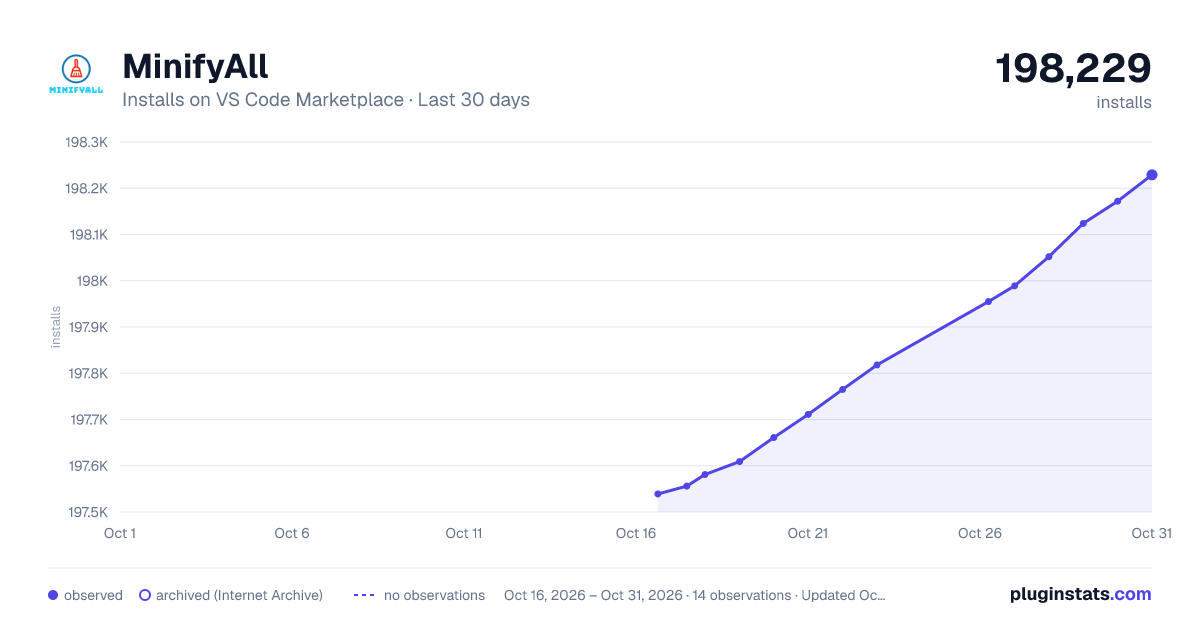
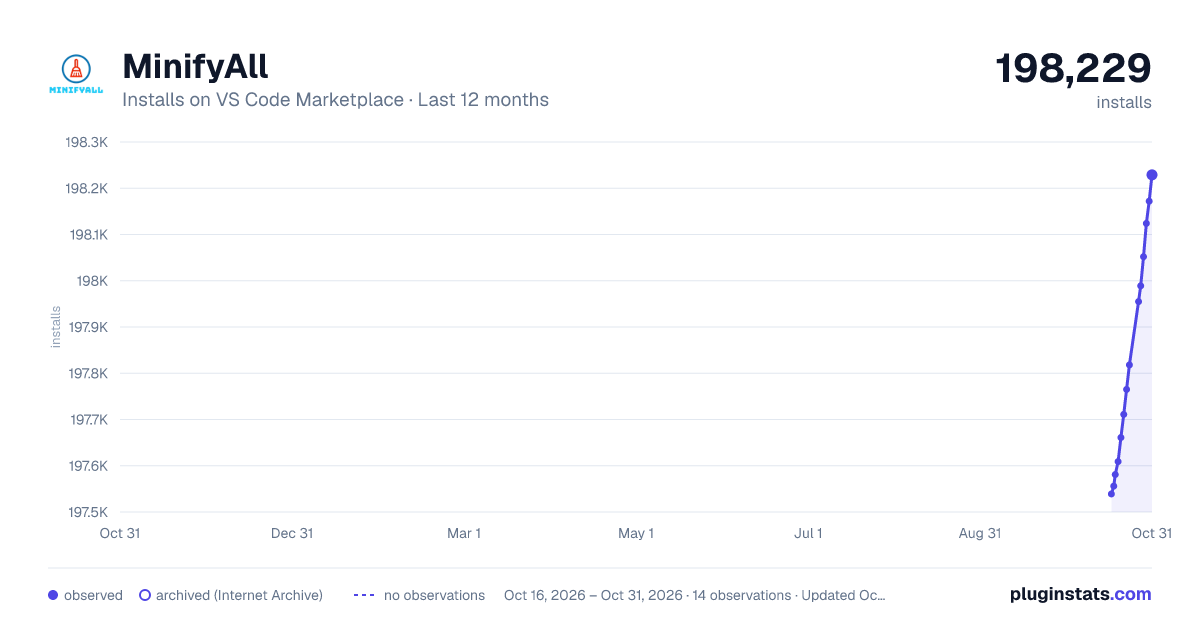
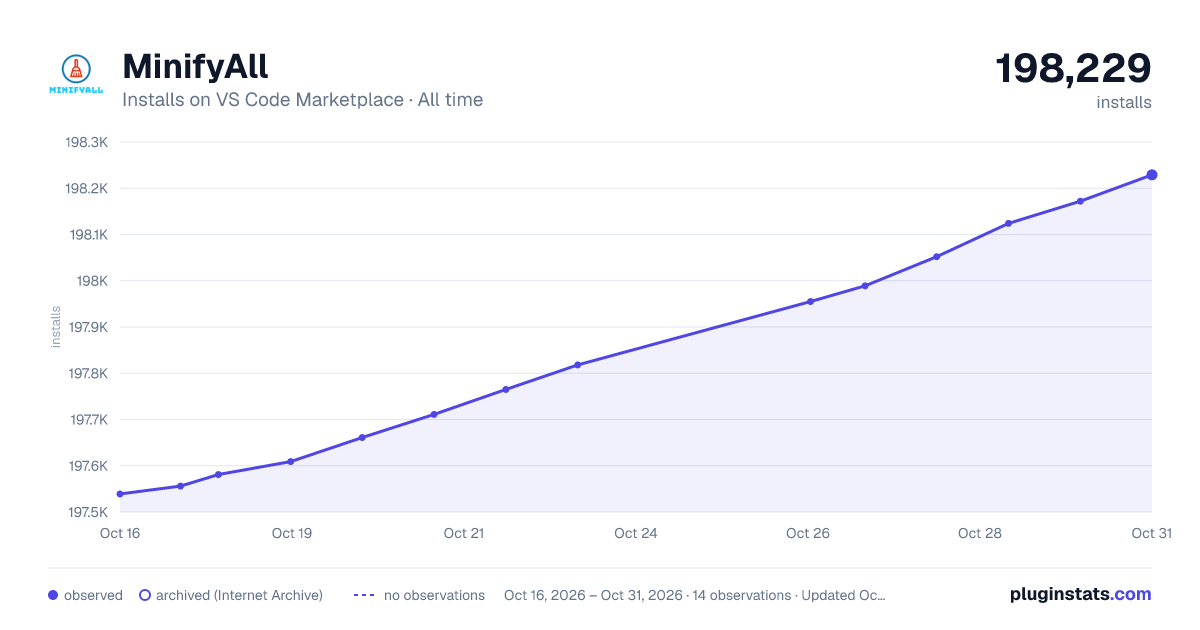

Adoption over time
7/30/90-day growth
Ranking history
Ratings over time
Listing placement
Listing placement
Listing placement
Filled points are observed values; hollow points come from Internet Archive snapshots of the listing page. Dashed segments span periods with no observations — values between points are not interpolated.
Each band is one page of 20. Installs on a linear scale. Placement is projected from installs, so it can differ from the marketplace's own sort order. Hover a dot to see the listing.
Recent observations
Full history (5)Similar VS Code Marketplace Programming Languages plugins
All 20 MinifyAll alternativesData source
Install counts, average rating, and rating counts come from the public Visual Studio Marketplace gallery API. Installs are cumulative and exclude updates.
Listing: https://marketplace.visualstudio.com/items?itemName=josee9988.minifyall. First seen Oct 16, 2026; last successful collection Oct 20, 2026. See the methodology.