 PluginStats
p5.vscode installs statistics
By Sam Lavigne · VS Code Marketplace · Programming Languages
Create and manage p5.js projects.
p5.vscode has 160,464 recorded installs on VS Code Marketplace.
It ranks #1782 of 2,500 tracked VS Code Marketplace listings by installs.
It is rated 4.4 out of 5 from 14 ratings.
PluginStats has 3 daily observations since Oct 16, 2026; the latest is from Oct 18, 2026.
Rating: 4.36 / 5 from 14 ratings
About p5.vscode
p5.vscode
p5.vscode helps you create p5.js projects in Visual Studio Code. It also includes autocompletion, a simple tool to browse and install third-party p5 libraries, and the Live Server extension.
I made this extension for my students in particular, but I hope it's helpful for anyone using p5. I'm aware there are a few other VS Code extensions that do something similar, but they didn't quite meet my requirements.
Instructions
To create a new p5 project:
1. Open the Command Palette (with command-shift-p on Mac, or ctrl-shift-p on Windows) and then start typing and select Create p5.js Project. 2. Select a new empty folder to put your project in. 3. (optional) click the "Go Live" button in the bottom status bar to open your sketch in a browser 4. Abolish cops.
To install p5 libraries:
1. Open the Command Palette, then start typing and select Install p5 Contributor Library 2. Select the library you'd like to install and hit enter. 3. Select Install to download the library and add it as a script tag to your index file, or select Visit home page to view documentation for that library.
Features
• Creates a p5.js project by populating an empty folder with required html/css/js files. • Browse and install third-party p5.js libraries. • Autocompletion and documentation for p5 keywords & functions using TypeScript definitions. • Avoids CDN use so that project creation can work offline. • Comes bundled with other recommended VS Code extensions to make things easier for beginners & students.
Troubleshooting
• When creating a new project, please select an empty folder. • Library installation requires a project workspace containing an index.html file and a libraries folder. • I've attempted to integrate all the contributed libraries found on p5's library page. If I've missed anything, please just let me know.
Please log an issue on GitHub if you find any problems or have suggestions.
Description from the VS Code Marketplace listing.
- generator
- javascript
- p5
- p5.js
- project
- template
Where p5.vscode sits in the listing
Each band is one page of 20. Installs on a log scale. Placement is projected from installs, so it can differ from the marketplace's own sort order. Hover a dot to see the listing.


Charts
Images: 30d · 1y · all time · 1600×900 dark
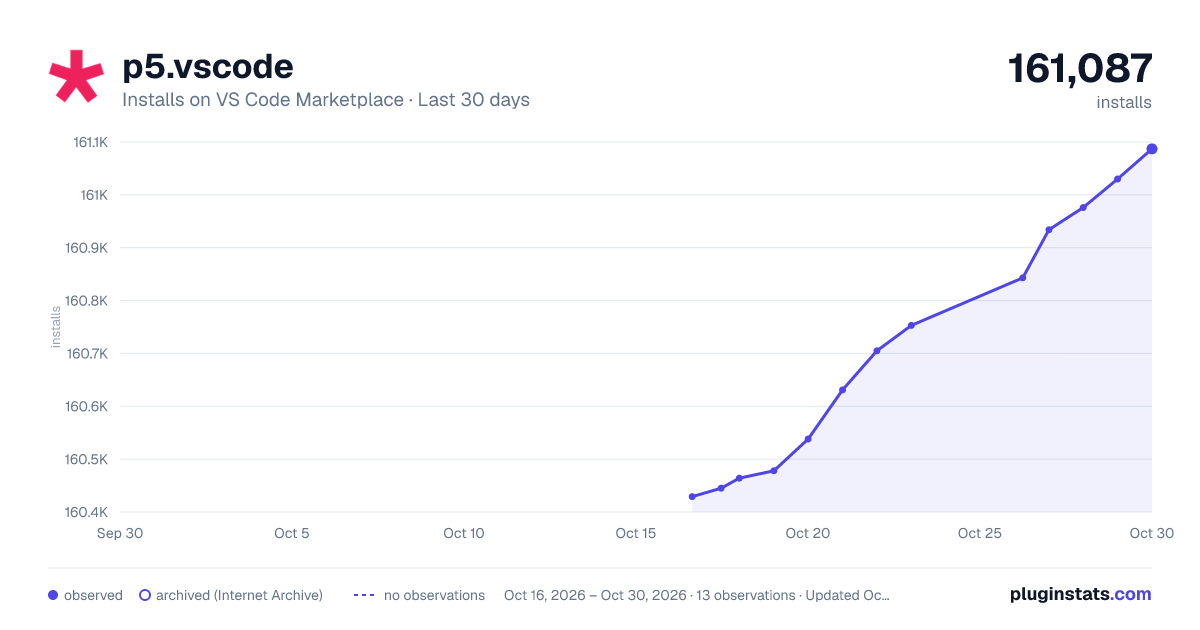
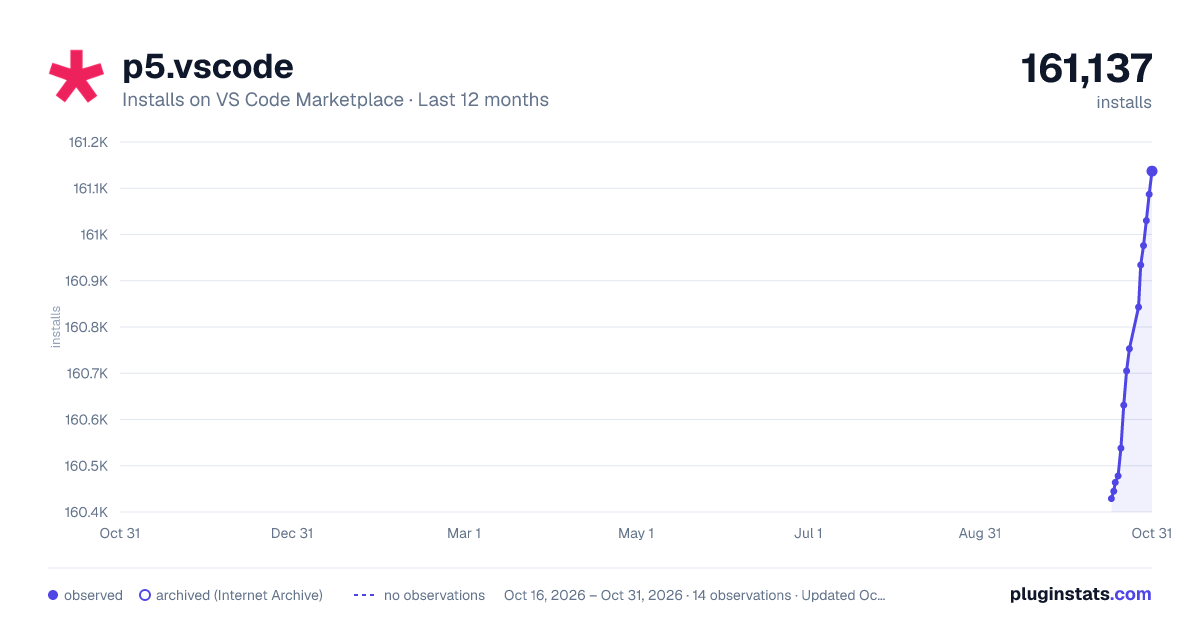
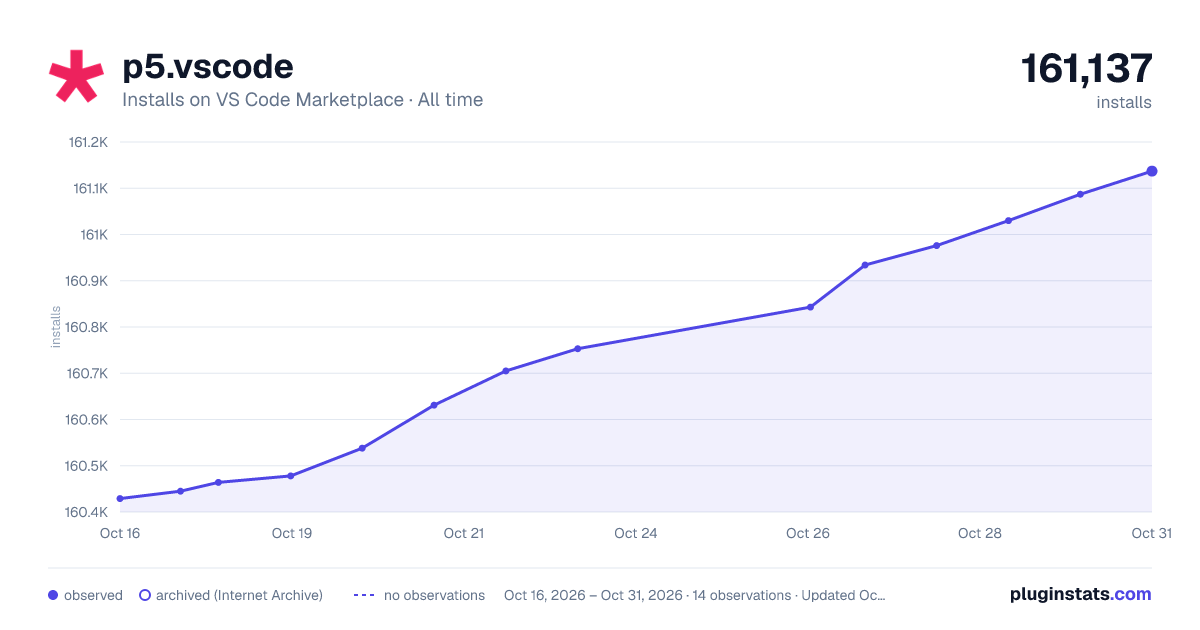

Adoption over time


7/30/90-day growth


Ranking history


Filled points are observed values; hollow points come from Internet Archive snapshots of the listing page. Dashed segments span periods with no observations — values between points are not interpolated.
Recent observations
Full history (3)Similar VS Code Marketplace Programming Languages plugins
Data source
Install counts, average rating, and rating counts come from the public Visual Studio Marketplace gallery API. Installs are cumulative and exclude updates.
Listing: https://marketplace.visualstudio.com/items?itemName=samplavigne.p5-vscode. First seen Oct 16, 2026; last successful collection Oct 18, 2026. See the methodology.