 PluginStats
Quarkus installs statistics
By Red Hat (18 listings) · VS Code Marketplace · Programming Languages
Quarkus Tools for Visual Studio Code
Quarkus has 380,203 recorded installs on VS Code Marketplace.
It ranks #994 of 2,500 tracked VS Code Marketplace listings by installs.
It is rated 5.0 out of 5 from 6 ratings.
PluginStats has 3 daily observations since Oct 16, 2026; the latest is from Oct 18, 2026.
Rating: 5.00 / 5 from 6 ratings
About Quarkus
Quarkus Tools for Visual Studio Code
Description
This Visual Studio Code extension provides support for :
• Quarkus and MicroProfile development by extending Visual Studio Code extension for MicroProfile with Quarkus features. • Qute support to provide completion, validation, etc. for the Qute template engine inside Java and template files. • Renarde support to make sure that the Quarkus, MicroProfile, and Qute features work properly when working with a Renarde application.
Quarkus VS Code Commands
The following commands are supported for both Maven and Gradle Quarkus projects:
• Quarkus: Generate a Quarkus project: Generate a Quarkus project, based on https://code.quarkus.io/ • Quarkus: Add extensions to current project: Add Quarkus extensions to currently opened Quarkus project • Quarkus: Debug current Quarkus project: Launches the Maven quarkus:dev plugin or the Gradle quarkusDev command and automatically attaches a debugger • Quarkus: Build executable: Launches Maven or Gradle with the correct arguments to build an executable of the application (requires GraalVM or Mandrel to be configured)
Quarkus/MicroProfile properties Features
In application.properties and microprofile-config.properties files, you will benefit with:
• Completion support for Quarkus/MicroProfile properties • Hover support for Quarkus/MicroProfile properties • Definition support for Quarkus/MicroProfile properties • Format support for Quarkus/MicroProfile properties • Validation and Quick Fix support for Quarkus/MicroProfile properties • Support for Quarkus profiles • Outline support (flat or tree view) • Code snippets: • qds - Configure a Quarkus datasource • qj - Configure a Jaeger tracer
Quarkus yaml Features
In application.yaml and application.yml files, you will benefit with:
• Completion support for Quarkus/MicroProfile properties • Hover support for Quarkus/MicroProfile properties • Validation support for Quarkus/MicroProfile properties • Support for Quarkus profiles • Outline support
Quarkus/MicroProfile Java Features
In Java files, you will benefit with:
• Completion support for MicroProfile • Hover support for MicroProfile • Validation and Quick Fix support for MicroProfile • Code Lens support for Quarkus/MicroProfile • Code snippets: • qtrc - Create a new Quarkus test resource class • qitrc - Create a new Quarkus integration test resource class • qntrc - Create a new Quarkus native test resource class (only works in older versions of Quarkus, since this testing method has been deprecated) • All the snippets provided by vscode-microprofile
Requirements
• Visual Studio Code extension for MicroProfile • Java JDK (or JRE) 11 or more recent is required except on the following platforms : win32-x64, linux-x64, linux-arm64, darwin-x64, darwin-arm64. See JDK Tooling for details. • Language Support for Java(TM) by Red Hat • Debugger for Java
Supported VS Code settings
The following settings are supported:
• All microprofile.tools.* settings from the Visual Studio Code extension for MicroProfile • quarkus.tools.debug.terminateProcessOnExit : Determines whether to terminate the quarkus:dev task after closing the debug session. Default is Ask. • quarkus.tools.alwaysShowWelcomePage : Determines whether to show the welcome page on extension startup. Default is true. • quarkus.tools.starter.api : Quarkus API base URL. Default is https://code.quarkus.io/api. • quarkus.tools.starter.showExtensionDescriptions: Determines whether to show the Quarkus extension descriptions when selecting Quarkus extensions. Default is true. • quarkus.tools.propertiesLanguageMismatch : Action performed when detected Quarkus properties have an incorrect language. Default is forceQuarkus.
For Qute settings, please see here
Telemetry
With your approval, vscode-quarkus extension collects anonymous usage data and sends it to Red Hat servers to help improve our products and services. Read our privacy statement to learn more. This extension respects the redhat.telemetry.enabled setting, which you can learn more about at https://github.com/redhat-developer/vscode-redhat-telemetry#how-to-disable-telemetry-reporting Note that this extension abides by Visual Studio Code's telemetry level: if telemetry.telemetryLevel is set to off, then no telemetry events will be sent to Red Hat, even if redhat.telemetry.enabled is set to true. If telemetry.telemetryLevel is set to error or crash, only events containing an error or errors property will be sent to Red Hat.
Articles
• New Features for Qute Templating Engine Support in Quarkus Tools for Visual Studio Code 1.13.0 • Qute Templating Engine Support - Now Available for Quarkus Tools for Visual Studio Code • Quarkus Tools for Visual Studio Code - 1.10.0 release • Quarkus Tools for Visual Studio Code - 1.4.0 release • Introducing 10 new features in Quarkus Tools for Visual Studio Code 1.3.0 • Quarkus Tools for Visual Studio Code - 1.2.0 release • Quarkus Tools for Visual Studio Code - 1.1.0 release • Quarkus developer joy for VS Code
Contributing
This is an open source project open to anyone. Contributions are extremely welcome!
For information on getting started, refer to the CONTRIBUTING instructions.
CI builds can be installed manually by following these instructions:
1) Download and unzip the vscode-microprofile artifact from the latest build.
2) Download and unzip the vscode-quarkus artifact from the latest build.
3) Click View/Command Palette
4) Type 'VSIX'
5) Select 'Extensions: Install from VSIX...' and choose the .vsix file.
Alternatively, you can install the latest pre-releases of Tools for MicroProfile and Quarkus from the Marketplace (published daily).
Feedback
File a bug in GitHub Issues.
License
Apache License 2.0. See LICENSE file.
Description from the VS Code Marketplace listing.
- debuggers
- java
- maven
- microprofile-properties
- quarkus
- Quarkusproperties
- quarkus-properties
- QuteHTML
- qute-html
- QuteJSON
- qute-json
- QuteText
- qute-txt
- QuteYAML
- qute-yaml
- starter
Where Quarkus sits in the listing
Each band is one page of 20. Installs on a log scale. Placement is projected from installs, so it can differ from the marketplace's own sort order. Hover a dot to see the listing.


Charts
Images: 30d · 1y · all time · 1600×900 dark

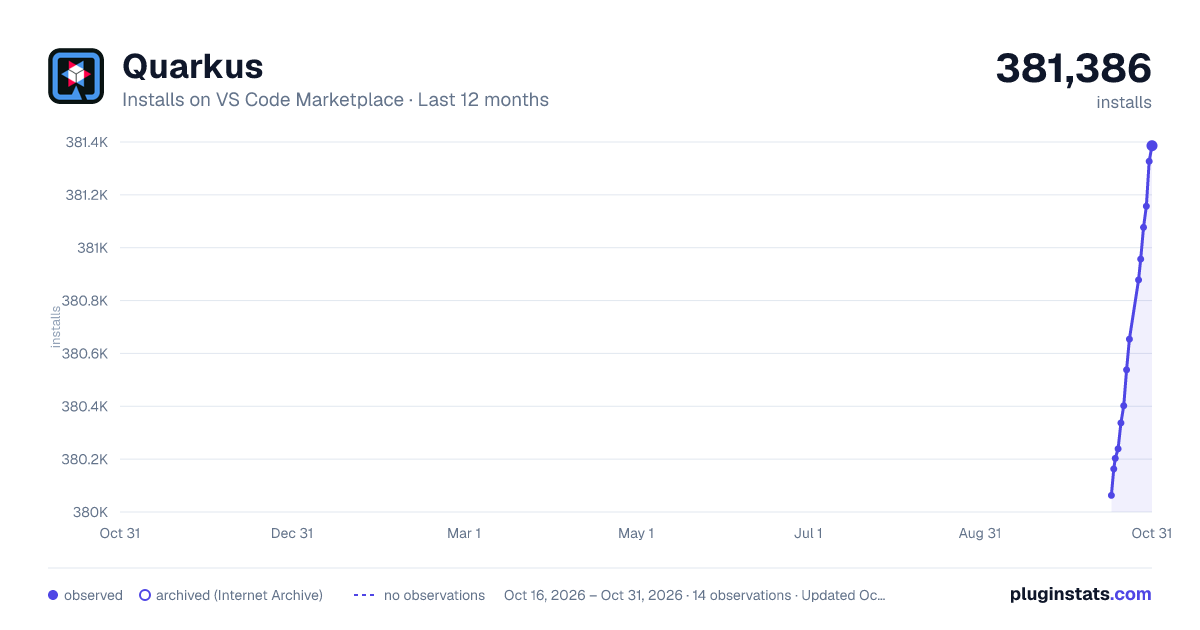
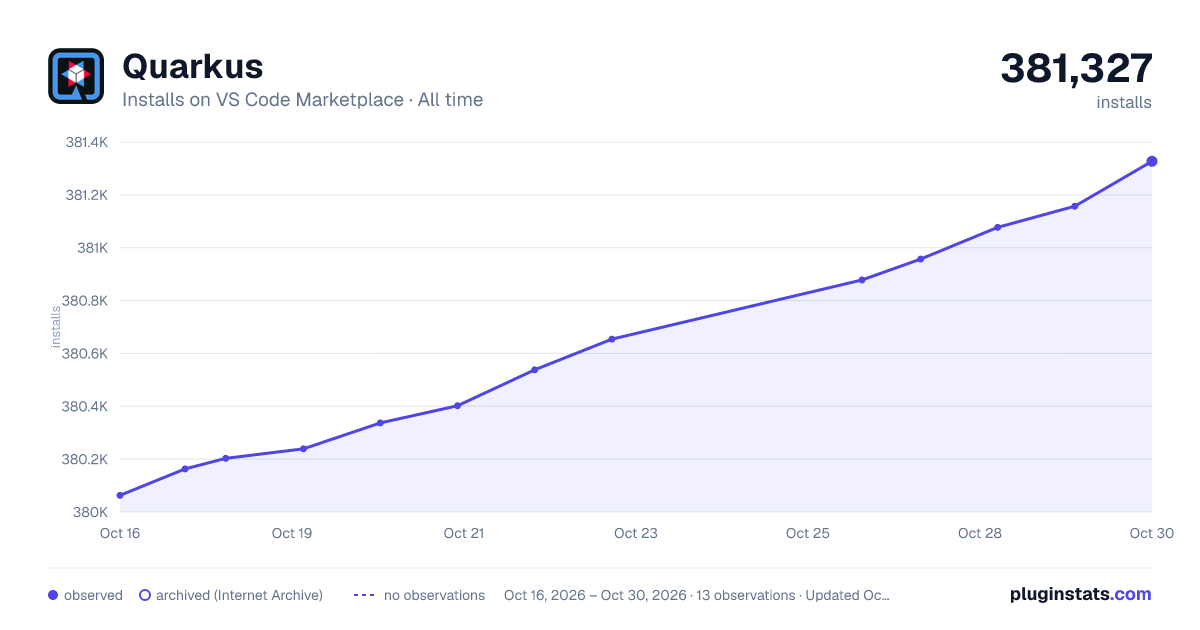

Adoption over time


7/30/90-day growth


Filled points are observed values; hollow points come from Internet Archive snapshots of the listing page. Dashed segments span periods with no observations — values between points are not interpolated.
Recent observations
Full history (3)Similar VS Code Marketplace Programming Languages plugins
Data source
Install counts, average rating, and rating counts come from the public Visual Studio Marketplace gallery API. Installs are cumulative and exclude updates.
Listing: https://marketplace.visualstudio.com/items?itemName=redhat.vscode-quarkus. First seen Oct 16, 2026; last successful collection Oct 18, 2026. See the methodology.