 PluginStats
Relay GraphQL installs statistics
By Meta (4 listings) · VS Code Marketplace · Programming Languages
Relay-powered IDE experience
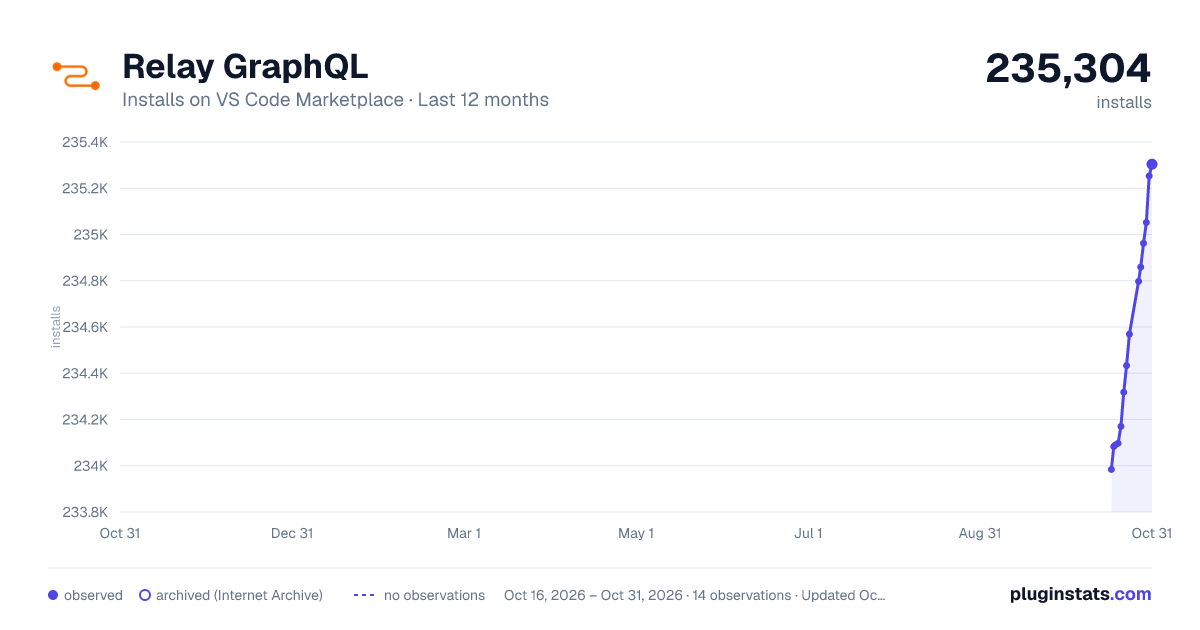
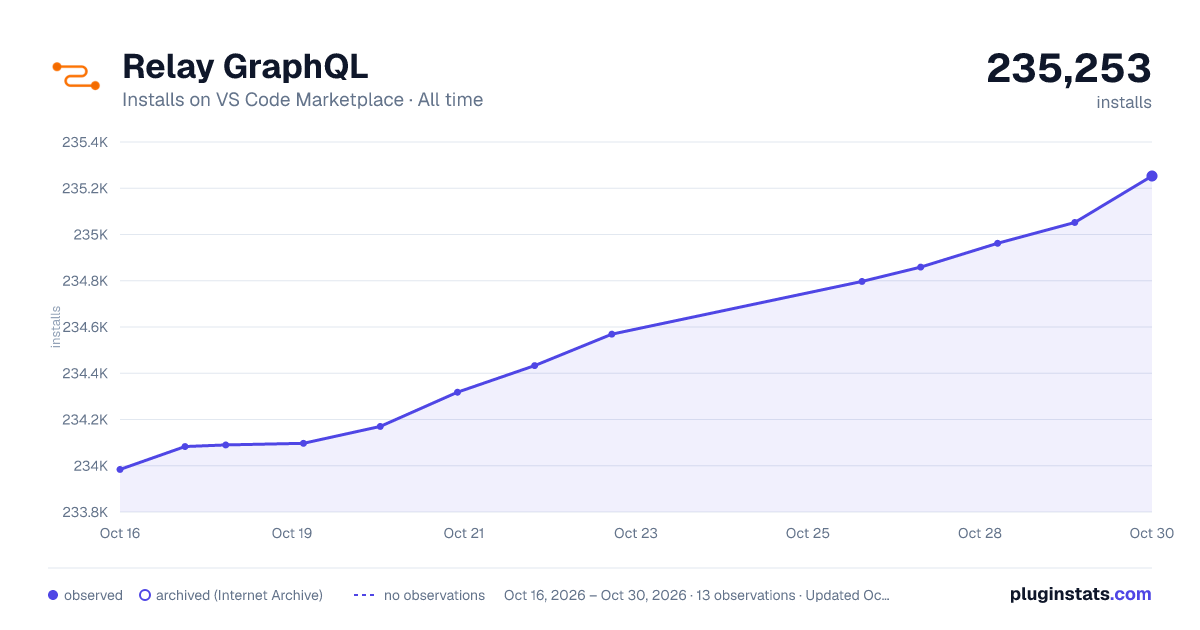
Relay GraphQL has 234,090 recorded installs on VS Code Marketplace.
It ranks #1362 of 2,500 tracked VS Code Marketplace listings by installs.
It is rated 5.0 out of 5 from 3 ratings.
PluginStats has 3 daily observations since Oct 16, 2026; the latest is from Oct 18, 2026.
Rating: 5.00 / 5 from 3 ratings
About Relay GraphQL
Relay for VSCode
The official extension to support Relay in VSCode.
Installation
Search for "Relay GraphQL" in the VS Code extensions panel or install through the marketplace.
Setup
• Make sure you have at least one Relay config file somewhere in your project. • We support standard config file formats (.yml, .js, .json), and the the relay field in your package.json • Make sure you have the relay-compiler installed in your project. The bare minimum for this extension is v13. • Make sure you are able to run the relay-compiler command from the command line. If yarn relay-compiler works, it's very likely that the extension will work. See more on debugging below. • Remove / disable any conflicting GraphQL extensions you have installed.
Configuration
Some of the configuration options for this extension only apply depending on whether you have a single or multiple Relay configs in your project.
Common Configuration Options
relay.autoStartCompiler (default: false)
Whether or not we should automatically start the Relay Compiler in watch mode when you open a project.
relay.compilerOutputLevel (default: verbose)
Specify the output level of the Relay compiler. The available options are
• quiet • quiet-with-errors • verbose • debug
relay.lspOutputLevel (default: quiet-with-errors)
Specify the output level of the Relay language server. The available options are
• quiet • quiet-with-errors • verbose • debug
relay.pathToBinary (default: null)
A path to the Relay binary relative to the root of your project. If this is not specified, we will try to find one in your node_modules folder.
Single Relay Config Options
relay.name (default: default)
The name of the project. This will be used to display messages related to the project's output.
relay.rootDirectory (default: Root of project)
A path relative to the root of your VSCode project for the extension to work from. This will change where we start looking for the relay-compiler node module. This will also affect where the LSP server is started, therefore affecting how the Relay config is found. This is helpful if your project is in a nested directory.
relay.pathToConfig (default: null)
Path to a Relay config relative to the rootDirectory. Without this, the compiler will search for your config. This is helpful if your Relay project is in a nested directory.
Multiple Relay Config Options
relay.projects (default: null)
An array of project configuration in the form {name: string, rootDirectory: string, pathToConfig: string}. If omitted, it is assumed your workspace uses a single Relay config and the compiler will search for your config file. But you can also use this configuration if your Relay config is in a nested directory. This configuration must be used if your workspace has multiple Relay projects, each with their own config file.
relay.pathToLocateCommand (default: null)
Path to a script to look up the actual definition for a GraphQL entity for implementation-first GraphQL schemas. This script will be called for "goto definition" requests to the LSP instead of opening the schema. The script will be called with 2 arguments. The first will be the relay project name, the second will be either "Type" or "Type.field" (a type or the field of a type, repectively). The script must respond with a single line of output matching "/absolute/file/path:1:2" where "1" is the line number in the file and "2" is the character on that line that the definition starts with. If it fails to match this pattern (or the script fails to execute for some reason) the GraphQL schema will be opened as a fallback.
This option requires >15.0.0 of the Relay compiler to function.
Features
• IntelliSense • Hover type information • Diagnostics (Errors, Warnings) • Go to Definition for fragments, fields, GraphQL types, etc. • GraphQL syntax highlighting within .graphql and JavaScript/TypeScript files. • Supports workspaces with multiple Relay projects. Example
Commands
• Restart Language Server: Restart the Relay language server.
Known Issues
Relay Compiler > v13
We built the language server around the new Rust compiler. We do not have plans to support any version < v13.
Credits
• GraphQL Syntax All of the GraphQL syntax highlighting is supported by this extension.
Description from the VS Code Marketplace listing.
- graphql
- javascript
- javascriptreact
- json
- plaintext
- typescript
- typescriptreact
Where Relay GraphQL sits in the listing
Each band is one page of 20. Installs on a log scale. Placement is projected from installs, so it can differ from the marketplace's own sort order. Hover a dot to see the listing.


Charts
Images: 30d · 1y · all time · 1600×900 dark


Adoption over time


7/30/90-day growth


Ranking history


Filled points are observed values; hollow points come from Internet Archive snapshots of the listing page. Dashed segments span periods with no observations — values between points are not interpolated.
Recent observations
Full history (3)Similar VS Code Marketplace Programming Languages plugins
Data source
Install counts, average rating, and rating counts come from the public Visual Studio Marketplace gallery API. Installs are cumulative and exclude updates.
Listing: https://marketplace.visualstudio.com/items?itemName=meta.relay. First seen Oct 16, 2026; last successful collection Oct 18, 2026. See the methodology.