 PluginStats
Pretty XML installs statistics
By Prateek Mahendrakar · VS Code Marketplace · Formatters
XML formatter extension for Visual Studio Code. Formats XML documents just like Visual Studio.
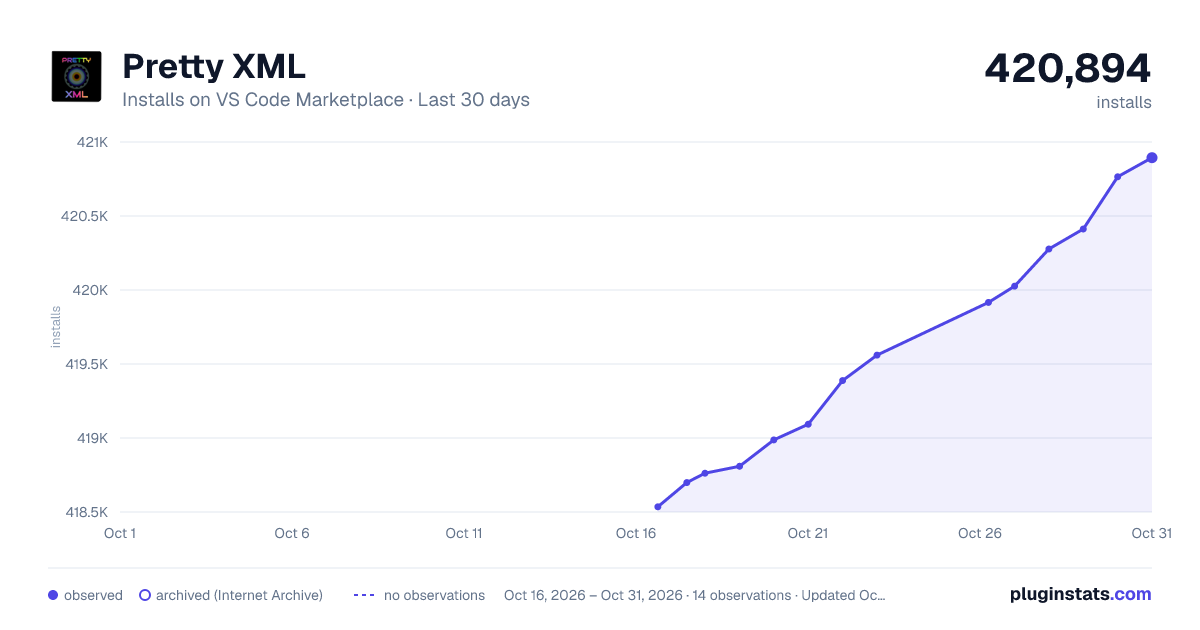
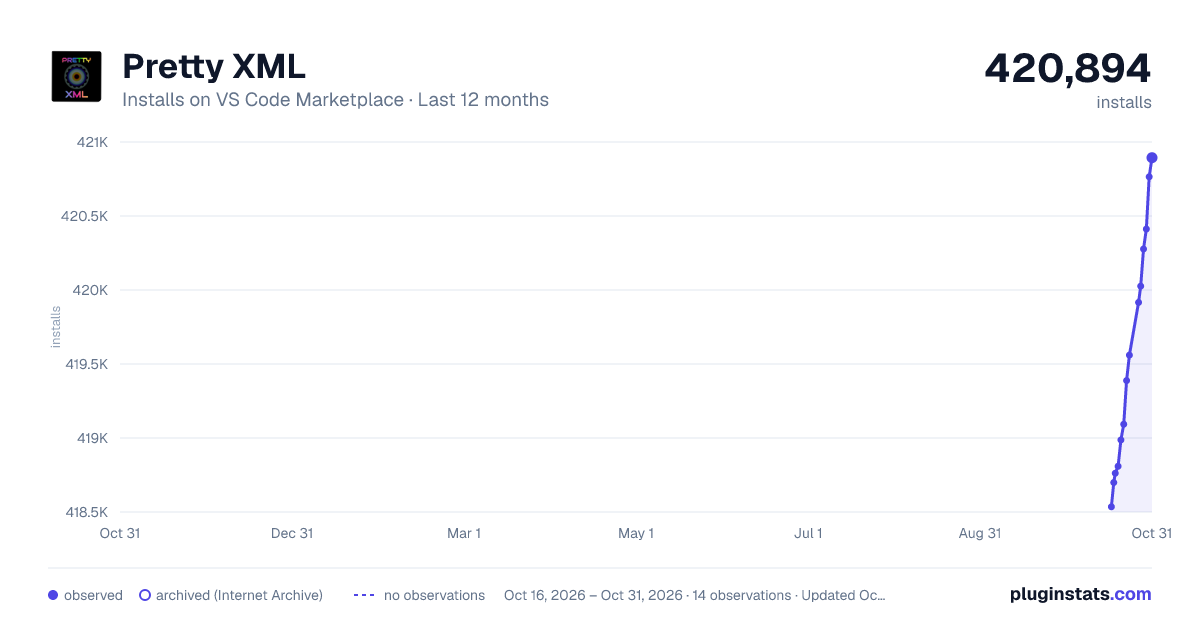
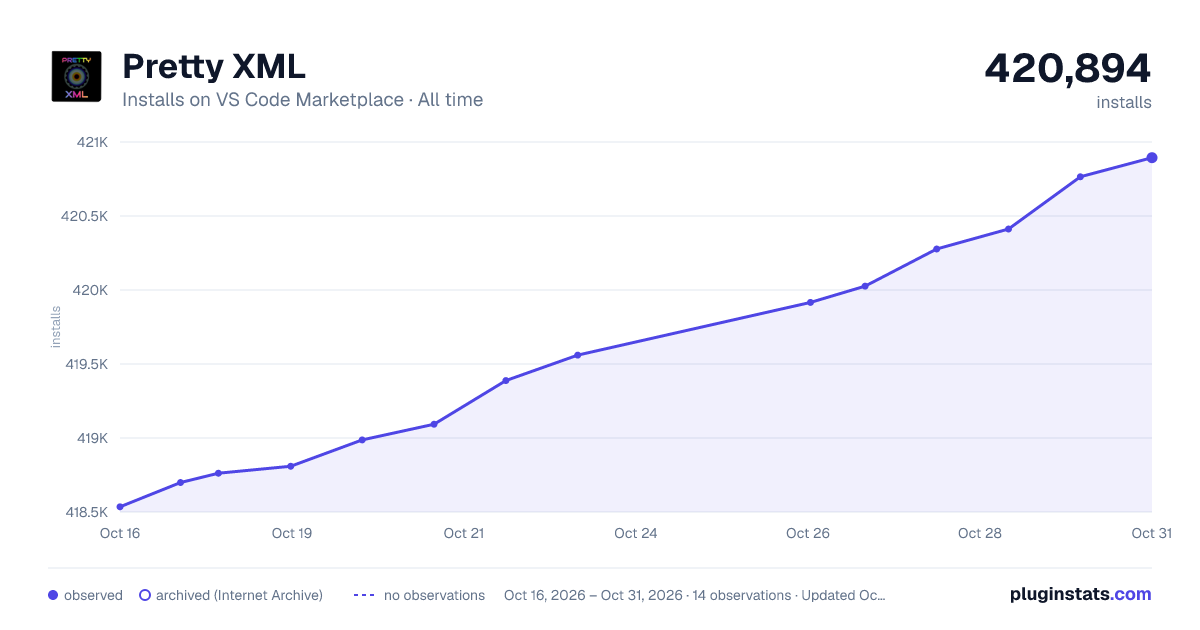
Pretty XML has 418,762 recorded installs on VS Code Marketplace.
It ranks #936 of 2,500 tracked VS Code Marketplace listings by installs.
It is rated 4.6 out of 5 from 156 ratings.
PluginStats has 3 daily observations since Oct 16, 2026; the latest is from Oct 18, 2026.
Rating: 4.62 / 5 from 156 ratings
About Pretty XML
Pretty XML
What is it?
Features 1. Prettify XML (XML Formatting) 2. Pretty XML: Minimize
Keyboard Shortcuts
Settings
Requirements
Installation
Known Issues
Change Log
For more information
What is it?
Pretty XML is a XML formatter extension for Visual Studio Code and VSCodium. It formats XML documents just like Visual Studio on Windows.
Supported file extensions:
• xml • xaml • axml • xsd • xsl • plist • mobileconfig • config • csproj • svg • resx and all other XML type of files.
There is also Visual Studio for Mac version of this extension. Check it out at PrettyXML.VSMac
Suggestions, improvement PRs are welcome.
Features
1. Prettify XML (XML Formatting)
Right Click and Select Prettify XML or use shortcut
• Position each attribute on a separate line. • First attribute on same line as start element start tag. • All attributes indented aligning with first attribute. • If no child for an element then close inline end tag. • No empty lines. • Supports ' and whitespace unicodes in attribute value for XAML parser compatibility.
1.a. Format Entire Document
• Lets you format entire valid XML document.
1.b. Format Selection - Beta
• Lets you format part of an XML document. XML can be partial and invalid. This is in beta, so feel free to submit pull request with improvements. • The selection is indented from the indentation of its first line, so it keeps the depth it sits at in the document, and that first line's indentation is kept exactly as it was written. • Indentation follows the editor: one tab per level when the editor inserts tabs, otherwise prettyxml.settings.indentSpaceLength spaces. Continuation lines of a wrapped attribute list line up with spaces, since a column inside a tag cannot be written in tabs. • Nothing is added or removed. An end tag closes the element it names, an element the selection leaves open keeps its content indented under it, and a selection that starts or ends in the middle of a tag keeps those characters as they are. • Content of an element carrying xml:space="preserve" is left as written when that element is inside the selection. • An element whose content mixes text and markup is kept on one line when it begins and ends with text, as in some bold text
. Otherwise the markup that the text joins together shares a line, as in . Text spanning several lines is re-indented a line at a time.
Before
After
2. Pretty XML: Minimize
Minimizes XML.
Keyboard Shortcuts
| Command | Platform | Shortcut |
| Prettify XML | Mac | Cmd+K L | | Prettify XML | Windows, Linux | Control+K L | | PrettyXML: Minimize | Mac | Cmd+K \` | | PrettyXML: Minimize | Windows, Linux | Control+K \` |
Note
You can change these in Preferences → Keyboard Shortcuts if you want.
Settings
These will be for Prettify XML command.
| Setting Key | Default Value | Description |
| prettyxml.settings.indentSpaceLength | 4 | No. of spaces for indentation. | | prettyxml.settings.useSingleQuotes | false | Use ' instead of \" | | prettyxml.settings.useSelfClosingTag | true | If no child nodes then self closing tag /> | | prettyxml.settings.formatOnSave | false | Enable format on save | | prettyxml.settings.allowSingleQuoteInAttributeValue | true | Allows ' in attribute values instead of \' | | prettyxml.settings.addSpaceBeforeSelfClosingTag | true | Adds space before self closing tag | | prettyxml.settings.wrapCommentTextWithSpaces | true | Wraps comment text with a single space | | prettyxml.settings.allowWhiteSpaceUnicodesInAttributeValues | true | Allows white space unicodes in attribute values | | prettyxml.settings.positionFirstAttributeOnSameLine | true | Position first attribute on same line. | | prettyxml.settings.positionAllAttributesOnFirstLine | false | Position all attributes on first line | | prettyxml.settings.preserveWhiteSpacesInComment | false | Preserves whitespaces in a comment. | | prettyxml.settings.addSpaceBeforeEndOfXmlDeclaration | false | Add space before end of XML declaration. | | prettyxml.settings.addXmlDeclarationIfMissing | true | Add XML declaration if missing. | | prettyxml.settings.attributesInNewlineThreshold | 1 | Attributes count threshold to position attributes in newlines. | | prettyxml.settings.enableLogs | false | Enables logs | | prettyxml.settings.wildCardedExceptionsForPositionAllAttributesOnFirstLine | Array\ | Wild card exceptions for elements to ignore positionAllAttributesOnFirstLine | | prettyxml.settings.addEmptyLineBetweenElements | false | Add empty line between elements if the child count is greater than 2 | | prettyxml.settings.addEmptyEol | false | Add empty EOL to files if it does not exist. | | prettyxml.settings.preserveNewLines | false | Preserve existing new lines between elements. | | prettyxml.settings.preserveCommentPlacement | false | Preserve comment line placement. | | prettyxml.settings.escapeInvisibleNonAsciiCharacters | false | Escape invisible non-ASCII characters as character references. |
The top of the settings pane. Each entry carries its default and, where it helps, a worked example. The table above is the complete list - search prettyxml in Settings to scroll through them all.
Attributes In Newline Threshold
Example:
Value = 2
Input 1
Output 1
Input 2
Output 2
Wild Carded Exceptions For Position All Attributes On First Line
List of element names to ignore Position All Attributes On First Line setting. Include element names or patterns here.
Example:
Input 3
Output 3
Add Empty Line Between Elements
If enabled, and child elements count is greater than 2 then adds empty line between elements.
[!NOTE] Please note it wont add empty element before first element and after last element.
Input 4
Output 4
Add Xml Declaration If Missing
Adds XML declaration if missing. Default is true.
Also applies to Pretty XML: Minimize, the one setting that does. A declaration the document already has is kept either way.
Preserve New Lines…
Description from the VS Code Marketplace listing.
- axml
- config
- csproj
- formatter
- keybindings
- mobileconfig
- plist
- resx
- xaml
- xml
- xsd
- xsl
Where Pretty XML sits in the listing
Each band is one page of 20. Installs on a log scale. Placement is projected from installs, so it can differ from the marketplace's own sort order. Hover a dot to see the listing.


Charts
Images: 30d · 1y · all time · 1600×900 dark

Adoption over time


7/30/90-day growth


Ranking history


Filled points are observed values; hollow points come from Internet Archive snapshots of the listing page. Dashed segments span periods with no observations — values between points are not interpolated.
Recent observations
Full history (3)Similar VS Code Marketplace Formatters plugins
Data source
Install counts, average rating, and rating counts come from the public Visual Studio Marketplace gallery API. Installs are cumulative and exclude updates.
Listing: https://marketplace.visualstudio.com/items?itemName=PrateekMahendrakar.prettyxml. First seen Oct 16, 2026; last successful collection Oct 18, 2026. See the methodology.