 PluginStats
Beautiful UI installs statistics
By swashata · VS Code Marketplace · Themes
A set of 32 beautiful color themes for VSCode, inspired by Sublime DA UI.
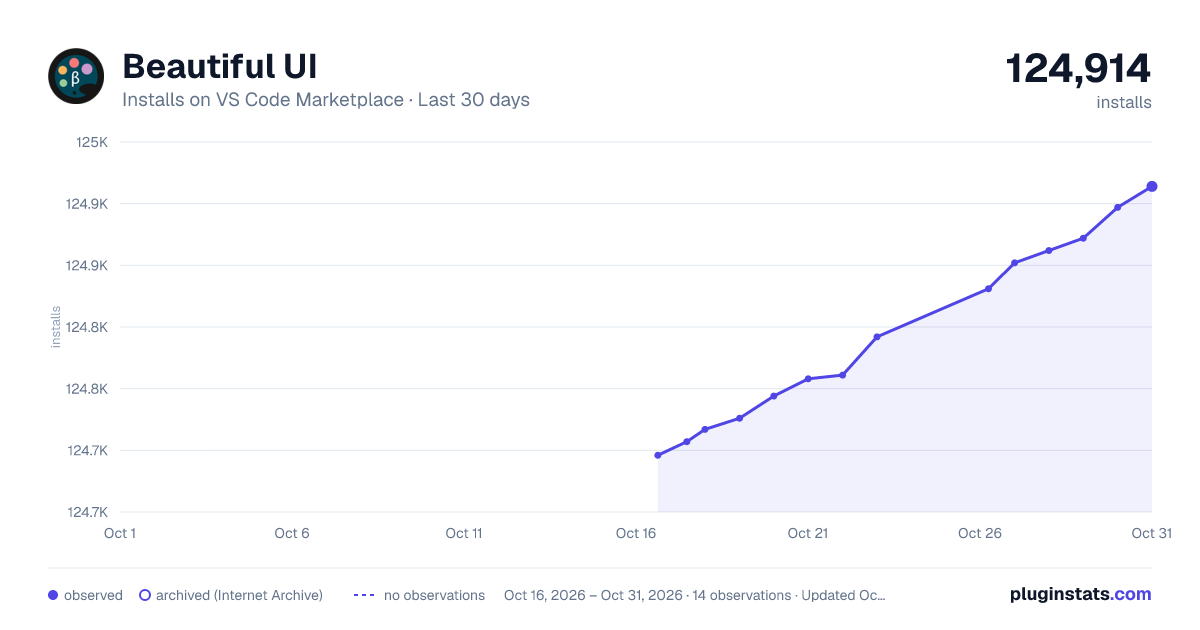
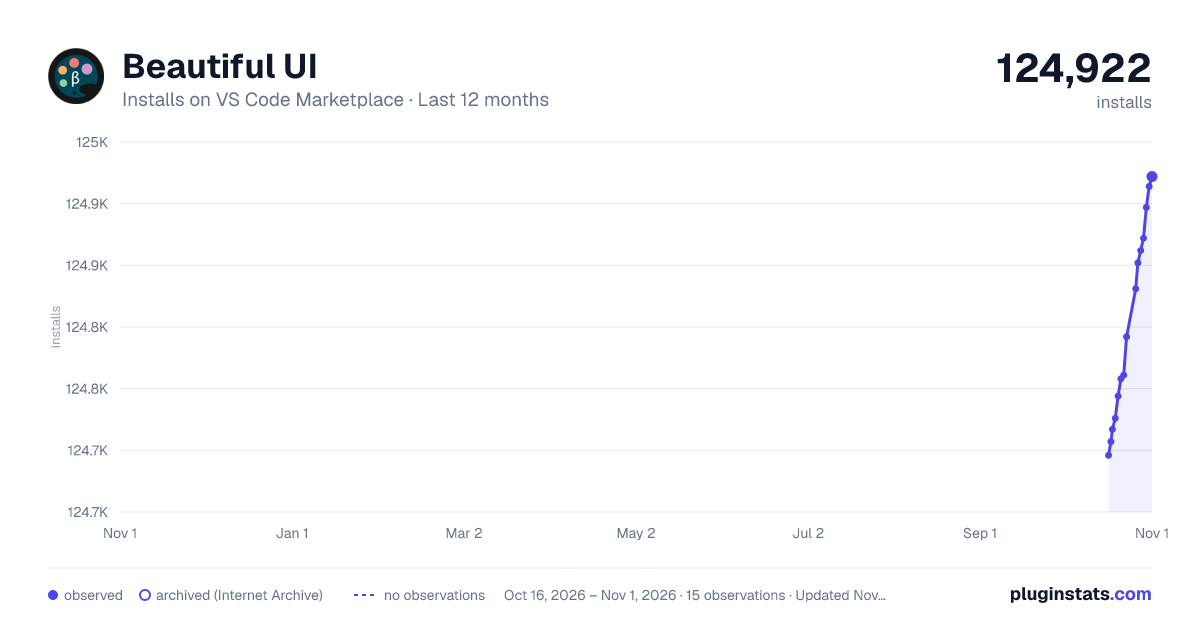
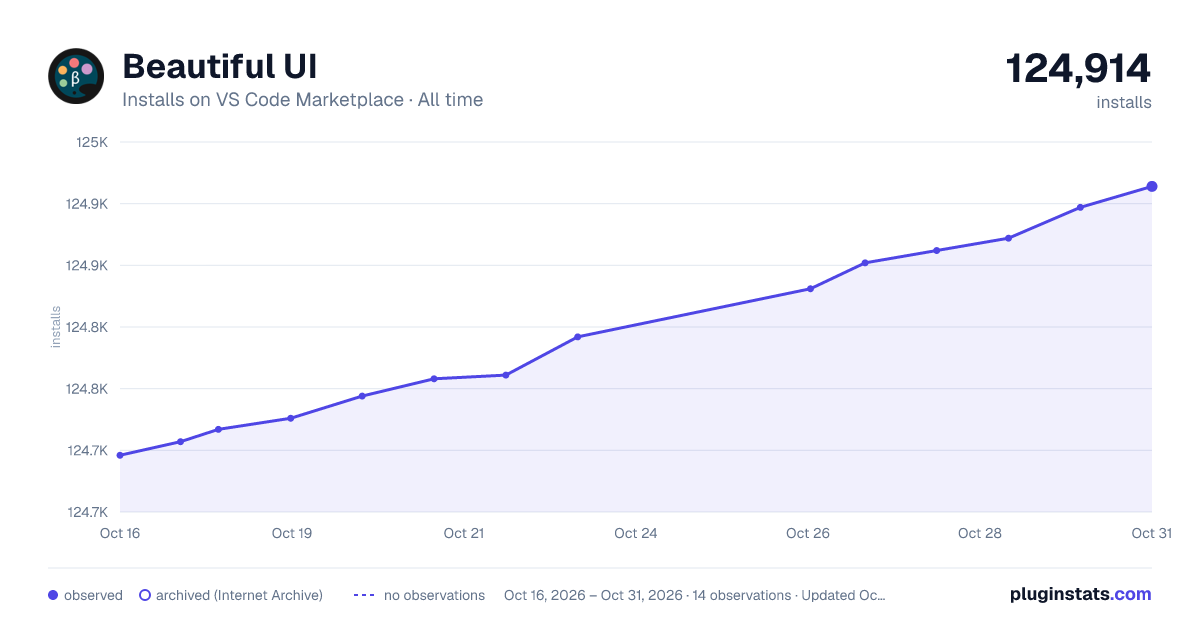
Beautiful UI has 124,717 recorded installs on VS Code Marketplace.
It ranks #2085 of 2,500 tracked VS Code Marketplace listings by installs.
It is rated 4.4 out of 5 from 13 ratings.
PluginStats has 3 daily observations since Oct 16, 2026; the latest is from Oct 18, 2026.
Rating: 4.38 / 5 from 13 ratings
About Beautiful UI
VSCode Beautiful UI - Color Themes
A collection of 32 VSCode themes inspired from the awesome Sublime DA CS.
I am not at all the original author of the color scheme. This project was born out of a necessity. I was a user of Sublime Text and Sublime DA UI for a long time.
Due to many reasons (mainly VSCode's intellisense and JS friendliness) I had to switch to VSCode and the only thing I felt missing was the awesome UI engine made by Ihor Oleksandrov and compatible themes.
So this is my attempt to fill the gap. Personally I've been using Tomorrow Night theme for a long time and I have put effort to port as many themes as possible.
* I am not original author of any of the color schemes. * Syntax highlighting differs from the DA UI and DA CS, but I have managed to keep as much as possible. Also in some cases I have increased the darkness of colors for light themes. * If you like any color theme, go and ❤️ the original authors.
Installation
You can install manually from git or use the vscode extensions marketplace.
Marketplace Installation
From command palette, run
Or search for Beautiful UI in the marketplace and install from there.
Git Installation
• Go to ~/.vscode/extensions/ • Clone the repository.
Activation
After installation, open/restart vscode and from command palette search for βui -. You can choose and apply the color theme of your choice.
Customization
Workspace colors can be customized by editing workbench.colorCustomizations user settings. More information can be found here.
Recommended Settings
Following extensions/tools are recommended for the color schemes.
• vscode-icons - For file icons. • WhiteViz - Sublime like whitespace highlight. • FiraCoda - For an awesome font with ligatures. • Dank Mono - Awesome font for 40.00£. This is what I am using right now. • Operator Mono - If you can spend $200 😉. • Operator Mono Lig - For creating ligatures for operator mono.
Also note the recommended user settings.
Color Themes
The following color themes have been ported.
Color Pack from Chris Kempson
• Original sources. • Licensed under the MIT License.
Eighties Dark
Ocean Dark
Ocean Light
Tomorrow Dark
Tomorrow Subliminal
Tomorrow Light
Color Pack from Ethan Schoonover
• Original sources. • Licensed under the MIT License.
Solarized Dark
Solarized Light
Color Pack from Dmitri Voronianski
• Original sources. • Licensed under the MIT License. • You can show your appreciation to Dmitri using PayPal.
Oceanic Next
Color Pack from Wimer Hazenberg
• Original sources. • Monokai © 2017. • You can show your appreciation to Wimer via buying Monokai Pro.
Monokai Classic
Monokai Machine
Monokai Octagon
Monokai Pro
Monokai Ristretto
Monokai Spectrum
Color Pack from Mattia Astorino
• Original sources. • Licensed under the MIT License. • You can show your appreciation to Mattia using Beerpay.
Material
Material Darker
Material Palenight
Color Pack from GitHub Inc.
• Original sources. • Licensed under the MIT License.
One Dark
One Light
Color Pack from Jani Nurminen, Colin T.A. Gray, William D. Neumann
• Original sources. • Licensed under the BSD 2-clause "Simplified" License.
Zenburn
Color Pack from Adam Christiansen, Merrick Christensen, Trevor D. Miller
• Original sources. • Licensed under the MIT License.
Nova
Color Pack from Arctic Ice Studio
• Original sources. • Licensed under the Apache License.
Nord
Color Pack from Chris Thomas
• Original sources. • Licensed under the Permissive License.
Espresso Libre
Color Pack from Ian Hill
• Original sources. • Licensed under the Creative Commons Attribution-ShareAlike 3.0 License.
Espresso Soda
Color Pack from Ike Ku
• Original sources. • Licensed under the MIT License.
Ayu Dark
Ayu Light
Ayu Mirage
Minimal Color Pack
Inspired from Dan Abramov's Subliminal.
• Original sources. • Licensed under the MIT License.
Minimal Blue
Minimal Yellow
Minimal Purple
Minimal Green
Development
Help porting popular tmThemes to vscode.
The development is made easy with some custom scripts. First fork and clone the repo and run
This will install all dependencies. Then run
To build the themes and watch for file changes. You can press F5 to launch VSCode development window where you can preview the themes.
Once satisfied run
to finalize the themes and make changes to package.json manually.
Then submit a PR.
Adding a new theme
• Copy ./src/schemes/Template.noop.js to ./src/schemes/MyTheme.js. • Mark the theme dark or light and make changes accordingly. • Add colors to the config. • Import and add the theme in src/colors.js. • Build and test.
👨🎨
Description from the VS Code Marketplace listing.
- Ayu
- color-theme
- Dark Theme
- Light Theme
- Monokai
- theme
- Tomorrow
Where Beautiful UI sits in the listing
Each band is one page of 20. Installs on a log scale. Placement is projected from installs, so it can differ from the marketplace's own sort order. Hover a dot to see the listing.


Charts
Images: 30d · 1y · all time · 1600×900 dark

Adoption over time


7/30/90-day growth


Ranking history


Filled points are observed values; hollow points come from Internet Archive snapshots of the listing page. Dashed segments span periods with no observations — values between points are not interpolated.
Recent observations
Full history (3)Similar VS Code Marketplace Themes plugins
Data source
Install counts, average rating, and rating counts come from the public Visual Studio Marketplace gallery API. Installs are cumulative and exclude updates.
Listing: https://marketplace.visualstudio.com/items?itemName=swashata.beautiful-ui. First seen Oct 16, 2026; last successful collection Oct 18, 2026. See the methodology.